Repository navigation
Rip it: RIPPS2 v1.0.9 beta (builds 108 and 109)

Rip it: RIPPS2 v1.0.9 beta (builds 108 and 109)
Download RIPPS2.elf (one file, about 3 MB) and put it in place of your old one. Your settings stay where they were. RIPPS2-languages.zip puts RIPPS2 in your language (copy its LNG folder to the top of a USB drive, the HDD's OPL partition or an MMCE card, then Settings > Display Settings > Language). The theme pack has a new edition (v108: Adapt and Adapt Rx show every screenshot): replace your Adapt folders. RIPGRID and RIPFLOW are built in.
Build 109: from testers' reports
- A big MMCE library lists at once. The card keeps RIPPS2's last list of its games (
RIPPS2.LST, beside its CD and DVD folders): at boot the games show from it straight away, then the card is read again in the background and the list follows whatever changed. A tester's 180 games took about 5 minutes to list on every boot, with nothing to press until then. - The pads keep working while an MMCE card is read. The card shares its bus with the controllers; the scan now pauses after each game, and a frame after each disc it has to open.
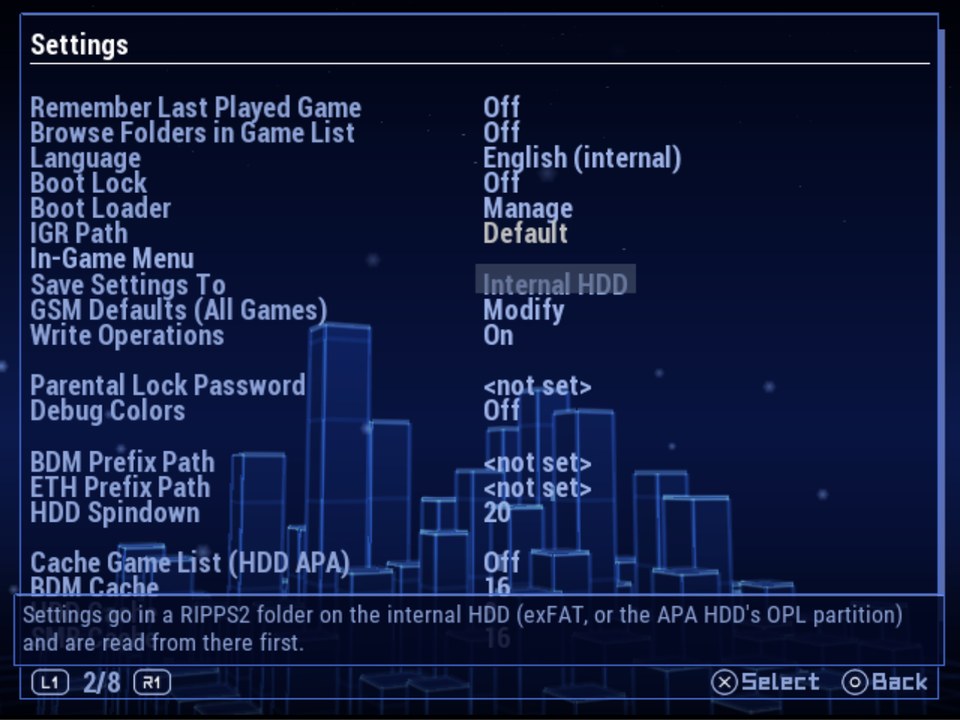
- Settings > General > Save Settings To: Memory Card (RIPPS2's own save, as before), Internal HDD (a RIPPS2 folder on the internal exFAT HDD, else the APA HDD's OPL partition; settings are read from there first) or Custom Path (the Custom Settings Path row shows only for this one). Every choice has its own hint; with no internal HDD it says so and changes nothing.
- A settings page's title stands clear of the line under it (it sat on the line, which cut its descenders).
- Hotfix (10/21, still build 109): Internal HDD is saved by the drive's type (
ata0:/RIPPS2), not its mass slot, so a USB stick can't take its place and the boot loads only the HDD's driver. If you chose Internal HDD on the first v1.0.9 ELF, choose it again and Save Changes.
Build 108: RIPSHOT, screenshots from the in-game menu
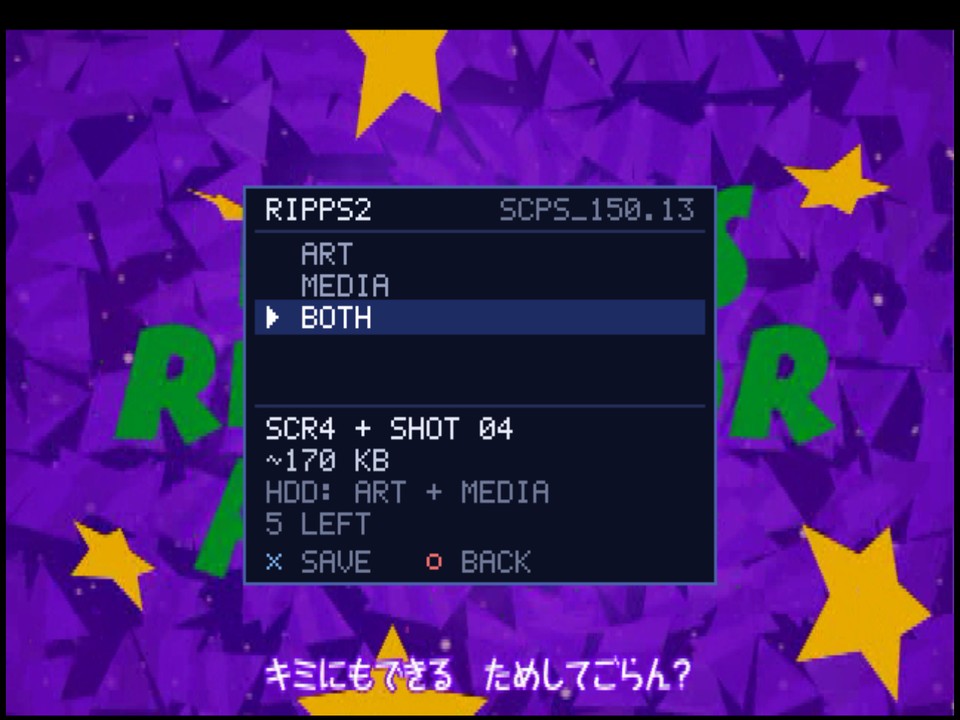
- SCREENSHOT is the in-game menu's third choice (L1+L2+R1+R2+SELECT+START). It takes the exact frame that was up when the menu opened, with no menu in it.
- ART, MEDIA or BOTH: ART is the game's screenshot art for your themes (250 x 188,
_SCR,_SCR2,_SCR3...), MEDIA a full-size PNG in a folder named for the game. Each choice shows the file it becomes, its size, the drive and the shots left. SAVE fades the menu off, then KEEP or DELETE. - 6 shots a game wait on its roll in
MEDIA/RIPSHOTuntil developed into 8-bit PNGs. Develop Shots: Manual (the default) does it from Memory Files (openMEDIA/RIPSHOT: VIEW a shot, ACTIONS to develop it); Auto does it in the background once you are back in RIPPS2. - Themes show every shot with the new
SCRnkey: RIPPS2's info page slideshow, RIPGRID, RIPFLOW, Adapt and Adapt Rx use it, so a shot appears as soon as it is developed (THEME_KEYS.md). - For now: games on USB, the internal exFAT HDD, MX4SIO and iLink. The APA HDD, MMCE, SMB and discs say NOT FOR THIS GAME.
The in-game menu
- Silent, and RESUME gives back the exact frame: the game's sound holds still while the menu is open and goes on where it was, so nothing skips, loops or drifts out of sync.
- On by default, no longer experimental (a config from an older build gets it switched on once). Settings > General > In-Game Menu is its own page: In-Game Menu, RIPSHOT and Develop Shots, every choice with its own hint. A setting another one switches off now reads dimmed on every settings page.
- Fixed in the lab: a game that sets a picture taller than the TV put the menu off screen; GSM's data breakpoint froze the menu.
Found while making the reel
- The info page no longer blinks when a device rescan rebuilds the game list under it: it knows a game by its id and title, not by its row.
- Shots developed while RIPPS2 runs show at once, and a developed PNG is checked on the drive and written again if it did not hold.
Underneath
- Games launch in PCSX2 with its host filesystem on (the launch used to hang there).
- The new words in all 33 languages.
Full changelog | Watch the beta reel | Talk about it on psx-place | RIPPCSX2 for seeing a theme in true 720p and 1080i
Beta: keep your usual loader close by, and tell us what breaks in the psx-place thread or an issue. This one wants real consoles above all: an MMCE with a big library, settings on an internal HDD after a power cycle, and RIPSHOT on USB, MX4SIO, iLink and the HDD in 480p, 1080i and PAL games.