Test Plan
The test plan will show how the software tester will approach the testing of the software and the overall framework that will push for the testing of the Smart Annotate tool. This document will include the following:
-
The test strategy will have the structure on what the test will be based on, which will include the objections, dates and what we expect from the results with a detailed description of the set up for a valid test. Also, the creation of the test cases, the tasks that will need to be performed and the scheduling.
-
The execution strategy will show us how the tests will be performed, and the process that’s going to be undergone and will be able to notify the defects and to fix and implement fixes.
-
The test management will then have to execute the logistics of the tests and the jobs that will come up during the process of the tests such as, risks, group roster and the escalation procedure.
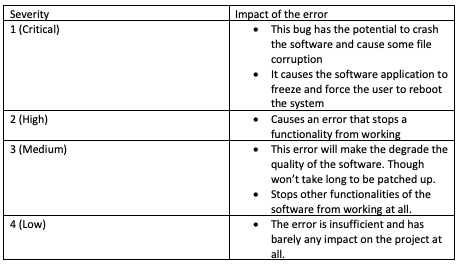
The main objective for this test is so we can verify that all the functionality within the Smart Annotate will work accordingly to the specification as we do not want any errors to pop up during the completion of the software. These tests will be executed and to verify the tests so they can be identified, fixed and retested at the severity of it as it could be medium severity defects or a lower severity defect. Though there are many things in the system software that will be needed to be tested shown below.
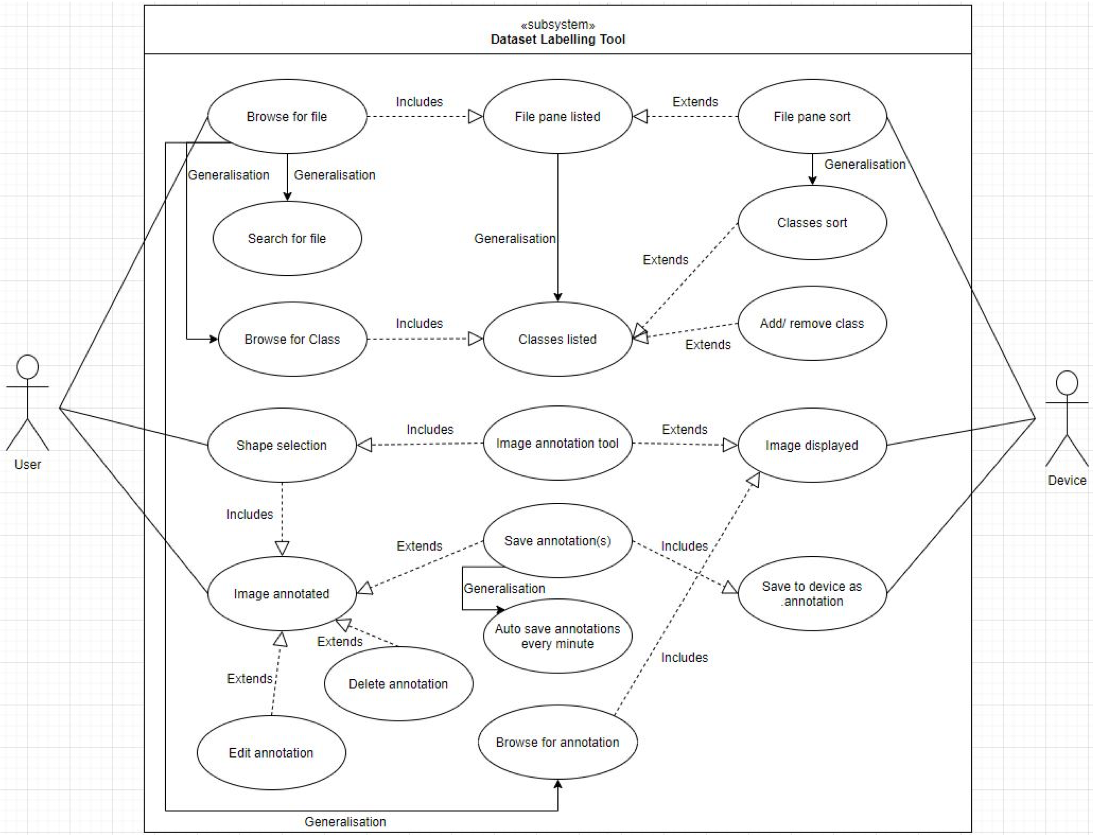
In the use case diagram created by the Software Architect, we can see that they have added two main actors for the use case diagram from the functionality point of view which is the user and the device. In the use case diagram, it shows us that the user will have the ability to browse for files, which will be an image or a set of images that will be inputted into the application that will allow the user to annotate.
Once the images have been added then the images will be listed on a file pane. Then the user will be able to sort the files or the images in ascending or descending order of their chose, which will then use the device to check the users file metadata.
Once the image has been selected, the device will then be able to display that image to the user on the screen, this will then allow the user to annotate the image that has been chosen. This will allow the user to pick the shape that they wish to use, and the image being annotated. Though the image that has been annotated can then be extended and manually saved, this will then make that image to be saved to the device as “. annotation” file. Though the annotations are going to be saved automatically. The user will have the option to search for a previously annotated image, which will be inherited from the browser for the file use case diagram. Also, each image annotate will also have the option to be deleted or even be edited. The use case diagram has given enough detail specifying on what exactly will be tested at the end.
For the scope of the project it will be limited to the testing of the functionalities and features that would’ve been described within this document. Though the non-functional testing of the project such as the stress and performance is not within the scope of this project. Though functional testing will be done within this project as, unit testing, user acceptance testing and function testing etc. In the project we must focus mainly on the features and functionalities of the program for in scope testing.
In the testing of the software, we shall running be running different types of functional testing on the application, which will show us where there could be errors, but also what areas might need improving in the long run as it can be improved. There will be for sure not out of scope testing as we’re not testing any hardware or any external interfaces testing, we’re only going to be doing in-scope testing on the project and only that.
The Smart Annotate will only be compatible on desktop and nothing else.
For the bounds of use for this application, the software will work as needed as there will not be any type of restraints on the application. This means the software will run perfectly even if it’s left alone for a long time, as other applications will tend to start slowing down or even end up crashing.
Key Assumptions
-
There will be a cycle in each testing phase where everything will have a time frame.
-
Cycles will be initiated if any type of defects were to come up
General
-
Unit Testing will be done once the final build is ready to be tested
-
All the bugs will come along with screenshot proof in a JPEG format
-
The Software Tester will have the proper input required when preparing the test design, and the execution of the program will be supported by the Software Developer.
-
The Software Developer will provide the correct bug fixes based on the defects given by the Software Tester
-
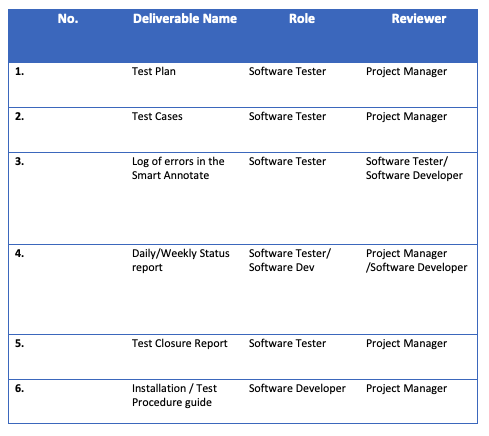
The project manager of the group will review the documents and project and sign all the test deliverables
-
The Smart Annotate will come with the test design and the test planning
-
The Software Tester will manage all the testing effort with close coordination with the Project Manager / Software Developer
-
The Test environment will be prepared by the Software Tester and the Software Developer
-
The project manager will sign off on the final version of the software after all the testing has been completed.
-
The system will be treated as a black box; if the functionalities work as needed and, in the documentation, it will be assumed that the software works correctly.
Though there could be stress on the application that can make the software to stop running making it crash. There could be many reasons on why this could occur on the application e.g. too many images loaded up for the software to handle. This type of stress testing will be checked as we would like to see if the system works under abnormal conditions or does it display any error messages when the system is under stress. Once the stress testing has been completed then we can see how the software can be improved so those type of issues won’t occur again.
Black box testing is the practice where the Software Tester will not have any type of information about the internal works of the software application, as black box testing is a high level of testing that will mainly work on how it will be acting of the application. This means that it will be tested on an external view and this can be applied to the testing methods that are going to be done such as the acceptance and system testing below. Though an example of black testing technique that shall be done on this application will be regression testing as this will be done after code fixes or any system maintenance that will be done to check the new code has not affected any parts of the existing code.
Though white box testing is the practice of checking the internal functioning of the software application. This type of testing is based on the code statements, branches and conditions of the program. This type of testing is usually done by the software tester and the software developer as there could be times where the software tester won’t know what’s happening. This type of testing is usually done for unit testing as we will need to look at parts of the code. Though the upside to white box testing is that it allows the hidden lines of code, which will then show any hidden defects in the program. An example of white box testing that the software tester shall be doing will be unit testing as this testing technique will be performed on each unit or block of code as it’s being developed.
In the project, we will be using different types of testing techniques. We have chosen these testing techniques carefully as we believe these will give the best results and will allow us to see any early errors before fully submitting the final application. Below is the type of techniques we will be using to the product as they all give their purpose on the code.
We have chosen to do Regression Testing as it’s a type of technique that is used to verify that the code in the software will not impact any other functionalities within the program. This makes sure that the project will work perfectly when any new functionalities have been added or even bug fixes as they affect other features.
The scope of regression testing will be a low level as they’re going have to test different parts of functionalities in the program and might have to go deep within the software to see where the problem could be coming from and find different ways on how they can be patched up.
The people testing this will be the Software Tester and some coordination with the Software Developer.
Function Testing will be used to check the functions of the application. Function Testing is used by feeding the application with inputs and will validate the output from the application. It will be validating the project software against the requirements, as the focus of functional testing is to test each function of the software system. It will test many things on the software, such as the basic usability of the program if the user is able to navigate easily around the software without any problems.
The scope of the Function Testing will be high level as there will be changes in the requirements.
The person testing this will be the Software Tester
System Testing will be used within the project as it allows the Software Tester to check the behaviour of a complete and fully integrated software system as it will be based on the requirement specification. The main part of System Testing is that it will be the functions of the program and the end-user requirements. As this type of testing will be based on the user’s point of view and the team would want to see how they find it, and will it be easy for them to function around the software.
The scope of the System Testing it will be high level as they’re going to need test everything from the outside. As we would want to see if the user will be able to certain things like opening the images or labelling the image or not.
The people that will be testing System Testing will be Software Architect, Project Manager, Software Tester and Software Developer. This is because we would like to see different perspectives on the software and to see who will find it the most difficult and who will find it quite simple to use.
User Acceptance Testing will be used within the project as this will be used as the last testing to be done on the software due it will validate the software against the requirements. This will be the last step to be done, because it makes sure everything is correct and will be ready before the delivery of the product and is usually done after the project has been thoroughly tested.
The scope of User Acceptance testing shows the broadest scope of requirements. Some of the things the User Acceptance Testing must cover:
-
Must make sure all the operational requirements are done correctly and are met compared to the document.
-
Must ensure that all the functional requirements have been done and to see which ones have not been met at all.
The UAT shows us that what the software system meets in the agreed functional specifications and the detailed design documents to make sure everything has been ticked off and nothing has been skipped. In the end, it should make sure that the user will be able to use the software on a day to day basis.
The people that will be testing the User Acceptance will be the Project Manager and Software Tester. The Project Manager is due to that they will be the ones submitting the project and they will need to see the final look of the software system.
Unit Testing will be done within the project as this will be done to check the individual unit or components of the software will be tested. The purpose to make sure that each unit of the program will perform on how it was designed, it will tend to have one or more inputs and one output. Though the unit will be a method which will probably belong to an abstract class or superclass. One of its benefits is that it is easy to catch any defects early in the stage of development compared to later down the line.
The scope of the Unit Testing will be check every single unit or module that has been used during the process to make sure that there won’t be a lot of errors during the final testing of the project as we do not want hundreds of errors showing up as this will delay the project by a long time. By doing unit testing, we will be able to fulfil the requirements as soon as possible and have everything ready for submission.
The people that will be testing the Unit Testing will be the Software Developer, as this type of testing can be done during development and they will be able to change any problems if they were to arise.
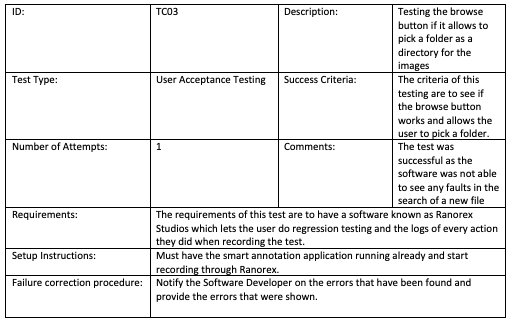
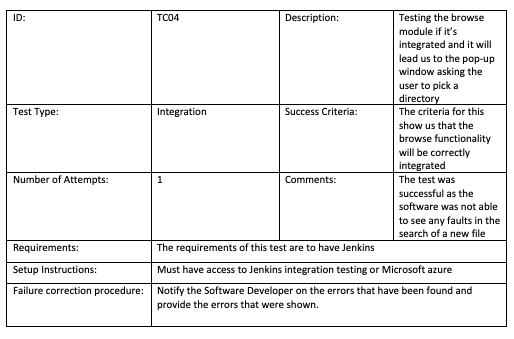
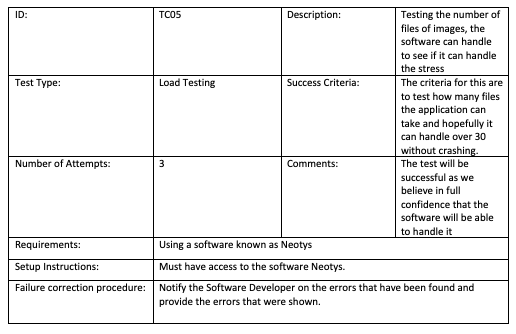
In all the methods of testing above, the software tester shall have a specific testing condition when they’re going through every test for each part of the application. They shall test the conditions of the functionality or anything else they would like to test thoroughly and verify. By doing this it shall ensure that the software application will be bug free. There will be some functionalities in the software that will be tested with one or two test cases to ensure that important functionality works as its supposed to.
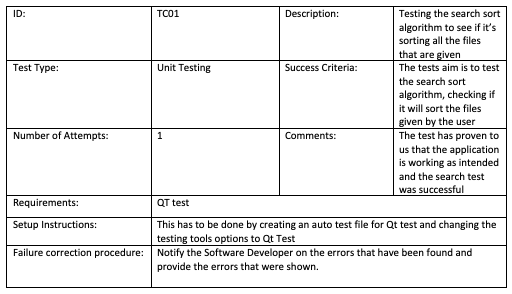
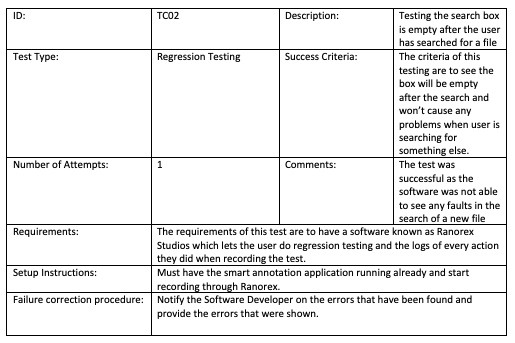
Below are examples of the test structure that are going to be used during the
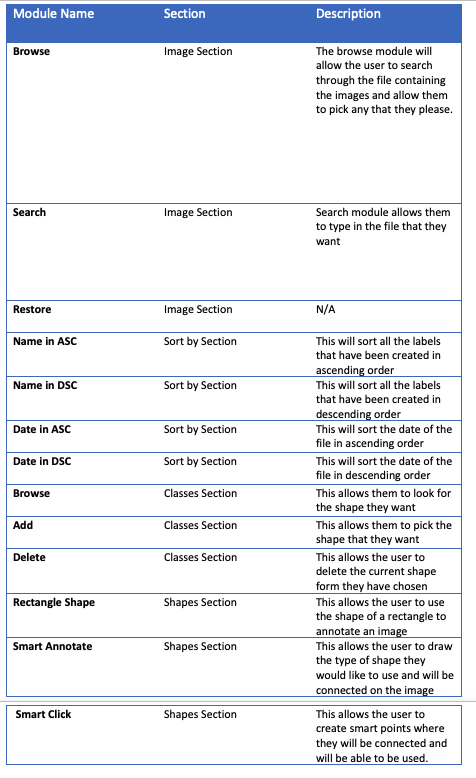
The Smart Annotate will contain a few features that it will have such as the ones below
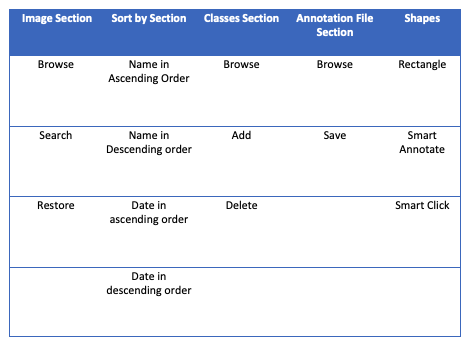
Here below are the descriptions of the modules