
Wallpaper Identity v4.7.5
v4.7.5 makes the least surprising backdrop the default: the login background Windows already uses.
Current background by default
- A truly fresh graphical or headless install now snapshots the current Windows login background before W:ID changes policy.
- Discovery checks the configured machine Group Policy image, a successful Personalization CSP image, the current Windows lock-screen URI, and the stock Windows lock-screen image.
- Only readable local JPEG/PNG files are accepted. HTTP-only references and any W:ID, BackgroundChanger, or BgStatusService output are ignored.
- The chosen image is copied once to W:ID's stable ProgramData background path. It is never a live reference, so later refreshes cannot recursively add an overlay to prior W:ID output.
- Azure Dark remains the safe fallback if Windows exposes no readable image.
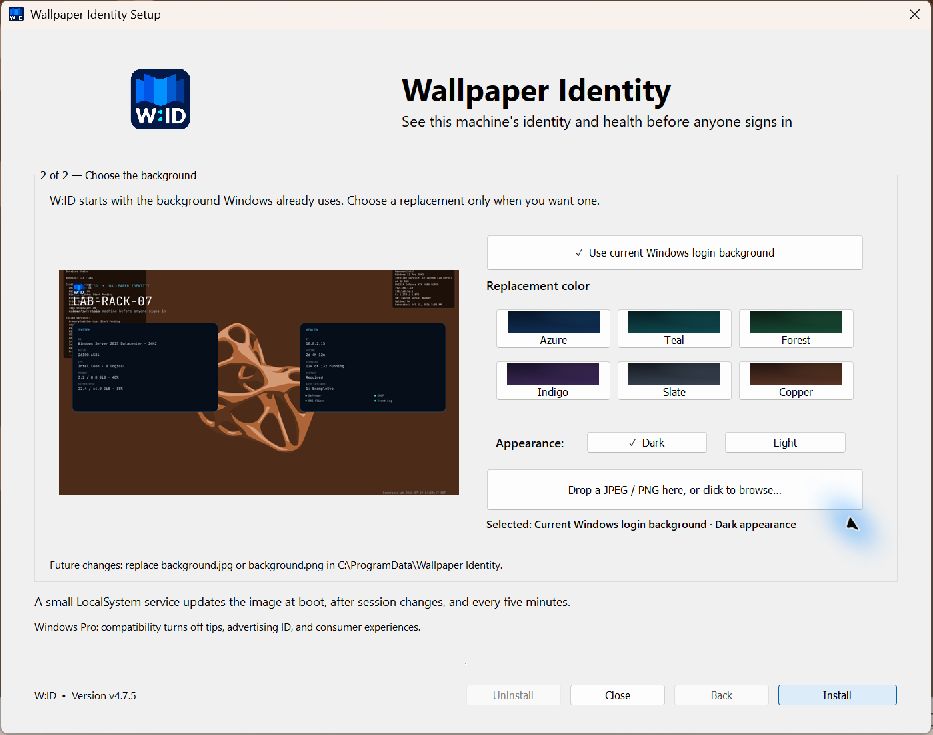
Explicit alternatives
The installer presents Use current Windows login background first. The twelve restrained Dark/Light color variants and JPEG/PNG drop/browser are replacement choices below it. Maintenance mode instead defaults to Keep current W:ID background.
RMM callers can make the fresh-install choice explicit:
& .\WallpaperIdentityCLI.exe install --quiet --use-current-backgroundThe existing --background-image, --background-color, --background-mode, and --use-colors options remain available. Background sources are mutually exclusive, and --use-current-background is rejected after W:ID is installed to prevent capturing its generated login image.
Upgrade
Existing W:ID installations keep their configured backdrop during repair or upgrade. Run WallpaperIdentitySetup.exe and select Repair / Upgrade, or use:
& .\WallpaperIdentityCLI.exe upgrade --quiet