Releases: amcchord/WallpaperIdentity
Release list
Wallpaper Identity v4.7.5

Wallpaper Identity v4.7.5
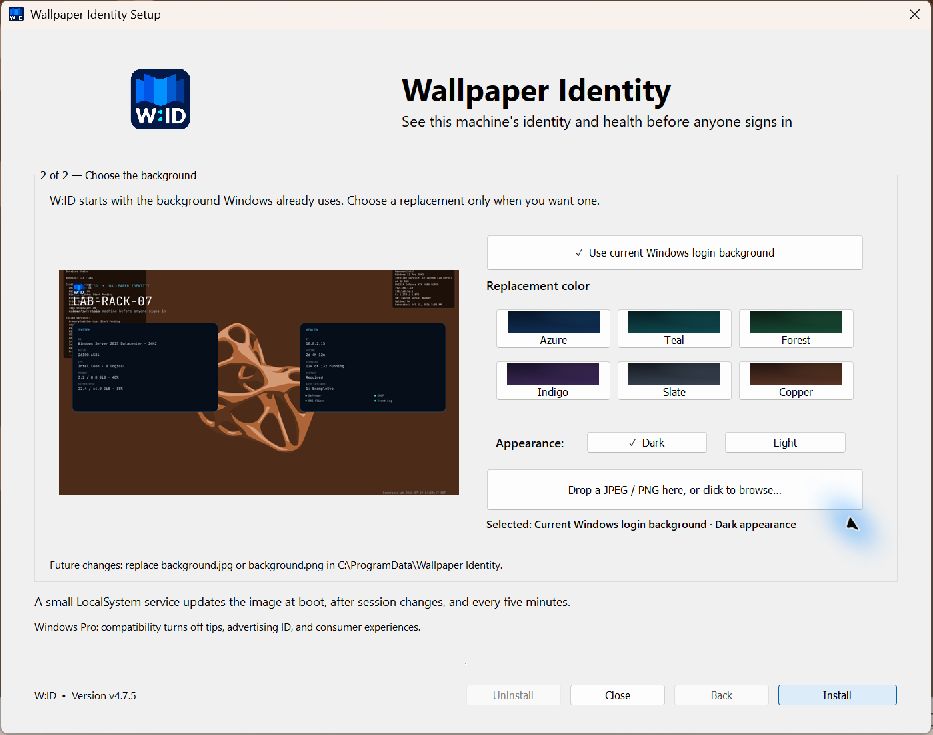
v4.7.5 makes the least surprising backdrop the default: the login background Windows already uses.
Current background by default
- A truly fresh graphical or headless install now snapshots the current Windows login background before W:ID changes policy.
- Discovery checks the configured machine Group Policy image, a successful Personalization CSP image, the current Windows lock-screen URI, and the stock Windows lock-screen image.
- Only readable local JPEG/PNG files are accepted. HTTP-only references and any W:ID, BackgroundChanger, or BgStatusService output are ignored.
- The chosen image is copied once to W:ID's stable ProgramData background path. It is never a live reference, so later refreshes cannot recursively add an overlay to prior W:ID output.
- Azure Dark remains the safe fallback if Windows exposes no readable image.
Explicit alternatives
The installer presents Use current Windows login background first. The twelve restrained Dark/Light color variants and JPEG/PNG drop/browser are replacement choices below it. Maintenance mode instead defaults to Keep current W:ID background.
RMM callers can make the fresh-install choice explicit:
& .\WallpaperIdentityCLI.exe install --quiet --use-current-backgroundThe existing --background-image, --background-color, --background-mode, and --use-colors options remain available. Background sources are mutually exclusive, and --use-current-background is rejected after W:ID is installed to prevent capturing its generated login image.
Upgrade
Existing W:ID installations keep their configured backdrop during repair or upgrade. Run WallpaperIdentitySetup.exe and select Repair / Upgrade, or use:
& .\WallpaperIdentityCLI.exe upgrade --quietWallpaper Identity v4.7.0
Wallpaper Identity v4.7.0
v4.7.0 makes W:ID resilient to unusual machine data and displays, then gives administrators a simple visual way to distinguish groups of servers and workstations.
Responsive, overflow-safe rendering
- Every hostname, machine value, failed-service list, health label, and generated timestamp is measured in pixels before it is drawn.
- Long values step down to a bounded readable size and are elided only when they still cannot fit; configured rows are no longer silently dropped at the panel edge.
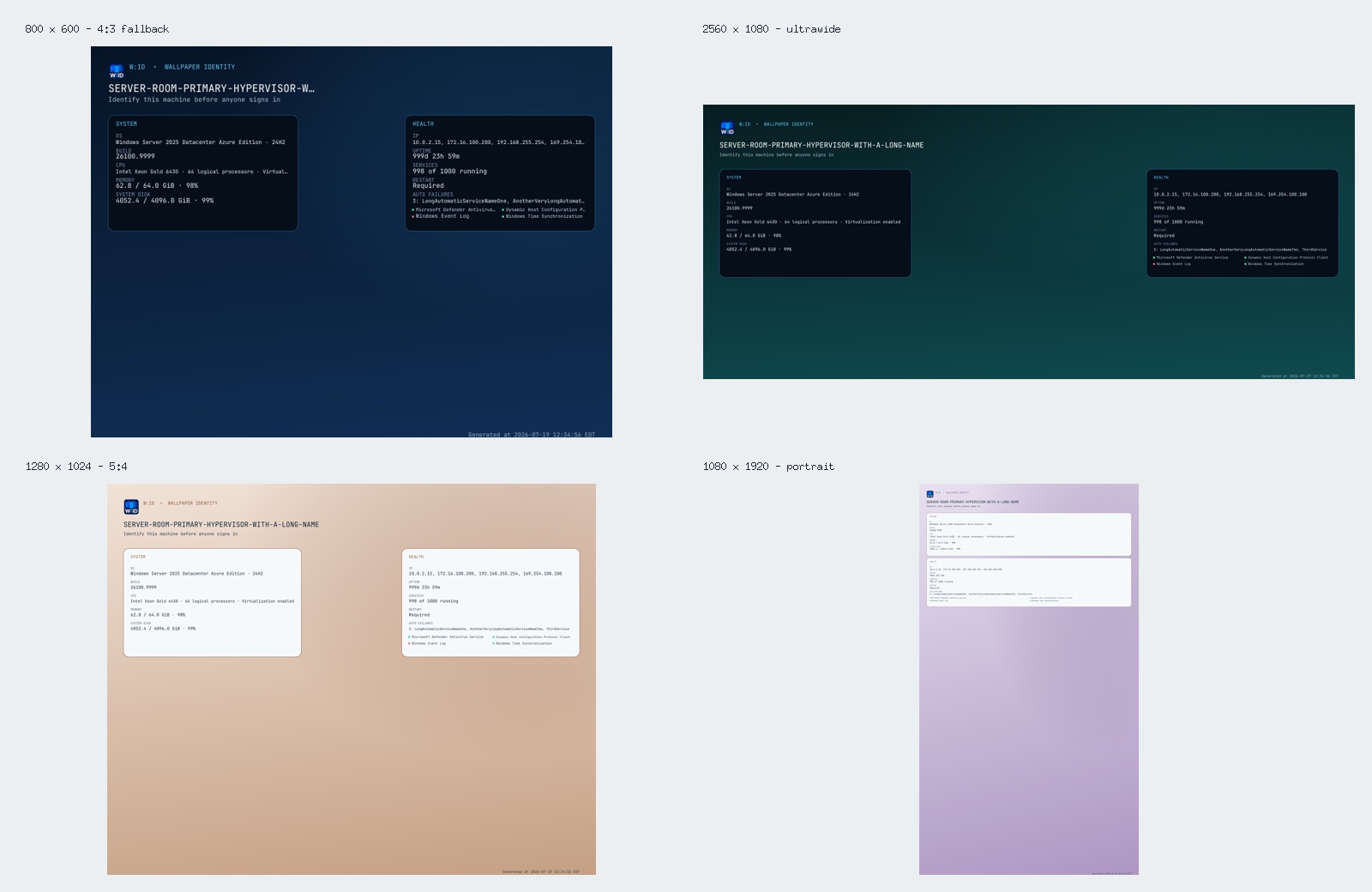
- Credible detected display dimensions are used directly. Partial or implausibly small display reports retain their aspect ratio and select a sensible 4:3, 16:10, 16:9, ultrawide, or portrait fallback.
- Standard and wide screens preserve the two clock-safe side panels. Tall screens stack the panels below the identity header.
Background choices
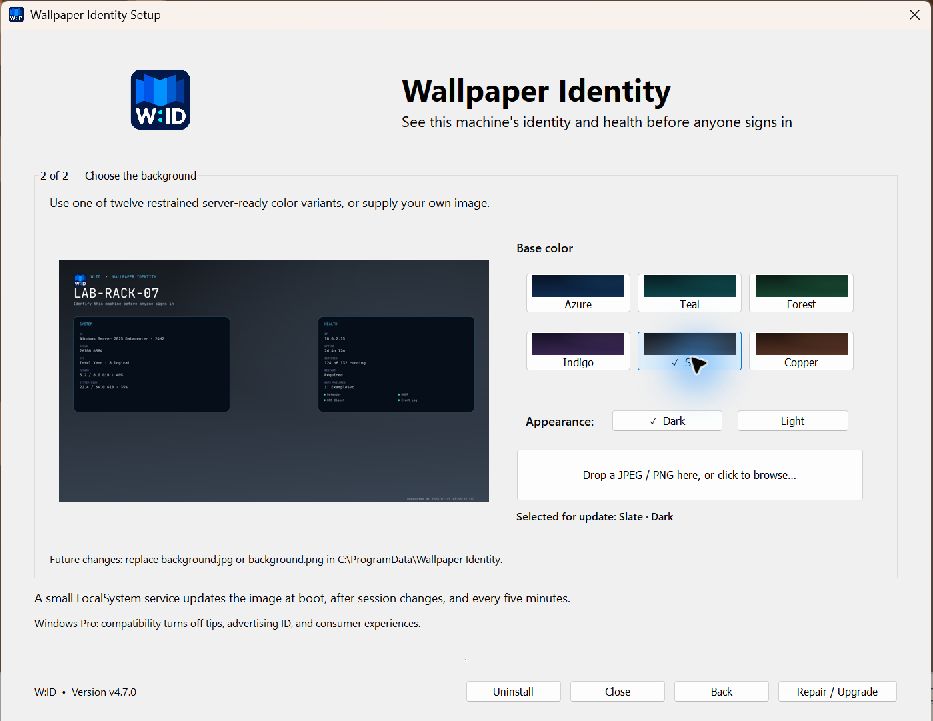
- Six restrained color families—Azure, Teal, Forest, Indigo, Slate, and Copper—each support matching Dark and Light panel/text treatments.
- The installer's second page has a live rendered preview, clickable color swatches, Dark/Light controls, and a JPEG/PNG well that supports both drag-and-drop and the native file browser.
- A selected image is validated and copied to
C:\ProgramData\Wallpaper Identity\background.jpgorbackground.png. - With
base_imageempty, the service discovers those standard files on every render. Replacing the file changes the next background without rerunning setup. - RMM callers receive matching
--background-image,--background-color,--background-mode, and--use-colorsoptions.
Validation
The release renders all twelve built-in variants and tests layout bounds at 800×600, 1024×768, 1280×1024, 1366×768, 1920×1080, 2560×1080, 3440×1440, and 1080×1920 with deliberately long machine values. Standard image discovery and PNG/JPEG replacement are covered by filesystem tests. The built installer was inspected at 150% Windows scaling through both pages, multiple color/mode changes, live-preview updates, and the native file browser.
The LocalSystem service, guarded boot-time pre-login refresh, permanent Generated at timestamp, policy rollback, and headless/RMM result contract remain intact.
Upgrade
Run WallpaperIdentitySetup.exe and proceed through both pages to Repair / Upgrade, or use the console artifact from an elevated RMM session:
& .\WallpaperIdentityCLI.exe upgrade --quietExisting configuration, images, logs, and policy rollback data are preserved unless an explicit replacement preset or background is selected.
Wallpaper Identity v4.5.0
Wallpaper Identity v4.5.0
v4.5.0 makes the graphical setup experience feel like a small, native Windows installer while retaining the deployment-grade CLI introduced in version 4.
Highlights
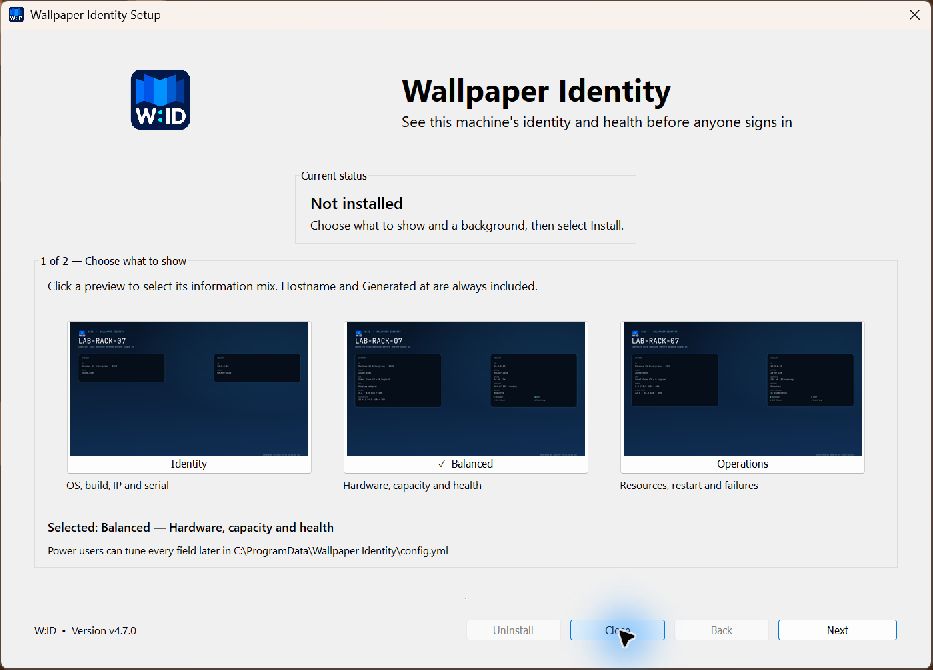
- Full-size, real rendered previews for Identity, Balanced, and Operations now fill their native selection wells at common Windows display scaling levels.
- The entire preview card is clickable and provides a check mark plus plain-language selection feedback.
- Existing named and custom configurations remain untouched during repair or upgrade unless a replacement preset is explicitly selected.
- Install, Repair / Upgrade, Close, and Uninstall use a conventional Windows action row with the advancing action in the lower right.
- Setup and progress windows use clean fixed layouts, and successful progress finishes at 100% with an explicit Done state and focused Close button.
- Unit coverage now includes preset intent, current/custom configuration behavior, success and error completion copy, and DPI-aware preview dimensions.
The LocalSystem service, boot-time rendering, guarded Windows 11 Pro pre-login refresh, power-user config.yml, and headless/RMM commands are unchanged from the verified version 4 implementation.
Screenshots
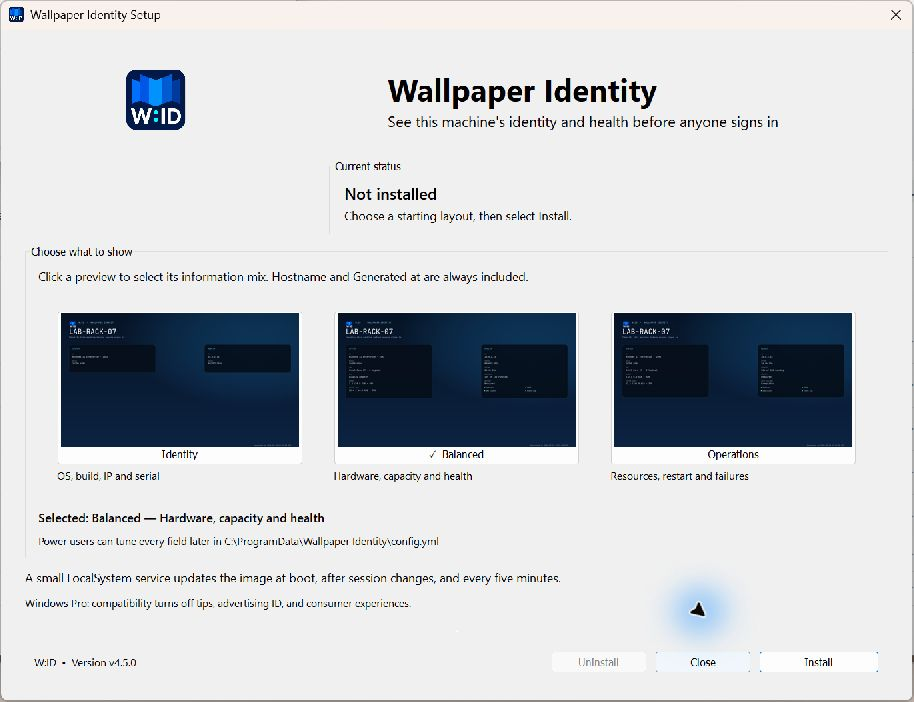
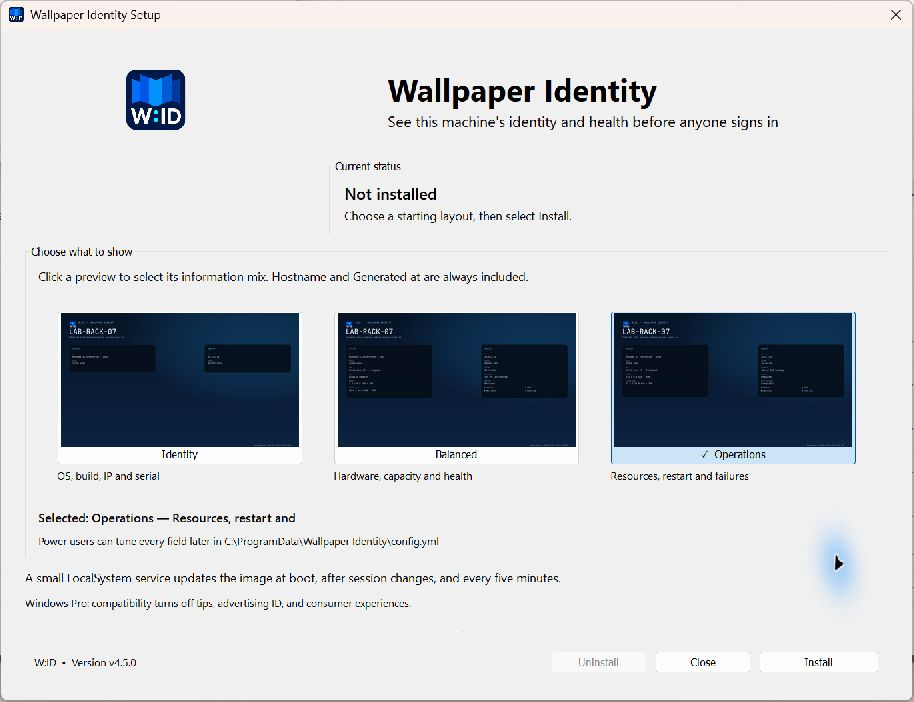
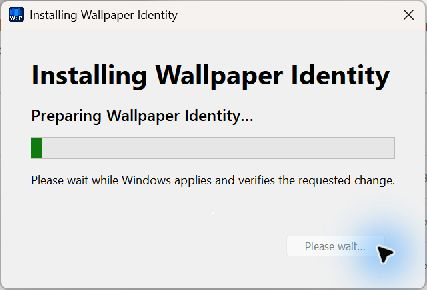
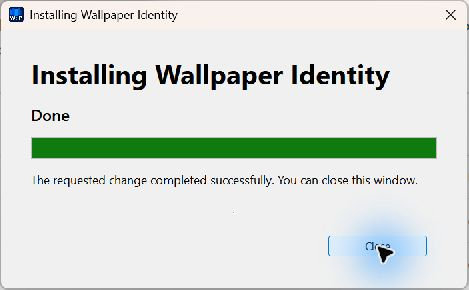
The login-screen result remains the real Windows 11 Pro frame captured after a powered-off network change:
Validation
The clean-install, preset-selection, installed-maintenance, active-progress, and final Done states were inspected from built Windows executables at 150% display scaling. The release also passes the full Go test suite, race-enabled internal tests, go vet, repository whitespace checks, and the reproducible release build.
Upgrade
Run WallpaperIdentitySetup.exe and choose Repair / Upgrade, or deploy the console artifact from an elevated RMM session:
& .\WallpaperIdentityCLI.exe upgrade --quietExisting config.yml, generated images, logs, and rollback data are preserved.
Wallpaper Identity v4.0.2
Wallpaper Identity v4.0.2
Windows 11 Pro can keep showing a previous verified lock-screen bitmap even after boot generates a current image and Personalization CSP reports status 1. v4.0.2 closes that gap without editing Windows' protected cache or terminating LogonUI.exe.
Highlights
- Waits for the existing boot-settled render so DHCP has time to replace an address retained from the previous network.
- After Windows accepts that exact image, calls the documented
WTSDisconnectSessionoperation only for an empty physical-console login session. - Requires every WTS session to have no authenticated user, the console to be connected, exactly one
LogonUIandwinlogon, no Explorer, and an unchanged session after a 500 ms race check. - Writes a stable
Win32_OperatingSystem.LastBootUpTimefence before the operation, preventing service restarts, repairs, upgrades, or crashes from rotating the console twice in one boot. - Adds
refresh_login_screen_on_boot: truetoconfig.yml; power users can opt out and retain Windows' original cache behavior. - Records attempted, refreshed, session, and skip details in
status.json, with the durable once-per-boot outcome inpre-login-refresh.json.
Windows 11 Pro validation
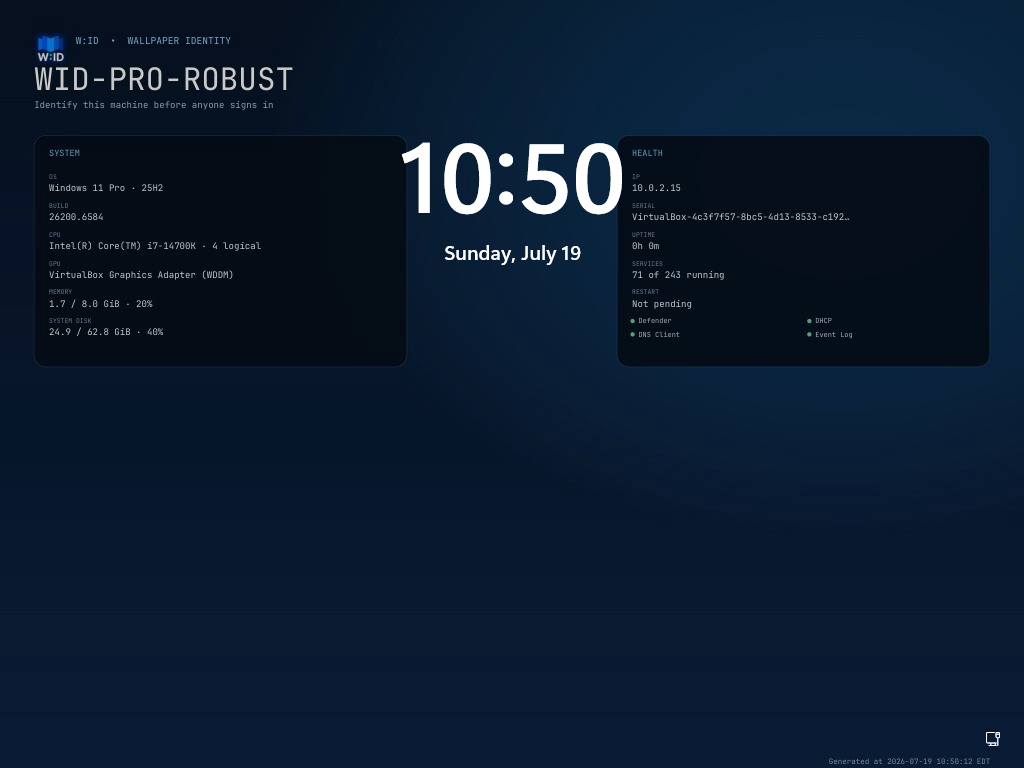
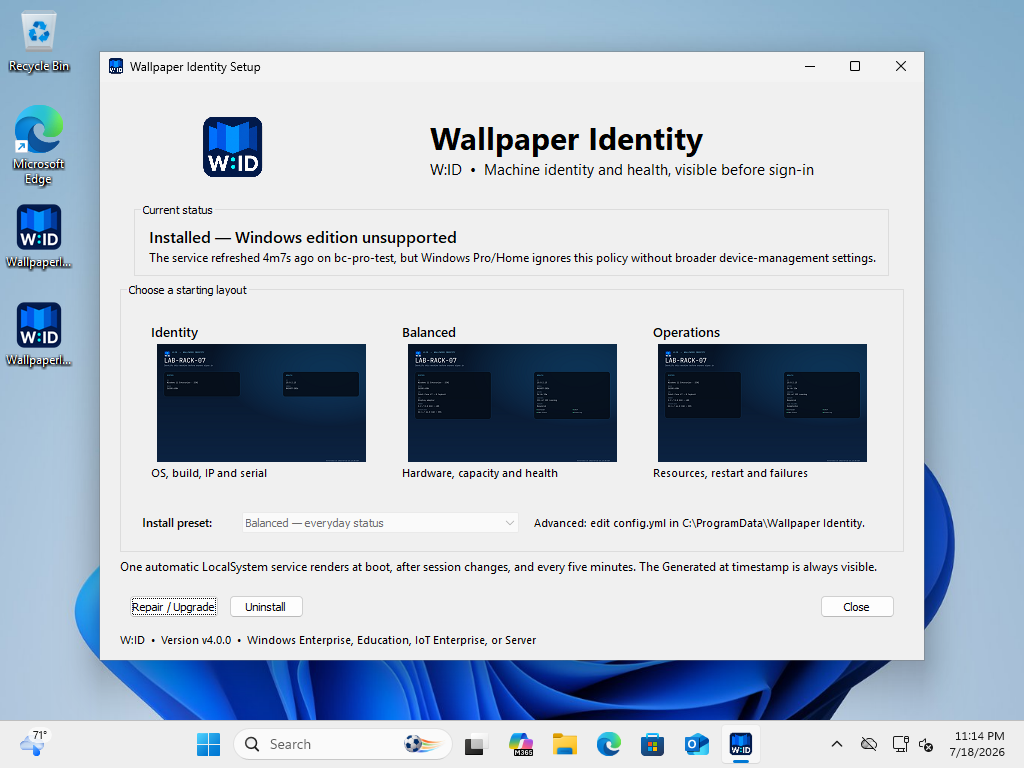
The final v4.0.2 binary was installed in the activated Windows 11 Pro 25H2 VirtualBox guest. Its adapter changed from 10.77.0.3 to 10.0.2.15 while powered off. The old address was still visible 30 seconds after power-on. W:ID's boot-settled render captured 10.0.2.15, verified CSP status 1, requested the empty-console refresh, and Windows recreated session 1 as session 2. By 55 seconds the actual pre-login screen showed 10.0.2.15 and the matching generation time.
The screenshot attached to this release and embedded in the README is that real post-transition frame. A same-boot headless repair was also verified to skip the rotation, while a CSP status 2 test failed closed without touching the session.
Upgrade
Run the graphical setup again, or use the blocking RMM path:
& .\WallpaperIdentityCLI.exe upgrade --jsonExisting config.yml, generated images, logs, and rollback records are preserved. Existing configurations that do not contain the new key receive the guarded true default; set refresh_login_screen_on_boot: false to opt out.
Wallpaper Identity v4.0.1
Wallpaper Identity v4.0.1
Version 4.0.1 is a lock-screen reliability release. It adds the documented Windows Pro policy path, replaces false-positive health with exact Windows readback, hardens service shutdown and unattended deployment, and clearly distinguishes a current boot-generated file from the bitmap Windows may already have cached for LogonUI.
Windows Pro compatibility
- Enables Microsoft's documented
SetEduPoliciescompatibility switch on Windows 10/11 Pro by default - Does not enable Shared PC mode, account cleanup, power policies, kiosk mode, or storage restrictions
- Clearly documents the three effects of
SetEduPolicies: Windows tips, advertising ID, and Microsoft consumer experiences are disabled - Adds
enable_pro_compatibilitytoconfig.ymlfor explicit power-user opt-out - Backs up the previous
SetEduPoliciesstate and positively verifies its restoration during uninstall
No more false-positive health
- Reads back every Group Policy value after writing it
- Waits for
MDM_Personalizationto report status1for the exact generated image URL - Stages CSP delivery images in a space-free path because the Pro provider did not complete file URLs containing spaces
- Requires both verified
SetEduPoliciesand verified Personalization CSP state on Pro - Reports a failed refresh and unhealthy CLI status when Windows has not accepted an effective policy
- Normalizes stale rollback records owned by version 3 or an earlier W:ID installation instead of restoring a deleted image path
Service and deployment robustness
- Reports the Windows service as running before starting potentially slow CSP work, avoiding Service Control Manager startup timeouts
- Keeps the initial render serialized ahead of boot-settled, session, timer, and RMM refreshes
- Gives an in-flight worker a bounded 30-second drain on stop/shutdown so CSP latency cannot indefinitely block Windows shutdown
- Extends bounded setup and uninstall waits for slow policy providers
- Verifies LocalSystem device-policy rollback before uninstall removes recovery files
- Correctly restores an absent or empty prior CSP lock-screen value without deleting the Personalization singleton or an unrelated desktop-image setting
Windows-managed display cache
- The automatic service does generate during boot and captures an IP address that changed while the machine was powered off
- Every layout permanently includes a timezone-qualified Generated at value
- Windows 11 Pro can still display its previous verified bitmap on the first pre-login frame even after the new file and CSP status are current
- W:ID does not add an ineffective boot delay, replace a credential provider, or terminate security-sensitive
LogonUIto bypass that Windows behavior
The release remains self-contained and offline. Use WallpaperIdentitySetup.exe for the graphical installer or WallpaperIdentityCLI.exe for blocking, headless RMM deployment.
Screenshots


The pre-login image is a real service-rendered example. As documented above, Windows may show its previously cached verified bitmap on the first LogonUI frame even when W:ID's boot-generated file and policy are current.
Wallpaper Identity v4.0.0
Wallpaper Identity v4.0.0
Wallpaper Identity is the new end-to-end identity for the pre-login machine-status project. Its shorthand is W:ID.
Rebrand
- New Wallpaper Identity name and W:ID shorthand across the installer, service, executable, overlay, configuration, documentation, repository, CI artifact, and release package
- New professionally generated W:ID folded-wallpaper logo
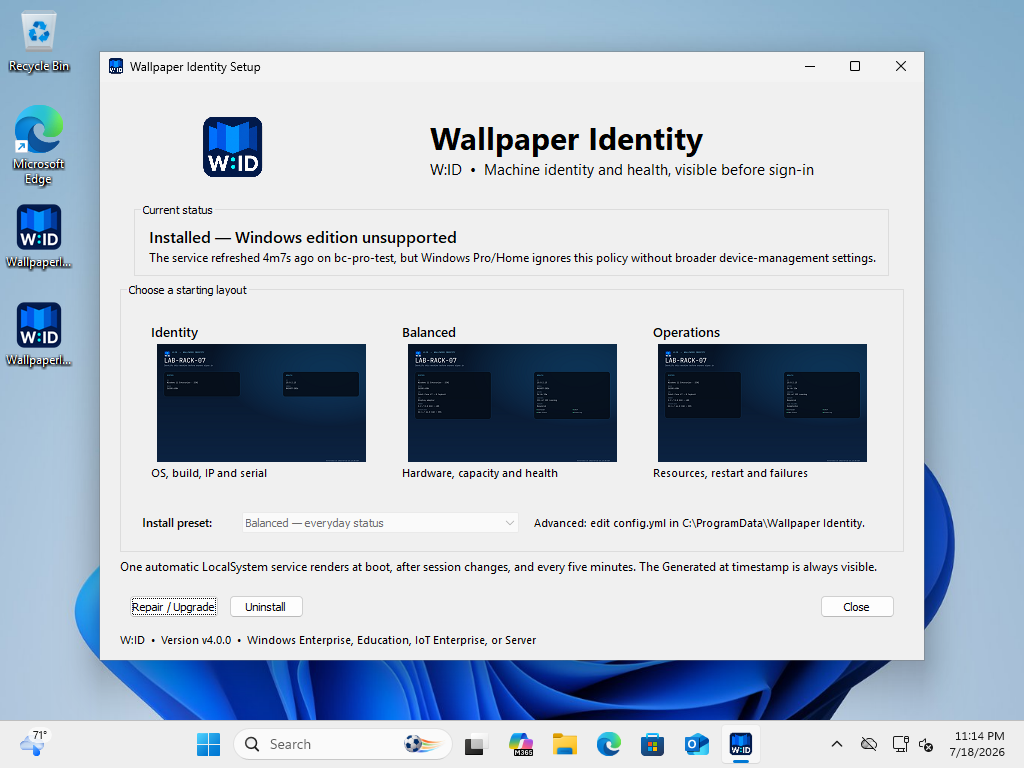
- Branded Windows executable icon, manifest metadata, Apps & features entry, title bars, installer header, and pre-login image
- New
WallpaperIdentitySetup.exerelease artifact - New
WallpaperIdentityCLI.execonsole-subsystem artifact for reliable RMM waiting, JSON, result files, and exit codes - Repository move to
github.com/amcchord/WallpaperIdentityand semantically versioned Go modulegithub.com/amcchord/WallpaperIdentity/v4
Safe upgrade from version 3
- Detects and stops the previous service automatically
- Migrates
config.yml, generated images, status, logs, and policy/MDM rollback files intoC:\ProgramData\Wallpaper Identity - Preserves custom configuration values while rewriting the generated YAML header for W:ID
- Replaces the previous install directory, service, executable, and Apps & features entry
- Retains the original pre-install policy backup so uninstall still restores the correct Windows state
- Recognizes previous-version image ownership during rollback without exposing the old identity in active UI
Existing v3 capabilities retained
- Fastfetch-inspired, resolution-aware Identity, Balanced, and Operations layouts
- Automatic LocalSystem refresh during boot, after boot settles, every five minutes, and on session/power events
- Permanent hostname and timezone-qualified Generated at text
- Supported Group Policy and LocalSystem
MDM_Personalizationapplication paths - Windows 11 top-center and Windows 10 lower-left clock-safe layout
- Offline graphical installer, repair/upgrade, rollback-aware uninstall, and Apps & features registration
- No
LogonUI.exetermination, credential provider, network listener, updater, or outbound dependency
Headless and RMM deployment
- True console-subsystem CLI that is headless by default and blocks until each operation completes
- Install, repair/upgrade, status, LocalSystem refresh, preview render, and rollback-aware uninstall commands
- Strict preflight validation for presets, YAML, absolute local JPEG/PNG base images, and conflicting result targets before installation state changes
- Versioned JSON and atomic result-file output with stable error codes,
1618concurrency handling, and standard success/reboot code3010 - Named global setup lock shared by graphical and CLI entrypoints
--remove-datapurge semantics that retain recovery data on rollback failure
Compatibility
Fully supported targets are Windows 10/11 Enterprise, Education, IoT Enterprise, and Windows Server. Windows 11 Pro accepts the policy writes but retains its stock image unless an administrator separately configures Microsoft's broader SharedPC/BootToCloud prerequisites. W:ID does not enable those settings automatically.
Validation
- Automated unit, migration, renderer, race, vet, and Windows CI checks
- Windows 11 Enterprise: v3-to-W:ID in-place upgrade, migrated configuration, healthy automatic LocalSystem service, and successful policy application before a Windows servicing reboot
- Windows 10 Enterprise: service/policy and clock-safe pre-login baseline validated; v4 binaries staged, with the final live upgrade deferred by Windows servicing
- Windows 11 Pro: branded installer/config/render validation and expected policy limitation
- Upgrade cleanup and rollback-aware uninstall verification
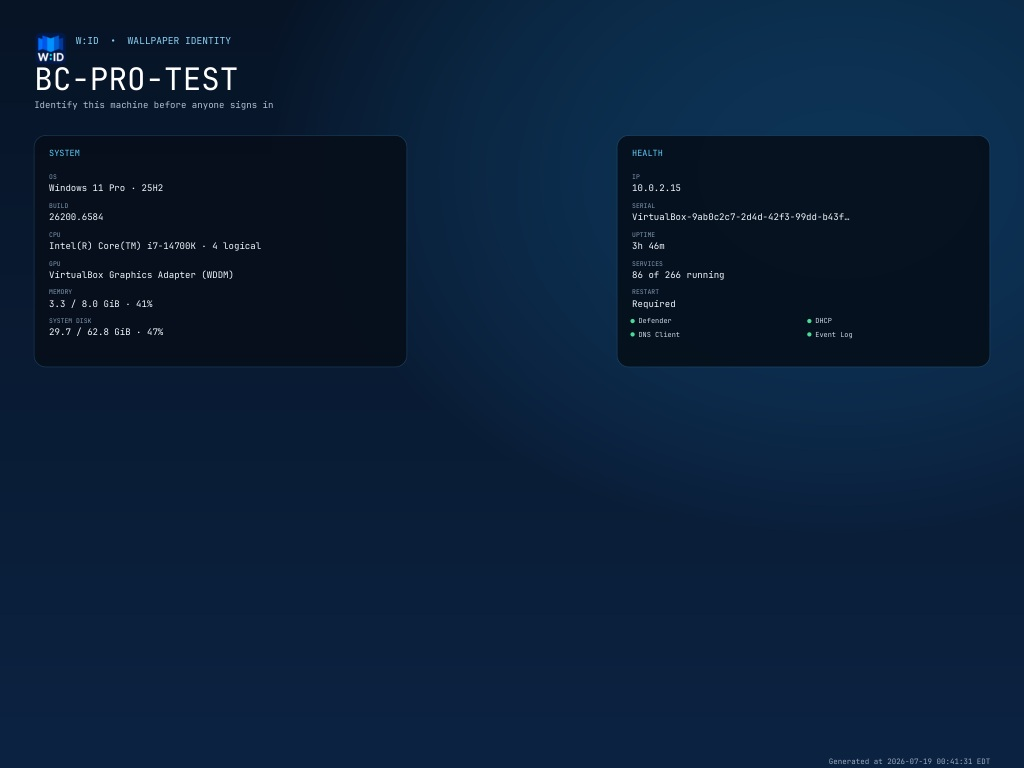
BackgroundChanger v3.0.0
BackgroundChanger v3.0.0
Version 3 is a ground-up redesign focused on one outcome: current machine identity and health on the Windows background before anyone signs in.
Highlights
- New fastfetch-inspired, resolution-aware pre-login design
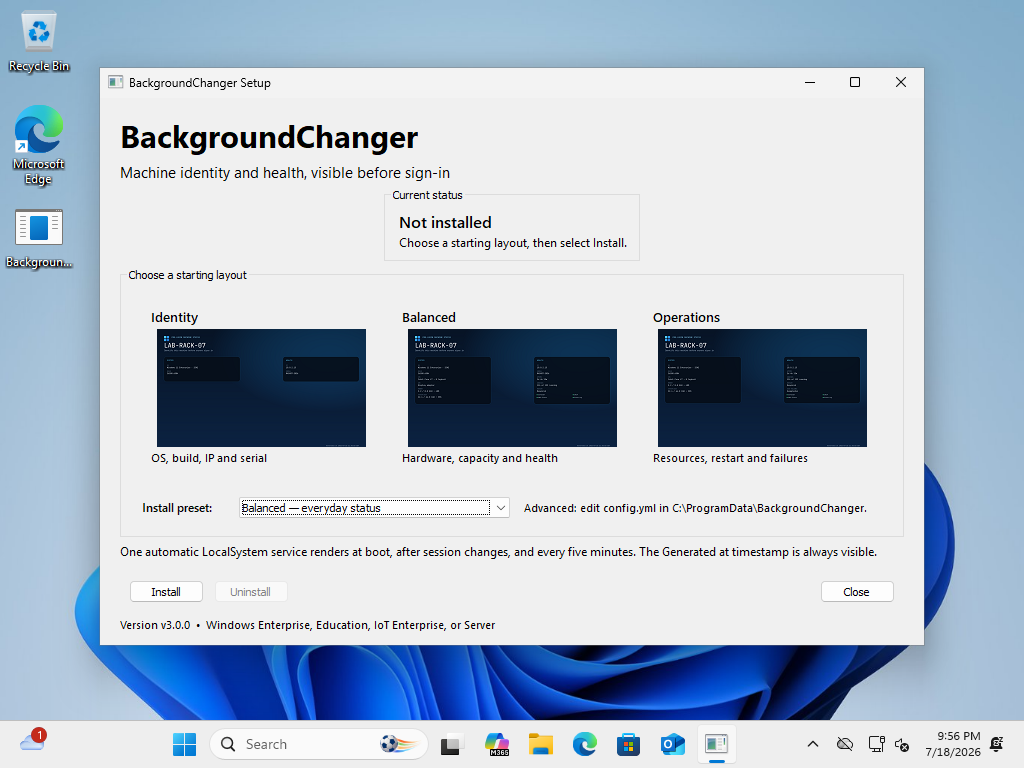
- Three installer presets with live screenshot examples: Identity, Balanced, and Operations
- Power-user
config.ymlwith per-field visibility, refresh, background-image, and output-size controls - Hostname and timezone-qualified Generated at text are permanently included so stale output is obvious
- One self-contained native Windows executable for setup, service, repair, and uninstall
- Automatic LocalSystem service refreshes during boot, after boot settles, every five minutes, and on session/power events
- Versioned image rotation avoids stale Windows image caches
- Uses supported Group Policy and Microsoft's LocalSystem
MDM_Personalizationbridge - Reserves the Windows 11 top-center and Windows 10 lower-left clock regions and disables credential-screen acrylic blur
- Never terminates
LogonUI.exe; only refreshesLockApp.exewhen it is present - Native graphical installer with offline install, visual preset selection, and Apps & features registration
- Atomic status/config writes, append-only diagnostics, service recovery actions, upgrade cleanup, and restoration of pre-existing policy values
- Automated Go tests, Windows CI build, SHA-256 release checksum, and a three-VM Windows 10/11 validation matrix
Compatibility
Fully supported targets are Windows 10/11 Enterprise, Education, IoT Enterprise, and Windows Server. Clean Windows 10 Enterprise and Windows 11 Enterprise guests displayed the live image successfully. A clean Windows 11 Pro guest confirmed Microsoft's documented boundary: it accepted the registry and MDM writes but retained the stock image. Pro and Home are therefore unsupported by default.
Microsoft allows the Personalization CSP on Pro only when an administrator separately configures SharedPC SetEduPolicies or BootToCloudPCEnhanced. BackgroundChanger does not silently enable those broader management settings.
Validation
- Windows 11 Enterprise Evaluation 25H2 (26200.6584): passed boot-time refresh before any user session, lock and credential display, repair/upgrade
- Windows 10 Enterprise Evaluation 22H2 (19045.2006): passed service, policy, and Windows 10 clock-safe lock-screen layout
- Windows 11 Pro 25H2 (26200.6584): expected unsupported result; render and writes passed, stock image remained
- Uninstall restored or removed owned policy state and removed the service, installed executable, and rollback files
Upgrade notes
Running BackgroundChangerSetup.exe removes the old BgStatusService service and its BgStatusServiceBoot / BgStatusServiceLock scheduled tasks before installing the v3 service. No network download is performed.
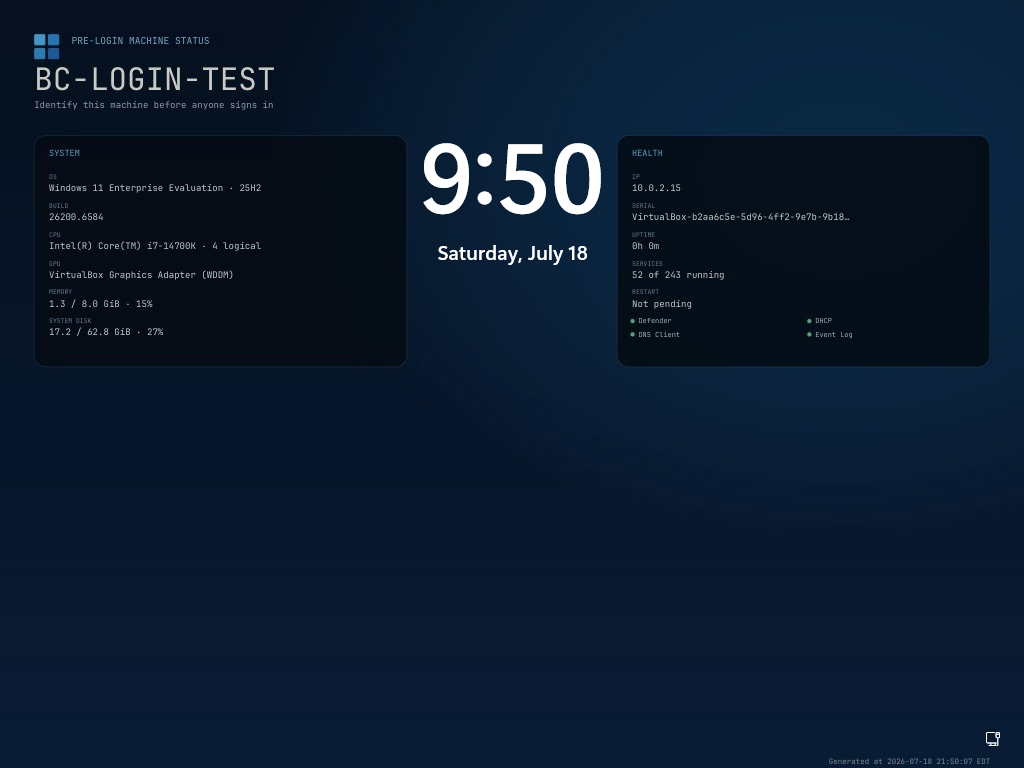
Screenshots
Pre-login machine status
Installer presets
v2.5.0 - Self-contained Installer
What's New
Self-Contained Installer
- bgStatusServiceSetup.exe now works completely offline - no internet required
- The service executable is embedded directly into the installer
Robustness Improvements
- Added timeouts to prevent installer lockups on network/service issues
- Added panic recovery with detailed error messages
- Improved error messaging for common problems (network issues, service manager busy, etc.)
- HTTP request timeouts (30s for API calls, 5min for downloads)
- Service manager connection timeouts (15s)
- External command timeouts for schtasks operations (30s)
Files
- bgStatusServiceSetup.exe - Full installer (just double-click, works offline!)
- bgchanger.exe - Standalone background changer utility
- bgStatusService.exe - Service executable (included in installer)
v2.4.0 - Scheduled Tasks Architecture
What's Changed
Major Improvements
- Replaced Windows Service with Scheduled Tasks for improved reliability and faster boot-time updates
- Two scheduled tasks for different scenarios:
- BgStatusServiceBoot - Runs at system startup with high priority, restarts LogonUI to display fresh system info
- BgStatusServiceLock - Runs when you lock your screen or log off, updates the image for the next viewing
Bug Fixes
- Fixed Windows 11 version detection - Now correctly reports 'Windows 11' instead of incorrectly showing 'Windows 10'
- LogonUI restart only at boot - Screen lock no longer forces password prompt or blur
Technical Details
- Uses WMI for accurate OS caption and reads DisplayVersion from registry
- Installer now cleans up old Windows Service installation automatically
- Boot task runs with Priority 1 (highest) for earliest possible execution
Installation
Download \�gStatusServiceSetup.exe\ and run it as Administrator. The installer will:
- Remove any existing installation (service or tasks)
- Download and install the latest version
- Create the scheduled tasks
- Generate the initial login screen image
Press Win+L to see your new login screen, or reboot to test the boot-time update.
v2.3.5 - Force Sign-in Screen Update
New Aggressive Method
Directly replaces Windows default lock screen images
New method overwrites the system default images at:
- \C:\Windows\Web\Screen\img100.jpg\ through \img105.jpg\
Uses \ akeown\ and \icacls\ to gain write access to protected system files.
Methods now tried (in order):
- PersonalizationCSP (MDM-style registry)
- Group Policy Registry
- Replace Windows default images - NEW
- OOBE background folder
- WinRT API (user context)
This is the most aggressive approach and should force the sign-in screen to display the custom image before login.