Releases: andrewfraley/dapple
Release list
Dapple 0.6.2

Nothing changes in Dapple itself. This release fixes how it gets built.
What's changed
- Builds no longer stall now and then. Two copies of the image build could start at once for the same change and get in each other's way, which sometimes held up a release for many minutes. Now the second one waits its turn.
Upgrading
Running Dapple as a Home Assistant app: install the update from Settings → Updates.
With Docker, docker compose up -d picks this up if you have pull_policy: always. Otherwise run docker compose pull && docker compose up -d. Your settings and saved presets carry over. To stay on this release, set the image line to:
image: afraley/dapple:0.6.2Dapple 0.6.1
The pattern editor now starts on Halloween.
What's changed
- The editor's starting pattern is the built-in Halloween preset: deeper orange (80%), purple (15%) and a touch of yellow (5%). It used to start on an older two-color orange and purple that didn't match any preset. You see it when a group has no pattern yet.
Upgrading
Running Dapple as a Home Assistant app: install the update from Settings → Updates.
With Docker, docker compose up -d picks this up if you have pull_policy: always. Otherwise run docker compose pull && docker compose up -d. Your settings and saved presets carry over. To stay on this release, set the image line to:
image: afraley/dapple:0.6.1Dapple 0.6.0
Dapple can now run inside Home Assistant, as an app.
What's changed
- Run Dapple on Home Assistant OS. If your Home Assistant runs Home Assistant OS, you can install Dapple from Home Assistant's App store instead of setting up Docker on another computer. It opens in Home Assistant's sidebar, behind Home Assistant's login, and new versions arrive under Settings → Updates like any other app's. The README's On Home Assistant OS section has a one-click link to add it.
- Less to type when connecting to Home Assistant. Running as an app with the Mosquitto broker installed, Dapple fills in the broker's address and a login on its Home Assistant tab by itself. It still starts switched off: turn on Connect to Home Assistant and press Save.
Nothing changes if you run Dapple with Docker. To move an existing Docker install over to the app, add your strands again in the app (or copy config.yaml and presets.json across), then stop the Docker one so the two don't both control your lights.
Upgrading
docker compose up -d picks this up if you have pull_policy: always. Otherwise run docker compose pull && docker compose up -d. Your settings and saved presets carry over. To stay on this release, set the image line to:
image: afraley/dapple:0.6.0Dapple 0.5.1
Halloween gets a little yellow.
What's changed
- The built-in Halloween preset now has three colors: a deeper orange (80%), purple (15%) and a touch of yellow (5%), where it used to be just orange and purple.
New installs start with the new Halloween. If you already run Dapple, your presets stay exactly as you left them, including Halloween. To get the new one, open Halloween in the pattern editor, add a yellow color, set the shares to 80, 15 and 5, and save it over the old one.
Upgrading
docker compose up -d picks this up if you have pull_policy: always. Otherwise run docker compose pull && docker compose up -d. Your settings and saved presets carry over. To stay on this release, set the image line to:
image: afraley/dapple:0.5.1Dapple 0.5.0
Dapple now shows which version you're running.
What's new
- The version number is at the bottom of every page, with a link to Dapple on GitHub. If you ever report a problem, include that number. It comes from the running Dapple, so it's always the version you actually have.
- Scripts can read the version too.
http://<your-dapple>:8080/api/pingnow answers with it, for example{"ok": true, "version": "0.5.0"}.
Nothing else has changed, and there's nothing you need to do.
Upgrading
docker compose up -d picks this up if you have pull_policy: always. Otherwise run docker compose pull && docker compose up -d. Your settings and saved presets carry over. To stay on this release, set the image line to:
image: afraley/dapple:0.5.0Dapple 0.4.3
A maintenance release. Dapple works and looks exactly as before.
What's changed
- Updated build tools. The tools that turn Dapple's web page into the files the app serves have been updated to their current versions, which fixes known security problems in the old ones. Those problems only affected developers building Dapple, not a running Dapple, but there's no reason to keep them.
Upgrading
docker compose up -d picks this up if you have pull_policy: always. Otherwise run docker compose pull && docker compose up -d. Your settings and saved presets carry over. To stay on this release, set the image line to:
image: afraley/dapple:0.4.3Dapple 0.4.2
A maintenance release. Dapple itself is unchanged; this changes how its dependencies are kept up to date.
What's changed
- Updates wait a week before they're considered. Dapple is checked every week for newer versions of the software it's built on, and a new version isn't taken until it's been out for 7 days. Most compromised packages are caught and pulled within that time. Fixes for known security problems still come straight away.
- Big upgrades are done by hand. Major new versions of the libraries Dapple uses, and new versions of Python or Node, are left for a person to make and test, not taken automatically. The Python and Node versions Dapple runs on still get their security fixes.
Upgrading
docker compose up -d picks this up if you have pull_policy: always. Otherwise run docker compose pull && docker compose up -d. Your settings and saved presets carry over. To stay on this release, set the image line to:
image: afraley/dapple:0.4.2Dapple 0.4.1
A security release. How Dapple is built now uses only exact, verified ingredients, so a compromised download or build tool somewhere upstream can't slip code into your install. Nothing about how Dapple works has changed.
What's changed
-
Every part of the build is locked to an exact, checked version. That covers the build tools GitHub uses to make the image, the base images, and every Python and JavaScript package. Each download has to match a fingerprint recorded in advance, or the build stops. Before, some of these always fetched whatever was newest.
-
Each image says what it was built from. Images now carry a record of the exact source code and build that produced them, plus a list of every package inside. Most people never need this, but it lets anyone check an image, or see straight away whether a newly announced security problem affects Dapple:
docker buildx imagetools inspect afraley/dapple:0.4.1 --format '{{ json .Provenance }}' -
latestnow means the newest release. Thelatestimage changes only when a new version comes out, with release notes saying what changed. Before, other behind-the-scenes changes could update it with no release at all. -
Updates only when you choose. The README now explains how to stay on a particular version instead of taking the newest one every time you run
docker compose up -d.
Upgrading
docker compose up -d picks this up if you have pull_policy: always. Otherwise run docker compose pull && docker compose up -d. Your settings and saved presets carry over. To stay on this release, set the image line to:
image: afraley/dapple:0.4.1Dapple 0.4.0
A reliability release: steadier lights when Dapple, Home Assistant and the Twinkly app all talk to the strands at once, a Home Assistant connection that recovers on its own, and a round of fixes across the app.
What's fixed
- No more tangled commands to a strand. Applying a pattern takes several steps, and Dapple's regular status checks, Home Assistant and the Pattern tab could all reach the same strand at the same moment. A command landing in the middle could leave the strand dark or half-updated. Dapple now sends one thing at a time to each strand.
- Patterns stay continuous even if a strand was off when Dapple started. If the first strand in a group was unplugged at startup, the first pattern applied after it came back could start over at the second strand. Dapple now checks any strand it hasn't heard from before working out where the pattern continues.
- The Home Assistant connection recovers from any error. Before, an unexpected error could stop updates to Home Assistant while the Home Assistant tab still said Connected. Dapple now reports the error and reconnects.
- Docker's health check no longer contacts your lights. It used to ask every strand every 30 seconds. Now it only checks that Dapple itself is running, so an unplugged strand no longer marks the container unhealthy.
- A preset that fails to save no longer looks saved. If Dapple can't write to its
datafolder, the preset doesn't appear in the list or in Home Assistant's effects. - Deleting a preset asks first, just as removing a strand does.
- The New group dialog shows the real id. For a name like "All", or a second group called "Tree", it used to show an id the group wouldn't actually get.
- Clearer errors behind a reverse proxy. When a proxy returns an error page, Dapple shows the error code instead of a confusing message.
- The page does less work. The preview only redraws when something changes, and the Home Assistant tab stops checking the connection while it's in a background browser tab.
Also changed
- Fresh installs get built-in presets that suit the sliders. Halloween is now saved as 80/20 rather than 4/1, and so on. The lights look exactly the same. Existing installs keep their saved presets. If yours load with every Share slider at the far left, set the shares you want and use Save as… with the same name.
- Environment variables for tuning keep working. Earlier versions copied
DAPPLE_GAMMA,DAPPLE_TIMEOUTandDAPPLE_MOVIE_FRAMESintodata/config.yamlthe first time you saved anything, and from then on the file overrode them. Dapple no longer does that. If you set these with environment variables, delete thegamma:,timeout:andmovie_frames:lines fromdata/config.yamlonce, and the variables take effect again. - Unknown strands return 404 from the REST API, like unknown groups, instead of 400.
- The README says plainly that Dapple has no login. Keep it on your home network.
Upgrading
docker compose up -d picks this up if you have pull_policy: always. Otherwise run docker compose pull && docker compose up -d. Your settings and saved presets carry over. To stay on this release, set the image line to:
image: afraley/dapple:0.4.0Dapple 0.3.0

 andrewfraley
Andy Fraley
andrewfraley
Andy Fraley
8bf8279
andrewfraley
Andy Fraley
Your lights in Home Assistant, with no YAML to write. Plus a Pattern page that always shows whether the lights are on.
What's new
- Each group is a light in Home Assistant. Switch it on and off, set its brightness, and pick any of your presets as its effect. Dashboards, scenes, automations and voice ("turn off the Christmas tree") all work like any other light.
- Set it up from Dapple's new Home Assistant tab. Enter your MQTT broker's address and login, turn on Connect to Home Assistant, and save. It's off until you do. If you don't have a broker yet, HOME_ASSISTANT.md walks through installing the Mosquitto add-on.
- Home Assistant shows what the lights are really doing. Dapple checks the strands every minute, so changes made with Home Assistant's Twinkly integration or the Twinkly app show up there too. Both can stay installed alongside Dapple.
- Renaming is safe. Renaming a group in Dapple renames its light in Home Assistant without breaking automations. Deleting a group removes its light, and new presets appear in every light's effect list straight away.
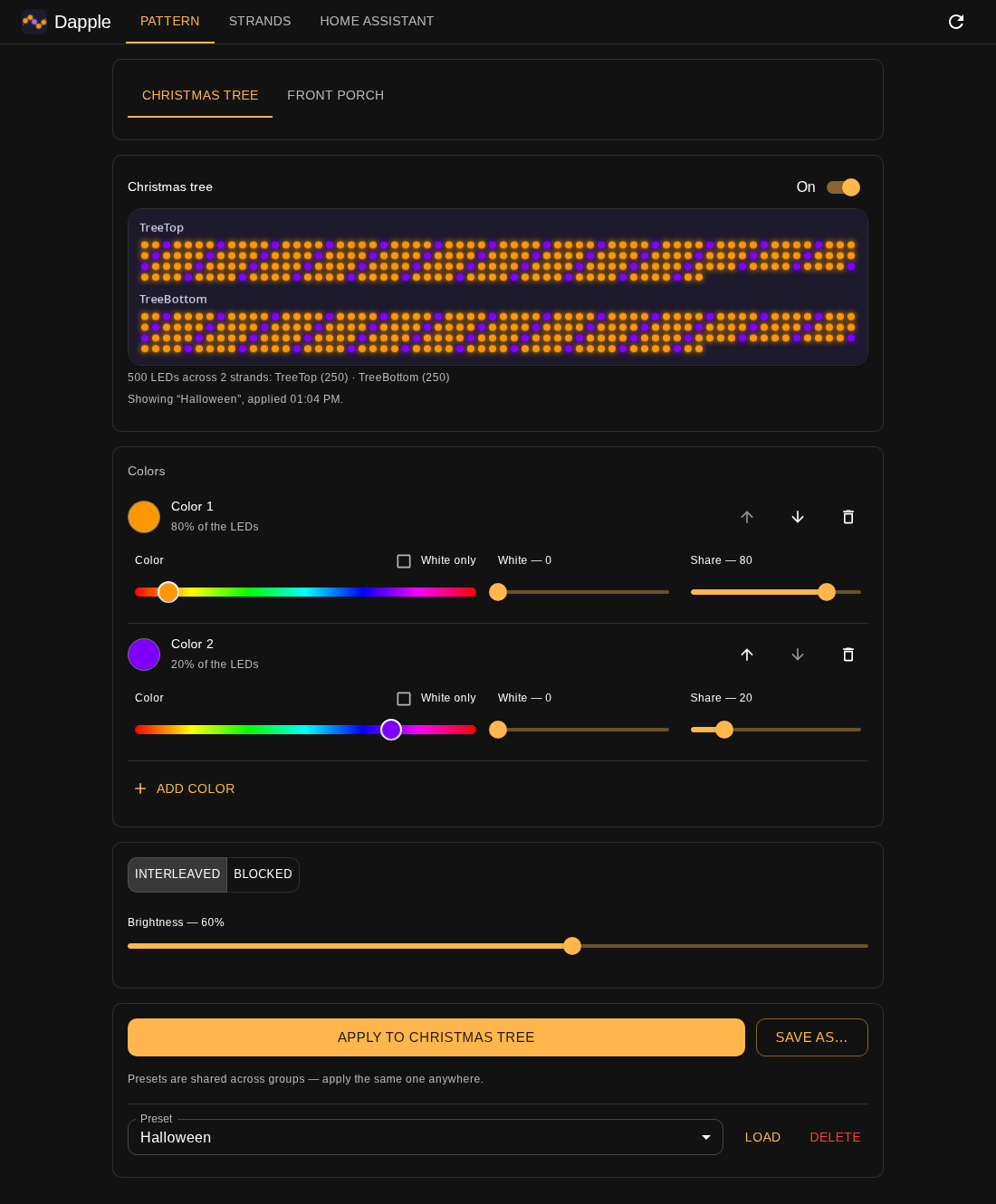
- A clear on/off switch. On the Pattern tab, the On and Off buttons are now one switch next to the group's name. It shows whether the lights are really on, and says so when a strand isn't answering.
- The page keeps up. While it's open, the Pattern tab re-reads the strands every few seconds. Turn the tree off or dim it from Home Assistant and the switch and brightness slider follow. If a Twinkly color or effect is showing instead of your pattern, the page says so.
If you already use Home Assistant with Dapple
The REST endpoints haven't changed, so existing rest_command automations keep working. The new lights replace the input_select dropdowns, automations and hand-kept preset lists from the old setup. Once the lights are working you can delete those. HOME_ASSISTANT.md also fixes the old guide's panel_iframe example, which newer Home Assistant versions no longer accept.
Upgrading
docker compose up -d picks this up if you have pull_policy: always. Otherwise run docker compose pull && docker compose up -d. Your settings and saved presets carry over. Your Home Assistant broker password is saved in data/config.yaml, so keep the data folder private. To stay on this release, set the image line to:
image: afraley/dapple:0.3.0