Texture Packing
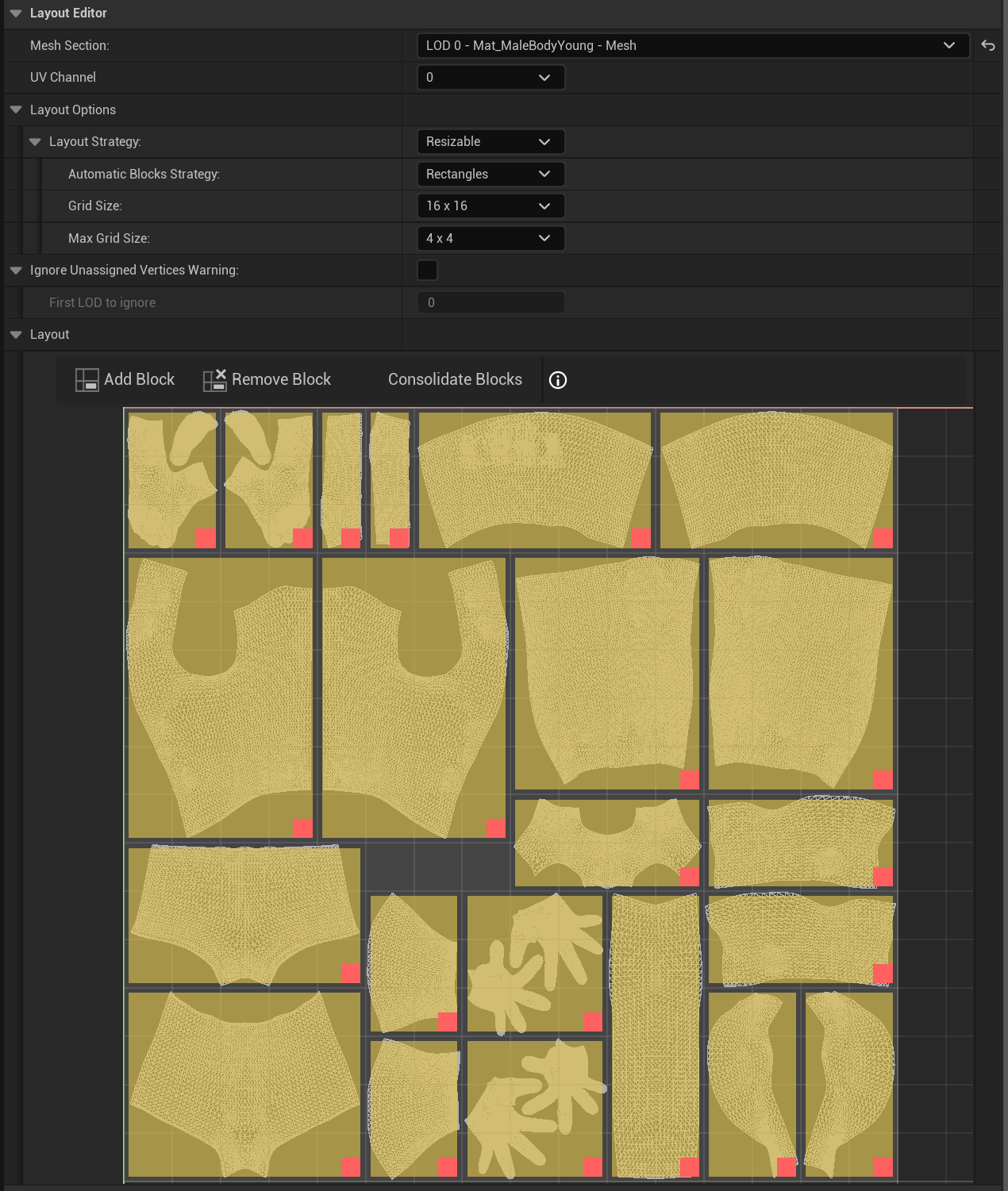
Mutable can also do Texture Packing. When set to do so, Mutable modifies not only Textures but also Skeletal Mesh UVs. This packing is done at runtime, and it can reorder existing blocks, remove unused blocks, or even add new ones.
-
Reorder Blocks: Blocks will be packed to optimize Texture space.
-
Remove Blocks: Clipping all vertices of a block removes it. Also blocks can be directly removed with the Remove Mesh Blocks node.
-
Add Blocks: Using the Extend Mesh Section node, you can extend both the geometry and the Texture. Textures are extended by adding blocks to the existing packing. See the Extend Mesh Section node for more details.
Warning
Texture Packing is costly. Only use it when necessary (to reduce draw calls, reduce Texture size, etc.).
Texture Packing settings are split across two places:
- In Material's Texture Parameter (Material Modify and Mesh Section nodes).
- Skeletal Mesh nodes (Skeletal Mesh, Skeletal Mesh Parameter and Table nodes).
The UV Packaging Settings define the maximum number of blocks that a Texture or UV will have. This is an upper limit, so the resulting packing may have fewer blocks than specified here. If the resulting number of blocks does not fit this limit, some of them will be reduced.
Warning
Only Mutable Textures can be packed; Object ones cannot.
Using the Layout Editor you can specify, per Mesh Section and UV Index, the blocks that will compose the resulting packing.
Layout Strategy:
- Resizable: Legacy, do not use! It allows the result to exceed the maximum number of blocks.
-
Fixed: Enables Texture packing.
- Automatic Blocks Strategy: Automatically detects blocks, optionally with an additional mask.
- Grid Size: Resolution, in blocks, of the current Mesh Section.
- Max Grid Size: Legacy, do not use!
- Reduction Method: How blocks will be reduced if they do not fit the final packing.
- Overlay: Disables Texture packing.
Note
Reduction Method Halve is the most performant one.
In addition, you can specify per block settings:
- Block Priority: Higher priority blocks will be reduced first if necessary. The higher the value, the higher the priority.
- Reduce Symmetrically: If set to true, both axis will be reduced at the same time.
- Reduce by Two: Only used with the Unary Reduction Method. Blocks will be reduced by 2 units instead of 1.
- Block Mask: Each block can have an optional mask that will be used when packing Textures.
Warning
Every vertex must belong to a block and faces cannot cross block boundaries.
Note
When using automatically generated LODs, in LODs greater than 0, vertices outside the block will be automatically corrected. A warning will be thrown when this happens. This warning can be suppressed with Ignore Unassigned Vertices Warning.