Find a better way to determine last status change#4989
Find a better way to determine last status change#4989mitchell852 merged 10 commits intoapache:masterfrom
Conversation


 ocket8888
added
cdn-in-a-box
ocket8888
added
cdn-in-a-box
 mitchell852
added
the
database
mitchell852
added
the
database

|
sorry, conflict in our favorite file :) |
|
@mitchell852 fixed 👍 |

… updated date for existing servers
adds a read-only form field to the server form to display status last…

|
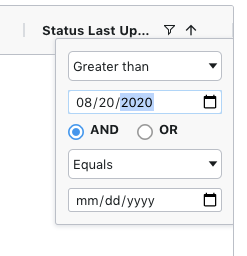
for some reason the column filter is not working in TP on this field:
I have a server i just changed the status of and it's not showing up. So i'm wondering if the data format needs to be changed to that of LastUpdated: lastUpdated: "2020-08-28 20:53:55+00", I'm not sure if that will solve the TP grid problem but maybe consistent is better anyhow? |

|
The data will compare properly if you coerce it to a Date. If you look in the servers table controller, when I set |
|
Resolved in |
|
Can you update so |
 mitchell852
left a comment
mitchell852
left a comment
mitchell852
left a comment
There was a problem hiding this comment.
lgtm. all tests pass. verified manually as well. all requested changes have been made.
3 participants


What does this PR (Pull Request) do?
Which Traffic Control components are affected by this PR?
What is the best way to verify this PR?
Run local TO and TP and create a server. Notice that the
status_last_updatedfield gets set to the current time in the DB.Now, go to TP, and select the
Status Last Updatedas one of the display columns for the servers table. Notice that it shows the correct time elapsed since you created the server.Now, update this server changing any field, EXCEPT the
statusof the server. Notice that thestatus_last_updatedvalue DOES NOT change.Now, update the server by changing the server's status (you will have to do this from the backend call, since TP doesn't let you do it from the front end).
Notice that the
status_last_updatedtime gets changed to the current time this time around.Also, make sure unit tests and API tests pass.
If this is a bug fix, what versions of Traffic Control are affected?
The following criteria are ALL met by this PR
Additional Information