Reference
size width height background newDrawing newPage
px pt cm inch mm degrees radians
fill stroke fillAlpha strokeAlpha noFill noStroke tint background
point line rect square oval circle polygon triangle
saveState restoreState savedState
newPath curveTo moveTo lineTo arcTo drawPath
grid gridCell gridArea nextGridCell prevGridCell
image imageSize imageWidth imageHeight background tint noTint
ctx.size(PAPER);
ctx.size(double width);
ctx.size(double width, double height);
Size ctx.size;
Set or get the size of the Paper.
Get the size of the Paper
auto s = ctx.size;
writefln("Width: %s  Height: %s", s.width, s.height);
Example:
auto s = ctx.size;

// Draw a rectangle that fits half of the paper
//       X  Y  W            H
ctx.rect(0, 0, s.width / 2, s.height);

// Draw horizontal line
//       X1   Y1   X2             Y2
ctx.line(100, 100, s.width - 200, 100);
Set the paper size while initializing the Chitra context. Alternatively, set the size dynamically.
auto ctx = new Chitra; // Default paper size is 700x700
ctx.size(1600, 900);
A4 Paper
auto ctx = new Chitra("a4");
// OR
auto ctx = new Chitra;
ctx.size("a4");
Example (Set the Paper size same as image size)
auto ctx = new Chitra;

auto img = ctx.imageSize("tiger.png");
ctx.size(img.width, img.height);
ctx.width;
Returns width of the Paper.
Example:
// Draw a rectangle that fits half of the paper
//       X  Y  W              H
ctx.rect(0, 0, ctx.width / 2, 200);

// Draw horizontal line
//       X1   Y1   X2               Y2
ctx.line(100, 100, ctx.width - 200, 100); ctx.height;
Returns height of the Paper.
Example:
// Draw a rectangle that fits half of the paper
//       X  Y  W    H
ctx.rect(0, 0, 400, ctx.height / 2);

// Draw vertical line
//       X1   Y1   X2   Y2
ctx.line(100, 100, 100, ctx.height - 200); ctx.point(x, y);
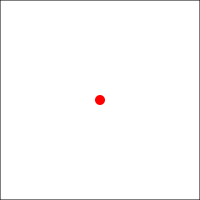
Draw a point on the Paper. Default width of the point is 1pt. Customize the width and color using strokeWeight and stroke commands.
Drawing a point is same as drawing a zero width line with strokeCap set to ROUND. point(x, y) is same as
ctx.strokeCap(ROUND);
ctx.line(x, y, x, y); // zero width line
Example:
ctx.strokeWeight(10);
ctx.stroke("red");
ctx.point(100, 100);