Repository navigation
Game Options
argonlefou edited this page Nov 10, 2026
·
1 revision
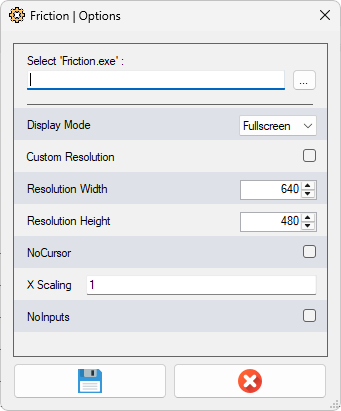
Displays specific game options. Those options are saved in the corresponding `.xml` game file in the `/UserData/Games/` folder.
| Option Name | Description |
|---|---|
| NoCrosshair | Check that option to remove the reticles from the game |
| Hide console | Hide the DOS console created by some game/emulators on start |
| X Scaling | See Custom Axis Scaling |
| NoInputs | Deactivate all U-Shoot inputs hacks, keeping the original game input system |
| Unity Plugin Installation | For Unity-based games, install the required BepInEx plugin to the game folder |
| Unity Plugin Configuration | For Unity-based games, change the availables BepInEx plugin settings |
See each game specific Wiki section to get the list of all available options.
< To be done later...>
-
Arcade PC
- Dino Invasion
- Drakons Realm Keepers
- Elevator Action Invasion
- Fire Hero
- Galaxy Rangers Arcade
- Mars Sortie
- Mechanical Dinosaur
- Mecha Tornado Arcade
- Men In Black : Arcade
- Mission Impossible Arcade
- Night Hunter Arcade II
- Rabbids Hollywood Arcade
- Raccoon Rampage
- Robin Hood
- Skull Of Shadow
- Tomb Raider Arcade
- Top Gun
- Top Gun II
- Wild West Shootout
- Wisdom Zombies
- Game Wax
- Global VR
- KONAMI
- Lindbergh
- NAMCO ES3
- NAMCO ES4
- Flycast
- Raw Thrills
- SEGA ALLS
- SEGA Europa-R
- SEGA Ring System
- SEGA Nu
- System 2X6
- System 357
- Taito Type X
-
Windows Games
- Alien Disco Safari
- Art Is Dead
- Big Buck Hunter : Ultimate Trophy
- Blue Estate
- Bug Busters
- Colt's Wild West Shootout
- DCOP
- Friction
- Heavy Fire Afghanistan
- Heavy Fire Shattered Spear
- The House of the Dead II
- The House of the Dead III
- The House of the Dead : Overkill
- [The House of the Dead : Remake]
- Mad Bullets
- Operation Wolf Returns
- Reload
- Zombie Crisis