Repository navigation
Main GUI Window
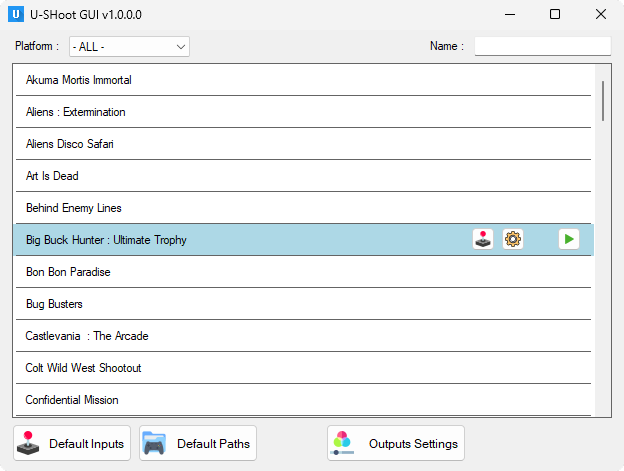
Select a category in the upper left drop-down list to display all game from that category.
Enter some text in the upper right text box to filter by game name.
There is no * or special char, just keep empty to display all.
Each game in the list is loaded from an xml file located in the /Data/Templates/Games/ folder of U-Shoot.
On the right side of each game entry are the buttons allowing to :
-
 Open the game Options screen
-
 Open the game Inputs screen (if available)
-
 Start the game. Keeping the mouse pointer over the button will display a small tooltip with the game parameter to use in a command line.
Those default inputs will be used by any game not having any entry added to the corresponding input name.
Adding an entry in a specific game to the corresponding button name will totally replace the default ones.
So, if a default input has 2 buttons linked to it, setting one only button in the game corresponding input will not add it as a 3rd button, but will deactivate the 2 default ones to replace them by the new one.
See Input System wiki page for more details about inputs.
For every emulators listed in that window, it is possible to set a global/default path to be used automaticaly by all games needing it.
That default path will be used if there is no target path specified in a specific game options.
In that case, the path will appear as a grayed, read-only field in the game options screen.
If a target path is specified in a specific game options screen, it will be used instead of the default one and it will be displayed normally