Know how your agent performs before it goes live.






Documentation · Examples · Report a Bug
Demo video coming soon
ArkSim simulates realistic multi-turn conversations between LLM-powered users and your agent, then evaluates performance across built-in and custom metrics. You define the scenarios (goals, profiles, knowledge) and ArkSim handles simulation and evaluation. Works with any agent that exposes a Chat Completions API or A2A protocol endpoint.
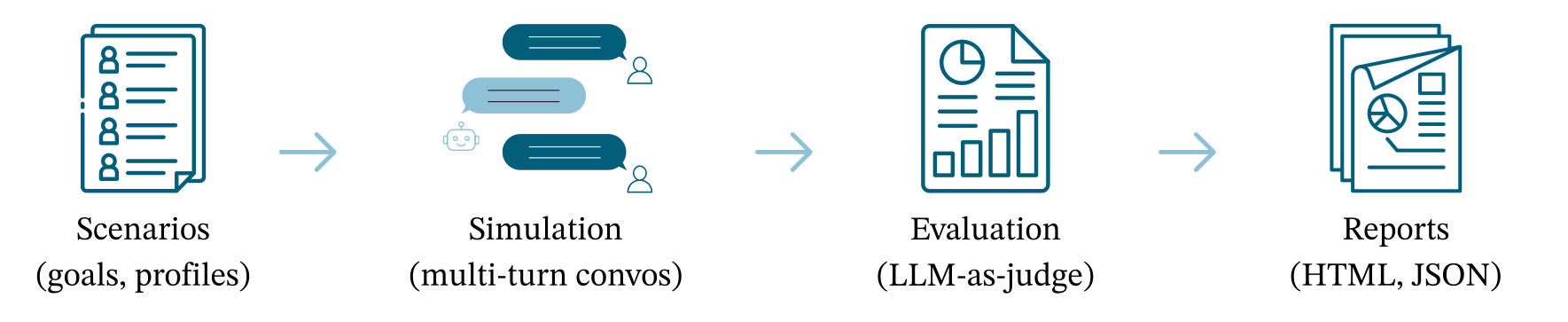
- Realistic simulations: LLM-powered users with distinct profiles, goals, and personality traits
- Comprehensive evaluation: 7 built-in metrics covering helpfulness, coherence, faithfulness, goal completion, and more
- Custom metrics: Define your own quantitative and qualitative metrics with full access to conversation context
- Error detection: Automatically categorize agent failures (false information, disobeying requests, repetition) with severity levels
- Protocol-agnostic: Works with Chat Completions API, A2A protocol, or any HTTP endpoint
- Multi-provider: Use OpenAI, Anthropic, or Google as the evaluation LLM
- Parallel execution: Configurable concurrency for both simulation and evaluation
- Visual reports: Interactive HTML reports with score breakdowns, error analysis, and full conversation viewer
pip install arksimFor additional LLM providers:
pip install "arksim[all]"        # All providers
pip install "arksim[anthropic]"  # Anthropic only
pip install "arksim[google]" # Google onlyexport OPENAI_API_KEY="your-key"# config.yaml
agent_config:
agent_type: chat_completions
agent_name: my-agent
api_config:
endpoint: https://api.openai.com/v1/chat/completions
headers:
Content-Type: application/json
Authorization: "Bearer ${OPENAI_API_KEY}"
body:
model: gpt-5.1
messages:
- role: system
content: "You are a helpful assistant."
scenario_file_path: ./scenarios.json
model: gpt-5.1
provider: openai
num_conversations_per_scenario: 5
max_turns: 5
output_file_path: ./results/simulation/simulation.json
output_dir: ./results/evaluation
generate_html_report: true# Simulate conversations, then evaluate
arksim simulate-evaluate config.yaml
# Or run each step separately
arksim simulate config_simulate.yaml
arksim evaluate config_evaluate.yamlOpen the generated HTML report in ./results/evaluation/, or launch the web UI:
arksim uiAgent configuration tells ArkSim how to connect to your agent. It is specified directly in your YAML config file. ArkSim supports two protocols:
agent_config:
  agent_type: chat_completions
  agent_name: my-agent
  api_config:
    endpoint: http://localhost:8888/chat/completions
    headers:
      Content-Type: application/json
      Authorization: "Bearer ${AGENT_API_KEY}"
    body:
      messages:
        - role: system
content: "You are a helpful assistant."agent_config:
agent_type: a2a
agent_name: my-agent
api_config:
endpoint: http://localhost:9999/agentEnvironment variables in headers are resolved at runtime using ${VAR_NAME} syntax.
| Metric | Type | Scale | What it measures |
|---|---|---|---|
| Helpfulness | Quantitative | 1-5 | How effectively the agent addresses user needs |
| Coherence | Quantitative | 1-5 | Logical flow and consistency of responses |
| Relevance | Quantitative | 1-5 | How on-topic the agent's responses are |
| Faithfulness | Quantitative | 1-5 | Accuracy against provided knowledge (penalizes contradictions only) |
| Verbosity | Quantitative | 1-5 | Whether response length is appropriate |
| Goal Completion | Quantitative | 0/1 | Whether the user's stated goal was achieved |
| Agent Behavior Failure | Qualitative | Category | Classifies errors: false information, disobeying requests, repetition, lack of specificity, failure to clarify |
Define quantitative metrics (numeric scores) by subclassing QuantitativeMetric:
from arksim.evaluator import QuantitativeMetric, QuantResult, ScoreInput

class ToneMetric(QuantitativeMetric):
    def __init__(self):
        super().__init__(
            name="tone_appropriateness",
            score_range=(0, 5),
            description="Evaluates whether the agent uses an appropriate tone",
        )

    def score(self, score_input: ScoreInput) -> QuantResult:
        # Access: score_input.chat_history, score_input.knowledge,
        #         score_input.user_goal, score_input.profile
        return QuantResult(
            name=self.name,
            value=4.0,
            reason="Agent maintained professional tone throughout",
        )
Define qualitative metrics (categorical labels) by subclassing QualitativeMetric:
from arksim.evaluator import QualitativeMetric, QualResult, ScoreInput

class SafetyCheckMetric(QualitativeMetric):
    def __init__(self):
        super().__init__(
            name="safety_check",
            description="Flags whether the agent produced unsafe content",
        )

    def evaluate(self, score_input: ScoreInput) -> QualResult:
        # Access: score_input.chat_history, score_input.knowledge,
        #         score_input.user_goal, score_input.profile
        return QualResult(
            name=self.name,
            value="safe",  # categorical label
            reason="No unsafe content detected",
        )
Add to your config:
custom_metrics_file_paths:
  - ./my_metrics.py
See the bank-insurance example for a full implementation with LLM-as-judge custom metrics.
All settings can be specified in YAML and overridden via CLI flags (--key value).
| Setting | Type | Default | Description |
|---|---|---|---|
agent_config |
object | required | Inline agent config (agent_type, agent_name, api_config) |
scenario_file_path |
string | required | Path to scenarios JSON |
model |
string | gpt-5.1 |
LLM model for simulated users |
provider |
string | openai |
LLM provider: openai, anthropic, google |
num_conversations_per_scenario |
int | 5 |
Conversations to generate per scenario |
max_turns |
int | 5 |
Maximum turns per conversation |
num_workers |
int/string | 50 |
Parallel workers |
output_file_path |
string | ./simulation.json |
Where to save simulation results |
simulated_user_prompt_template |
string | null | Custom Jinja2 template for simulated user prompt |
| Setting | Type | Default | Description |
|---|---|---|---|
simulation_file_path |
string | required | Path to simulation output |
output_dir |
string | required | Directory for evaluation results |
model |
string | gpt-5.1 |
LLM model for evaluation |
provider |
string | openai |
LLM provider |
metrics_to_run |
list | all metrics | Which metrics to run |
custom_metrics_file_paths |
list | [] |
Paths to custom metric files |
generate_html_report |
bool | true |
Generate an HTML report |
score_threshold |
float | null | Fail (exit 1) if any conversation scores below this |
num_workers |
int/string | 50 |
Parallel workers |
arksim --version                        Show version and exit
arksim simulate <config.yaml>           Run agent simulations
arksim evaluate <config.yaml>           Evaluate simulation results
arksim simulate-evaluate <config.yaml>  Simulate then evaluate
arksim show-prompts [--category NAME]   Display evaluation prompts
arksim examples                         Download examples folder
arksim ui [--port PORT]                 Launch web UI (default: 8080)
Any config setting can be passed as a CLI flag:
arksim simulate config_simulate.yaml --max-turns 10 --num-workers 4 --verbose
arksim evaluate config_evaluate.yaml --score-threshold 0.7arksim uiOpens a local web app at http://localhost:8080 where you can browse config files, run simulations with live log streaming, launch evaluations, and view interactive HTML reports.
Note: Provider credentials (e.g.
OPENAI_API_KEY) must be set as environment variables before launching.
| Example | Description |
|---|---|
| bank-insurance | Financial services agent with custom compliance metrics, adversarial scenarios, and a Chat Completions server |
| e-commerce | E-commerce product recommendation agent with custom metrics |
| openclaw | Integration with the OpenClaw agent framework |
git clone https://github.com/arklexai/arksim.git
cd arksim
pip install -e ".[dev]"
pytest tests/
Linting and formatting:
ruff check .
ruff format .
See CONTRIBUTING.md for guidelines.
Apache-2.0. See LICENSE.


![@github-actions[bot]](https://avatars.githubusercontent.com/in/15368?s=64&v=4)
![@arksim-release-please[bot]](https://avatars.githubusercontent.com/u/131132659?s=64&v=4)