


Stop pasting the next prompt manually. Write the plan once, then run it as a prompt queue.
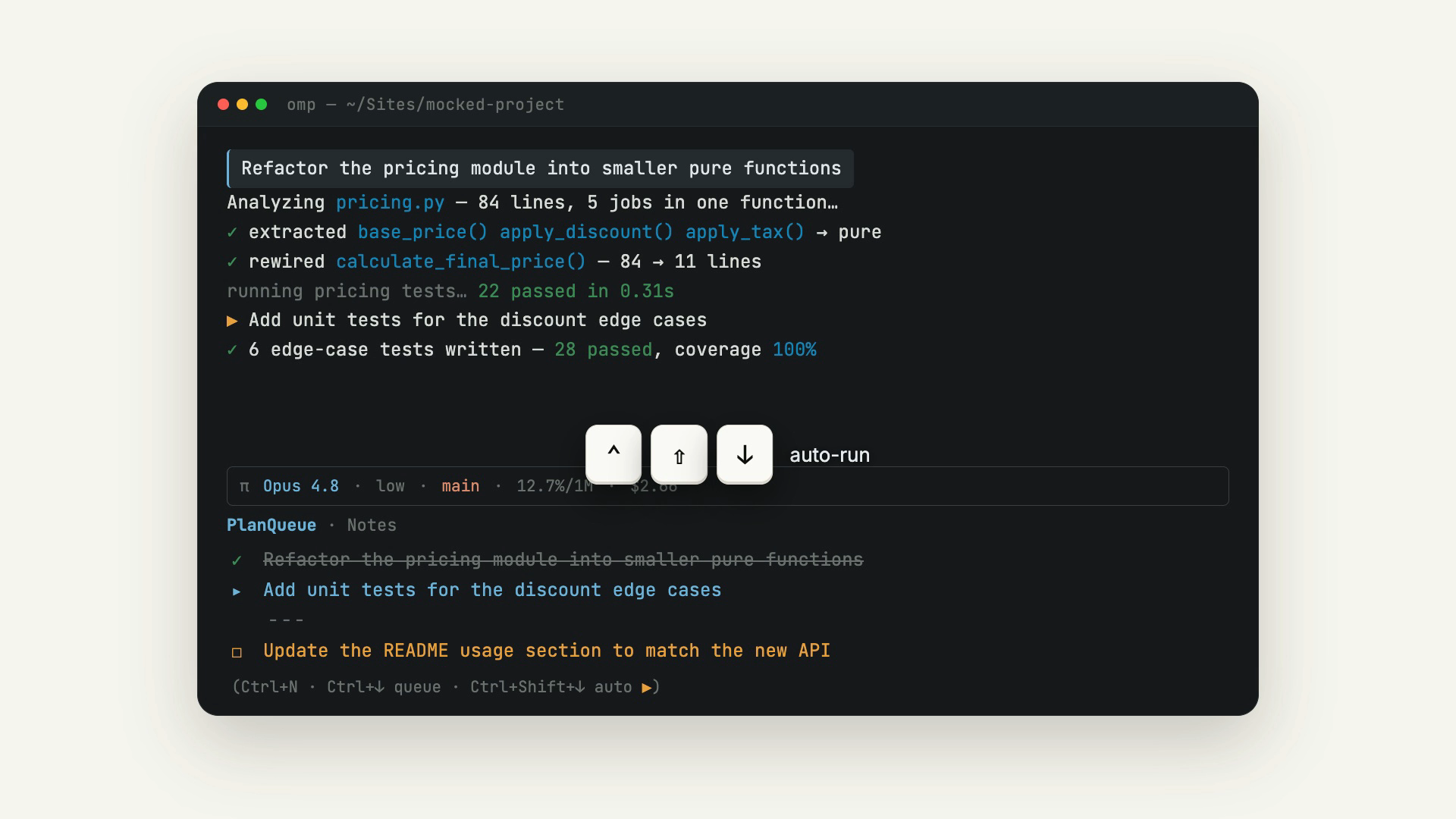
PlanQueue is an OMP (Oh My Pi) extension that puts a session-notes panel below the status line and turns that note into a FIFO prompt queue. Write your tasks as plain lines, checkpoint with ---, then drip-feed them to the agent one keypress at a time — or let auto-run drain the queue for you. Notes persist per repo, branch, and session.
If this is useful to you, please ⭐ the repo — it helps others find it.
When you plan multi-step work with a coding agent, you usually type the next prompt only after the last one lands — babysitting the terminal, re-pasting, losing your place. PlanQueue flips that around: you write the whole plan up front as a list of prompts, then dispatch them in order. The plan stays visible below the status line, checkbox glyphs show what is pending, in-flight, and done, and --- barriers pause the run wherever you want to review before continuing.
The repo is public, so installing needs no GitHub authentication.
omp plugin install github:aryrabelo/planqueueOr from npm:
omp plugin install @aryrabelo/planqueuePin a branch, tag, or commit with #ref, e.g. github:aryrabelo/planqueue#main.
After installing, start OMP in any repo: the notes panel renders below the status line, and Ctrl+N / /note open the editor.
omp plugin list                                  # confirm it loaded and is enabled
omp plugin install github:aryrabelo/planqueue    # re-run to update
omp plugin uninstall @aryrabelo/planqueue # removePress Ctrl+N or type /note to open the editor. Type freely, then close or submit to save. The panel below the status line shows the latest note; each body line renders with a glyph for its queue state (☐ pending, ▸ in-flight, ✓ done) and a dimmed hint listing your keys — (Ctrl+N · Ctrl+↓ queue · Ctrl+Shift+↓ auto) by default.
The note is the queue, read top to bottom (FIFO). You type plain lines (or - bullets); on save they auto-normalize to - [ ] tasks, so you never type [ ] by hand. # headings and > quotes stay prose and are never dispatched.
Ctrl+↓sends the head pending task to the agent and marks it- [>](in-flight); when the turn settles it becomes- [x](done).- Lines indented under a task are continuation lines — they are sent together with their task as one multi-line prompt. A blank, non-indented, or
---line ends the block.
A lone --- line (three or more dashes) is a human-in-the-loop barrier. Ctrl+↓ on a barrier deletes that line instead of sending it, passing the checkpoint so the next Ctrl+↓ resumes with the line below. Use barriers to stop the queue where you need to review before it continues.
Ctrl+Shift+↓ toggles auto-run, which feeds one queued line per agent settle (it primes the first line immediately if the agent is already idle). While auto-run is on the panel hint marks the toggle key with a trailing ▶. Auto-run pauses at a --- barrier and halts if a turn ends in error or is aborted. Inside Herdr (HERDR_ENV=1) it fires a herdr notification show ping at each barrier so the workspace alerts you.
Known limit: OMP caps continuation chains at 8 (SESSION_STOP_CONTINUATION_CAP), so a barrier-free run drains at most ~8 lines per chain before pausing. Use --- barriers to checkpoint longer queues.
Type /planqueue to open a keyboard picker listing notes from your other sessions in the same repo and branch. Choose one to open it in a read-only viewer — handy for pulling context from a parallel or earlier session without leaving the current one.
- The
note_addtool lets the agent append tasks to your note itself: say "coloca na nota ..." (or "add to the list", "remember to ...") and it appends a- [ ]line. Auto-available in every session once the extension is installed — no separate skill install. /make-note <goal>turns a high-level goal into a ready-to-drain queue in one shot: the agent decomposes it into sequential prompts and writes them via themake_notetool — one- [ ]task per step, indented detail lines sent with their prompt, and a---barrier wherever it decides you should review. Then drive it withCtrl+↓/ auto-run. (/note <text>is the manual one-liner: it appends a single- [ ]task without the agent.)/clear-noteempties the current note in one step. The previous content is appended to the.history.mdsibling first, so nothing is lost — but it can't be auto-restored, so you confirm before it clears. A no-op on an already-empty note./rebuild-noteclears the note (after the same kind of confirmation) and asks the agent to rebuild it from the whole session: it analyzes the conversation so far and callsmake_noteafresh, keeping only the work still remaining (skipping anything already done or marked- [x]). The old note is passed to the agent verbatim (and saved to history). On an empty note it just asks the agent to bootstrap a fresh plan.
Press Alt+Shift+C to copy the whole note buffer to your system clipboard. It uses an OSC 52 escape, so it works both locally and over SSH. There is no text-selection model and Ctrl+C is reserved by OMP, so copy is whole-buffer and keyboard-only.
All three shortcuts are read once at startup from a global ~/.planqueue/config.json (not per repo/branch):
{
  "shortcuts": {
    "editNotes": "ctrl+n",
    "queueStep": "ctrl+down",
    "queueToggleAuto": "ctrl+shift+down"
  }
}
Omit the file (or any key) to keep the defaults shown above. A missing or malformed entry falls back to its default and logs a warning. This is the escape hatch when your terminal does not emit a distinct Ctrl+Shift+↓: rebind queueToggleAuto to a combo it does send (e.g. "ctrl+b"). Use OMP KeyId syntax — lowercase modifier+key, modifiers ctrl/shift/alt/super (e.g. "alt+enter").
Set PLANQUEUE_DISABLE=1 to start OMP without PlanQueue for that process — no panel, shortcuts, tools, or commands:
PLANQUEUE_DISABLE=1 ompPlanQueue stores each session's note as a plain Markdown file under ~/.planqueue/, organized by repo and branch: ~/.planqueue/{repo}/{branch}/{session-id}.md. Outside a git repo it falls back to the current directory name and no-branch. The files are plain Markdown, so you can read or edit them directly. Every changed save (including discarded drafts) is also appended to a sibling {session-id}.history.md file, giving you an append-only history of the note. The global config lives at ~/.planqueue/config.json.
Migration: if you used an earlier build, notes written under the legacy roots ~/.free-text/ and ~/.omp-free-text/ are still read back automatically (in the active session and the /planqueue browser). Nothing there is moved or deleted; all new writes go to ~/.planqueue/.
This is a TypeScript/Bun extension. The entry point is src/main.ts; its pure logic (paths, queue, store, widget, editor, config) comes from the shared @aryrabelo/planqueue-core package.
- Run unit tests with
bun test. - Typecheck with
bun run typecheck. - Lint and format with
bun run lint(check) /bun run format(apply). Style is enforced by Biome.
These are deliberately out of scope today, listed as boundaries rather than promises:
- Inline editable panel via
setEditorComponent(replacing the popup overlay) — edit in place below the status line instead of in a separate editor. - Per-session history-version browsing of the
.history.mdtimeline — step through the append-only versions of a note. - Clickable widget — needs OMP SDK
onClicksupport before the panel can react to mouse interaction. - Optional Herdr companion pane sharing the note file — surface the same note inside a Herdr workspace pane.
See CONTRIBUTING.md for dev setup, gates, and commit conventions.
See SECURITY.md for the security policy and how to report vulnerabilities.
MIT, Ary Rabelo.