Releases: ashb13/zmk-config-corne-eclipse
Release list
Disable experimental zoom

Disabled experimental zoom. The two-finger pinch/expand never triggered reliably on the 43 mm pad and at sensitive thresholds stole two-finger scroll, so the feature has been removed.
- 84dbdff Merge remote-tracking branch 'upstream/main'
- d6cb1e2 build(trackpad): disable experimental zoom
- 91cbea2 build(trackpad): disable experimental zoom
Each zip is organized by trackpad scenario:
- no trackpads/ - standard left + right (no pointing device)
- trackpad on peripheral side/ - flash this pair if your trackpad is on the peripheral (right) half
- trackpad on central side/ - flash this pair if your trackpad is on the central (left) half
Pick the folder for your build and flash both halves from it (a peripheral-side trackpad forwards input to the central, so the halves must match). settings_reset-nice_nano_v2-zmk.uf2 is included for clean-slate flashing. Follow the flashing guide and the trackpad wiring guide.
You can customize your keymap using ZMK Studio.
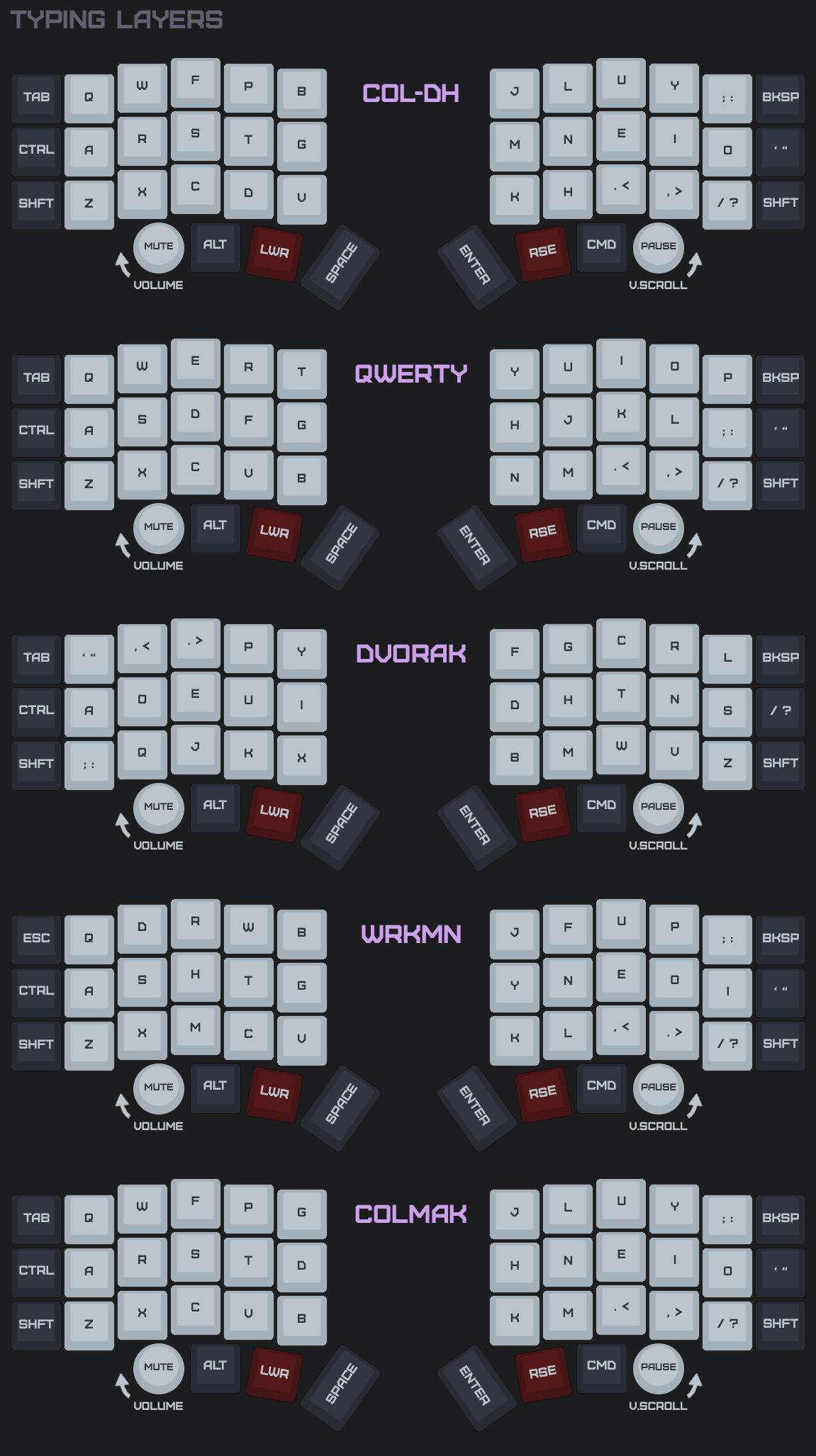
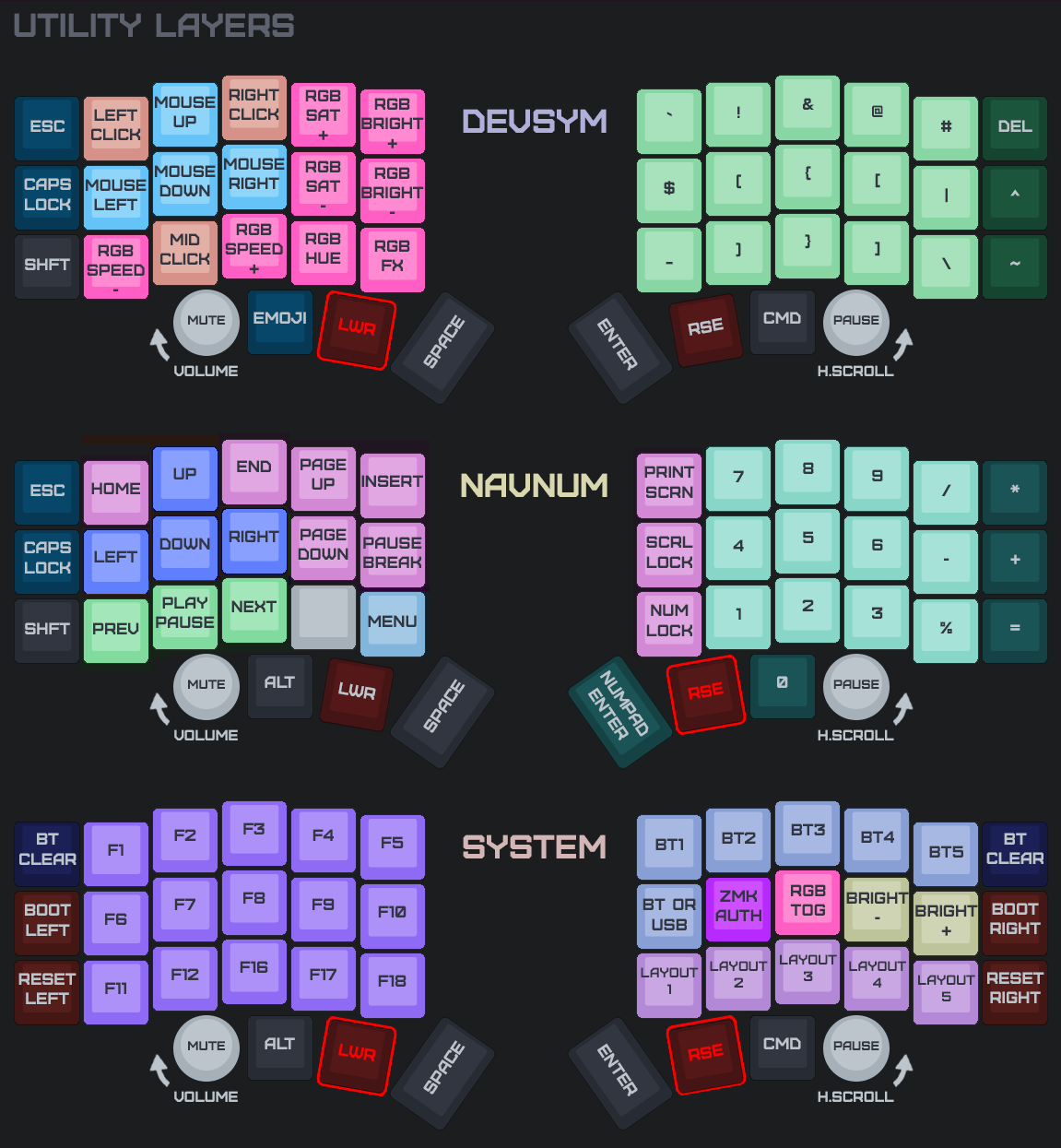
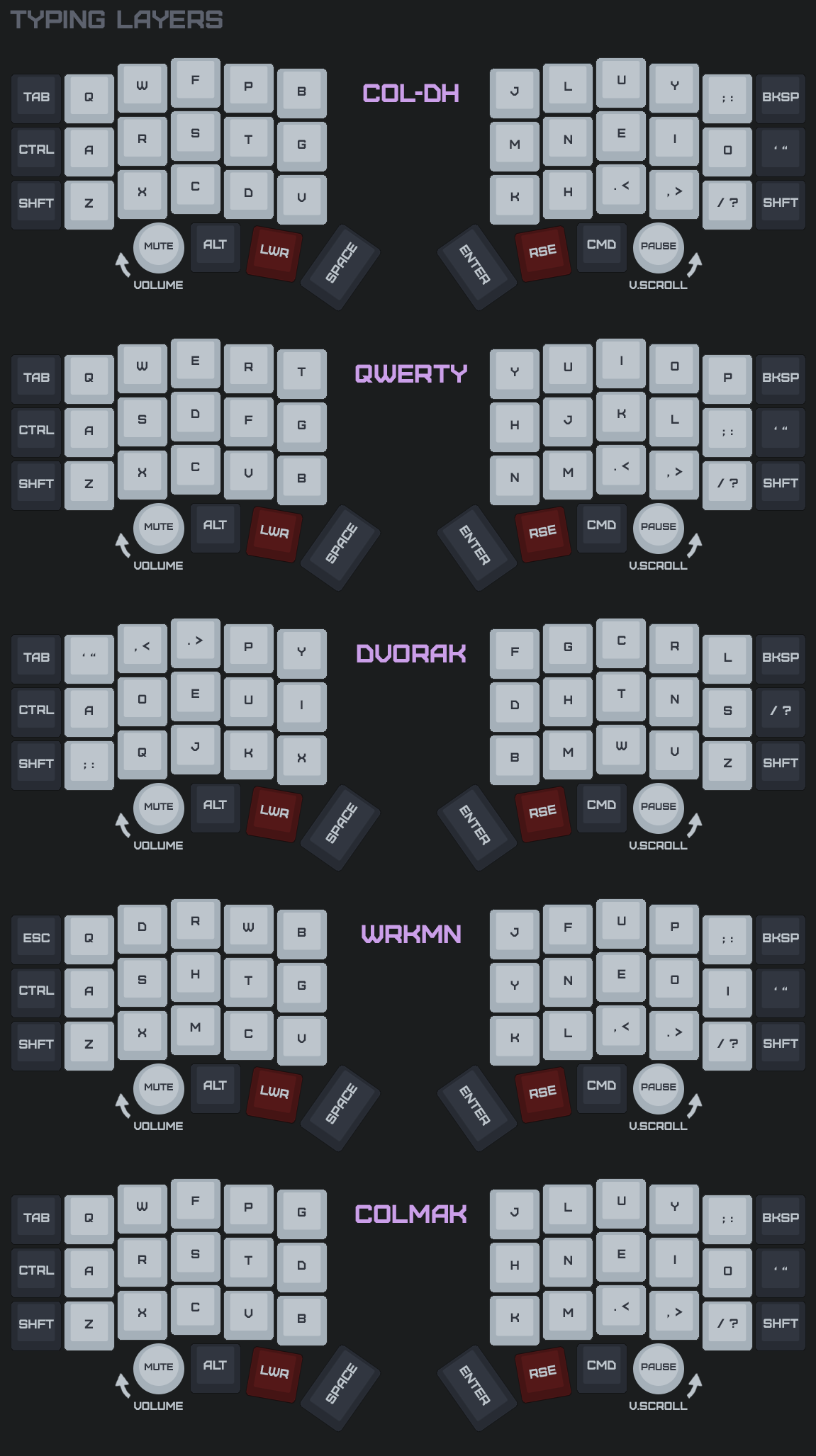
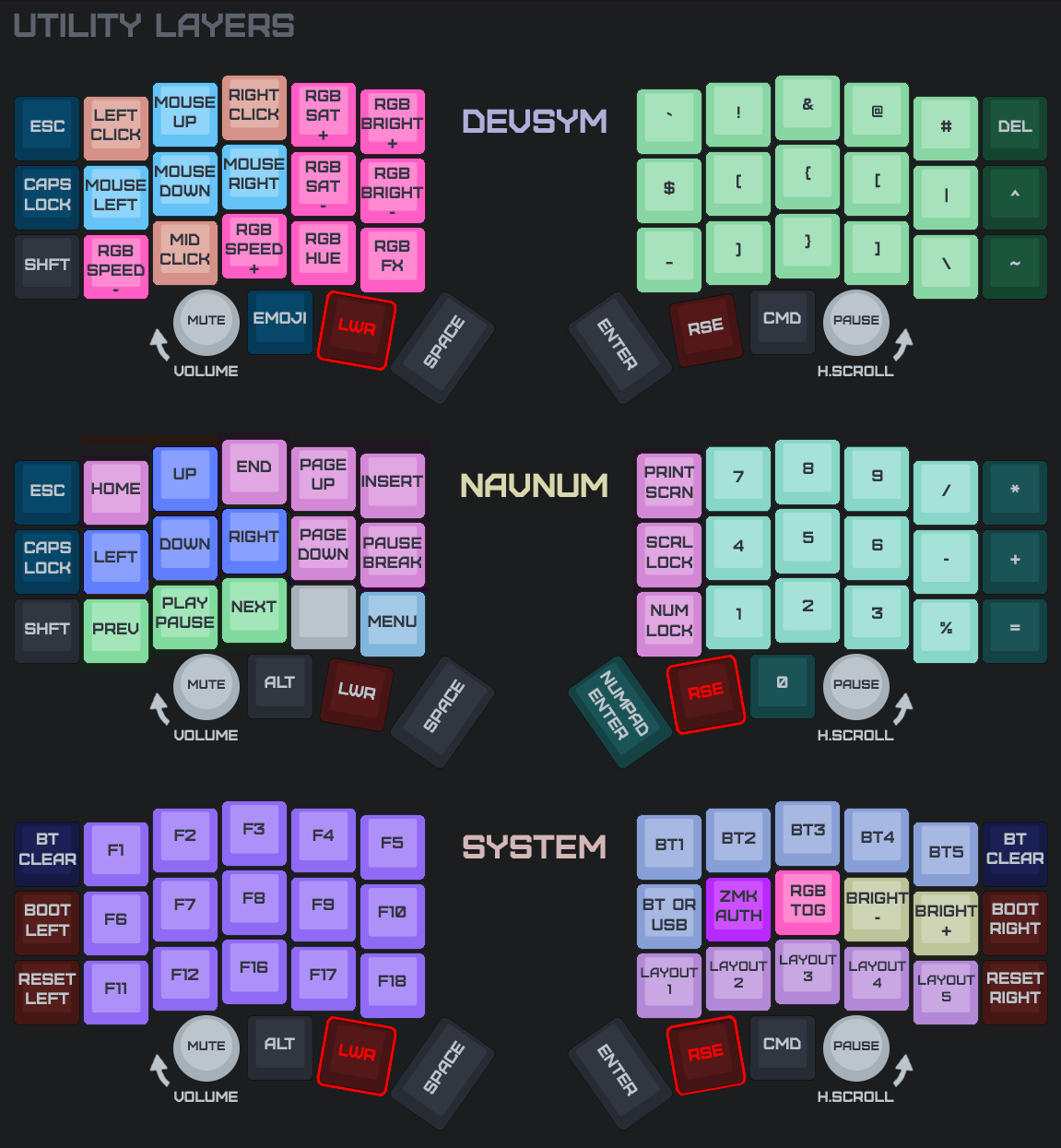
Keymap Images:
Drag Preserves Selection
Improved drag lock to not click before dragging. This corrects an issue where you can select files, but not drag them after.
Each zip is organized by trackpad scenario:
- no trackpads/ - standard left + right (no pointing device)
- trackpad on peripheral side/ - flash this pair if your trackpad is on the peripheral (right) half
- trackpad on central side/ - flash this pair if your trackpad is on the central (left) half
Pick the folder for your build and flash both halves from it (a peripheral-side trackpad forwards input to the central, so the halves must match). settings_reset-nice_nano_v2-zmk.uf2 is included for clean-slate flashing. Follow the flashing guide and the trackpad wiring guide.
You can customize your keymap using ZMK Studio.
Keymap Images:
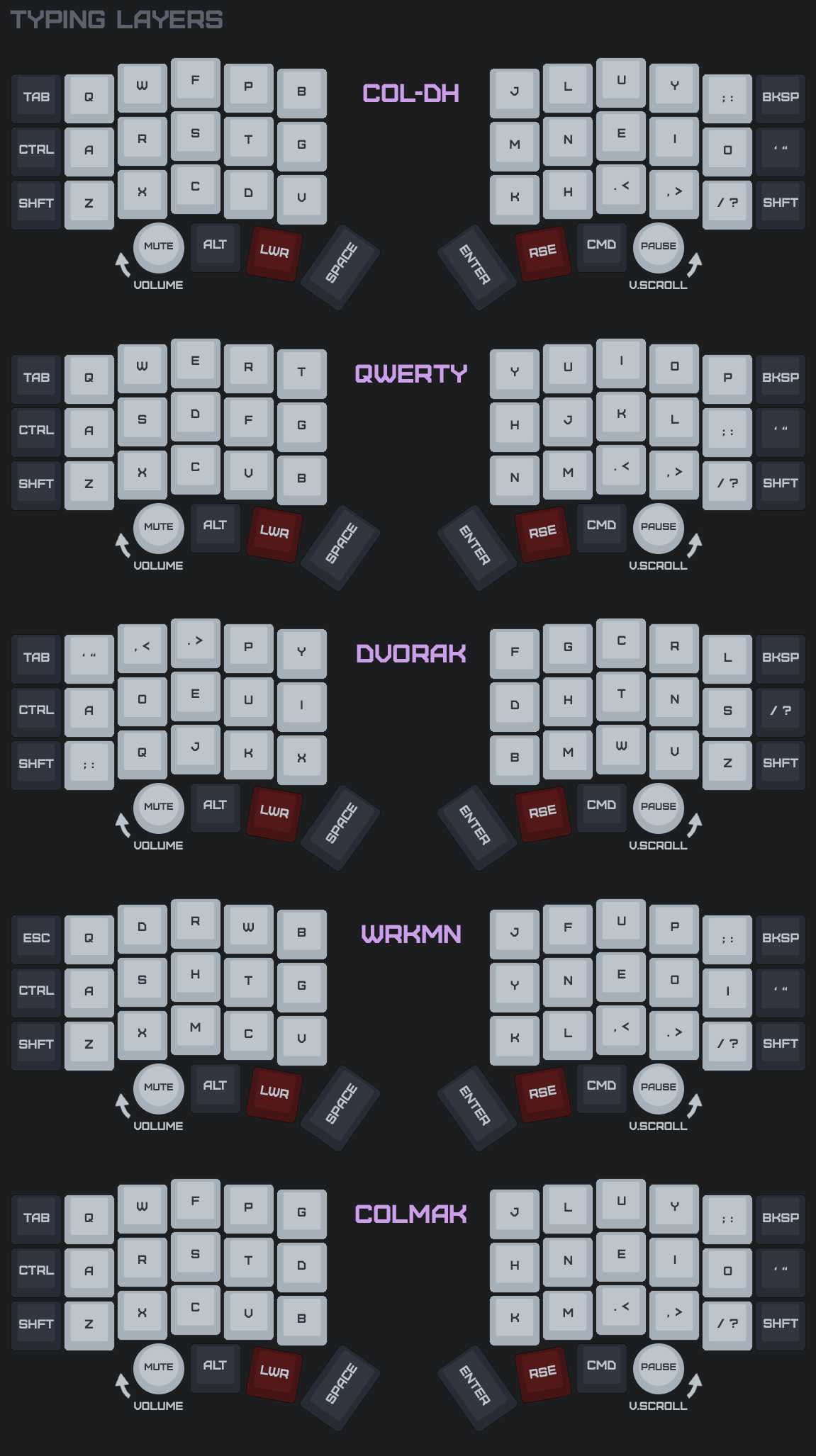
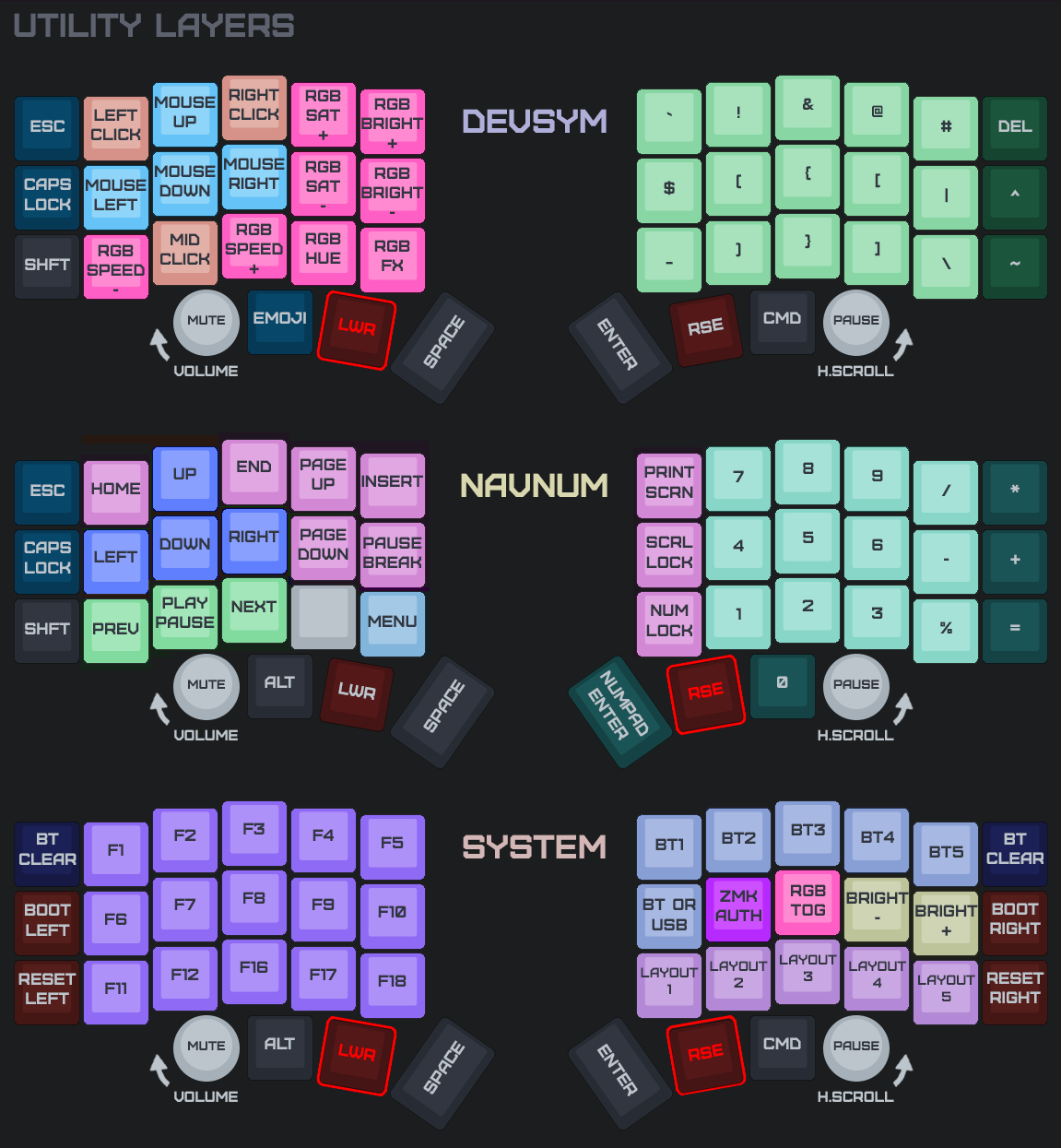
Double-Tap Fix + Lighter Scroll
What's new
- Double-taps work again. Tap-then-hold drag-lock no longer latches the second touch on land — it waits for actual finger motion before engaging, so a quick second tap lifts cleanly through the normal tap path as a second click.
- Two fast taps inside the 100 ms auto-release window now land as two distinct clicks (the synthetic click emit release-firsts a still-held button) instead of collapsing into one long press.
- Scroll slowdown halved relative to cursor: at
cursor-scale-percent=50, scroll requires ~1.3× the motion per tick instead of 2×. The wheel doesn't feel as heavy as the cursor.
Each zip is organized by trackpad scenario:
- no trackpads/ - standard left + right (no pointing device)
- trackpad on peripheral side/ - flash this pair if your trackpad is on the peripheral (right) half
- trackpad on central side/ - flash this pair if your trackpad is on the central (left) half
Pick the folder for your build and flash both halves from it (a peripheral-side trackpad forwards input to the central, so the halves must match). settings_reset-nice_nano_v2-zmk.uf2 is included for clean-slate flashing. Follow the flashing guide and the trackpad wiring guide.
You can customize your keymap using ZMK Studio.
Keymap Images:
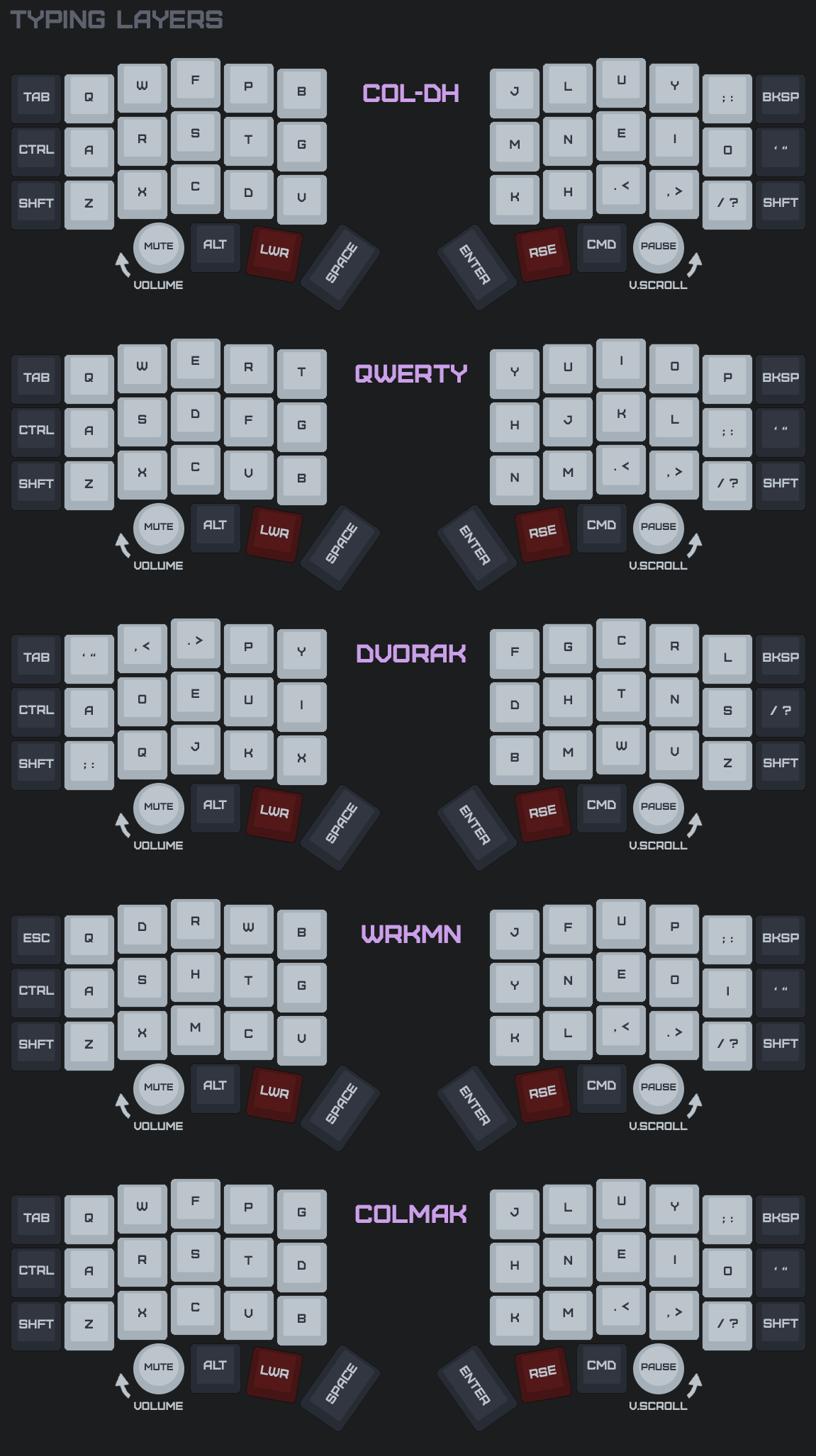
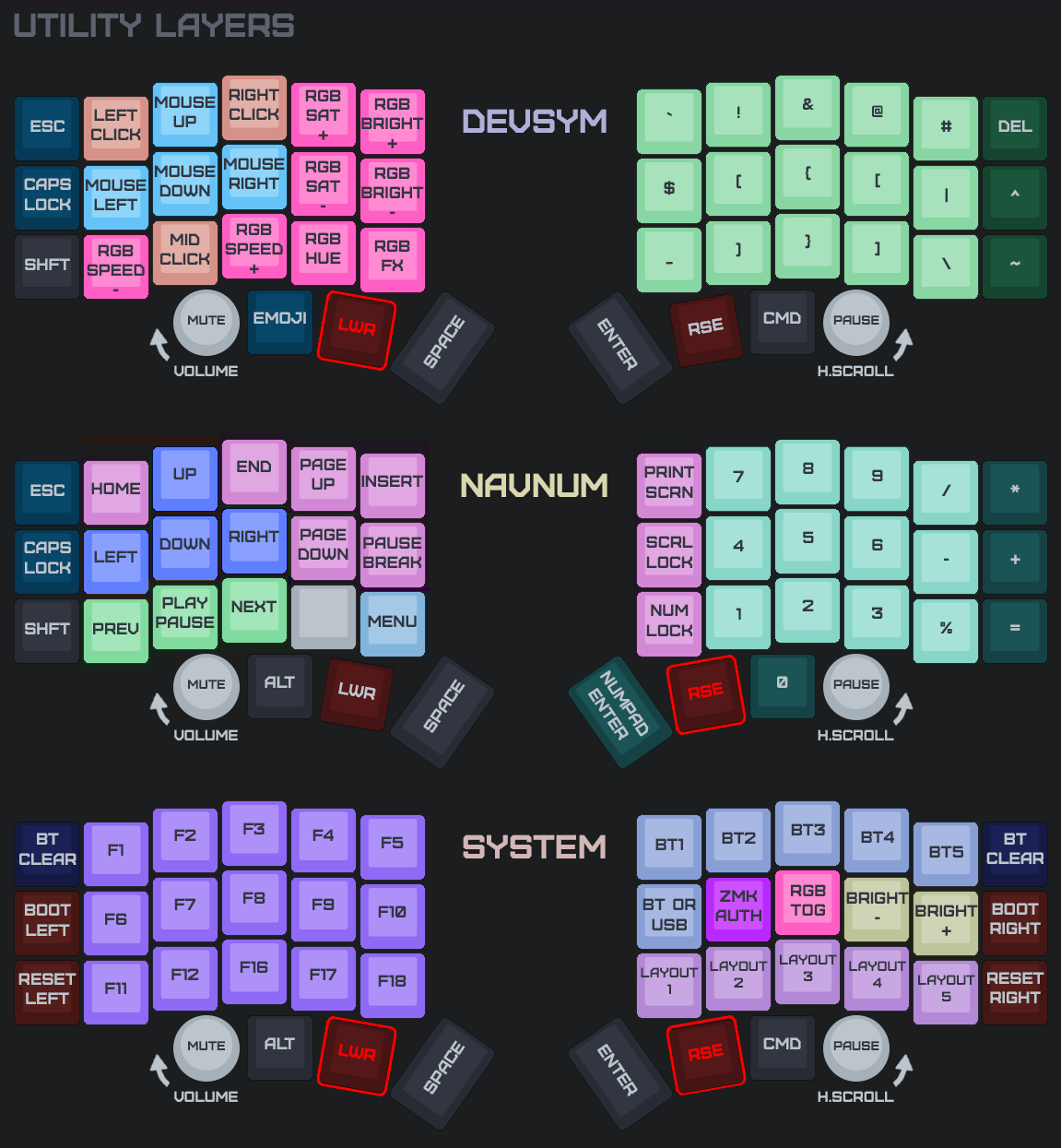
Faster Encoder Scroll
What's new
- Right encoder scroll value bumped from 25 to 100 per detent — one notch of encoder rotation now moves roughly a couple of lines of content (was easily missed by hosts that expect larger scroll deltas).
- 608dd32 Merge remote-tracking branch 'upstream/main'
- 50c8da5 tune(encoder): scroll val 25 -> 100 per detent
Each zip is organized by trackpad scenario:
- no trackpads/ - standard left + right (no pointing device)
- trackpad on peripheral side/ - flash this pair if your trackpad is on the peripheral (right) half
- trackpad on central side/ - flash this pair if your trackpad is on the central (left) half
Pick the folder for your build and flash both halves from it (a peripheral-side trackpad forwards input to the central, so the halves must match). settings_reset-nice_nano_v2-zmk.uf2 is included for clean-slate flashing. Follow the flashing guide and the trackpad wiring guide.
You can customize your keymap using ZMK Studio.
Keymap Images:
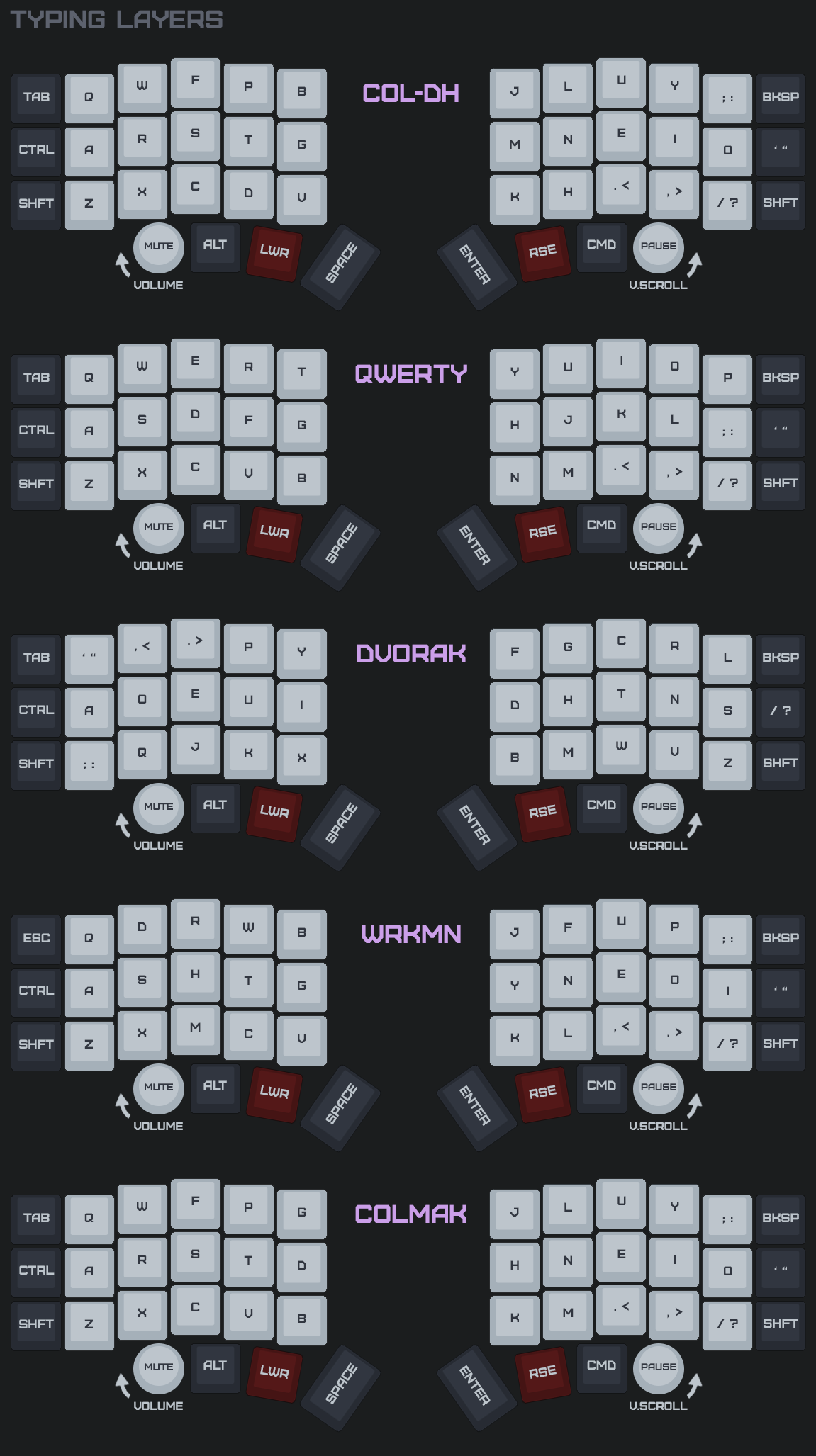
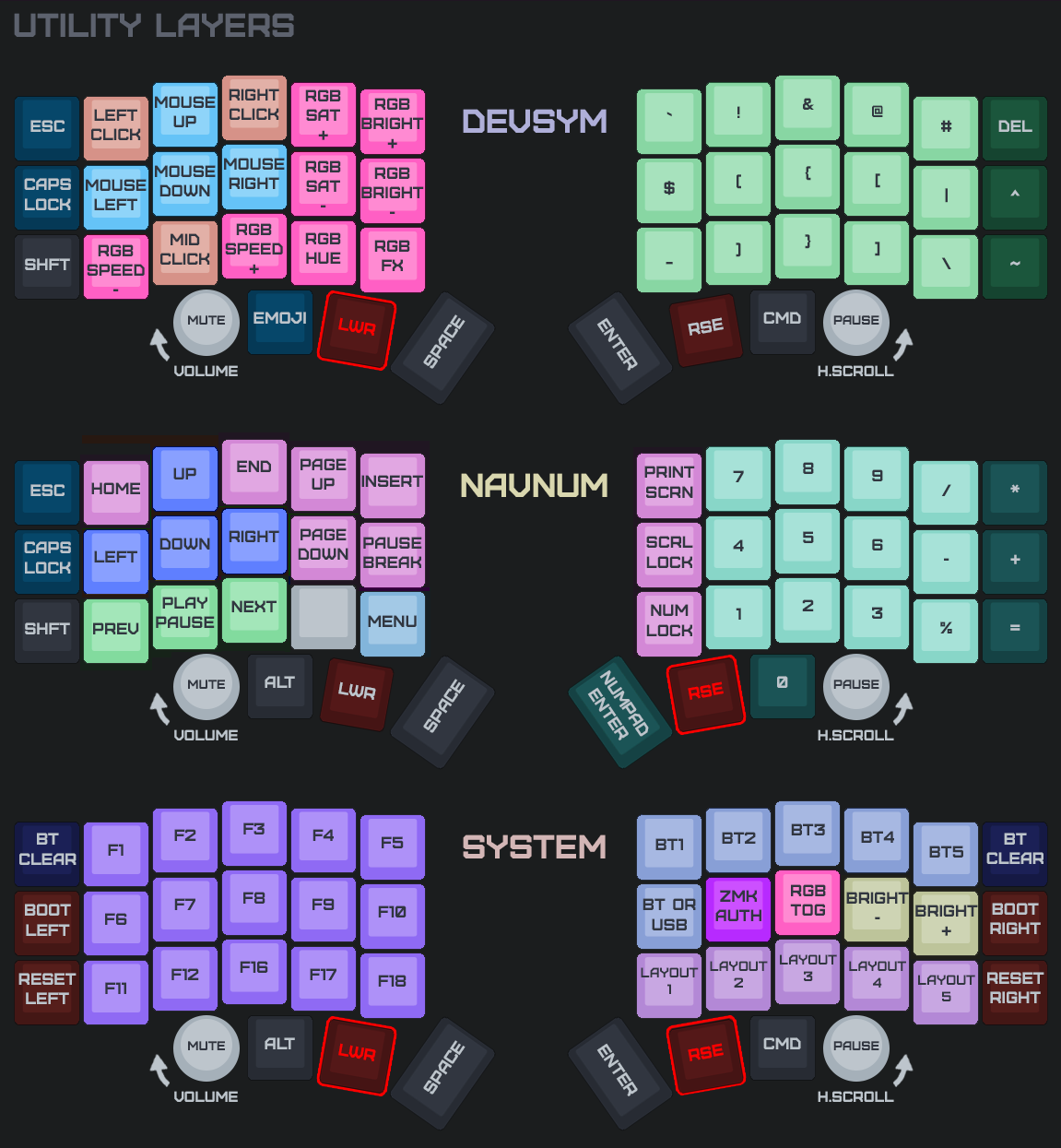
Cursor Precision + Slower Scroll
What's new
- Cursor uses a per-axis fractional accumulator: slow precision motion no longer disappears into integer rounding when
cursor-scale-percentis below 100. Granular selection feels natural again. - Scroll honors
cursor-scale-percenttoo — a 50% cursor means scroll requires 2× the motion per tick, matching the slowdown. - Tap-then-hold engage window tightened to 200 ms (was 250) — feels like a deliberate double-touch, not a chance re-tap.
Each zip is organized by trackpad scenario:
- no trackpads/ - standard left + right (no pointing device)
- trackpad on peripheral side/ - flash this pair if your trackpad is on the peripheral (right) half
- trackpad on central side/ - flash this pair if your trackpad is on the central (left) half
Pick the folder for your build and flash both halves from it (a peripheral-side trackpad forwards input to the central, so the halves must match). settings_reset-nice_nano_v2-zmk.uf2 is included for clean-slate flashing. Follow the flashing guide and the trackpad wiring guide.
You can customize your keymap using ZMK Studio.
Keymap Images:
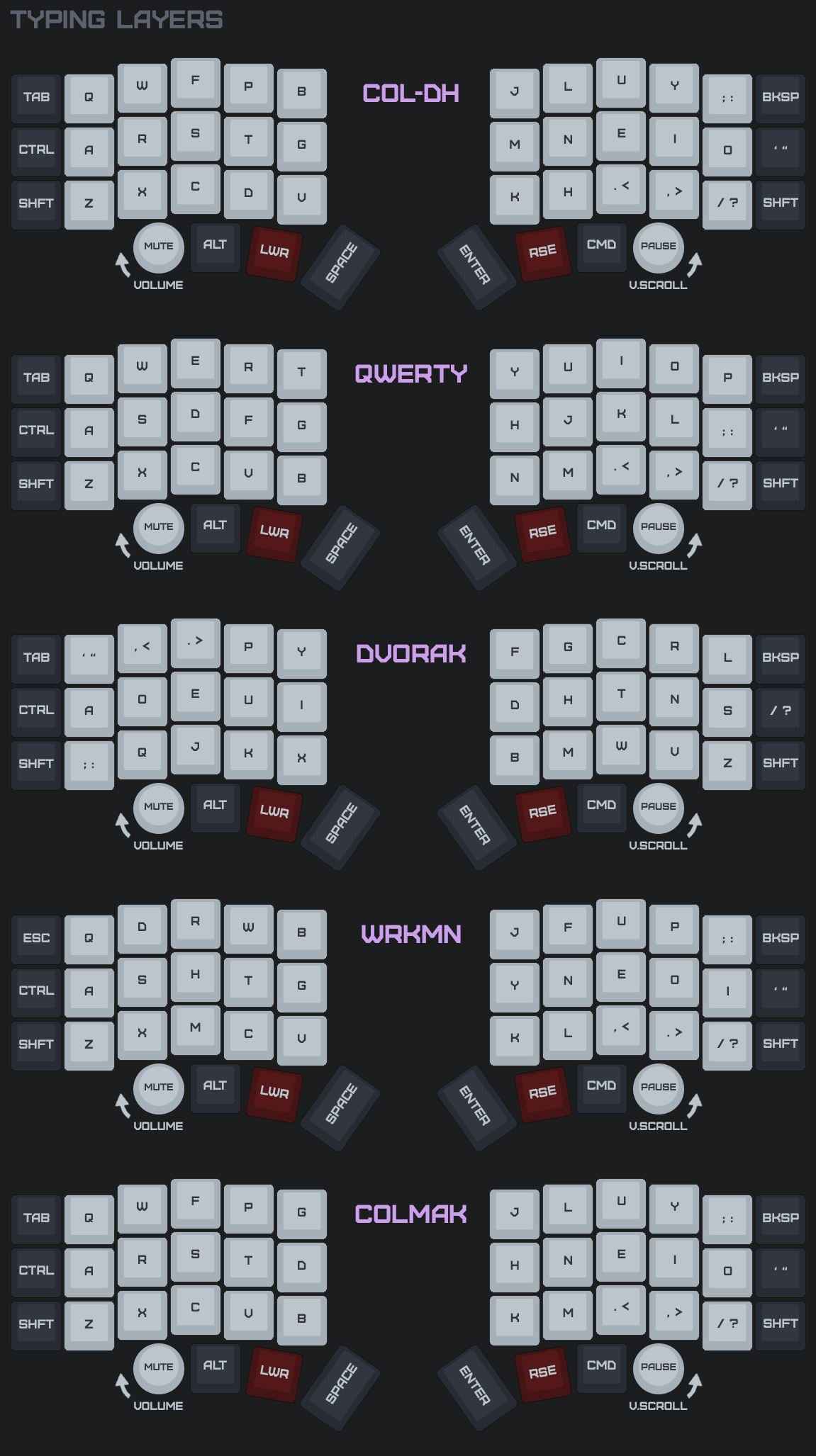
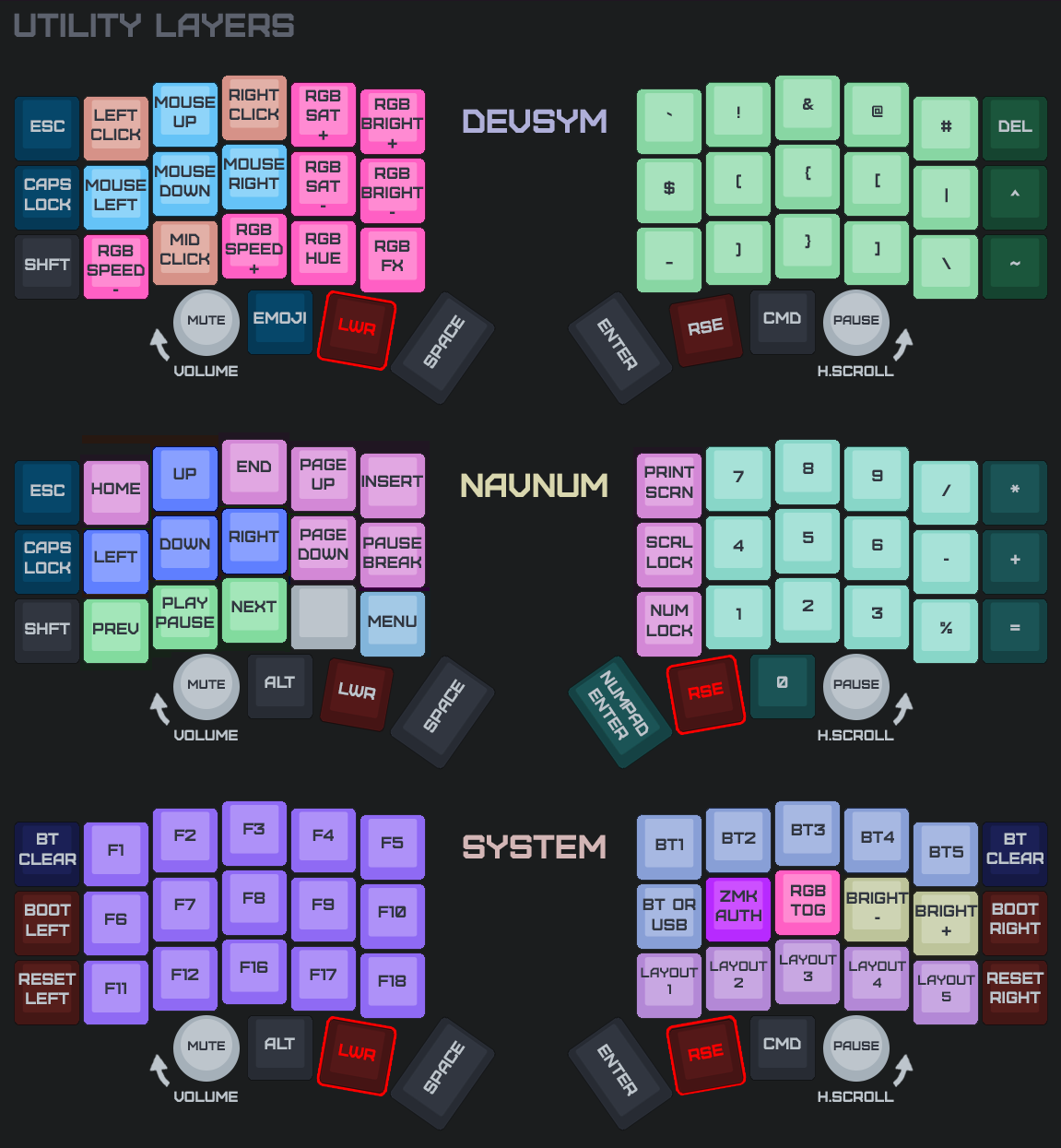
Tap-to-Drag, Slower Cursor, Scroll Encoder
What's new
- Tap-then-hold drag-lock replaces press-and-hold: tap, then touch again within 250 ms to grab and drag. The lock holds across finger lifts; released by a tap.
- Azoteq cursor now 50% of chip speed for a more consistent feel across hosts.
- Right encoder always scrolls (drops the trackpad-build zoom mode — two-finger trackpad scroll already covers it).
- ea2bd99 Merge remote-tracking branch 'upstream/main'
- 00de7c2 fix(west): bump azoteq SHA to ddda9f8 (race fix; missed in earlier commit)
- 7ca9c54 fix(west): bump azoteq SHA to ddda9f8 (race fix; missed in earlier commit)
- 01a87fb docs(trackpad): describe tap-then-hold drag-lock in WIRING_TRACKPAD
- b0eeab7 docs(trackpad): describe tap-then-hold drag-lock in WIRING_TRACKPAD
- cfd017e feat(encoder): right encoder always scrolls (drop trackpad zoom mode)
- 8b353d6 feat(encoder): right encoder always scrolls (drop trackpad zoom mode)
- 21d2bd5 feat(trackpad): tap-then-hold drag-lock (replace chip press-and-hold)
- 150ed7b feat(trackpad): tap-then-hold drag-lock (replace chip press-and-hold)
- b1e3fda feat(trackpad): slow Azoteq cursor 50% (cursor-scale-percent 75 -> 50)
- 8bec20d feat(trackpad): slow Azoteq cursor 50% (cursor-scale-percent 75 -> 50)
- 343c706 feat(trackpad): slow Azoteq cursor 25% via cursor-scale-percent
- 08cb109 build(west): bump cirque + azoteq forks for trackpad PM device support
- 6fe6df9 feat(mouse): faster emulated cursor (max 1200, ramp over 500ms)
- 494b309 build(west): bump azoteq driver to 35fac92 (scroll no longer right-clicks)
- 2eee9db build(west): bump zmk to d5963f2 (smart-idle before input-split chars)
Each zip is organized by trackpad scenario:
- no trackpads/ - standard left + right (no pointing device)
- trackpad on peripheral side/ - flash this pair if your trackpad is on the peripheral (right) half
- trackpad on central side/ - flash this pair if your trackpad is on the central (left) half
Pick the folder for your build and flash both halves from it (a peripheral-side trackpad forwards input to the central, so the halves must match). settings_reset-nice_nano_v2-zmk.uf2 is included for clean-slate flashing. Follow the flashing guide and the trackpad wiring guide.
You can customize your keymap using ZMK Studio.
Keymap Images:
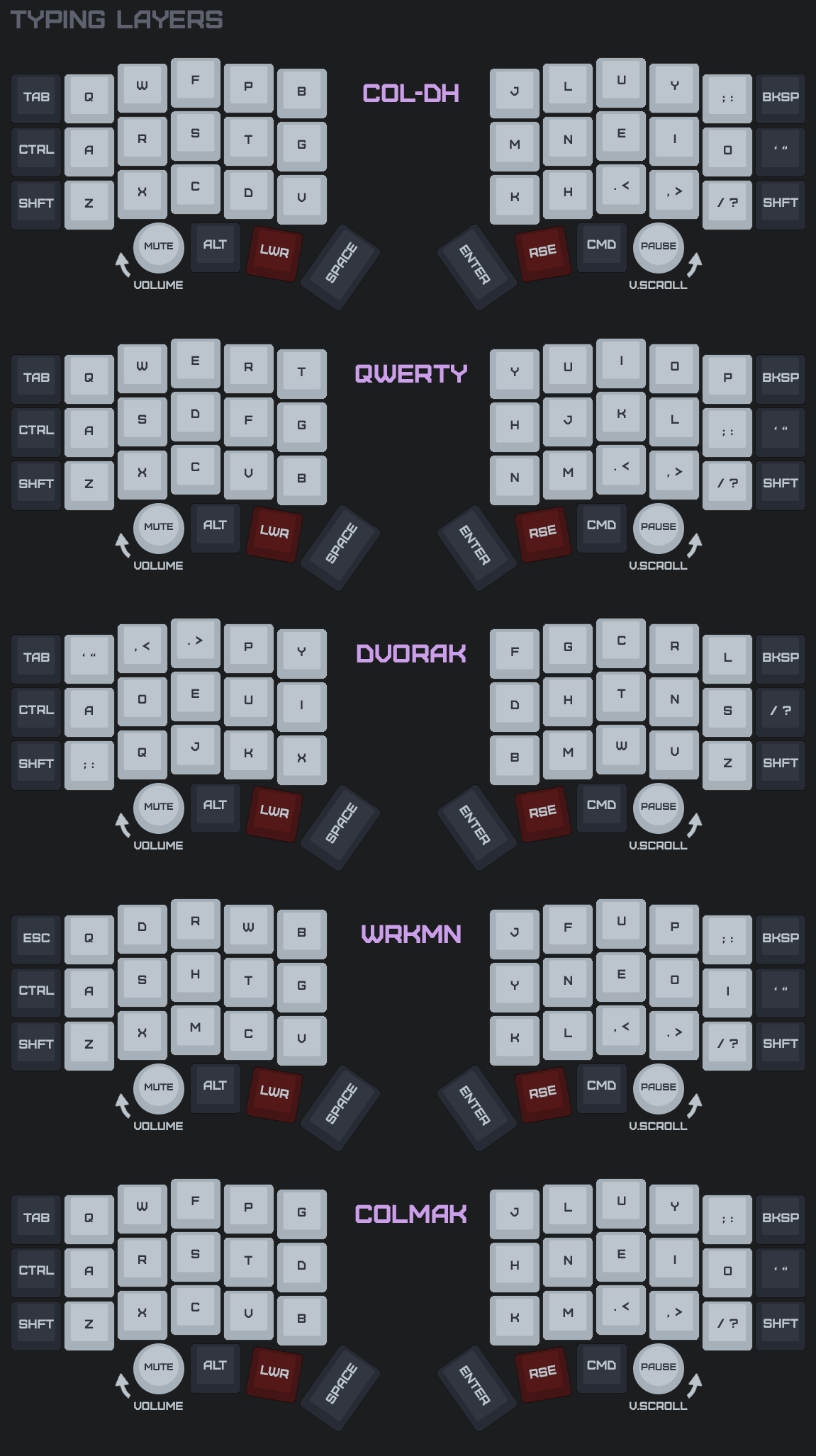
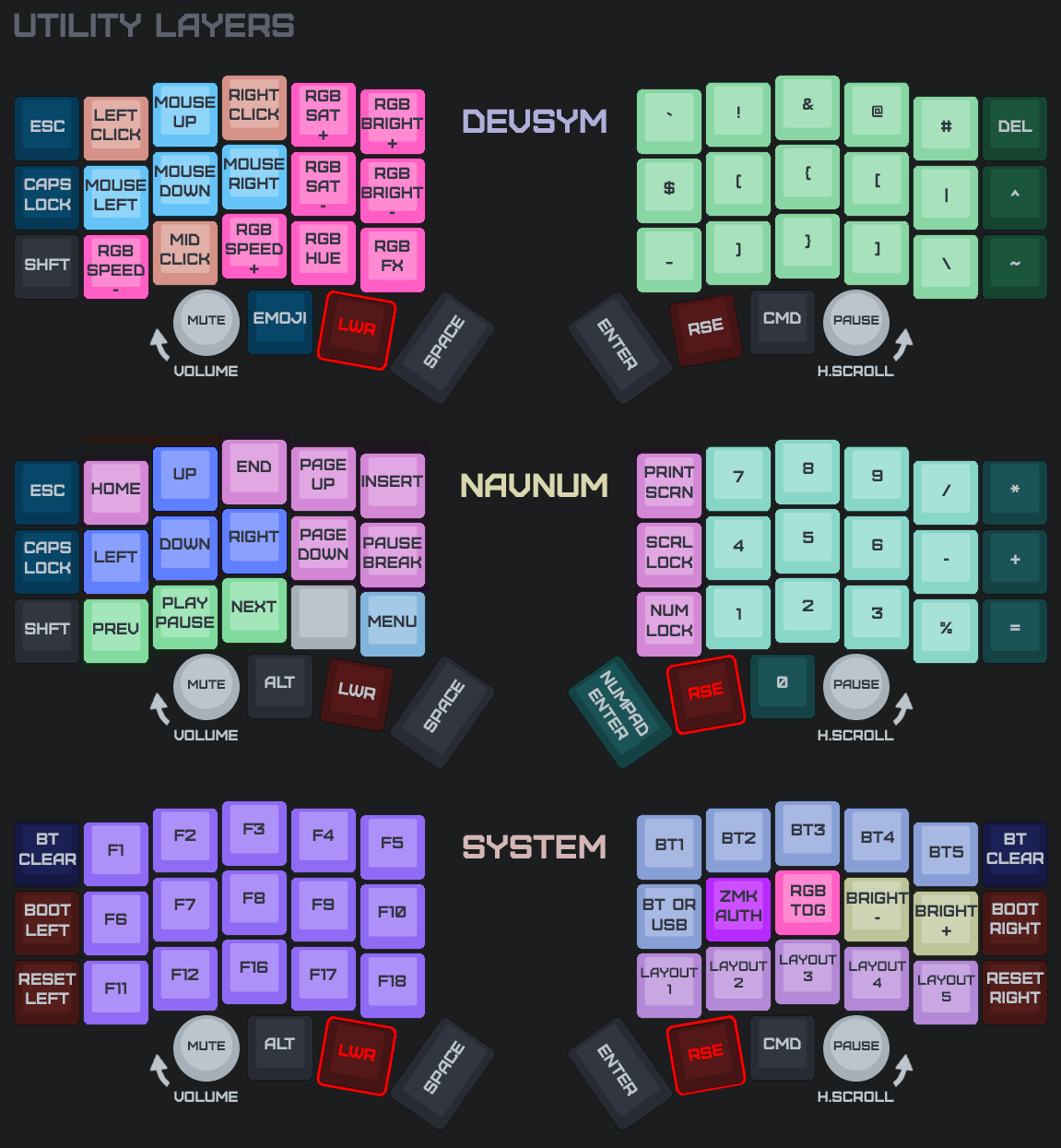
Slower Azoteq Cursor
- afa4b19 feat(trackpad): slow Azoteq cursor 25% via cursor-scale-percent
Each zip is organized by trackpad scenario:
- no trackpads/ - standard left + right (no pointing device)
- trackpad on peripheral side/ - flash this pair if your trackpad is on the peripheral (right) half
- trackpad on central side/ - flash this pair if your trackpad is on the central (left) half
Pick the folder for your build and flash both halves from it (a peripheral-side trackpad forwards input to the central, so the halves must match). settings_reset-nice_nano_v2-zmk.uf2 is included for clean-slate flashing. Follow the flashing guide and the trackpad wiring guide.
You can customize your keymap using ZMK Studio.
Keymap Images:
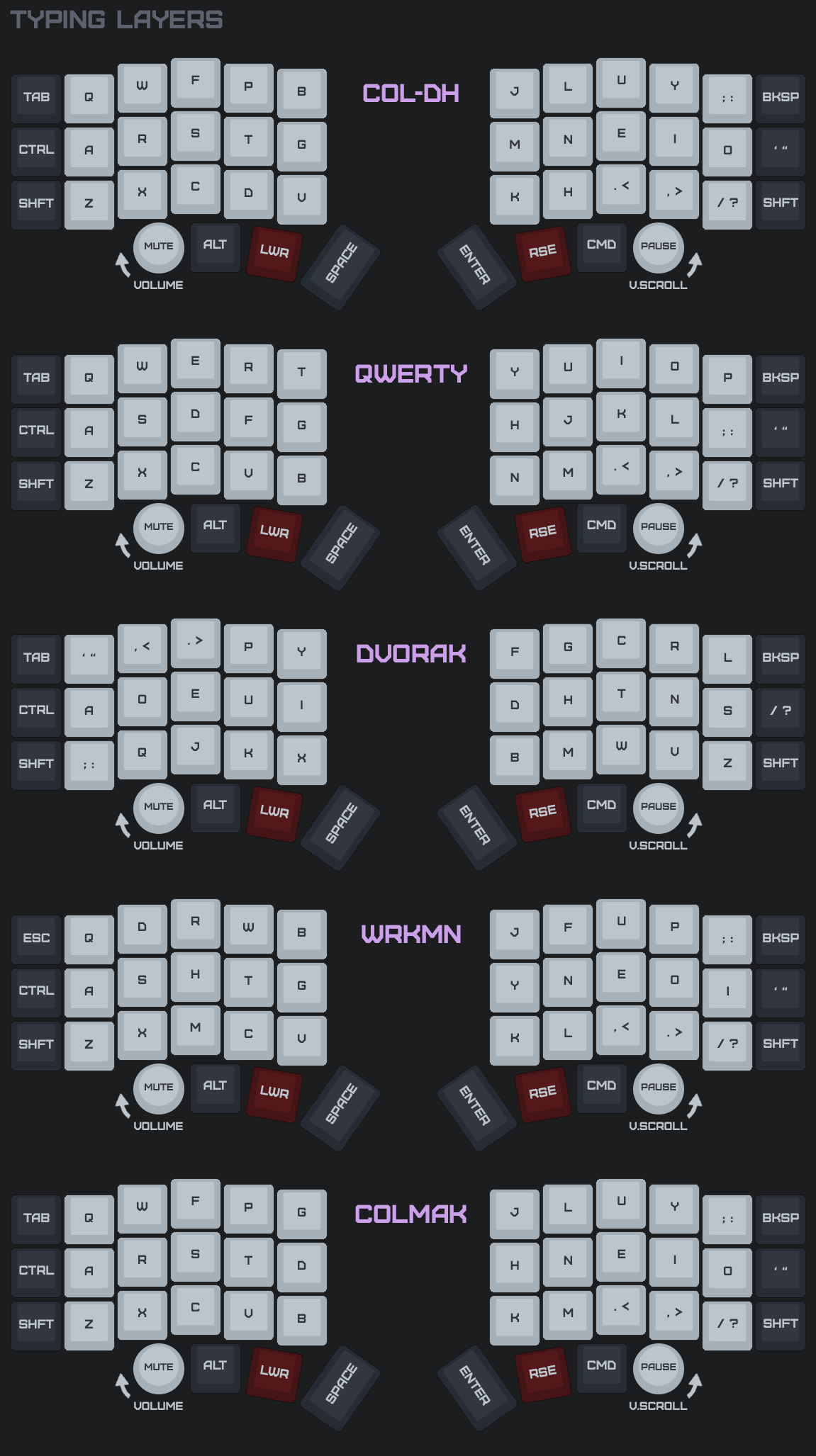
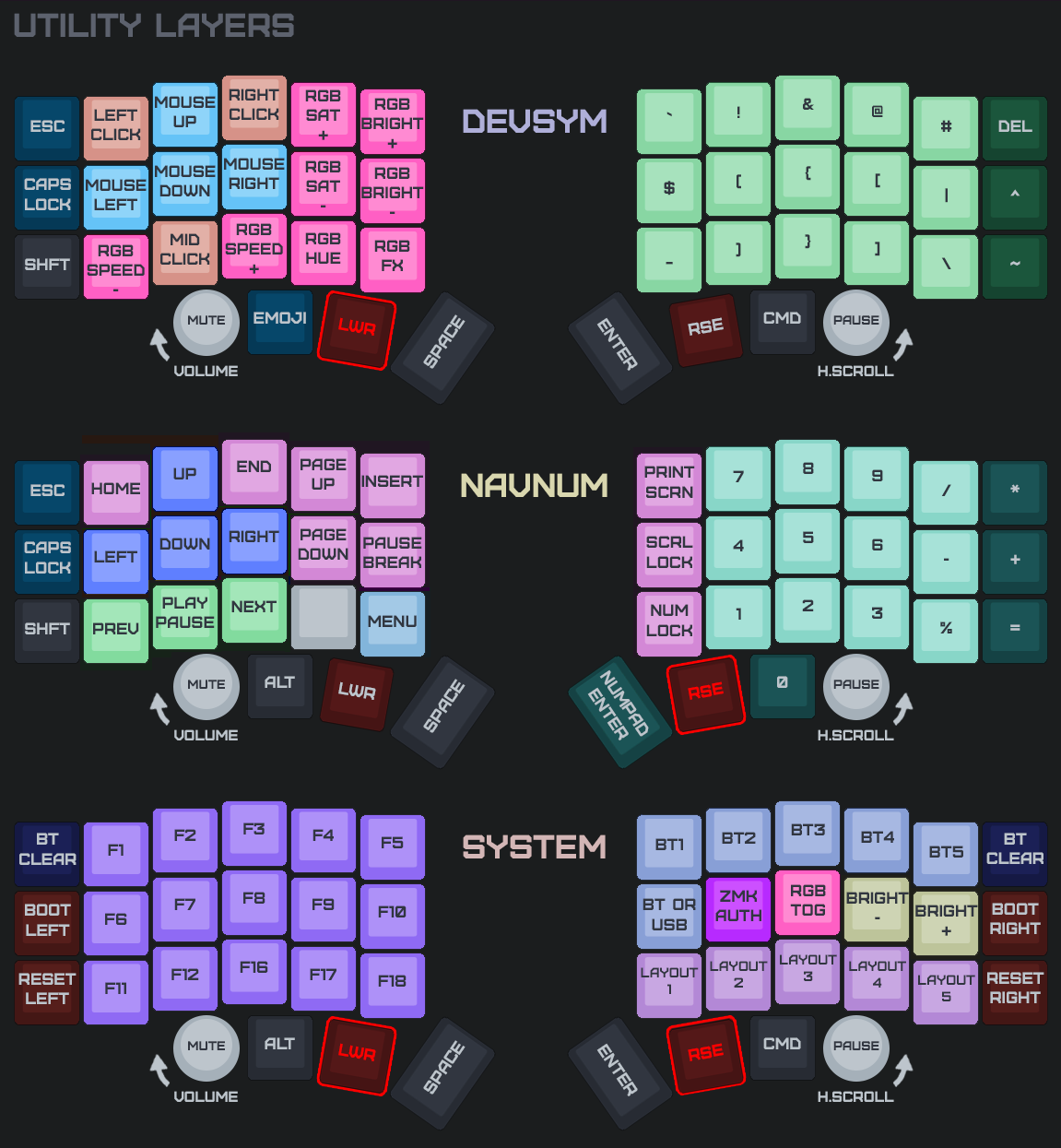
Trackpad Resumes from Deep Sleep
- 6df6f2d build(west): bump cirque + azoteq forks for trackpad PM device support
Each zip is organized by trackpad scenario:
- no trackpads/ - standard left + right (no pointing device)
- trackpad on peripheral side/ - flash this pair if your trackpad is on the peripheral (right) half
- trackpad on central side/ - flash this pair if your trackpad is on the central (left) half
Pick the folder for your build and flash both halves from it (a peripheral-side trackpad forwards input to the central, so the halves must match). settings_reset-nice_nano_v2-zmk.uf2 is included for clean-slate flashing. Follow the flashing guide and the trackpad wiring guide.
You can customize your keymap using ZMK Studio.
Keymap Images:
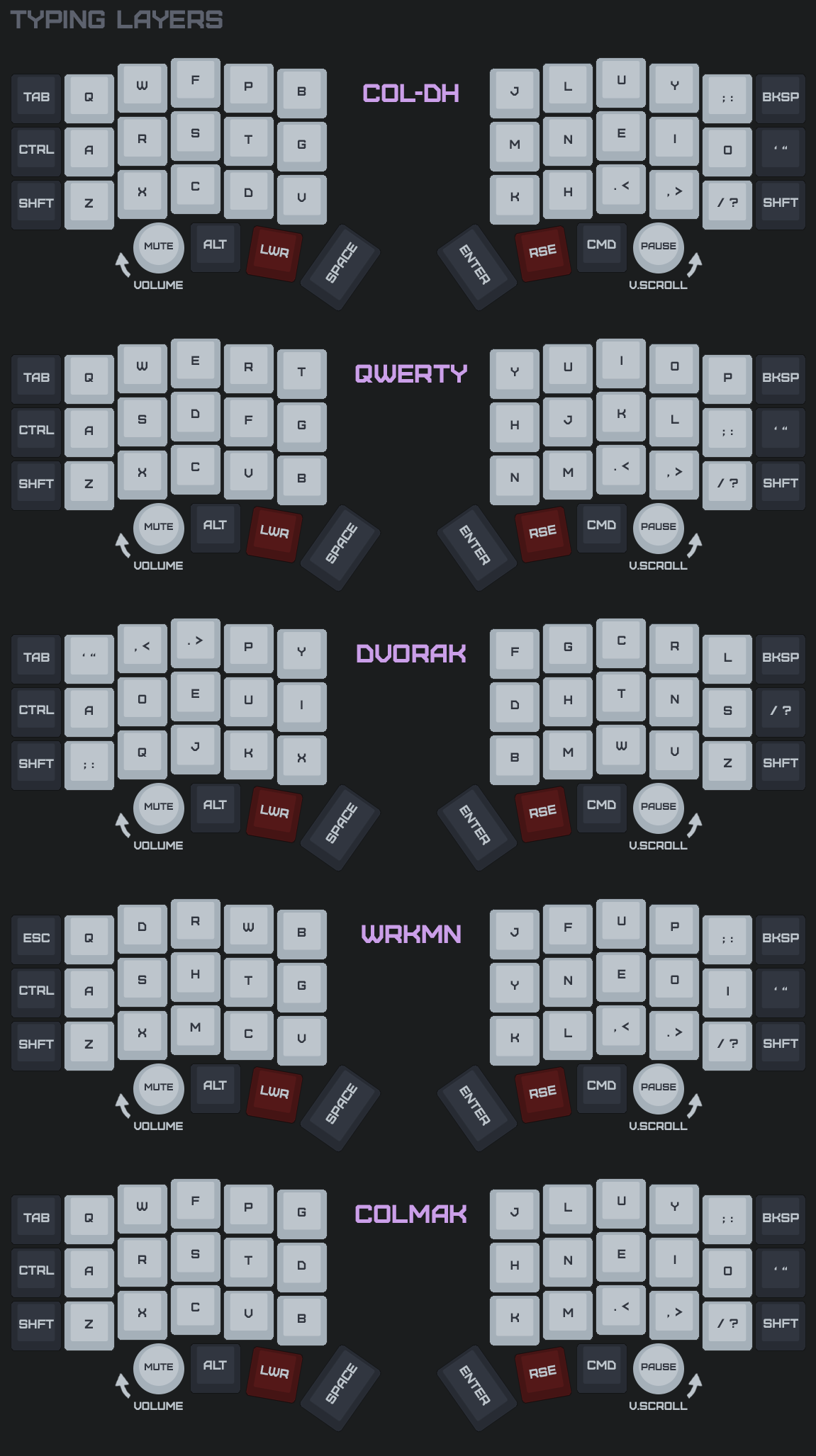
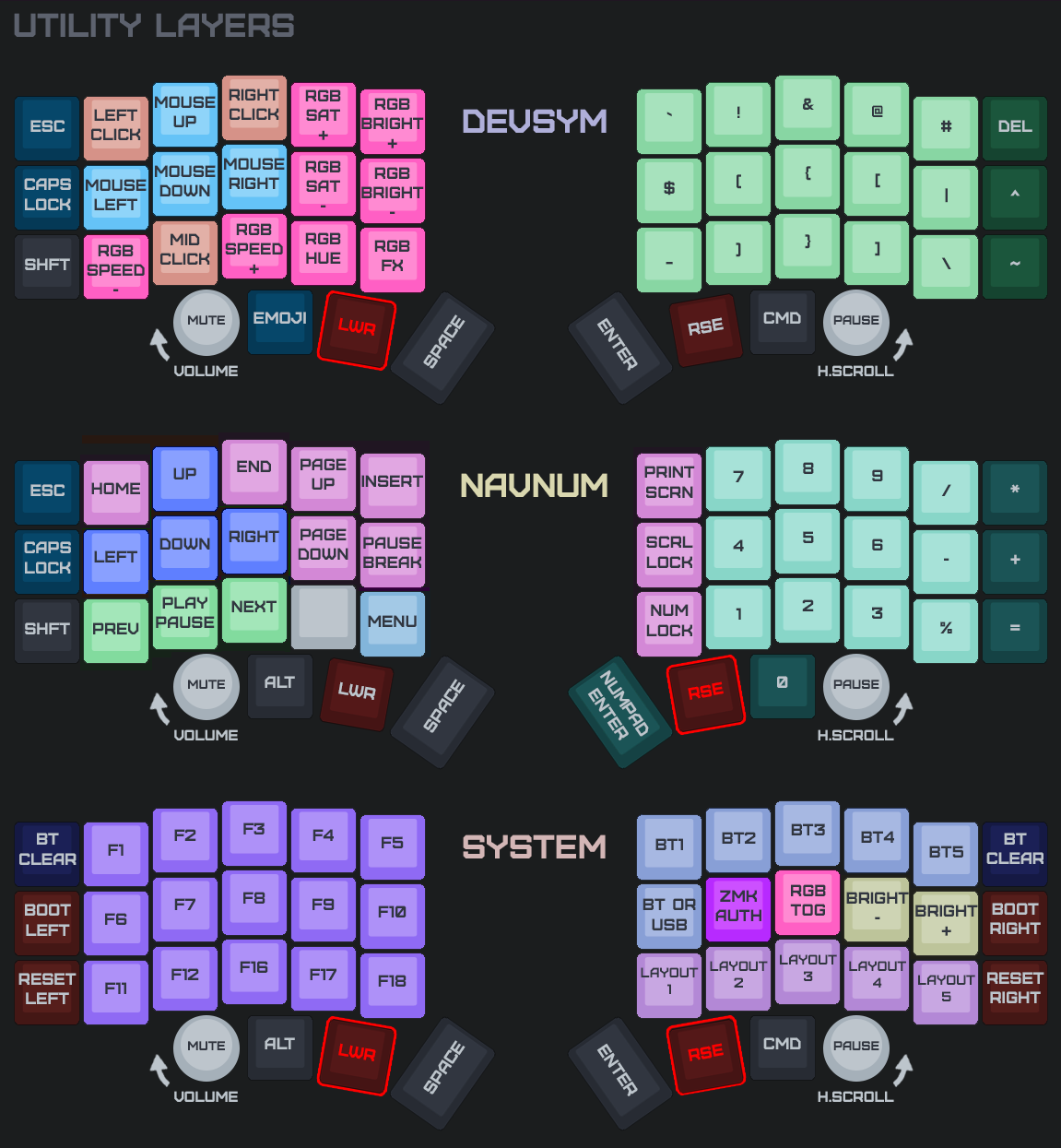
Faster Emulated Mouse Movement
- 6b887b7 feat(mouse): faster emulated cursor (max 1200, ramp over 500ms)
Each zip is organized by trackpad scenario:
- no trackpads/ - standard left + right (no pointing device)
- trackpad on peripheral side/ - flash this pair if your trackpad is on the peripheral (right) half
- trackpad on central side/ - flash this pair if your trackpad is on the central (left) half
Pick the folder for your build and flash both halves from it (a peripheral-side trackpad forwards input to the central, so the halves must match). settings_reset-nice_nano_v2-zmk.uf2 is included for clean-slate flashing. Follow the flashing guide and the trackpad wiring guide.
You can customize your keymap using ZMK Studio.
Keymap Images:
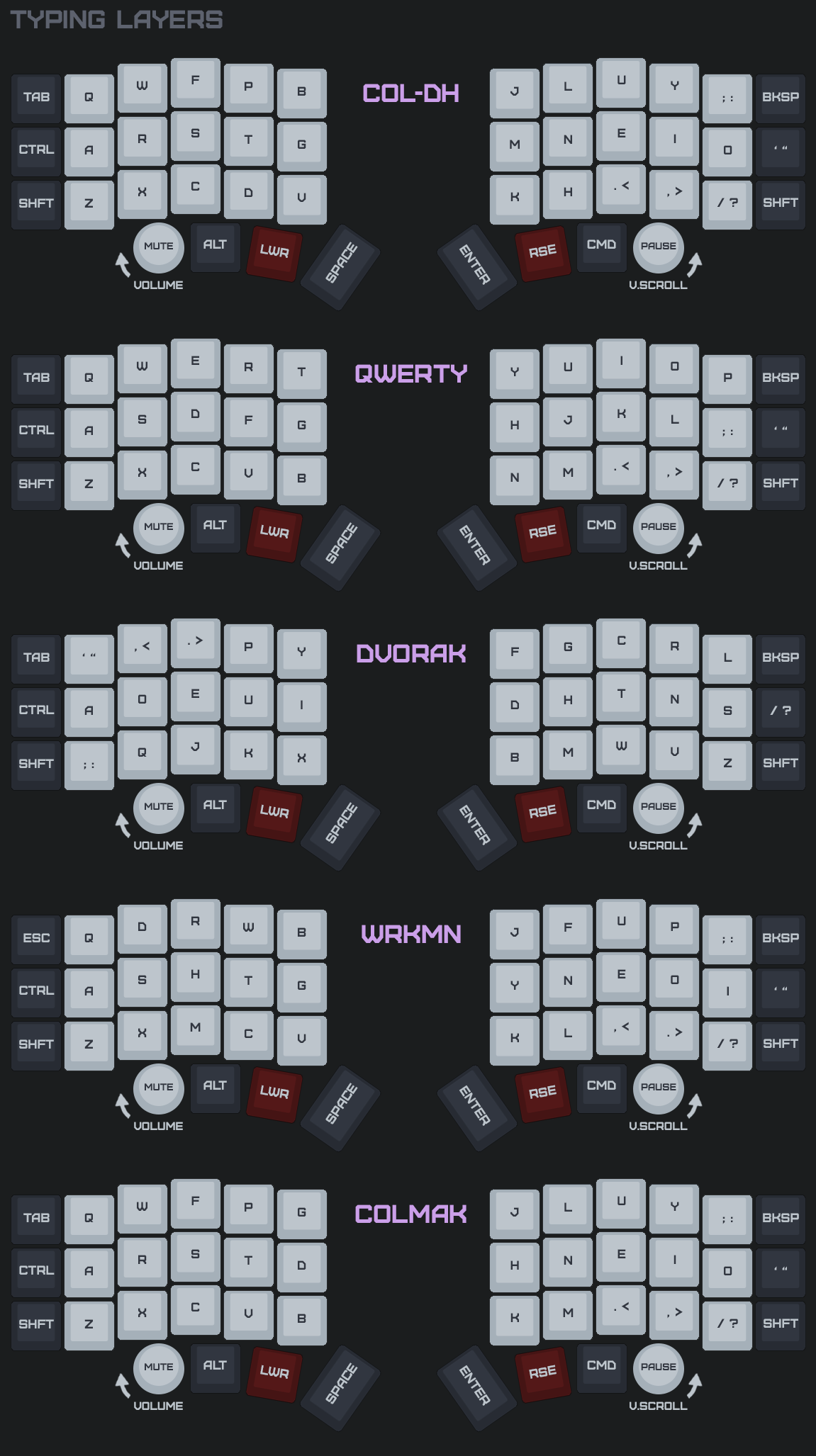
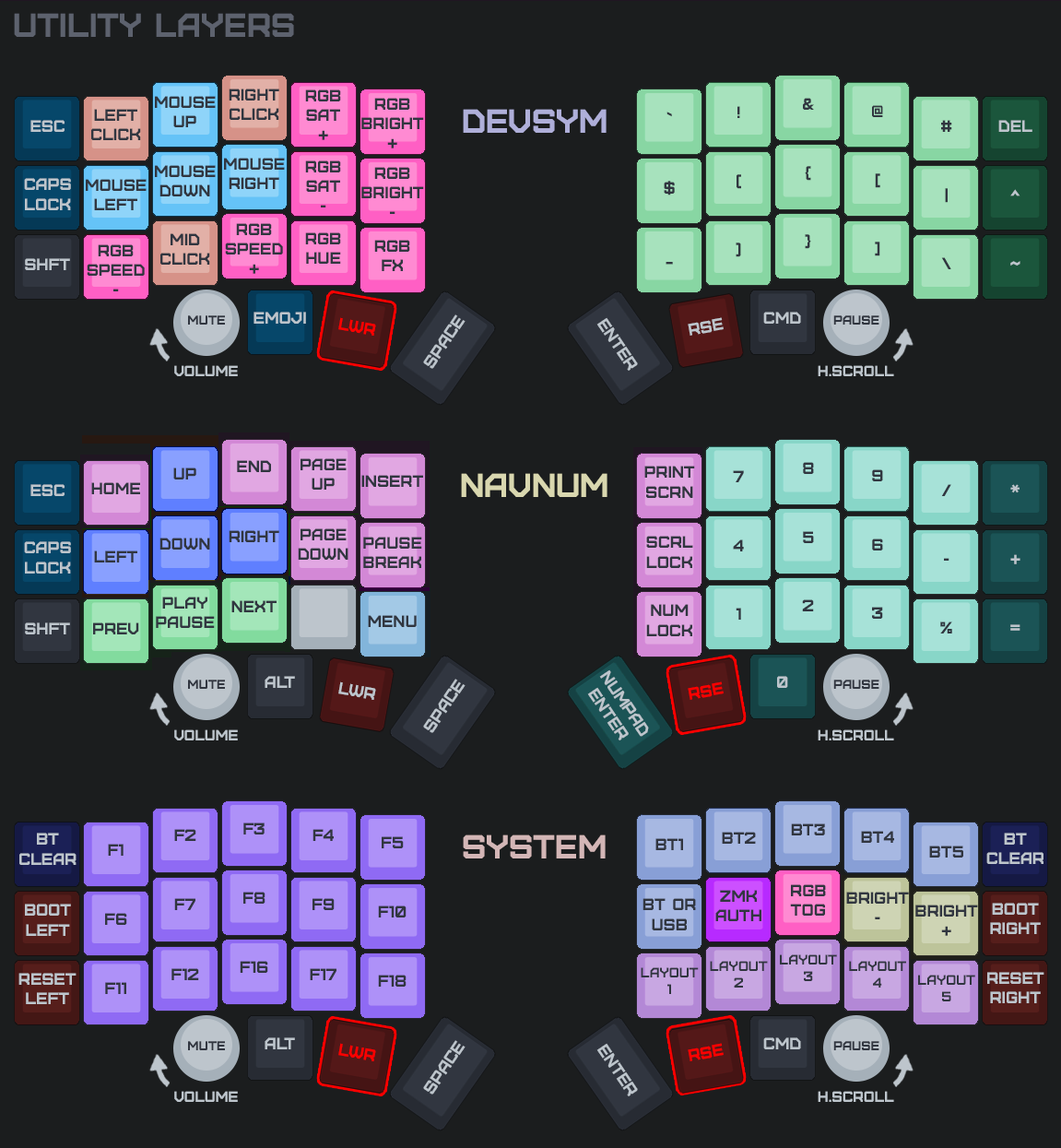
Azoteq Tuning
Better recognition of scrolling gestures.
- 144c1f8 build(west): bump azoteq driver to 35fac92 (scroll no longer right-clicks)
Each zip is organized by trackpad scenario:
- no trackpads/ - standard left + right (no pointing device)
- trackpad on peripheral side/ - flash this pair if your trackpad is on the peripheral (right) half
- trackpad on central side/ - flash this pair if your trackpad is on the central (left) half
Pick the folder for your build and flash both halves from it (a peripheral-side trackpad forwards input to the central, so the halves must match). settings_reset-nice_nano_v2-zmk.uf2 is included for clean-slate flashing. Follow the flashing guide and the trackpad wiring guide.
You can customize your keymap using ZMK Studio.
Keymap Images: