Custom properties tagging
Data collection / Piano analytics tagging / Tagging custom properties sdk / Custom properties tagging
This guide is only available for Piano Analytics analysis
Please check the compatibility table
The Tracker has advanced technical tagging methods that are useful to complete the data collection. These utility methods are mainly used to manipulate parameters for the enrichment of hits and thus extend the basic functionality of the SDK.
These methods are available for SDKs:
- JavaScript from version
5.21.0- Android from version
2.17.0- Apple from version
2.18.0
In order to type a property, you can use a prefix:
-
s:→ string -
f:→ float -
n:→ integer -
b:→ boolean -
d:→ date -
a:X:→ array of type X (e.g:a:s:means array of string)
Properties ending with _date, _utc, _timestamp and _ts are automatically cast as date if:
- it is a Timestamp in seconds
- it respects RFC 3339
YYYY-MM-DDTHH:mm:ssZ
If you use
eventsmethods, if there is no prefix, JSON type will be affected to the property:
- string
- float (any number will be considered as a float)
- boolean
- object (JSON object)
The Tracker provides a series of useful functions for manipulating properties.
A property consists of a key and a value:
- The key of a property is used as a hit parameter. It must correspond exactly to an entry in your Data Model.
- The value of a property is transmitted as encoded in the hit.
Notion of persistence
A property can be declared as “persistent”. In this case, it is automatically added to all hits generated by the Tracker, regardless of type. Otherwise, it is only associated with the next hit; it is then deleted after sending.
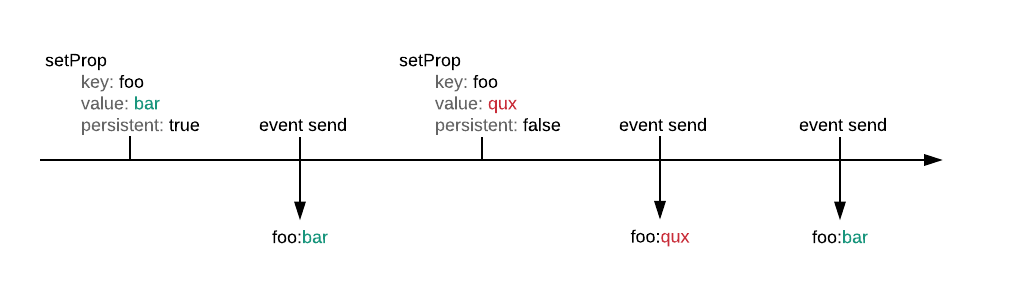
setProp(key, value, persistent)
Declare a property to be added to the hit.
| Param | Type | Description |
| key | string |
Name of the property to be added – How can I type the property? |
| value | `string | number` |
| persistent | boolean |
Persistence of property (true: all hits, false: the next hit only) |
The declaration of a property leads to the creation of an entry having as main key the name of the property and as value an object composed of the keys
value(the value) andpersistent(the persistence option).Example of a “key1” property added to the list of properties :
var properties = {
    "key1": {
        "value": "val1",
        "persistent": true
    }
};
Tagging examples
tag.setProp('custom1', 'val1', true); // Persistent
tag.setProp('custom2', 'val2', false); // Non-persistent
tag.page.send({'name': 'page_name'}); // Will get both 'custom1' and 'custom2' properties
tag.page.set({'name': 'page_name_set'});
tag.dispatch(); // Will only get 'custom1' property
setProp(key, value, persistent) ⇒
Tracker
Declare a property to be added to the hit.
| Param | Type | Description |
| key | String |
Name of the property to be added – How can I type the property? |
| value | String |
Property value |
| persistent | Bool |
Persistence of property (true: all hits, false: the next hit only) |
Tagging examples
tracker.setProp("custom1", value: "val1", persistent: true) // Persistent
tracker.setProp("custom1", value: "val1", persistent: false) // Non-persistent
setProp(key, value, persistent) ⇒
Tracker
Declare a property to be added to the hit.
| Param | Type | Description |
| key | String |
Name of the property to be added – How can I type the property? |
| value | String |
Property value |
| persistent | boolean |
Persistence of property (true: all hits, false: the next hit only) |
Tagging examples
tracker.setProp("custom1", "val1", true); // Persistent
tracker.setProp("custom2", "val2", false); // Non-persistent
setProps(props, persistent)
Declare a set of properties to add to the hit.
| Param | Type | Description |
| props | Object |
Object containing the properties to be added – How can I type the property? |
| persistent | boolean |
Persistence of properties (true: all hits, false: next hit only) |
In the case of a complex object with several levels, the keys must be grouped on a single level with a separator of type “_” (underscore). As a reminder, the keys must correspond to your Data Model.
Example :
// Multi-level object
var props = {
    "key1": {
        "key2": "val2"
    },
    "key3": "val3"
};

// Expected object
var props = {
    "key1_key2": "val2",
    "key3": "val3"
};
Tagging examples
tag.setProps({
    "key1_key2": "val2",
    "key3": "val3"
}, true); // Persistent
tag.setProps({
    "key4": "val4"
}, false); // Non-persistent
tag.page.send({'name': 'page_name'}); // Will get 'key1_key2', 'key3' and 'key4' properties
tag.page.set({'name': 'page_name_set'});
tag.dispatch(); // Will only get 'key1_key2' and 'key3' properties
setProps(props, persistent) ⇒
Tracker
Declare a set of properties to add to the hit.
| Param | Type | Description |
| props | [String: String] |
Object containing the properties to be added – How can I type the property? |
| persistent | Bool |
Persistence of properties (true: all hits, false: next hit only) |
In the case of a complex object with several levels, the keys must be grouped on a single level with a separator of type “_” (underscore). As a reminder, the keys must correspond to your Data Model.
Tagging examples
tracker.setProps([
    "key1_key2": "val2",
    "key3": "val3"
], persistent: true) // Persistent
tracker.setProps([
    "key1_key2": "val2",
    "key3": "val3"
], persistent: false) // Non-persistent
setProps(props, persistent) ⇒
Tracker
Declare a set of properties to add to the hit.
| Param | Type | Description |
| props | Map<String, String> |
Object containing the properties to be added – How can I type the property? |
| persistent | boolean |
Persistence of properties (true: all hits, false: next hit only) |
In the case of a complex object with several levels, the keys must be grouped on a single level with a separator of type “_” (underscore). As a reminder, the keys must correspond to your Data Model.
Tagging examples
tracker.setProps(new HashMap<String, String>() {{
    put("key1_key2", "val2");
    put("key3", "val3");
}}, true); // Persistent
tracker.setProps(new HashMap<String, String>() {{
    put("key1_key2", "val2");
    put("key3", "val3");
}}, false); // Non-persistent
getProp(key) ⇒
Object
Retrieve the contents of a property.
| Param | Type | Description |
| key | string |
Property name |
Tagging example
var property = tag.getProp('key1');
// property = {"value": "val1", "persistent": true};
getProp(key) ⇒
Param
Retrieve the contents of a property.
| Param | Type | Description |
| key | String |
Property name |
Tagging example
let property = tracker.getProp("key1")getProp(key) ⇒
Param
Retrieve the contents of a property.
| Param | Type | Description |
| key | String |
Property name |
Tagging example
Param property = tracker.getProp("key1");
getProps() ⇒
Object
Retrieve all properties.
Tagging example
var properties = tag.getProps();
// properties = {"key1": {"value": "val1", "persistent": true}};
getProps() ⇒
[Param]
Retrieve all properties.
Tagging example
let properties = tracker.getProps()getProps() ⇒
List<Param>
Retrieve all properties.
Tagging example
List<Param> properties = tracker.getProps();
delProp(key)
Delete a property.
| Param | Type | Description |
| key | string |
Property name |
Tagging example
tag.delProp('custom2');delProp(key)
Delete a property.
| Param | Type | Description |
| key | String |
Property name |
Tagging example
tracker.delProp("custom2")delProp(key)
Delete a property.
| Param | Type | Description |
| key | String |
Property name |
Tagging example
tracker.delProp("custom2");
delProps()
Delete all properties.
Tagging example
tag.delProps();delProps()
Delete all properties.
Tagging example
tracker.delProps()delProps()
Delete all properties.
Tagging example
tracker.delProps();