Utilisation of dispatch SDKs
This article explains in detail how the dispatch method works, ONLY FOR SDKs.
The dispatch is a feature implemented in the SDKs allowing you to send all tagging data all at once � as opposed to sendView for screens, or sendTouch for gestures, for example, which only send data of their respective types. However, using dispatch requires some specific information in order to avoid having problematic hits.
In order to use this method correctly, it is necessary to understand the system for adding tagging data.
This system relies on the chronological order of code execution. When implementing your application�s tagging, objects will gradually be added as the code is executed:
// Adding Custom Var
tracker.CustomVars().add(1, "value", CustomVar.CustomVarType.App);

// Adding Custom Object
tracker.CustomObjects().add("{\"key\":\"value\"}");

// Adding Aisle
tracker.Aisles().add("level1");

// Dispatch
tracker.dispatch();
In this example, all objects added are related to the same type of tagging; therefore, only one hit containing everything will be sent.
However, if we add a Gesture:
// Adding Custom Var
tracker.CustomVars().add(1, "value", CustomVar.CustomVarType.App);

// Adding Custom Object
tracker.CustomObjects().add("{\"key\":\"value\"}");

// Adding Gesture
tracker.Gestures().add("gesture");

// Adding Aisle
tracker.Aisles().add("level1");

// Dispatch
tracker.dispatch();
If this code is executed, two hits will be sent, in this order:
- A first hit containing Gesture and CustomObject
- A second hit containing CustomVar and Aisle
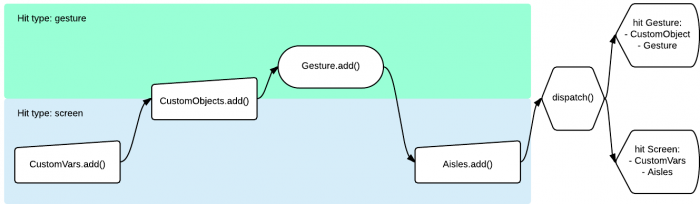
Why? Because certain objects are non-essential, and others are final objects.
Non-essential objects are used to enrich data, and final objects will trigger the sending of a hit containing all information compatible with its type at the moment it is executed.
If we take the previous example:
tracker.CustomVars().add(1, "value", CustomVar.CustomVarType.App); // -> Object compatible with Screen

// Adding Custom Object
tracker.CustomObjects().add("{\"key\":\"value\"}"); // -> Object compatible with all types

// Adding Gesture
tracker.Gestures().add("gesture"); // "Final" object : Sending hit which contains compatible data with Gesture

// Adding Aisle
tracker.Aisles().add("level1"); // Object compatible with Screen

// Dispatch
tracker.dispatch(); // If no other final object was added before, sending all objects added- Addition of a CustomVar object, enhancing a Screen
- Addition of a CustomObject object, enhancing any type of hit
- Addition of a Gesture �final� object -> Sends a hit containing all information compatible with a Gesture, and specifically at this level of code execution, only the added CustomObject is compatible
- Addition of an Aisle object, enhancing a Screen
- Calling dispatch: if no �final� object is added before its execution, all objects previously added will be sent, with respect to their compatibilities.
| “FINAL” OBJECTS | Enhancing COMPATIBLE OBJECTS |
|---|---|
| Défaut/Screen | - CustomObject (NuggAd,TvTracking) - IdentifiedVisitor - Publisher - SelfPromotion - Location - CustomVar - Order - Cart - Aisle - Campaign - InternalSearch - DynamicScreen - CustomTreeStructure |
| Gesture | - CustomObject (NuggAd,TvTracking) - IdentifiedVisitor - InternalSearch |
| Publisher, SelfPromotion | - CustomObject (NuggAd,TvTracking) - Publisher - SelfPromotion |
| Product | - CustomObject (NuggAd,TvTracking) - Product |
Last update: 03/05/2016