Releases: atiladefreitas/bloocky
Release list
v1.1.0-beta.1 — Two-Way Calendar Sync, Companion App & All-Day Events 📅🔄📱

🧪 This is a beta. Everything below works and is covered by 395 specs, but sync can write to and delete from your real calendar. Point it at a throwaway calendar until you trust it. What has and has not been verified against live servers is spelled out in Beta status — please read that section before enabling sync on a calendar you care about.
New Feature Overview
Bloocky v1.0.0 was a calendar that lived entirely inside Neovim. This release connects it to the rest of your life.
Blocks you create in Neovim now appear in your real calendar, and events from your real calendar appear on the grid — as genuine, editable, deletable blocks, not a read-only mirror. It speaks CalDAV (Fastmail, iCloud, Nextcloud, Radicale, mailbox.org, and anything else implementing RFC 4791) and Google Calendar through its REST API.
The second headline is a companion-app bus: bloocky runs a small server on your LAN, paired by scanning a QR code, so a phone app can reach your local time blocks. It is bloocky's own bus on its own port, independent of the calendar sync and of Dooing.
Both are off by default. If you never enable them, not a single line of either subsystem is loaded, and bloocky behaves exactly as it did in v1.0.0.
The design rule underneath all of it: never destroy work silently. When the calendar wins a genuine conflict, your version is kept and restorable. When an edit cannot be pushed, it is handed back rather than left displaying a time your calendar has never had. When bloocky cannot model a repeat rule, it refuses to rewrite it rather than flattening someone else's meeting.
Key capabilities:
- Two-way CalDAV sync — discovery, incremental pulls via
sync-collection(RFC 6578) with a full-resync fallback, andIf-Matchon every write - Two-way Google Calendar sync — REST v3,
syncTokenincremental pulls,410 Gonerecovery, and your own OAuth client with PKCE - Multiple accounts and calendars, each markable read-write or read-only
- Conflicts surfaced and recoverable — a trail you can inspect and restore from, plus a marker on the grid so you notice without reading a notification
- All-day events — imported and drawn above the hour grid, spanning every day they cover
- Excluded dates (
EXDATE) — a weekly meeting with a skipped week is no longer locked read-only - Companion-app sync over your LAN — QR pairing, hashed device tokens, three-way merge
:checkhealth bloocky— verifies the things that fail quietly- Per-view window height and
"full"sizing, with the grid stretching to match - 395 specs, including an end-to-end suite against an in-memory CalDAV server
Setting Up Your Calendar
This is the part that takes ten minutes once and then never again. Pick your provider below. Every path ends the same way: :checkhealth bloocky, then :BloockySync.
The same walkthroughs live in CALENDARS.md, which is kept current after this release page scrolls out of view.
Before you start — where the password goes
Bloocky will not take a password typed into your config. Well, it will, but it warns you every time, because a plain-text credential in a dotfiles repo is how credentials leak. What it wants instead is a command that prints the password on stdout. Bloocky runs it when it needs the value and reads the first line.
Pick whichever you already have:
-- libsecret / GNOME Keyring — already present on most Linux desktops
password_cmd = { "secret-tool", "lookup", "service", "bloocky", "key", "caldav" }

-- pass
password_cmd = { "pass", "show", "fastmail/caldav" }

-- 1Password CLI
password_cmd = { "op", "read", "op://Private/Fastmail/caldav" }

-- macOS Keychain
password_cmd = { "security", "find-generic-password", "-s", "bloocky-caldav", "-w" }

-- Just a file you chmod 600
password_cmd = { "cat", vim.fn.expand("~/.config/bloocky/caldav-password") }
To store one with secret-tool (it will prompt for the value):
secret-tool store --label='bloocky caldav' service bloocky key caldavAlways use an app-specific password, never your account password. Every provider below issues them. They are revocable on their own, and they cannot be used to log in to your account.
📮 Fastmail
1. Create an app password. In Fastmail's web settings, find Password & Security → App Passwords and create a new one. When it asks what the password is for, choose the option covering CalDAV / Calendars (not "Mail"). Copy the generated password — Fastmail shows it once.
2. Store it:
secret-tool store --label='bloocky fastmail' service bloocky key caldav3. Configure:
require("bloocky").setup({
    sync = {
        enabled = true,
        accounts = {
            {
                id = "fastmail",
                provider = "caldav",
                url = "https://caldav.fastmail.com/dav/",
                username = "you@fastmail.com",   -- your full address
                password_cmd = { "secret-tool", "lookup", "service", "bloocky", "key", "caldav" },
            },
        },
    },
})
4. Restart Neovim, then run :checkhealth bloocky. You want to see password_cmd works (N characters).
5. Sync: :BloockySync. Then :BloockySyncStatus to see which calendars it found and when it last ran.
Fastmail is the smoothest CalDAV provider to set up — discovery works from the base URL with no extra steps.
🍎 iCloud
1. Create an app-specific password. Go to appleid.apple.com → Sign-In and Security → App-Specific Passwords → +. Name it something like bloocky. Copy it — Apple shows it once. It looks like abcd-efgh-ijkl-mnop.
Two-factor authentication must be on. Apple does not offer app-specific passwords without it.
2. Store it:
secret-tool store --label='bloocky icloud' service bloocky key icloud3. Configure:
require("bloocky").setup({
    sync = {
        enabled = true,
        accounts = {
            {
                id = "icloud",
                provider = "caldav",
                url = "https://caldav.icloud.com/",
                username = "you@icloud.com",   -- your Apple ID email
                password_cmd = { "secret-tool", "lookup", "service", "bloocky", "key", "icloud" },
            },
        },
    },
})
4. Restart, :checkhealth bloocky, then :BloockySync.
If discovery fails, iCloud is the most likely provider to need a hand. It hands out your calendar home on a numbered partition host — something like https://p42-caldav.icloud.com/1234567890/calendars/. Bloocky follows that cross-host redirect on purpose (a strict same-origin rule would break iCloud entirely; the URL check guarantees it is only ever reached over verified TLS). If it still cannot find your calendars, you can skip discovery entirely:
{
    id = "icloud",
    provider = "caldav",
    url = "https://caldav.icloud.com/",
    username = "you@icloud.com",
    password_cmd = { "secret-tool", "lookup", "service", "bloocky", "key", "icloud" },
    -- Paste the calendar-home URL another CalDAV client showed you
    calendar_home = "https://p42-caldav.icloud.com/1234567890/calendars/",
}
⚠️ iCloud has not been exercised end to end. It is known to be fussy about discovery. If you hit something, an issue with the:messagesoutput is genuinely useful.
☁️ Nextcloud
1. Create an app password. In Nextcloud: Settings → Security → Devices & sessions → Create new app password. Give it a name, copy the password.
2. Store it:
secret-tool store --label='bloocky nextcloud' service bloocky key nextcloud3. Configure. The URL is your Nextcloud host plus /remote.php/dav/:
require("bloocky").setup({
    sync = {
        enabled = true,
        accounts = {
            {
                id = "nextcloud",
                provider = "caldav",
                url = "https://cloud.example.com/remote.php/dav/",
                username = "yourusername",   -- your Nextcloud login, not an email
                password_cmd = { "secret-tool", "lookup", "service", "bloocky", "key", "nextcloud" },
            },
        },
    },
})
4. Restart, :checkhealth bloocky, :BloockySync.
Your Nextcloud must be served over HTTPS. Bloocky refuses plain HTTP to anything but
localhost, and TLS verification is never disabled — not even behind a config flag. A self-signed certificate needs to be trusted by your system's CA store.
📬 mailbox.org
Identical to Nextcloud in shape, with mailbox.org's own DAV host:
{
    id = "mailbox",
    provider = "caldav",
    url = "https://dav.mailbox.org/",
    username = "you@mailbox.org",
    password_cmd = { "secret-tool", "lookup", "service", "bloocky", "key", "mailbox" },
}
Create the app password in mailbox.org's settings under the section covering app-specific or third-party passwords.
🔵 Google Calendar
Google takes the longest, because the OAuth client has to be yours. Bloocky deliberately ships none.
A shared client id would put every bloocky user behind one credential — so one person's abuse could get it suspended for everyone — and behind the same "this app isn't verified" warning screen, which trains people to click through security prompts. Your own client is isolated, scoped, and revocable by you.
About five minutes, once.
1. Create a Google Cloud project. Go to console.cloud.google.com and create a project. Any name.
2. Enable the Google Calendar API for that project. Search for it in the API library and click Enable. Sync will fail with a confusing error if you skip this.
3. Configure the OAuth consent screen. Choose External. Fill i...
v1.0.0 — Timeblocking for Neovim 🧱📅
v1.0.0 Release Notes - Bloocky
v1.0.0 Timeblocking for Neovim — Day View Sidebar, Adaptive Layouts & Recurring Blocks 🧱📅
New Feature Overview
The first stable release of Bloocky, a timeblocking calendar that lives inside Neovim. Plan your day by placing time blocks on a calendar with day, week and month views, navigate all of it with hjkl, and optionally pull your Dooing todos onto the grid.
The headline of this release is the Day View Sidebar — a persistent vertical split that keeps today's schedule next to your code instead of on top of it. A floating calendar is something you open, glance at and dismiss; a sidebar is something you keep. Both modes share the same buffer, keymaps, cursor and views, so moving between them never costs you your place.
Backing that up, every view now fits itself to the window it is given: the hour grid always shows the whole day, grouping hours onto shared rows when the window is short instead of scrolling them out of sight. That is what makes a 46-column sidebar a usable calendar rather than a cropped one.
Key capabilities:
- Persistent day view sidebar — a real vertical split, left or right, with a configurable width and view
- Float ⇄ sidebar switching that preserves the cursor, the date and the current view
- Three views — month calendar, week grid with hour rows, and a detailed day view
- Adaptive hour grid — the full day always fits, dividers and grouping adjust to the available rows
- Time blocks with title, start time, duration, notes and a stable color drawn from the block id
- Recurring blocks —
daily,weekly,weekdays(Mon–Fri) or acustomday set, with an optional end date - Creation dialog — a floating form with per-field inputs, inline hints and inline validation errors
- Read-only Dooing integration — todos appear on their due date with estimates and priorities, never written back
- Automatic JSON persistence on every change
hjklnavigation everywhere, withH/Ljumping a whole month or week
A Look at It
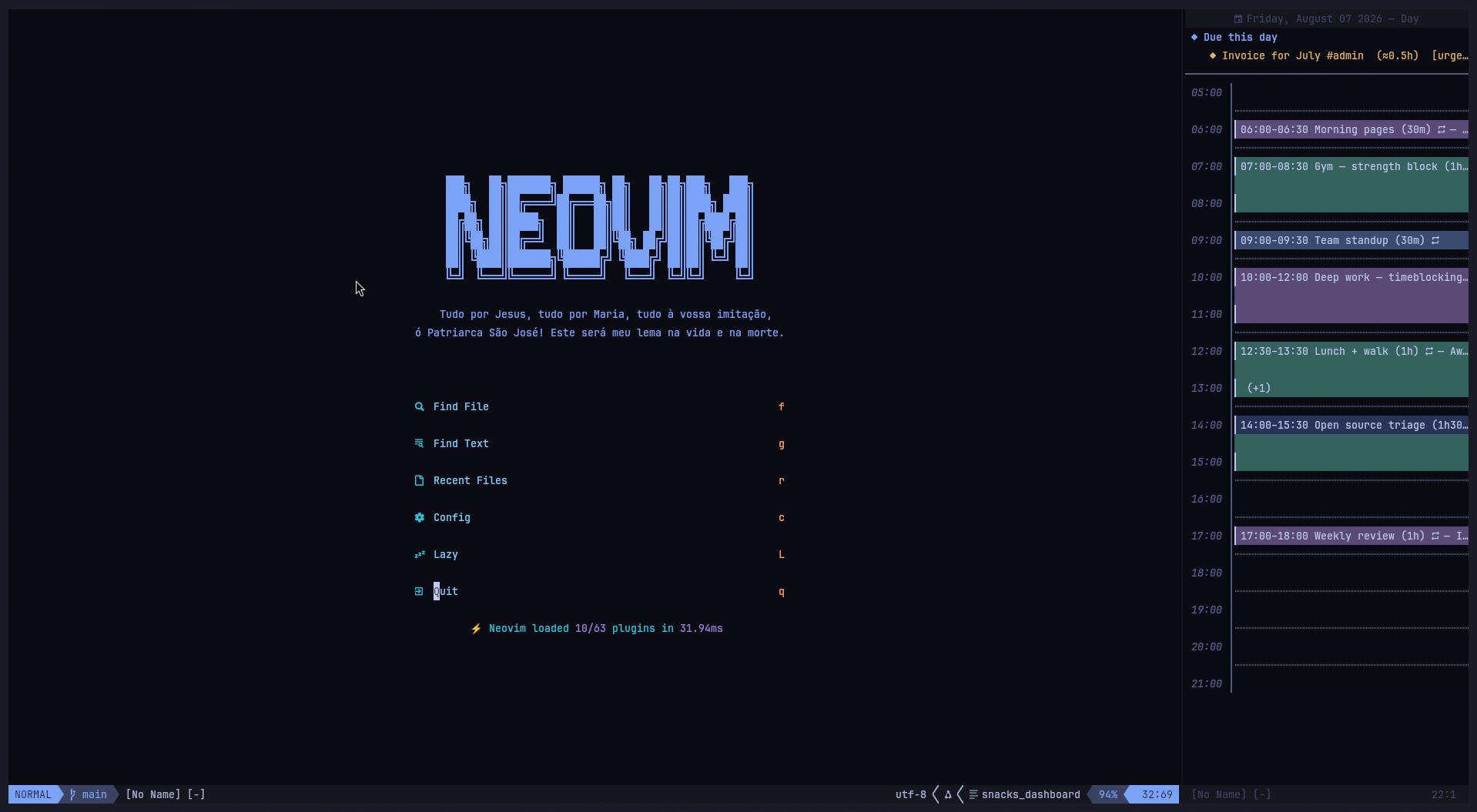
The day view sidebar — your schedule pinned beside your code, not on top of it. Time blocks spread over the hours they occupy, each with a stable color, recurring ones marked , overlapping ones collapsed to a (+1). Dooing todos due today sit above the grid with their estimate and priority.
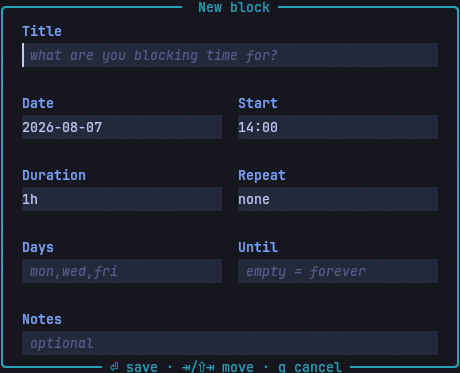
The block creation dialog — one input per field, hints inside the empty ones, and validation errors attached to whichever field is wrong.
What's Changed
🪟 Day View Sidebar
A second window mode (lua/bloocky/ui.lua, lua/bloocky/config.lua):
- New
window.modeoption picks how the calendar opens:"float"(default) or"sidebar" - New
window.sidebartable configuresposition("left"/"right"),widthand theviewit opens in <leader>tBtoggles the sidebar in day view;:BloockySidebarand:BloockySidebarTogglemirror it, both accepting an optional view name- The sidebar is a regular vertical split — not a float — so it participates in normal window navigation (
<C-w>h/l), survives:only-free layouts, and never covers your code
Shared state across modes:
- Float and sidebar share the same buffer, keymaps, cursor and views — only the window is rebuilt
<leader>tBon an already-open float moves the calendar into the sidebar without losing the date or view you were on- Opening a split steps out of a floating window first (Neovim refuses to split from a float), which is what makes that move possible
Split-specific behaviour:
- A split cannot carry a title or footer, so the view title moves to the winbar, centered
- Layout is measured from the window itself rather than the float sizing rules — resize the split by hand with
<C-w>>and the calendar re-renders to the new width winfixwidthkeeps the sidebar's width stable when other windows open and close- A
WinResizedautocmd re-renders on manual resizes, and drops itself once the sidebar is gone <Esc>is bound to close in floating mode only — on a window you keep around it is far too eagernumber,relativenumber,list,spell,signcolumn,foldcolumnandstatuscolumnare all cleared window-locally, so your global UI settings do not bleed into the calendar
Width resolution:
sidebar.widthaccepts columns (46) or a fraction of the editor (0.25)- Clamped to a minimum of 20 columns and to
columns - 4, so an absurd value can never wedge the layout
📐 Adaptive Layouts
utils.hour_layout() — the whole day always fits (lua/bloocky/utils.lua):
The day and week grids used to render one fixed row per hour. In a short window, or a 46-column sidebar with a Dooing section on top, the last hours of the day simply fell off the bottom. The hour grid is now laid out against the rows it actually has:
- Roomy: one row per hour, plus a dotted divider between them
- Tighter: dividers dropped, one row per hour
- Tightest: hours grouped onto shared rows, labelled
05-07instead of05:00
The same day, in a window with a third of the rows:
│ Friday, August 07 2026 — Day
│ 05-07 │
│ 07-09 │▎07:00–08:30 Gym — strength block
│ 09-11 │▎09:00–09:30 Team standup
│ 11-13 │▎12:30–13:30 Lunch + walk (+1)
│ 13-15 │▎14:00–15:30 Open source triage
│ 15-17 │
Blocks spanning a divider stay solid across it, so a 90-minute block still reads as one continuous pill.
Day view (lua/bloocky/views/day.lua):
- Everything above the hour grid (the Dooing "Due this day" section) is now collected first and given only the rows the grid does not need
- When it does not fit, it is trimmed to a
+N more aboveline rather than pushing the afternoon off screen
Week view (lua/bloocky/views/week.lua):
- The hour grid receives whatever the header and the due strip did not use, and groups hours the same way
Month view (lua/bloocky/views/month.lua):
- Week separator rules are dropped before cell height is sacrificed — every week row must fit
- Cell height clamped to 8 rows so a tall editor does not produce absurdly airy cells
Float sizing (lua/bloocky/ui.lua):
- Height accounts for
cmdheightand the border rows the title and footer live in, instead of a hardcoded- 6 - Vertical centering measures the rows the editor actually offers, border included
- A
VimResizedautocmd refits the layout when the terminal changes size
🗨️ Block Creation Dialog
Rebuilt as a real form (lua/bloocky/dialog.lua):
- One small input window per field inside a container window, laid out in a two-column grid (
Date/Start,Duration/Repeat,Days/Until), withTitleandNotesspanning the full width - Placeholder hints render inside each empty input (
1h30m · 45m · 2h,mon,wed,fri,empty = forever) - Validation errors are attached inline to the offending field — fix it and save again, no dialog teardown
<Tab>/<S-Tab>andj/kmove between fields,<CR>in insert advances and saves from the last field,<C-s>saves from anywhere,ddclears a field,q/<Esc>cancels- Parsing no longer depends on fixed line numbers — each field owns its own buffer
Input formats:
Durationaccepts1h30m,45m,2h, or a bare90DateandUntilacceptYYYY-MM-DDorMM/DD/YYYY- Start times and durations snap to
granularity(30 minutes by default); a block can never be shorter than one slot
🎯 Focus Restoration on Dialog Close
The two-press bug (lua/bloocky/dialog.lua, lua/bloocky/ui.lua) — fixes #3:
Closing the dialog only tore its windows down and let Neovim pick whatever window came next. That happened to land on the calendar as long as you never left the first field — but every <Tab> calls nvim_set_current_win on another input window, so by the time you cancelled or saved, the "previous window" chain pointed at a window that was also being closed. Neovim fell through to the ordinary buffer underneath. The calendar stayed open the whole time, just unfocused, which is why getting back in took two presses of the toggle: one to close, one to reopen.
- The dialog now remembers the window it was opened from and restores it on both the cancel and the save path
- The restore is deferred through
vim.schedule, becauseclose()also runs fromWinClosedwhere switching windows mid-teardown is unsafe - Guarded by a validity check, so a calendar closed while the dialog was open is not resurrected
ui.luapasses the window explicitly rather than letting the dialog infer it: when a slot holds more than one block the dialog opens from avim.ui.selectcallback, and the picker may still own the cursor at that point
🔁 Time Blocks & Recurrence
lua/bloocky/state.lua:
- Blocks carry
title,date,start_min,duration_min,notes,recurrenceandcreated_at - Recurrence types:
daily,weekly(same weekday as the start date),weekdays(Mon–Fri) andcustom(an explicit day set), each with an optionaluntil_date - Occurrences are computed at render time — a recurring block is stored once, not expanded onto disk
- Blocks never occur before their start date
- Deleting a recurring block deletes the whole series, and says so in the confirmation prompt
- Overlapping blocks on the same slot show a
(+N)marker;<CR>andxopen avim.ui.selectpicker to choose between them - Saved to
stdpath("data")/bloocky_blocks.jsonon every add, edit and delete; a corrupt file w...