
v1.0.0 Release Notes - Bloocky
v1.0.0 Timeblocking for Neovim — Day View Sidebar, Adaptive Layouts & Recurring Blocks 🧱📅
New Feature Overview
The first stable release of Bloocky, a timeblocking calendar that lives inside Neovim. Plan your day by placing time blocks on a calendar with day, week and month views, navigate all of it with hjkl, and optionally pull your Dooing todos onto the grid.
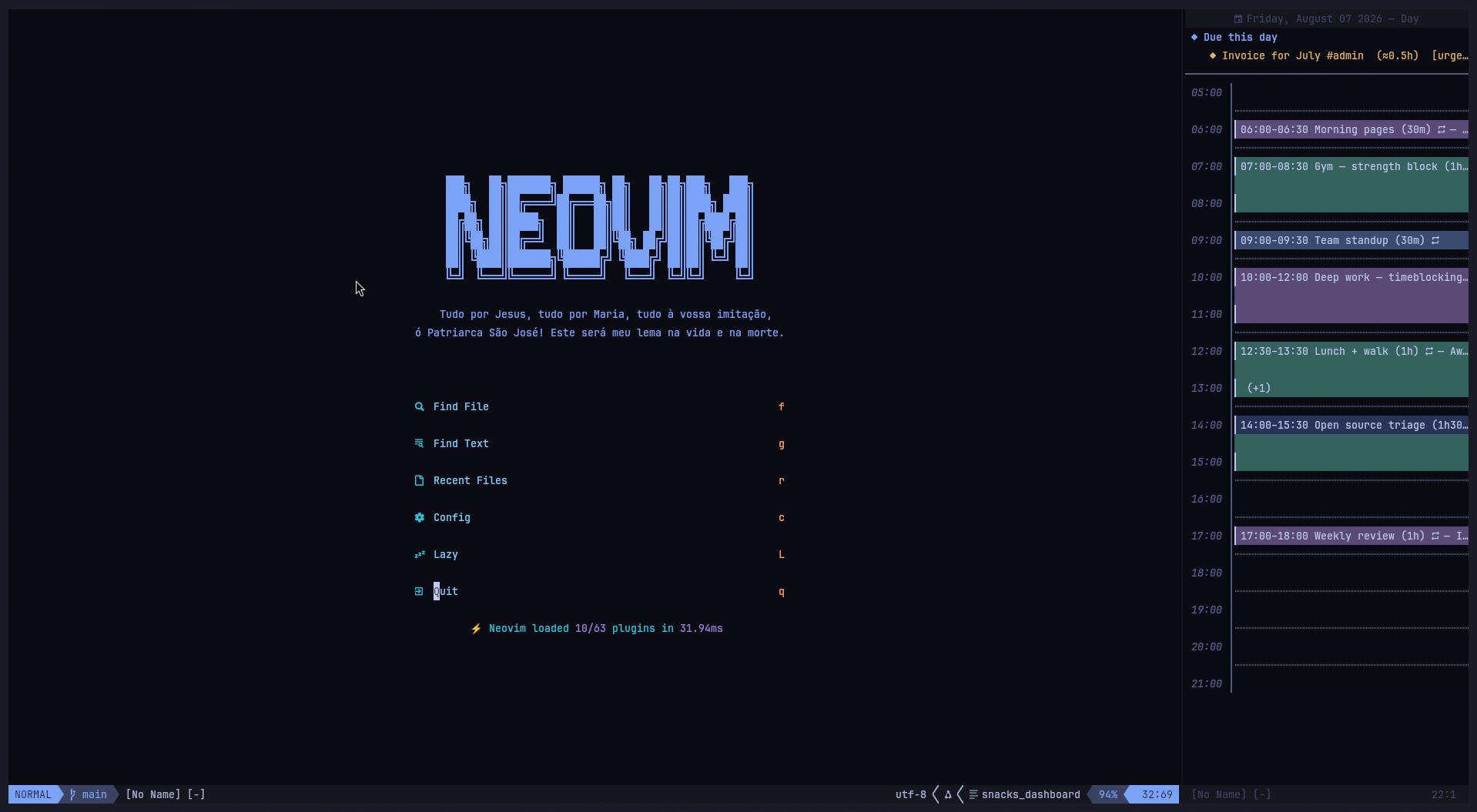
The headline of this release is the Day View Sidebar — a persistent vertical split that keeps today's schedule next to your code instead of on top of it. A floating calendar is something you open, glance at and dismiss; a sidebar is something you keep. Both modes share the same buffer, keymaps, cursor and views, so moving between them never costs you your place.
Backing that up, every view now fits itself to the window it is given: the hour grid always shows the whole day, grouping hours onto shared rows when the window is short instead of scrolling them out of sight. That is what makes a 46-column sidebar a usable calendar rather than a cropped one.
Key capabilities:
- Persistent day view sidebar — a real vertical split, left or right, with a configurable width and view
- Float ⇄ sidebar switching that preserves the cursor, the date and the current view
- Three views — month calendar, week grid with hour rows, and a detailed day view
- Adaptive hour grid — the full day always fits, dividers and grouping adjust to the available rows
- Time blocks with title, start time, duration, notes and a stable color drawn from the block id
- Recurring blocks —
daily,weekly,weekdays(Mon–Fri) or acustomday set, with an optional end date - Creation dialog — a floating form with per-field inputs, inline hints and inline validation errors
- Read-only Dooing integration — todos appear on their due date with estimates and priorities, never written back
- Automatic JSON persistence on every change
hjklnavigation everywhere, withH/Ljumping a whole month or week
A Look at It
The day view sidebar — your schedule pinned beside your code, not on top of it. Time blocks spread over the hours they occupy, each with a stable color, recurring ones marked , overlapping ones collapsed to a (+1). Dooing todos due today sit above the grid with their estimate and priority.
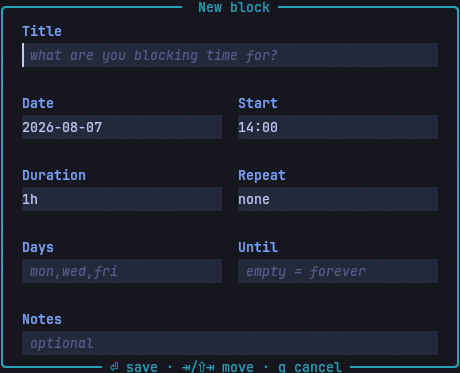
The block creation dialog — one input per field, hints inside the empty ones, and validation errors attached to whichever field is wrong.
What's Changed
🪟 Day View Sidebar
A second window mode (lua/bloocky/ui.lua, lua/bloocky/config.lua):
- New
window.modeoption picks how the calendar opens:"float"(default) or"sidebar" - New
window.sidebartable configuresposition("left"/"right"),widthand theviewit opens in <leader>tBtoggles the sidebar in day view;:BloockySidebarand:BloockySidebarTogglemirror it, both accepting an optional view name- The sidebar is a regular vertical split — not a float — so it participates in normal window navigation (
<C-w>h/l), survives:only-free layouts, and never covers your code
Shared state across modes:
- Float and sidebar share the same buffer, keymaps, cursor and views — only the window is rebuilt
<leader>tBon an already-open float moves the calendar into the sidebar without losing the date or view you were on- Opening a split steps out of a floating window first (Neovim refuses to split from a float), which is what makes that move possible
Split-specific behaviour:
- A split cannot carry a title or footer, so the view title moves to the winbar, centered
- Layout is measured from the window itself rather than the float sizing rules — resize the split by hand with
<C-w>>and the calendar re-renders to the new width winfixwidthkeeps the sidebar's width stable when other windows open and close- A
WinResizedautocmd re-renders on manual resizes, and drops itself once the sidebar is gone <Esc>is bound to close in floating mode only — on a window you keep around it is far too eagernumber,relativenumber,list,spell,signcolumn,foldcolumnandstatuscolumnare all cleared window-locally, so your global UI settings do not bleed into the calendar
Width resolution:
sidebar.widthaccepts columns (46) or a fraction of the editor (0.25)- Clamped to a minimum of 20 columns and to
columns - 4, so an absurd value can never wedge the layout
📐 Adaptive Layouts
utils.hour_layout() — the whole day always fits (lua/bloocky/utils.lua):
The day and week grids used to render one fixed row per hour. In a short window, or a 46-column sidebar with a Dooing section on top, the last hours of the day simply fell off the bottom. The hour grid is now laid out against the rows it actually has:
- Roomy: one row per hour, plus a dotted divider between them
- Tighter: dividers dropped, one row per hour
- Tightest: hours grouped onto shared rows, labelled
05-07instead of05:00
The same day, in a window with a third of the rows:
│ Friday, August 07 2026 — Day
│ 05-07 │
│ 07-09 │▎07:00–08:30 Gym — strength block
│ 09-11 │▎09:00–09:30 Team standup
│ 11-13 │▎12:30–13:30 Lunch + walk (+1)
│ 13-15 │▎14:00–15:30 Open source triage
│ 15-17 │
Blocks spanning a divider stay solid across it, so a 90-minute block still reads as one continuous pill.
Day view (lua/bloocky/views/day.lua):
- Everything above the hour grid (the Dooing "Due this day" section) is now collected first and given only the rows the grid does not need
- When it does not fit, it is trimmed to a
+N more aboveline rather than pushing the afternoon off screen
Week view (lua/bloocky/views/week.lua):
- The hour grid receives whatever the header and the due strip did not use, and groups hours the same way
Month view (lua/bloocky/views/month.lua):
- Week separator rules are dropped before cell height is sacrificed — every week row must fit
- Cell height clamped to 8 rows so a tall editor does not produce absurdly airy cells
Float sizing (lua/bloocky/ui.lua):
- Height accounts for
cmdheightand the border rows the title and footer live in, instead of a hardcoded- 6 - Vertical centering measures the rows the editor actually offers, border included
- A
VimResizedautocmd refits the layout when the terminal changes size
🗨️ Block Creation Dialog
Rebuilt as a real form (lua/bloocky/dialog.lua):
- One small input window per field inside a container window, laid out in a two-column grid (
Date/Start,Duration/Repeat,Days/Until), withTitleandNotesspanning the full width - Placeholder hints render inside each empty input (
1h30m · 45m · 2h,mon,wed,fri,empty = forever) - Validation errors are attached inline to the offending field — fix it and save again, no dialog teardown
<Tab>/<S-Tab>andj/kmove between fields,<CR>in insert advances and saves from the last field,<C-s>saves from anywhere,ddclears a field,q/<Esc>cancels- Parsing no longer depends on fixed line numbers — each field owns its own buffer
Input formats:
Durationaccepts1h30m,45m,2h, or a bare90DateandUntilacceptYYYY-MM-DDorMM/DD/YYYY- Start times and durations snap to
granularity(30 minutes by default); a block can never be shorter than one slot
🎯 Focus Restoration on Dialog Close
The two-press bug (lua/bloocky/dialog.lua, lua/bloocky/ui.lua) — fixes #3:
Closing the dialog only tore its windows down and let Neovim pick whatever window came next. That happened to land on the calendar as long as you never left the first field — but every <Tab> calls nvim_set_current_win on another input window, so by the time you cancelled or saved, the "previous window" chain pointed at a window that was also being closed. Neovim fell through to the ordinary buffer underneath. The calendar stayed open the whole time, just unfocused, which is why getting back in took two presses of the toggle: one to close, one to reopen.
- The dialog now remembers the window it was opened from and restores it on both the cancel and the save path
- The restore is deferred through
vim.schedule, becauseclose()also runs fromWinClosedwhere switching windows mid-teardown is unsafe - Guarded by a validity check, so a calendar closed while the dialog was open is not resurrected
ui.luapasses the window explicitly rather than letting the dialog infer it: when a slot holds more than one block the dialog opens from avim.ui.selectcallback, and the picker may still own the cursor at that point
🔁 Time Blocks & Recurrence
lua/bloocky/state.lua:
- Blocks carry
title,date,start_min,duration_min,notes,recurrenceandcreated_at - Recurrence types:
daily,weekly(same weekday as the start date),weekdays(Mon–Fri) andcustom(an explicit day set), each with an optionaluntil_date - Occurrences are computed at render time — a recurring block is stored once, not expanded onto disk
- Blocks never occur before their start date
- Deleting a recurring block deletes the whole series, and says so in the confirmation prompt
- Overlapping blocks on the same slot show a
(+N)marker;<CR>andxopen avim.ui.selectpicker to choose between them - Saved to
stdpath("data")/bloocky_blocks.jsonon every add, edit and delete; a corrupt file warns instead of throwing
✅ Dooing Integration
Read-only, opt-in (lua/bloocky/dooing.lua):
- Enable with
integrations.dooing.enabled = true;show_doneoptionally includes completed todos - Month view:
◆entries on the due day - Week view: a
duestrip above the hour grid, collapsing to◆×3when a day has several - Day view: a "Due this day" section with the time estimate (
≈2h) and priorities, capped at 4 with a+N moreline - Overdue todos highlighted with
DiagnosticError, completed ones dimmed - Bloocky never writes to Dooing's state — it reads
dooing.state.todosand nothing else - Warns once, not repeatedly, if the integration is enabled but
dooing.nvimis not installed
🎨 Highlights
lua/bloocky/highlights.lua:
- A six-color palette cycled across blocks, with each block's color derived from its id — a block keeps the same color forever, across restarts
- Every group is defined with
default = true, so a colorscheme can override any of them - Groups:
BloockyHeader,BloockyTime,BloockyGrid,BloockyToday,BloockyCursor,BloockyOtherMonth,BloockyMore,BloockyDooing,BloockyDooingDone,BloockyDooingOverdue,BloockyInput,BloockyInputBar,BloockyError, andBloockyBlock1…BloockyBlock6 - Re-applied on
ColorScheme, so switching themes at runtime does not leave stale colors
Configuration Examples
Day view sidebar on the left, a quarter of the editor
require("bloocky").setup({
    window = {
        sidebar = {
            position = "left", -- "left" | "right"
            width = 0.25,      -- a fraction of the editor, or columns (e.g. 46)
            view = "day",      -- "day" | "week" | "month"
        },
    },
})
Make the sidebar the default for everything
require("bloocky").setup({
    window = { mode = "sidebar" }, -- <leader>tb and :Bloocky open a split too
})
Working hours and week start
require("bloocky").setup({
    week_start = "monday",
    hours = { start = 8, ["end"] = 18 },
    granularity = 15, -- 15-minute slots instead of 30
})
Dooing integration
require("bloocky").setup({
    integrations = {
        dooing = {
            enabled = true,
            show_done = false,
        },
    },
})
Custom block colors
vim.api.nvim_set_hl(0, "BloockyBlock1", { fg = "#ffffff", bg = "#005f87" })
vim.api.nvim_set_hl(0, "BloockyToday", { fg = "#ff9e64", bold = true })
Default Keybindings
Global
| Key | Action |
|---|---|
<leader>tb |
Toggle the calendar |
<leader>tB |
Toggle the calendar as a sidebar in day view |
Inside the calendar
| Key | Action |
|---|---|
h / l |
Previous / next day |
j / k |
Next / previous hour (week/day) or week (month) |
H / L |
Previous / next month (month view) or week |
gd gw gm |
Switch to day / week / month view |
<Tab> |
Cycle through the views |
t |
Jump to today |
a |
Create a block at the cursor slot |
<CR> |
Edit the block under the cursor (or create one) |
x |
Delete the block under the cursor |
q / <Esc> |
Close the calendar (<Esc> in floating mode only) |
Commands
:Bloocky [day|week|month]— open the calendar, optionally in a specific view:BloockyToggle— toggle the calendar:BloockySidebar [day|week|month]— open the calendar as a sidebar:BloockySidebarToggle [day|week|month]— toggle the sidebar:BloockyAdd— open the calendar and jump straight into the creation dialog
Installation
Requires Neovim >= 0.10.0 and a Nerd Font for the icons (optional — every icon is configurable).
-- Using lazy.nvim
{
    "atiladefreitas/bloocky",
    version = "v1.0.0",
    config = function()
        require("bloocky").setup({
            -- every option has a sensible default
        })
    end,
}
Or with the Neovim 0.12+ native package manager:
vim.pkg.add("atiladefreitas/bloocky")

require("bloocky").setup({
    -- your config here
})
Breaking Changes
None — this is the first stable release. Everything ships with defaults that work out of the box: the calendar opens as a centered float in week view, the Dooing integration is off, and blocks are persisted to stdpath("data")/bloocky_blocks.json.
Technical Details
Module layout:
lua/bloocky/init.lua— setup, user commands, global keymapslua/bloocky/config.lua— defaults andvim.tbl_deep_extendmergelua/bloocky/ui.lua— window lifecycle (float and sidebar), rendering, cursor, actionslua/bloocky/state.lua— block CRUD, recurrence resolution, JSON persistencelua/bloocky/dialog.lua— the multi-window creation formlua/bloocky/views/{day,week,month}.lua— pure renderers:(ctx) -> lines, highlights, metalua/bloocky/utils.lua— date maths, duration parsing, display-width text helperslua/bloocky/highlights.lua— palette and highlight groupslua/bloocky/dooing.lua— read-only bridge todooing.nvimplugin/bloocky.vim— command stubs, guarded onhas('nvim-0.10')
Notable functions:
utils.hour_layout()— fits[h0, h1)into the available rows, returning row spans, gutter labels and divider flagsutils.compose()— builds a line from highlighted chunks and returns byte-offset spans, so highlights never drift on multibyte iconsutils.dw()/utils.fit()/utils.truncate()/utils.center()— display-cell width helpersstate.blocks_for_date()— resolves recurrence on the fly and returns the day's blocks sorted by start timehighlights.block_group()— stable per-block color from the block idui.open()/ui.toggle()— accept a view name or{ view, mode }, and rebuild the window when the mode changesui.content_width()/ui.max_height()— mode-aware sizing; the sidebar trusts the window, the float trusts the config
Rendering contract: views are pure. A view receives { width, height, cursor, today, config } and returns lines, extmark specs and a meta table (title, width, cursor_line). Nothing in a view touches a window, which is why the same renderers serve both the float and the sidebar unchanged.
All Changes
772c659— first commit: views, state, dialog, Dooing integration, persistenced7f1a36— better new block dialog form: per-field windows, inline hints, inline errors5f70961,827ca6a,a7fcc17— documentation and screenshotsa052c3b— adaptive layouts:hour_layout(), month rule dropping, day section trimming, border-aware float sizing,VimResizedrefit3187e2f— fix(dialog): hand focus back to the calendar when the dialog closes (closes #3)362995e— feat(ui): open the calendar as a sidebar splitcc54565,1cc2b43— repository cleanup
Full Changelog: https://github.com/atiladefreitas/bloocky/commits/v1.0.0
Made with ❤️ for the Neovim community. If you find any issues or have suggestions, open an issue or reach out at contact@atiladefreitas.com
⚠️ This release is 80% written by AI.