Repository navigation
Effects
Loop 2 runs through four effect inserts, always in this order:
 Loop 2 ──► Bitcrush ──► Filter ──► Flanger ──► Reverb ──┐
                                                          ├──► out
 Loop 1 (dry) ────────────────────────────────────────────┘
Each insert exists once and has one set of settings, shared by all Loop-2 regions. What differs per region is only whether an insert is on. So you can, for example, send only region C through filter and reverb while the other regions stay dry. Effects apply to Loop 2 only; Loop 1 is always dry.
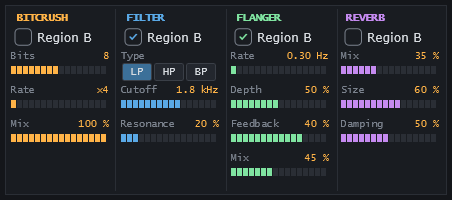
There are two places to switch, and both do the same:
- Insert strip under the Loop-2 lane: each Loop-2 region has four markers (Bitcrush, Filter, Flanger, Reverb, in that order and in the module colours): filled = on, outline = off. Click a marker to switch it; this also selects the region. A region too narrow for four markers shows one combined marker; switch it in the panel.
- Effects panel: select a region in the Loop-2 lane; each module's switch shows Region and switches the insert for that region. Without a selected region it reads no region and is disabled.
Toggling a switch of the region that sounds is heard immediately. New regions start with all inserts off.
- The switches follow the Loop-2 region that started last. A drawn silence switches all inserts off.
- Reverb and Flanger ring out: when a region ends, a region without them starts or the host stops, their input fades out but their tail keeps sounding.
- Bitcrush and Filter have no tail: switching them crossfades between the dry and the processed signal.
- An insert that is off passes the signal unchanged.
- Right-click audition of a Loop-2 region runs through that region's inserts.
Drag a slider sideways; a double-click resets it to its default. The settings are not host parameters, so they cannot be automated (see Host Integration).
| Label | Range | Default | Notes |
|---|---|---|---|
| Bits | 1 – 16 | 8 | Bit depth, whole steps. |
| Rate | ×1 – ×64 | ×4 | Downsampling factor, whole steps. |
| Mix | 0 – 100 % | 100 % | Share of the crushed signal. |
At 1 bit there are three levels (−1, 0, +1): material peaking below half scale (−6 dBFS) becomes silent.
| Label | Range | Default | Notes |
|---|---|---|---|
| Type | LP, HP, BP | LP | Low-pass, high-pass, band-pass (three buttons). |
| Cutoff | 20 Hz – 20 kHz | 2.0 kHz | Logarithmic slider. |
| Resonance | 0 – 100 % | 20 % |
| Label | Range | Default | Notes |
|---|---|---|---|
| Rate | 0.05 – 5 Hz | 0.30 Hz | Free-running, no tempo sync. |
| Depth | 0 – 100 % | 50 % | |
| Feedback | −90 – +90 % | 40 % | Negative values invert the feedback. |
| Mix | 0 – 100 % | 50 % |
| Label | Range | Default |
|---|---|---|
| Mix | 0 – 100 % | 30 % |
| Size | 0 – 100 % | 50 % |
| Damping | 0 – 100 % | 50 % |
The settings and the per-region switches are saved with the project and in presets. Switches belong to Loop-2 regions: they move with their regions when you add or remove boundaries, and they are deleted when you replace Loop 2 (the slider settings stay). A pass slot stores no effects; a replayed pass uses the current switches.