Repository navigation
Rules
A rule belongs to a Loop-1 region. It says what Loop 2 does each time Loop 1 enters that region: which Loop-2 region plays, with which probability, how (GATE or ONE, forwards or REV) and at which mix. Each Loop-1 region has its own rule; one entry of a rule (Loop-1 region → Loop-2 region) is a mapping.
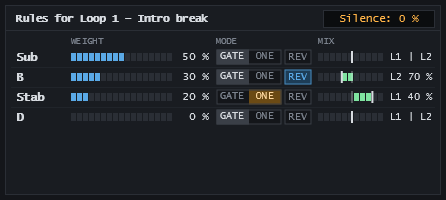
Click a region in the Loop 1 lane. The rule panel shows Rules for Loop 1 – and one row per Loop-2 region. The rows appear once both loops are loaded.
| Column | Control | Meaning |
|---|---|---|
| (name) | Region name | The Loop-2 region. Double-click to rename it. |
| WEIGHT | Slider and percent | Probability (0–100 %, 1 % steps) that this Loop-2 region plays. |
| MODE | GATE | ONE | Click to switch. GATE: plays as long as Loop 1 stays in the region. ONE: plays once, then ends. |
| REV | Lit: this Loop-2 region plays backwards for this mapping. | |
| MIX | Slider and readout | Balance of Loop 1 and Loop 2 while this region plays. Double-click: centre. |
Silence: n % (top right) is the rest up to 100 %: the chance that Loop 2 plays nothing new. The weights of a rule can never add up to more than 100 %: a slider stops where the others leave no room. Set the weights so the sum is 100 % to have no silence at all.
- Each time Loop 1 enters a region that has a rule, exactly one outcome is drawn by weight: one Loop-2 region, or silence. This happens on every pass, also after the loop wraps and after a transport jump.
- The drawn Loop-2 region always starts at its own beginning.
- Loop 2 plays one region at a time. A new draw cuts the running region (also a one-shot) with a short fade (about 5 ms) and starts the new one. A drawn silence stops whatever Loop 2 plays.
- A Loop-1 region without a rule draws nothing: no new Loop-2 region starts there.
| Mode | Behaviour |
|---|---|
| GATE | The Loop-2 region plays and repeats until Loop 1 leaves the triggering region, then stops. |
| ONE | The Loop-2 region plays once, completely, even past the end of the Loop-1 region, unless the next draw cuts it. |
Loop-2 regions have their own lengths, independent of Loop 1: use GATE to fill a Loop-1 region with a short Loop-2 region, ONE to drop a fill or a phrase that should finish.
REV plays the Loop-2 region backwards for this mapping only: the same Loop-2 region can play forwards from one Loop-1 region and backwards from another. REV is independent of the mode:
- GATE + REV plays the region backwards and loops it backwards seamlessly until Loop 1 leaves the region.
- ONE + REV plays it once from its end to its start, with the same fades as forwards.
Tempo stays locked to the host and the pitch is unchanged (only time is reversed). The Loop-2 playhead moves backwards meanwhile. A change of REV is heard at the next start of that region, not in the middle of playback. Right-click audition always plays forwards.
MIX sets the balance of the two loops while this Loop-2 region plays:
| Position | Readout | Loop 1 | Loop 2 |
|---|---|---|---|
| Far left | L1 only |
full | silent |
| Left of centre | L2 n % |
full | quieter |
| Centre (default) | L1 | L2 |
full | full |
| Right of centre | L1 n % |
quieter | full |
| Far right | L2 only |
silent | full |
The mix applies only while that Loop-2 region plays; otherwise Loop 1 is back at full level. Changes are smoothed, so nothing clicks. Moving the MIX of the region that sounds is heard at once. Right-click audition ignores the mix.
Rules move with their regions when you add or remove a boundary (merging two regions keeps the left region's rule). AUTO keeps the rules as they are, so they may point to Loop-2 regions that no longer exist. The panel then shows n % of it on removed regions and a Reset button, which removes those mappings. Replacing a loop deletes all rules.
Weights, modes, REV and mix are saved with the project and in presets (see Presets and Banks). A pass slot stores only which region played when; on replay it uses the current REV and mix of its mapping (see Pass Slots).