A Magisk Module which enables Pixel UI and some exclusive features.
- Supported Android Versions: Android 7.0 to Android 16
- ARM64 device
- Volume Keys (optional)
- Internet for downloading NGA Resources, Pixel Livewallpaper, Device Personalization Services & Pixel Launcher
- Magisk v24 or above from Pixelify v2+
- Zygisk (Recommended but not mandatory, needed for spoofing functions)
- NOTE: Flash the module zip file in the Magisk Manager app only; flashing the module in TWRP or any other recovery won't work.
- Telegram (https://t.me/basgame1)
- Group Chat (https://t.me/PixelifyNext)
- Xda (https://xdaforums.com/m/basgame1.13021465/)
- Github Issues (https://github.com/BasGame1/Pixelify-Next/issues)
- Realme Ui (Android 14), Oxygen Os (Android 14), axion Os (Android 16) will not work. It will bootloop rom after reboot. only way is to fix it by factory reset. #Don't Flash Pixelify Next on it
- Tested on LineageOS (Android 15 and 16)
- Make Sure Play Store not installing when Pixelify is installing.
- If using KSU, install KSU zygisk module first
- Add Google Play Services and inside com.google.android.gms.unstable in DenyList.
- On installation, If see error when installing Google Photos, then uninstalling updates of google apps
- Playstore
- Clear Playstore data
- Open Playstore for 5-10 secs
- Force Stop Playstore
- Update Google App (For NGA & NGA Voice Typing)
- Untick Auto Updates for Google Photos, Android System Intelligence (Don't Update these app from playstore)
- Google Dialer
- Clear Data
- Open it for 5-10 secs
- Force Stop Google Dialer
- Open Google Dialer
- Google App
- After Updating Google app from playstore
- Launch Google Assistant
- Let it Download and setup everything
- After setting up, automatically NGA Voice should work.
- If NGA Voice typing not working then
- Set main Language of phone and Gboard to Supported NGA Languages
- Download 50xx Voice Pack in Google app
- Restart
- Google Photos
- Clear Data
- Make sure connected to WiFi
- You may receive Updating Photos Editor, wait for it.
- Google Photos may download around 300-400mb only with WiFi
Note: Photos editor tool struck Editing Tool will install soon
- First Wait for sometimes and connect with WiFi
- Reboot
- if still not fixed (Reinstall Pixelify;- sometimes flags doesn't get patched due to gms performing action on database)
Working of Magic Editor, New Automatic Call Screening depends on Device, Kernel.
If Some features not working,
- Make Sure to Select YES for Disable Internal Spoofing
- Check file /sdcard/Pixelify/flaglog.txt if you find Status: Error xxxxx on some flags, then you may need to reinstall pixelify.
- Use packages with Pixelify-${version}-no_VK.zip
- Place config.prop in your internal storage>Pixelify (/sdcard/Pixelify/config.prop)
- Edit the prop file according to what features you want
- (If you have any problem placing config.prop there then you also can extract and update config.prop inside the packages it automatically use it.)
- Pixel XL:- Google Photos
- Pixel 9 Pro XL:- Dialer functions
- Pixel 6 Pro:- Rest Google apps except (all Google camera package)
Note :- Zygisk spoofing can't override PixelProp Utils.
- Initial Size of module is low
- Open Source
- Works with most of Android version
- Uses Dynamic spoofing (Zygisk) for only Google apps to prevent crashes and other issues
- Provides most of the Pixel exclusive features
- Installation of features is optional
- Supports (720p,1080p,1440p) Google bootanimation
- Allows creation of backup of online Pixelify packages
- Also provides some unreleased Pixel Features
- Creates Google keyboard, Google app, Google Text to speech, Google Dialer as system app if not installed
- Dynamic Permission generation of apps installed by pixelify
- Config as well as Volume key installation
- Patches Flags to force enable pixel features
(They may not work depending on the device, bc some are server side, but report them if they dont work, u are adviced)
- Pixel 6 & Pixel 7 Live Wallpapers*
- Magic Eraser
- Magic Editor
- Audio Eraser
- ProofRead
- Google Dialer Direct Call (12+)
- New At a Glance feature (12+ & Dec+ Patch)
- Google Quick Phrase*
- Google Next Generation Assistant Typing (Next Generation Assistant Required)*
- Personalized Speech Recognition
- Call Caption Typing (12+)
- Live Captions different language
- Adaptive Charging (Google SystemUI)
- Adaptive Connectivity (11+)
- Adaptive Sound (11+)*
- Battery Widget (Working depends on rom)
- Call Captions (11+)(Depends on Rom)
- Enables Nexus, Pixel, and Android One app support
- Google Dialer Call Screening
- Google Dialer Hold for me
- Google Dialer Call Recording (Device depended for working)
- Google Dialer Automatic Call Screening
- Google Digital Wellbeing Heads up
- Google Duo features
- Google Fit Heart rate
- Google Fit Respiratory rate
- Live captions (10+)
- Next Generation Assistant* (10+)(Optional)
- Now Playing Export* (Works only on Pixel Phone)
- Pixel Device spoofing (Optional)
- Pixel Blue theme accent
- Pixel bootanimation (Optional)
- Pixel Live Wallpapers (Optional)
- Screen Attention Service
- Smart Compose
- Unlimited Photos backup (Storage saver)
- Unlimited Photos backup (original) (needs Zygisk)
* - Requires Spoofing to Pixel device
- Italian (IT)
- Japanese (JP)
- Spain (ES)
- France (FR)
- Germany (DE)
Missing something? Here are some more Pixel features from other developers. (meanwhile
we're working on implementing more in pixelify)
• circle to search:
Circle 2 search
(README)
• pixel play:
Pixel Play
• now playing:
Ambient music mod
• customize your pixel launcher:
Pixel Launcher mods
Pixel Launcher Enhanced
- Reporting bugs with logs
- Feature Requests
- Supporting other persons on issues or telegram (t.me/@basgame1)
- Creating pull request to enable new feature or code improvements
- Google for creating these awesome features
- topjohnwu for Magisk
- #TeamFiles for so many themed icons for Pixel Launcher android 12
- Kdrag0n for SimpleDeviceConfig
- Freak07 for Adaptive Sound
- Pranav Pandey for BreelWallpaper2020 Port
- HuskyDG for intial Riru Port, Bootloop saver
- [Enzo Ariel] (https://github.com/enzosanchezariel) for pixel launcher fix
- Saitama Fixing Pixel Launcher crashes
- Gapps Flag Leaks AssembleDebug For some flags
- Pixelify Support Group Members for testing beta versions :)
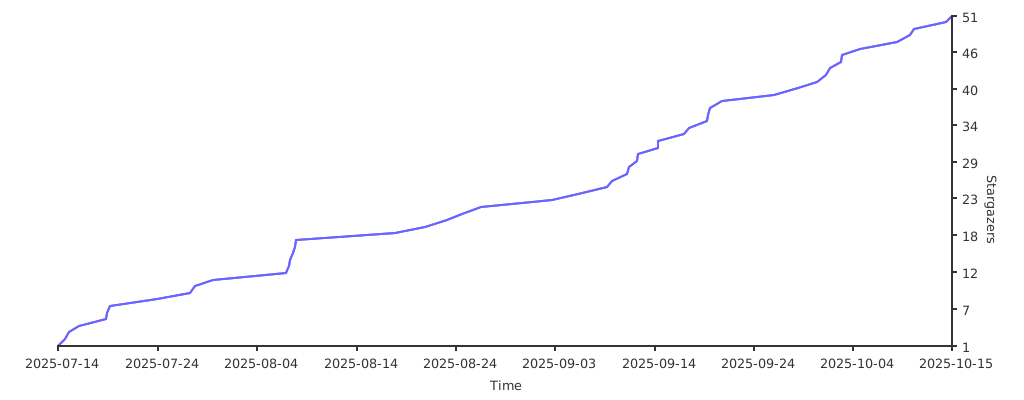
-INIT PIxelify Next
-Fix bugs