v0.26.0

The whole-page release. Minn's editor was built for writing, and for a while that quietly meant it was built for posts: the moment content turned into a Group or a set of Columns, it locked into a read-only card. This cycle it grew up to real pages. Every core layout container now opens for writing (Group, Columns, Cover and Media & Text), nested inside one another to any depth, with each container's frame and styling kept to the byte. The complex pieces inside a layout, a spacer, a row of buttons, an embed, a third-party block, stay as small protected cards you can configure, duplicate, or move between columns without leaving Minn, and the slash menu, block picker and paste all reach inside a group now. Paste raw block markup from an AI tool or a tutorial and it becomes real, editable blocks on the spot. Everything you do not touch saves back identical, so the block editor always reopens your layout exactly as it was. Around the layout work sits a run of reader-reported fixes: decoded labels and numbers on non-English sites, real avatars for users without a Gravatar, an honest and clickable notice on builder-managed pages, and a new performance benchmark that keeps deeply nested pages typing smoothly.
Added
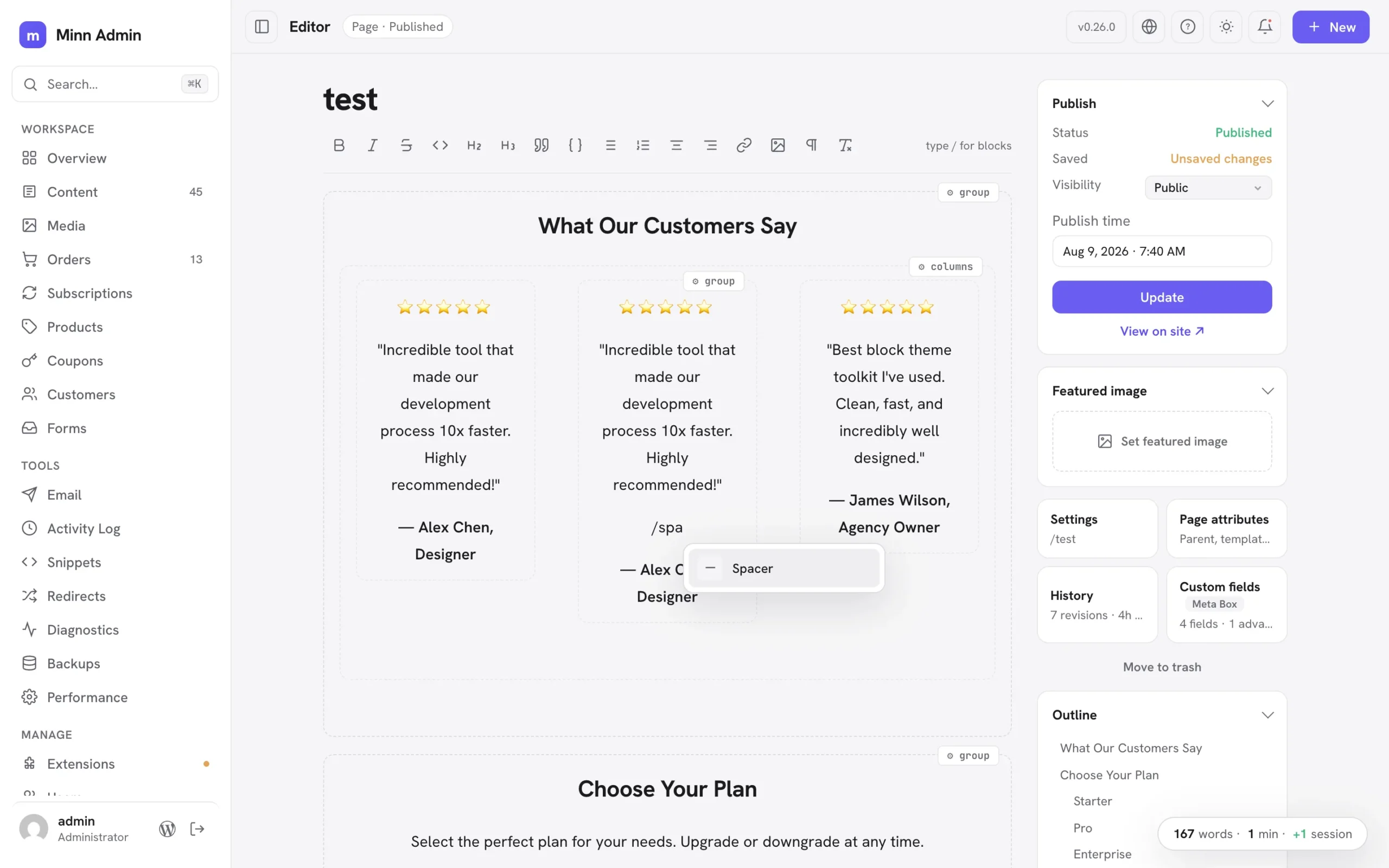
- Write inside groups and columns: Group and Columns blocks are no longer locked cards. The container's frame stays protected while everything inside it is simply writable: type, split paragraphs with Enter, use bold and the other inline markdown shortcuts, and create new blocks right there with the markdown prefixes (# for headings, - for lists, > for quotes, --- for a divider), the toolbar's block buttons and the slash menu. Each column is its own writing surface, laid out side by side like the front end. Complex pieces inside a container (a spacer, a row of buttons, an embed, a nested group, a third-party block) stay as small protected cards you can configure from their ⚙ chip, remove (two presses, with Undo) or edit in place where they offer text. Containers nest to any depth: groups inside columns inside groups all open for writing. The container's own settings, layout and styling re-save byte-for-byte, and a container you never touch saves back identical to the byte, so the block editor always reopens your layout exactly as it was.
- Hidden wp-admin menus stay hidden in Minn: many sites hide admin menus from clients with a few lines of code (
remove_menu_page; hiding Comments is the classic). Minn now notices: the same background check that gathers admin notices also reads the final admin menu, and anything a developer removed there (Comments, Media, Users, Extensions, Settings) leaves Minn's sidebar too. Like the wp-admin original it is purely cosmetic; every screen stays reachable by URL and the command palette. Menus absent only because a user lacks the capability are never treated as removed, and site owners can opt out with theminn_admin_respect_removed_menusfilter. - Styled text blocks stay editable: paragraphs, headings and lists carrying custom styling (a font size, a text color, a style preset) used to lock into protected cards; now they load as ordinary editable text. Their styling travels with them untouched: the block's settings re-save byte-for-byte, splitting a styled paragraph with Enter gives both halves the styling (exactly what the block editor does), pressing Enter at the end starts a fresh unstyled paragraph, and merging two paragraphs keeps the first one's look. Changing such a block's TYPE (a styled paragraph into a heading, say) is deliberately declined with a pointer to the block editor, since that conversion cannot keep the styling intact. List items with their own styling now also keep it across saves, which previously could be lost silently.
- Protected blocks are editable in place: text inside a protected block card (a plugin's fancy block, a complex layout piece) can now be edited right where it sits. Click any text in the card and type; your words save into the exact spot they live in while the block's layout, styling and settings stay byte-for-byte untouched, so the block editor always reopens it cleanly. Editing inside a protected card is deliberately text-only: formatting and new paragraphs belong to the ⚙ inspector and the block editor, and the hover hint says so. A block whose displayed text can't be matched safely back to its saved markup simply stays as it was, with the ⚙ inspector available as before.
Improved
- Faster editor loads on pages full of groups: editable Group and Columns blocks no longer ask the server to render a preview they never display, so a page built from many grouped sections opens with noticeably less work behind the scenes.
- Copying a few words inside a group or a locked block: selecting part of a sentence inside grouped content and copying now copies exactly those words. It previously copied the entire block.
- Plugin views read like cards on phones: every plugin-contributed list (snippets, redirects, activity logs, email logs, form entries, diagnostics and the rest) now stacks each row as a small card at phone widths: the item's name gets the full line and can wrap, the details sit quietly underneath, and nothing scrolls sideways or truncates to a few letters. Status cards tidy up too, with stats flowing two-up and charts taking the full width. Desktop keeps the familiar table.
- The What's-new popup reads one release at a time: a clickable version list sits beside the notes (the same layout as the changelog on minnadmin.com), so finding what changed in any release is one click instead of a long scroll. On phones the list becomes a compact row of version chips that scrolls on its own.
- Rich paste inside groups and columns: pasting from Word, Docs or another post now works inside an editable group the same way it does at the top level. Multi-paragraph payloads land as separate real blocks, formatting normalizes to what the editor stores, and lists merge naturally.
- Insert anything inside a group: the slash menu inside a group now offers the full set (tables, images, embeds, spacers, design libraries, patterns and Browse all, not just headings and lists), the ⌘K block picker inserts at your cursor even inside a group, pasting a video URL into an empty line in a group creates the embed right there, and pasted or dropped images upload and land inside the group.
- Cover and media-and-text open for writing too: the text inside a Cover block or a Media & Text block is now directly editable, with the background image or media preserved exactly as the block editor saved it. Together with groups and columns, every core layout container is now a writing surface.
- Paste block markup, get blocks: pasting raw Gutenberg markup as plain text (from an AI tool, a tutorial, or a theme's pattern file) now converts to real blocks instantly, exactly as the block editor does. Groups become writable sections, complex pieces become protected cards, and everything saves as proper blocks. Pasting the same markup inside a code block keeps it as literal text, so writing about markup still works.
- Duplicate a block in place: every block card's ⚙ settings popover now has a duplicate button next to remove. The copy lands right below the original: a testimonial card duplicates inside its own column, ready to edit.
- Nested layouts calmed down: deeply structured pages used to wear a settings chip on every card at every level, and hovering a section lit up the whole ancestry. Now nesting is quiet at rest (faint outlines, no chips) and the chrome follows the innermost card under your pointer: hover a testimonial and only its chip and outline appear, while the containers around it stay still. Top-level blocks keep their familiar resident chip, and the explanatory hints only appear on top-level containers.
- Nested layouts stay fast: the calmer nested-layout chrome is driven by lightweight hover tracking instead of a CSS feature that made the browser re-check the whole document on every keystroke, which had made typing stutter on deeply nested pages. Keystrokes are smooth again, and a new editor performance benchmark guards against this class of slowdown going forward.
- Move blocks without leaving Minn: the same popover gains move arrows. Up and down reorder a block within its section; when a block lives in a column, left and right arrows hop it to the neighboring column, so a duplicated testimonial walks straight into the empty middle column. The popover stays open, so repeated presses carry a block exactly where you want it.
- Pasted markup with semantic wrappers renders correctly: AI tools often generate a group as a
<section>element without the matchingtagNameattribute. On classic themes that mismatch made WordPress mis-nest the whole section on the front end (columns stacked instead of sitting side by side). Pasted markup now heals the attribute to match the element, the same normalization the block editor applies. - HTML comments don't lock a section anymore: AI tools often label markup sections with plain comments (
<!-- Testimonial 1 -->). Those used to make the whole container read-only-ish (text editable, but no new lines). Containers with comment labels now open fully for writing, line returns included, and the labels survive every save.
Fixed
- Stale update notices are filtered out: WordPress's update cache routinely keeps announcing an update that's already installed until something refreshes it (the classic refresh-the-updates-screen fix). Minn now validates every plugin and theme offer against the actually installed version before showing it anywhere (the notifications panel, the Extensions badges, and Update all), so an already-satisfied update simply never appears.
- The builder notice is one big button now: on pages managed by Elementor, Bricks and friends, the whole "canvas is managed by" banner is clickable and opens the builder, with the Edit-in-builder pill staying readable on hover (its text used to vanish into the highlight). And when a builder page has nothing to preview (a fully dynamic canvas like a store account page), the body says "Nothing to preview here" instead of showing the misleading "Keep writing…" prompt. Reported in issue #10.
- Code blocks can be removed from their settings popover: the ⚙ popover on a code block gains a Remove button, matching what tables and images already had. Removal shows the Undo toast, and ⌘Z while it shows brings the block back with its content.
- Table and code settings inside groups: tables, code blocks and images living inside an editable group or column now get the same floating ⚙ settings chip they have at the top level, so row and column operations, syntax highlighting and image settings work there too. Deleting a table inside a group keeps your cursor in the group.
- Broken avatars in the Users list: on sites with the Show Avatars setting turned off (or a privacy plugin emptying avatar URLs), every user row showed a broken-image icon. Those rows now show a colored tile with the user's initial, and an avatar that fails to load falls back to the same tile. Reported in issue #9.
- Discussion defaults respect the wp-admin off state: the v0.25.0 fix for the new-post comment and pingback switches missed how wp-admin actually stores an unchecked Discussion checkbox (an empty string, not
closed), so sites that turned comments off in Settings → Discussion still saw both switches start on. Only a literal open counts as open now, and new pages start with both switches off, exactly as WordPress stores them. Re-reported in issue #6. - Raw HTML codes in labels and numbers: on many non-English sites, numbers showed the literal text
between digit groups (WordPress inserts it as the thousands separator for locales that group with a space), and post type or taxonomy labels containing an apostrophe could display'instead. All formatted numbers and display labels are now decoded before Minn renders them, everywhere. Reported in issue #11.