Releases: austinginder/minn-admin
Release list
v0.29.0

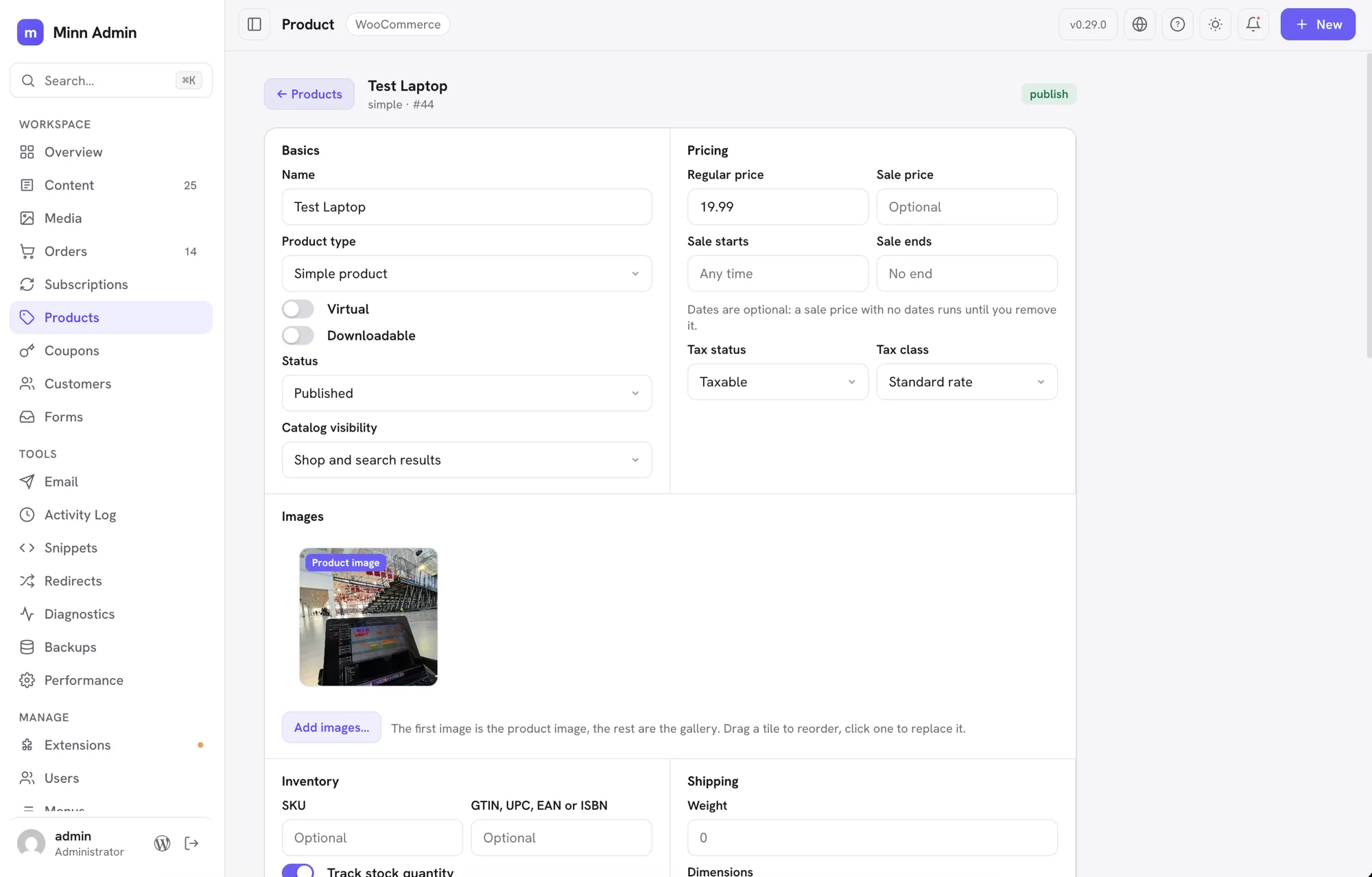
The product release. Orders became real pages a few cycles ago and products follow now, further than orders went. A product used to be a modal with a handful of fields, so almost every real edit still finished in WooCommerce. It is a page at its own URL now, and it holds on one screen what WooCommerce spreads across the Product data tabs: pricing with its sale schedule and tax class, inventory down to GTIN, backorders and a low stock threshold, shipping, the product image and gallery as tiles you drag to reorder, categories, tags and brands, upsells and cross-sells, attributes, and variations that a variable product can generate from its own attributes. The product type is a control here too, so marking something downloadable or external rearranges the page around it without losing anything you had already typed. The long description opens in Minn's own editor rather than sending you back. The page settled a house rule while it grew, one that now holds across all of it: every choice is one of Minn's own comboboxes and every yes or no is a switch, so no operating-system menu punches a pale hole through a dark screen. Around the store work, licensing and connections keep filling in. Every Brainstorm Force product gets its own key and renewal date, SureRank joins the SEO panel, OttoKit's outgoing webhooks become something you can search and retry, and SureCart's store connection appears beside the rest. Smaller comforts run through the release as well: older dates name their year, the content list sorts by title, a post carrying unsaved edits wears a quiet dot instead of a second status, and the caret stays where you put it when a list finishes loading underneath you.
Added
-
Every Brainstorm Force product can be licensed from Minn. Astra Pro, Ultimate Addons for Beaver Builder and for Elementor, Convert Pro, Schema Pro, WP Portfolio, Premium Starter Templates and Spectra Blocks Pro used to appear on the Licenses tab as a single read-only list. Each is now its own row with its own key: paste a key to activate, free the seat again with Deactivate, and ask Brainstorm Force to confirm a license with Re-verify, all through the plugin's own activation code. Licensed products show their renewal date once they have been verified, and a product Minn has never heard of is covered the day Brainstorm Force ships it.
-
SureRank joins the SEO panel. Sites running SureRank now edit their SEO title, meta description, focus keyword and social thumbnail from the editor, the same panel Yoast, Rank Math, AIOSEO, SEOPress and SiteSEO already fill. Clearing a field really clears it: SureRank treats an empty box as "use the site-wide template" and writes that template into the post, so Minn removes the value instead of storing the template as though you had typed it.
-
OttoKit's outgoing requests are visible in Minn. OttoKit runs your automations from its own cloud, but every webhook this site fires at it is recorded here, and that record is what you want when an automation did not run. The new Automation surface lists those requests with their response code and error, filtered by delivered or failed, searchable by endpoint, with the payload on the card and Retry available one at a time or in bulk. Retrying goes through OttoKit's own retry, so the attempt count and status stay its own. Workflows and run history live in OttoKit and Minn links out to them rather than showing a stale copy.
-
SureCart shows whether your store is connected. SureCart keeps every order, customer and product in its own service, reached with a site token, so that connection is the whole local story. It now appears with your other site connections on the Licenses tab: connected or not, with a link to SureCart's own setup when it is not. The token itself is only checked for presence and never read.
Improved
- Products open as a page. A product used to be a modal you clicked a row to get, which meant it could not be linked to, bookmarked or opened in a second tab. Clicking a row now opens /minn-admin/products/{id}, a real page with a back button and the same fields the modal had. The modal stays as a quick look: hover a row and click the eye, or right-click and choose Quick view. Both surfaces share one body, so anything added to the page arrives in the quick view too. The long product description now opens in Minn's own editor, with blocks, autosave and revisions, rather than sending you to WooCommerce.
-
The product page covers inventory and shipping. It used to stop at name, SKU, status, visibility, price and stock, which meant most edits still ended in WooCommerce. The page now carries the identifier fields (SKU and GTIN, UPC, EAN or ISBN), the stock policy that goes with tracking quantity (backorders and a low stock threshold), the one-per-order limit, and shipping: weight, dimensions and shipping class picked from the classes your store actually has. The fields are grouped the way WooCommerce groups them, as Basics, Pricing, Inventory and Shipping, but on one page instead of behind tabs. A virtual product hides shipping, the same as WooCommerce does. Leaving the low stock threshold empty means your store-wide setting, not a threshold of zero.
-
Products are organized from the product page. Categories, tags, brands, the slug and the featured flag now live on the page in an Organization card. Each taxonomy shows what is assigned as chips you can click to remove, with a search box under it that looks through the terms your store already has. Tags and brands can be made on the spot: type a name that does not exist and press Enter. Categories are pick-only on purpose, since a typo there would leave a stray category in your shop's navigation. Brands appear only if your WooCommerce has them.
-
Product images are managed on the product page. The page shows the product image and the whole gallery as a row of tiles. Drag a tile to reorder, click one to swap it for something else in your media library, and hover it for the × that removes it. The first tile is labelled, because that is the picture WooCommerce shows in the shop, so promoting a gallery image to the product image is a drag rather than a trip to WooCommerce. Add images opens the media picker and appends what you choose. It all saves with the rest of the page, in one Save changes.
-
The product page covers every product type. The type is a control on the page now, not something you leave for WooCommerce: switch between simple, grouped, external and variable, and mark a product virtual or downloadable. The page follows along. A virtual product drops the shipping fields, a downloadable one gains a Downloads card where you name each file and point it at a URL or pick it from your media library, with the download limit and expiry beside it, and an external product asks for the address and the button text that send shoppers there. Anything you have already typed stays put when the page rearranges itself.
-
Upsells and cross-sells are set on the product page. A Linked products card searches your catalogue by name or SKU and holds what you pick as chips: upsells appear on the product's own page, cross-sells in the cart. A product never offers itself, and reopening the page shows the names of what you linked rather than a row of ids.
-
Product attributes are edited on the product page. Each attribute is a row: its name, its values separated by commas, and two switches for whether shoppers see it and whether a variable product varies by it. Attributes you invent for one product are typed in place; attributes your whole store shares are picked from a list and keep their name as a label, since that name belongs to the store rather than to this product. Creating a brand new store-wide attribute is still WooCommerce's job.
-
Variable products build their variations in Minn. A variable product gets a Variations card listing each variation with its attribute values, SKU, price, sale price and stock status. Generate from attributes creates every combination your attributes allow and skips the ones you already have, or add them one at a time. Everything saves with the page's own Save changes, and saving twice updates your variations rather than duplicating them.
-
Older dates on lists name the year. Once a date is more than a week away, Minn still shows a short month and day (Aug 17). Dates from another year now add the year (Aug 17, 2025), so a long-lived site's content list no longer looks out of order. This year's dates stay compact. The same wording is used everywhere a relative date ages out: comments, orders, users, and plugin surfaces.
-
The content list sorts by title or date. Click the Title or Date header to sort. Date starts newest first, Title A to Z; click again to flip. The default stays newest first, which is what a blog wants. Author and status are not sortable.
-
The theme button is a light/dark switch. Clicking it used to walk System, Light and Dark, so a second click could land you on follow-the-OS when you only wanted the other color. Click now flips light and dark only, locking that choice. Follow the system is still on the right-click menu, and on Your profile.
-
Unsaved edits are a mark on the status, not a second status. A live post with a newer autosave used to wear an amber Modified pill next to Published, which stacked two labels in a narrow column. The status pill now carries a small amber dot instead: one pill, one line, and the same quiet marker the sidebar uses to say something is waiting for you. Hover it for the explanation. The Modified filter is unchanged.
Fixed
- Content counts describe the list underneath them. An author signing in saw a sidebar count and an item count taken from every post on the site, above a list holding only thei...
v0.28.0
The multisite release. Minn runs on a WordPress network now. A chevron beside the site name moves you between the sites you belong to, and the palette knows them by name. If you run the network, a fourth sidebar group appears: every site with its state and members, the network settings worth revisiting, the accounts and who administers them, and plugin and theme activation for the whole network from Extensions. The rules WordPress leaves to its own screens are enforced here on the server: the main site is never offered deletion, nobody revokes their own network administrator status or the last one on the network, and a site administrator's view stops at their own site. That last point drove a security pass across the release. Several plugins keep one table for an entire network, and Minn was reading them with a single site's permission; those, the shared debug log, and everywhere Minn writes or runs code now ask for the permission the data deserves.
Added
-
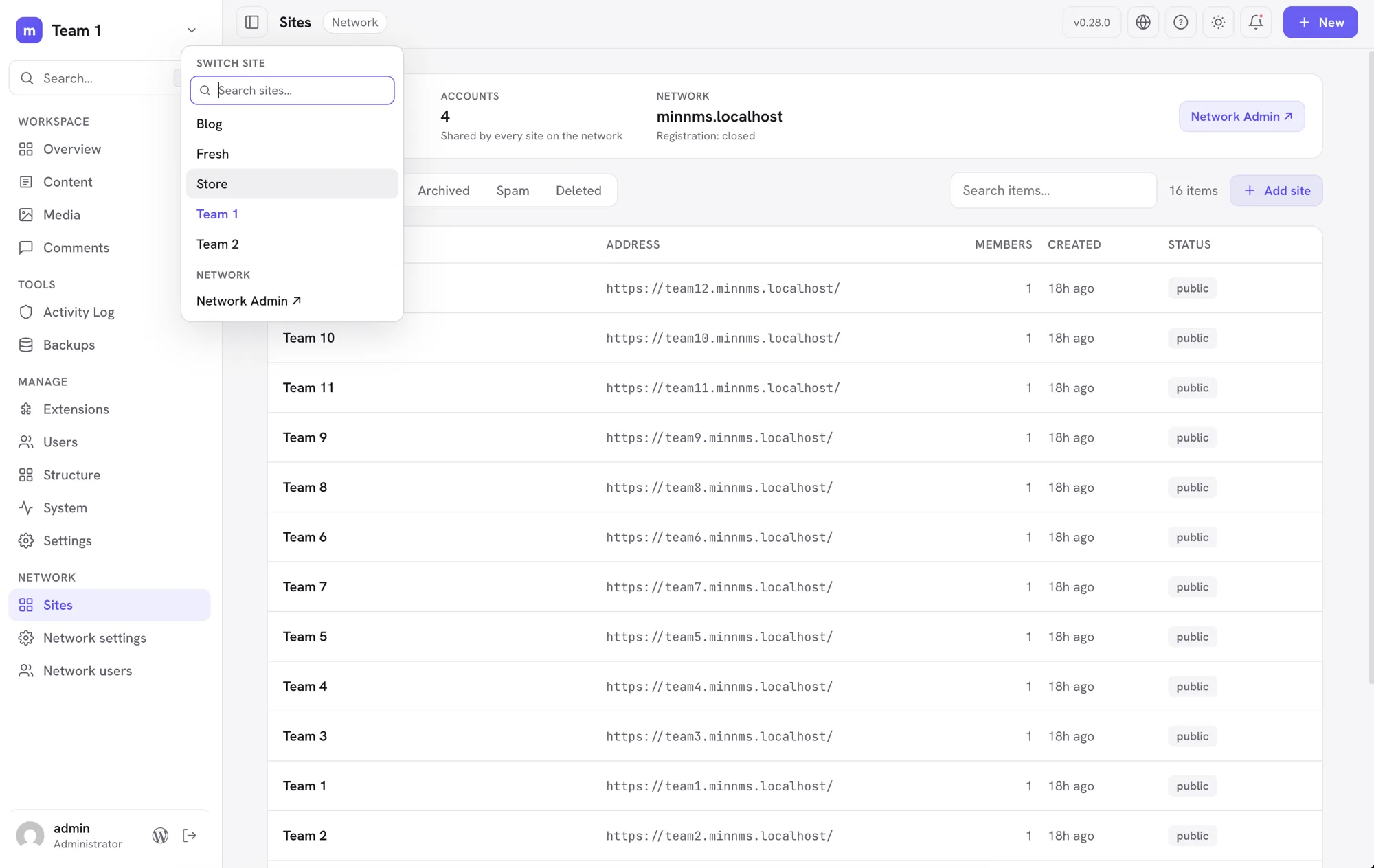
A Network area for the people who run the whole network. Network administrators get a Sites view: every site on the network with its address, member count and state, filters for public, archived, spam and deleted sites, and search. From a site's row you can open it in Minn, visit it, archive or restore it, mark it as spam or clear that, and delete it. Adding a site takes an address, a title and the email of someone who already has an account. The main site of the network is never offered archive or deletion, nor is the site you are working in, and every one of these refusals is enforced on the server rather than only hidden in the interface. Site administrators do not see any of it. Network-wide settings and account creation stay in Network Admin, one click away.
-
The network settings you actually revisit. Registration (who may sign up, and whether new sites and accounts email you), uploads (storage per site, the largest single file, which file types are allowed), whether site administrators may create accounts and manage plugins, and where network mail goes. The rest of the network settings screen, the welcome emails and reserved names and language defaults, stays in Network Admin behind a link, the same way Minn treats a single site's settings long tail.
-
Turn a plugin on everywhere, or offer a theme to every site. Network administrators can activate a plugin across the whole network from its card in Extensions, and withdraw it again, without leaving for Network Admin. Themes get the matching control: offer one to every site, or stop offering it. These are separate from a single site's own switches, so turning a plugin off network-wide leaves sites that chose it for themselves alone, and withdrawing a theme never changes the theme a site is already using. Minn will not deactivate itself network-wide from inside itself.
-
Network accounts, with the safety rails WordPress leaves to the screen. The Network area lists every account on the network with the number of sites it belongs to, and marks the network administrators. You can promote someone or take that status away, but never your own (that would lock you out of the network) and never the last one standing. Where the list of network administrators is fixed in wp-config.php, Minn says so instead of offering buttons that would do nothing. Creating and deleting accounts stays in Network Admin, because deleting a network account removes that person's posts from every site and only WordPress's own flow offers to reassign them first.
-
Move between sites on a network without leaving Minn. A chevron beside the site name opens a compact switcher with an autofocused search field and no more than five fuzzy-matched sites at a time. It searches site names and addresses across the full set you can use, so
team1findsTeam 1and even a shorthand liketm10reachesTeam 10beyond the initial menu cap; arrow keys and Enter work without leaving the field. Network administrators get a link to Network Admin from the same menu. The command palette carries the sites too, so ⌘K and a site's name is enough. Nothing appears when you belong to a single site, or when the site is not part of a network. -
Users on a multisite subsite now work the way the network intends. A site administrator sees the whole site's user list again (it used to collapse to just their own account), changes roles from the row menu, adds an existing network account to the site by email or username with a role, and removes a member from the site without touching their network account or other memberships. Deleting accounts stays a Network Admin job, and network administrators are off limits: their rows offer no role or removal controls, and the server refuses such requests no matter where they come from.
-
Core updates finish the job on a network. After updating WordPress on a multisite network, every site's database migration now runs as part of the update, the way Network Admin's Upgrade Network does; before, only the site you updated from migrated, and the rest waited for someone to open each dashboard. The update status check also notices a half-finished network walk and completes it.
-
Translations join the rest of the updates. WordPress keeps language packs apart from plugin, theme and core updates, so Minn could tell you everything was current while WordPress itself was still offering Update Translations. Waiting translations now appear in the Updates list, count toward the update badge, and go in with everything else when you update. They install in one step, the way the WordPress screen does it, and only for someone allowed to install languages.
Fixed
- Links that carry a whole address work again. Where a plugin's row action links straight to an address the item supplies, rather than building one around it, the address was being escaped as though it were a fragment of a longer link. The result was a dead link back to the current site with the real destination stuck on the end. This affected the Performance Lab settings links, and would have affected the new per-site links in the network Sites list.
- Network-activated plugins read as what they are. On a multisite network, a plugin activated for the whole network showed in Extensions as Inactive with a live switch, and clicking it tried to activate a plugin that was already running. Those plugins now show a Network active label with no switch, count as active in the filters, and their menu drops the activate and delete entries; network-wide changes belong to Network Admin.
- Security and backup histories stay inside the right hands on a network. Several plugins keep one network-wide table that Minn read with a single site's permission: Wordfence's login log, Solid Security's lockouts, Duplicator's backup packages, and Limit Login Attempts in its network mode. A site administrator could see, and in some cases act on, other sites' data. Each now requires network permission on a network, matching where those plugins put their own screens.
- The System page no longer offers logs it will not serve. On a network, the shared debug log is readable only with network permissions, but the Debug card still showed every log source to a site administrator, whose clicks then failed. The card now lists only what the viewer may actually open.
- Minn's address now works across a whole multisite network. Activating Minn network-wide only taught the main site the /minn-admin/ address; every other site on the network answered Not Found until its rewrite rules were rebuilt by hand. Each site now repairs its own rules the first time Minn loads there. Deactivating had a mirror problem on any site, multisite or not: the address quietly kept working and showed the homepage. Deactivation now removes the route cleanly, network-wide.
- A capability check could be pointed at the wrong thing. Two places asked "may you do this?" about one item and then acted on another, because the question and the answer read the request differently. On WPCode, sending the snippet type in the web address rather than the body skipped the check that decides who may write PHP, so someone trusted only with markup could turn a snippet into code the site runs. On the user routes, a request could ask about your own account while writing to somebody else's, so any signed in visitor could change an administrator's Minn language or appearance. Both now resolve the target once and act on that.
- Snippets that run as code now need the capability that implies. Custom CSS and JS quietly ran non-privileged code through an HTML filter, which does nothing to JavaScript, and then wrapped it in a script tag anyway. JavaScript and HTML snippets now require the unfiltered HTML capability, as do stylesheets that load in the admin or on the login screen, and a stylesheet cannot be retyped into JavaScript to get around it. Editing ordinary front end CSS is unchanged. Header Footer Code Manager already refused those writes, but activating or deleting an existing snippet skipped the same check, and both now take it.
- Form entries stay with the person who owns the form. The Everest Forms list showed every author's entries, including the submitted answers, to anyone who could see entries at all. It now follows the same own and others rule the plugin applies everywhere else, and so do the form list and the entry counts.
- Shared logs are no longer treated as this site's own. On a network, wp-content holds one debug log for every site on it, and the viewer could read and empty it with a single site's permissions. It now asks for network permissions there, matching the database browser. The viewer also stopped falling back to the server's own PHP error log, which on shared...
v0.27.0
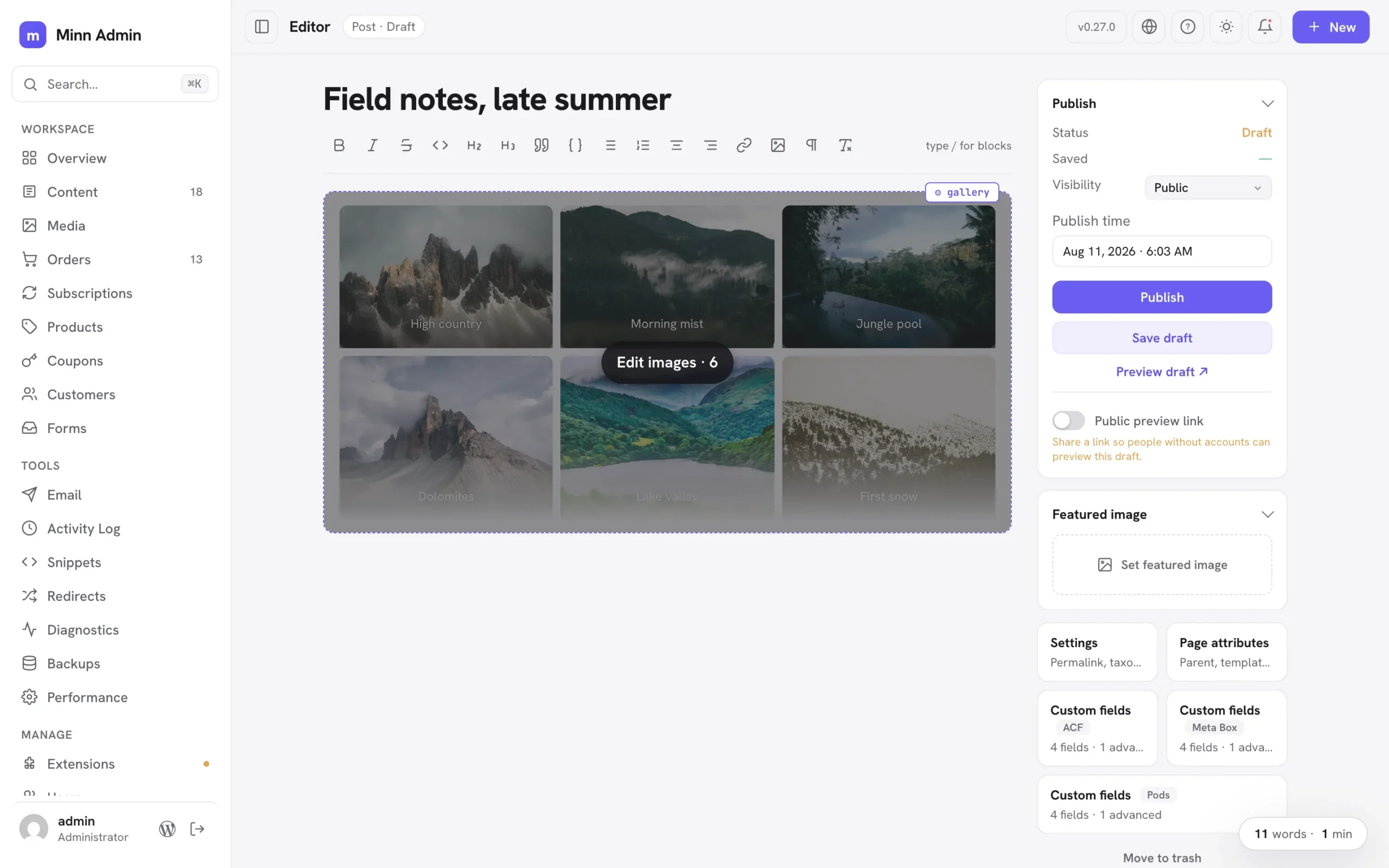
The images release. Every gallery-shaped block gets one images editor: a tile grid to reorder, replace, add, remove, duplicate and caption photos, covering sliders, fixed layouts and blocks that keep their pictures in settings. Each image moves as an exact unit, so captions and per-image tweaks travel with it. Columns, crop and random order sit on the gallery's ⚙ popover, dropped photos upload straight into the block, and Jetpack's tiled gallery can be built and edited outright. Groups of styled paragraphs open in an Edit content window, text first, with each block's other settings behind a toggle. Previews match the front end, and a security audit of v0.26.0 is complete with every finding fixed.
Added
- Gallery settings, the safe ones: a gallery's ⚙ popover now offers Columns, Crop images and Random order alongside Edit images. Columns and crop live in both the block's settings and its markup, so applying rewrites the two together and the change renders exactly as the block editor would have written it. Link, size and lightbox options rewrite every photo in the gallery, so those stay in the block editor and the popover says so.
- Previews lay galleries out correctly: a four-column gallery used to preview three across. The width each column reserves assumes the gap the theme actually uses, and that gap value only existed on a real page view; previews now receive it, so columns match the block's setting (this also tightens group and grid spacing in previews generally).
- You can always tell which block a ⚙ popover belongs to: the open popover's block wears an outline, hovering any ⚙ handle outlines the block it configures before you click, and nested handles that used to stack on the same corner now sit side by side. A group inside a group reads as two distinct controls instead of one button that seems to change its mind.
- Nested blocks edit in a roomy window, text first: a group of styled paragraphs used to unroll in the ⚙ settings popover as a text field plus a dozen schema inputs per block, so fixing a typo meant scrolling past walls of settings (GitHub #12). Containers holding several blocks now open an "Edit content" window instead: one card per block with its text front and center, and everything else tucked behind a small Settings toggle, exactly the shape the images editor already has. Reorder with the arrows, remove with ×, add another block from the footer. The popover keeps the container's own settings plus a "Content · N blocks" doorway; protected cards open the window from a click anywhere on them, with the block you clicked highlighted; and inserted designs open it directly, so placeholder copy is replaceable the moment it lands. Text you didn't touch is kept byte for byte. The same work fixed a quiet bug underneath: editing a live container's blocks through its ⚙ settings used to update only the stored copy, so the next keystroke inside the container could silently revert the change; applying now updates the container in place.
- Duplicate an image where it sits: the ⚙ popover on any editable image gains a duplicate button, so a photo inside a group or column can be copied in place without a trip to the block editor. The copy keeps the caption, size and the image itself, and lands directly below the original. Protected blocks keep their duplicate in the same place they always had it, the ⚙ settings popover. And for either kind, ⌥-clicking a block's ⚙ handle duplicates it outright instead of opening settings, while ⇧⌥-click removes it (⌘Z brings it back). Both are listed in the help dialog's shortcuts.
- Synced patterns open for editing: a synced pattern in a post is a reference to content that lives elsewhere, so Minn now says so and offers the way in: hovering one dims the whole card and names the action, and clicking anywhere on it saves the post you are on and opens that pattern in Minn's editor, where every editing tool works as usual. Changes there flow to every post using the pattern, which is what synced means.
- Two quiet ways into the block editor: while you are editing, the ⌘K palette offers "Edit in the block editor", and ⌥-clicking the WordPress button at the bottom of the sidebar opens the post you are editing in wp-admin's own editor. Both save your work first, so the tab that opens shows exactly what you were looking at. Without the modifier that button still goes to the dashboard, and the help dialog lists the shortcut.
- Less chatter around blocks: hovering a group or columns block no longer shows a label explaining that you can write inside it, and protected cards no longer carry one repeating the ⚙ button sitting right next to it. Cards explain themselves only where there is something to explain: a styled text block that looks typeable and isn't, and a card whose text can be edited in place.
- Block handles wait to be asked: the ⚙ handles on images, tables and code blocks used to sit on screen permanently, so a page of photos wore a row of chips. They now appear only on the block you are pointing at, and the image settings popover fits its actions on one line.
- Row layouts stay rows while you write: a group whose blocks sit side by side on the front end (a details strip of label and value pairs, a row of links) used to unroll into a tall stack of one-word lines in the editor. Those groups now lay out horizontally while you edit, honoring their alignment, so what you type looks like what visitors see. Groups set to stack vertically are unchanged, and the block’s saved settings are untouched either way.
- Sliders and carousels get the same image editing, and preview as one slide: carousel blocks wrap every image in its own slide block (Carousel Slider, and most slick or swiper based blocks), which used to leave them out of the images editor and listing every photo as a separate Replace row. Those blocks now offer "Edit images…" like any gallery: reorder, replace, add and remove, with each slide moved as an exact unit so its settings and captions travel with it. Their previews behave too: a slider is a stack of slides until its script runs, and the editor never runs a plugin's scripts, so a six-slide carousel used to render as six full-height images and bury the rest of the page. The preview now shows the first slide, the way the block does on the site, and the hover overlay says how many images are inside. That overlay dims the block now as well, so the images read as the button they are.
- Jetpack tiled galleries, built and edited in Minn: Tiled Gallery is in the slash menu now, so picking a set of photos builds the block for you, and existing ones can have photos added or removed rather than only swapped. The block works out its own rows and columns from the shapes of the images in it, so Minn had to learn those rules exactly; the result is checked against the block editor itself, which accepts what Minn writes as though it had written it.
- Blocks can teach Minn how their images work: a plugin whose block computes its own layout can now hand Minn a way to rebuild it, and the block then gets the full images editor plus a place in the slash menu. Nothing about a plugin's layout lives in the editor itself.
- Galleries with a fixed layout open too: some blocks don't keep a list of images, they keep a layout whose openings hold images, with column widths the plugin worked out from each photo's shape (Jetpack's tiled gallery is the common one). Those blocks used to fall back to replacing one photo at a time. They now open the images editor for what is safely theirs, reordering and replacing: the photos move through the openings and the layout stays exactly as the plugin built it. Adding and removing aren't offered there, since the layout holds a set number of images, and the editor says so.
- Sliders that keep their images in settings, too: some sliders save no image at all in the page's markup, keeping each slide's picture in the block's settings with a mirror list on the block itself (Gutenslider works this way). Those slides now get the same images editor as any gallery, and the mirror list travels with them, so reordering can't leave the slider showing one set of pictures while listing another.
- Captions, edited with the images: every tile in the images editor now carries its caption, typed straight in, so a gallery's captions are managed in the same place as its photos. Clearing one removes it rather than leaving an empty line behind, and a caption you didn't touch is left exactly as it was.
- The editor ignores full-screen section heights: a page built as a slide deck sets each section to fill the screen, which while writing reads as acres of empty space between two paragraphs. The editor now lays those sections out around their content. Your page is untouched: visitors still get the full-screen sections.
- Tall image blocks preview as a card: a gallery of two dozen photos used to render as a column of full-size images you had to scroll past to reach the rest of the post, with the editing button somewhere in the middle. Those previews now fade out at a readable height, with the number of images on the hover overlay and the editor one click away.
- Blocks that fetch their own styling now preview correctly: some blocks load the stylesheet their layout depends on from their own script, when a visitor opens the page. The editor never runs a plugin's scripts, so that stylesheet was simply missing and the block's pieces fell into a plain stack: a slider's caption, for instance, ended up just past the bottom of the slide and was cut off, leaving what looked like an empty box. Minn now takes those stylesheets from a real view of the page and applie...
v0.26.0
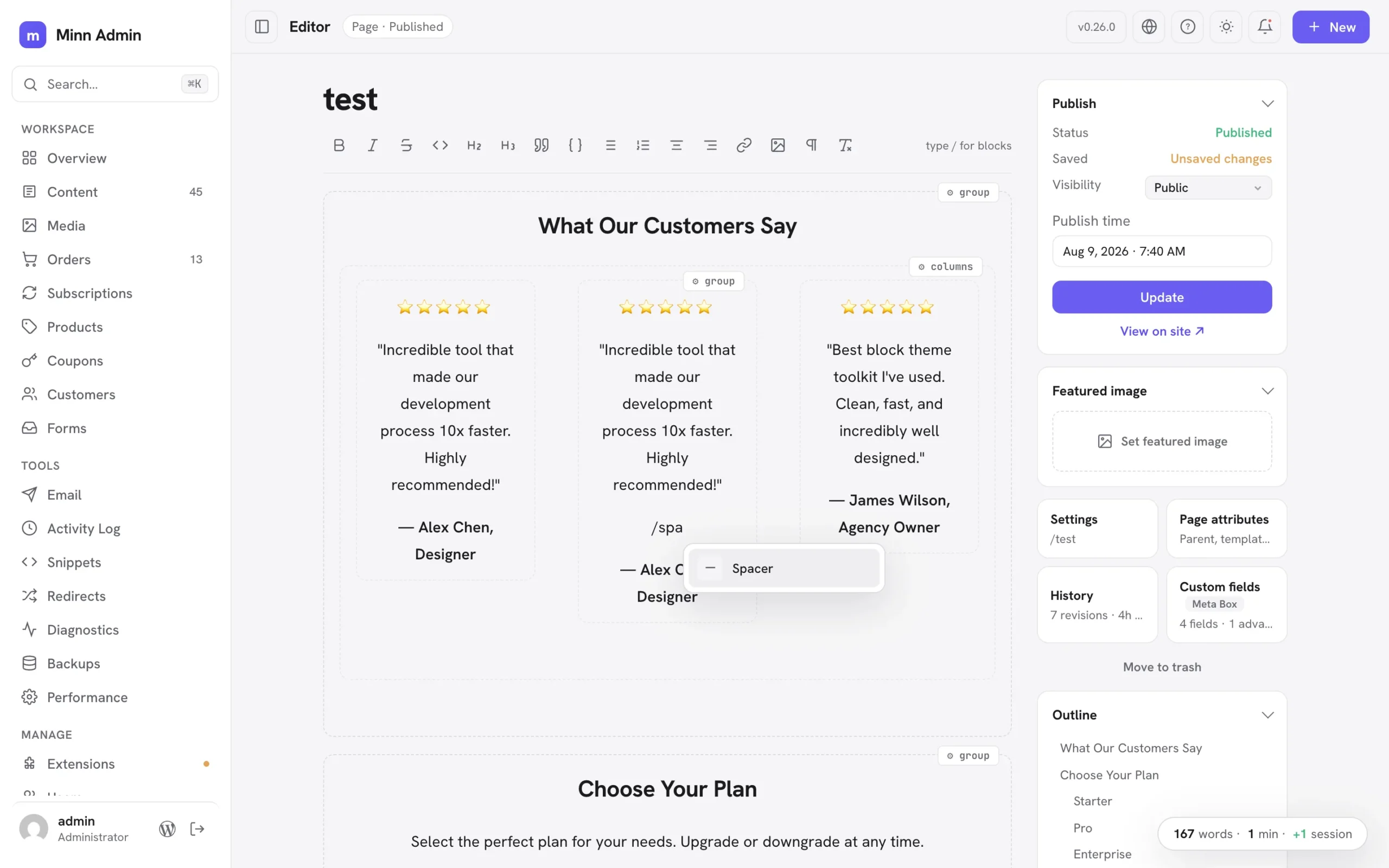
The whole-page release. Minn's editor was built for writing, and for a while that quietly meant it was built for posts: the moment content turned into a Group or a set of Columns, it locked into a read-only card. This cycle it grew up to real pages. Every core layout container now opens for writing (Group, Columns, Cover and Media & Text), nested inside one another to any depth, with each container's frame and styling kept to the byte. The complex pieces inside a layout, a spacer, a row of buttons, an embed, a third-party block, stay as small protected cards you can configure, duplicate, or move between columns without leaving Minn, and the slash menu, block picker and paste all reach inside a group now. Paste raw block markup from an AI tool or a tutorial and it becomes real, editable blocks on the spot. Everything you do not touch saves back identical, so the block editor always reopens your layout exactly as it was. Around the layout work sits a run of reader-reported fixes: decoded labels and numbers on non-English sites, real avatars for users without a Gravatar, an honest and clickable notice on builder-managed pages, and a new performance benchmark that keeps deeply nested pages typing smoothly.
Added
- Write inside groups and columns: Group and Columns blocks are no longer locked cards. The container's frame stays protected while everything inside it is simply writable: type, split paragraphs with Enter, use bold and the other inline markdown shortcuts, and create new blocks right there with the markdown prefixes (# for headings, - for lists, > for quotes, --- for a divider), the toolbar's block buttons and the slash menu. Each column is its own writing surface, laid out side by side like the front end. Complex pieces inside a container (a spacer, a row of buttons, an embed, a nested group, a third-party block) stay as small protected cards you can configure from their ⚙ chip, remove (two presses, with Undo) or edit in place where they offer text. Containers nest to any depth: groups inside columns inside groups all open for writing. The container's own settings, layout and styling re-save byte-for-byte, and a container you never touch saves back identical to the byte, so the block editor always reopens your layout exactly as it was.
- Hidden wp-admin menus stay hidden in Minn: many sites hide admin menus from clients with a few lines of code (
remove_menu_page; hiding Comments is the classic). Minn now notices: the same background check that gathers admin notices also reads the final admin menu, and anything a developer removed there (Comments, Media, Users, Extensions, Settings) leaves Minn's sidebar too. Like the wp-admin original it is purely cosmetic; every screen stays reachable by URL and the command palette. Menus absent only because a user lacks the capability are never treated as removed, and site owners can opt out with theminn_admin_respect_removed_menusfilter. - Styled text blocks stay editable: paragraphs, headings and lists carrying custom styling (a font size, a text color, a style preset) used to lock into protected cards; now they load as ordinary editable text. Their styling travels with them untouched: the block's settings re-save byte-for-byte, splitting a styled paragraph with Enter gives both halves the styling (exactly what the block editor does), pressing Enter at the end starts a fresh unstyled paragraph, and merging two paragraphs keeps the first one's look. Changing such a block's TYPE (a styled paragraph into a heading, say) is deliberately declined with a pointer to the block editor, since that conversion cannot keep the styling intact. List items with their own styling now also keep it across saves, which previously could be lost silently.
- Protected blocks are editable in place: text inside a protected block card (a plugin's fancy block, a complex layout piece) can now be edited right where it sits. Click any text in the card and type; your words save into the exact spot they live in while the block's layout, styling and settings stay byte-for-byte untouched, so the block editor always reopens it cleanly. Editing inside a protected card is deliberately text-only: formatting and new paragraphs belong to the ⚙ inspector and the block editor, and the hover hint says so. A block whose displayed text can't be matched safely back to its saved markup simply stays as it was, with the ⚙ inspector available as before.
Improved
- Faster editor loads on pages full of groups: editable Group and Columns blocks no longer ask the server to render a preview they never display, so a page built from many grouped sections opens with noticeably less work behind the scenes.
- Copying a few words inside a group or a locked block: selecting part of a sentence inside grouped content and copying now copies exactly those words. It previously copied the entire block.
- Plugin views read like cards on phones: every plugin-contributed list (snippets, redirects, activity logs, email logs, form entries, diagnostics and the rest) now stacks each row as a small card at phone widths: the item's name gets the full line and can wrap, the details sit quietly underneath, and nothing scrolls sideways or truncates to a few letters. Status cards tidy up too, with stats flowing two-up and charts taking the full width. Desktop keeps the familiar table.
- The What's-new popup reads one release at a time: a clickable version list sits beside the notes (the same layout as the changelog on minnadmin.com), so finding what changed in any release is one click instead of a long scroll. On phones the list becomes a compact row of version chips that scrolls on its own.
- Rich paste inside groups and columns: pasting from Word, Docs or another post now works inside an editable group the same way it does at the top level. Multi-paragraph payloads land as separate real blocks, formatting normalizes to what the editor stores, and lists merge naturally.
- Insert anything inside a group: the slash menu inside a group now offers the full set (tables, images, embeds, spacers, design libraries, patterns and Browse all, not just headings and lists), the ⌘K block picker inserts at your cursor even inside a group, pasting a video URL into an empty line in a group creates the embed right there, and pasted or dropped images upload and land inside the group.
- Cover and media-and-text open for writing too: the text inside a Cover block or a Media & Text block is now directly editable, with the background image or media preserved exactly as the block editor saved it. Together with groups and columns, every core layout container is now a writing surface.
- Paste block markup, get blocks: pasting raw Gutenberg markup as plain text (from an AI tool, a tutorial, or a theme's pattern file) now converts to real blocks instantly, exactly as the block editor does. Groups become writable sections, complex pieces become protected cards, and everything saves as proper blocks. Pasting the same markup inside a code block keeps it as literal text, so writing about markup still works.
- Duplicate a block in place: every block card's ⚙ settings popover now has a duplicate button next to remove. The copy lands right below the original: a testimonial card duplicates inside its own column, ready to edit.
- Nested layouts calmed down: deeply structured pages used to wear a settings chip on every card at every level, and hovering a section lit up the whole ancestry. Now nesting is quiet at rest (faint outlines, no chips) and the chrome follows the innermost card under your pointer: hover a testimonial and only its chip and outline appear, while the containers around it stay still. Top-level blocks keep their familiar resident chip, and the explanatory hints only appear on top-level containers.
- Nested layouts stay fast: the calmer nested-layout chrome is driven by lightweight hover tracking instead of a CSS feature that made the browser re-check the whole document on every keystroke, which had made typing stutter on deeply nested pages. Keystrokes are smooth again, and a new editor performance benchmark guards against this class of slowdown going forward.
- Move blocks without leaving Minn: the same popover gains move arrows. Up and down reorder a block within its section; when a block lives in a column, left and right arrows hop it to the neighboring column, so a duplicated testimonial walks straight into the empty middle column. The popover stays open, so repeated presses carry a block exactly where you want it.
- Pasted markup with semantic wrappers renders correctly: AI tools often generate a group as a
<section>element without the matchingtagNameattribute. On classic themes that mismatch made WordPress mis-nest the whole section on the front end (columns stacked instead of sitting side by side). Pasted markup now heals the attribute to match the element, the same normalization the block editor applies. - HTML comments don't lock a section anymore: AI tools often label markup sections with plain comments (
<!-- Testimonial 1 -->). Those used to make the whole container read-only-ish (text editable, but no new lines). Containers with comment labels now open fully for writing, line returns included, and the labels survive every save.
Fixed
- Stale update notices are filtered out: WordPress's update cache routinely keeps announcing an update that's already installed until something refreshes it (the classic refresh-the-updates-screen fix). Minn now validates every plugin and theme offer against the actually installed version before showing it anywhere (the notifications panel, the...
v0.25.0
The people release. A full-page user editor lets admins set another user's entire Minn experience, color scheme included, before their first sign-in. Any menu item can now be hidden just for you, core views included, and restored from your profile or by an admin. New posts honor the site's discussion defaults, the version badge stopped crowding the site name, locked editor blocks explain themselves on hover, and plugin authors gain status panels: post-scoped status and actions in the editor sidebar, declared entirely server-side.
Added
- Hide any menu item, just for you: the right-click "Hide for you" that plugin surfaces have had now works on the core menu too. Comments turned off sitewide? Hide the Comments entry. Never touch Widgets? Gone. Hiding is per-user and purely cosmetic (every screen stays reachable by URL and the command palette), items disappear immediately with an Undo toast, and everything you hid lists on Your profile for one-click restore. Overview and the editor stay put; they are destinations, not menu noise.
- Admins can restore what a user hid: the user edit page gains a "Hidden for them" card showing every item that user chose to hide from their own Minn, with a Restore button for each. Hiding remains each user's own choice; admins can only bring things back.
- Editing a user is a full page now: clicking a user opens /minn-admin/users/{id}, a deep-linkable page with everything the old dialog had (identity, role, password, sessions, delete) plus what it never had room for: public profile fields, language, and the user's whole Minn appearance. Admins can set another user's color scheme (including full custom palettes for both dark and light), make Minn their default admin, and flip their front-end toolbar, so a client's Minn looks right before their first sign-in. Appearance changes apply to that user's next session and never restyle yours. A "← Users" link at the top returns to the list, and the dialog remains only for adding new users. Light or dark mode stays a device preference each person controls themselves.
- Status panels in the editor sidebar: plugins can now add a post-scoped status card to the editor's door stack. The door shows a live one-line summary from the plugin (with a green, amber or red tint when it declares one), and opening it reveals status rows plus the plugin's own action buttons: plain verbs, dangerous verbs behind Minn's themed confirm, and verbs that collect a value first (an email address, for example). Everything is server-declared through the
minn_admin_editor_panelsfilter's newstatusRouteshape, so a newsletter plugin can say "Not sent · 57 subscribers" on the door and offer its send buttons without shipping a line of JavaScript.
Improved
- Locked blocks explain themselves: hovering a locked block card in the editor now reveals a short hint saying why it is locked and where edits live. A core text block that locked because of custom styling reads "Styled block: edit text via ⚙"; every other protected block points at the ⚙ chip and the block editor escape hatch.
Fixed
- The version badge no longer crowds the site name: the changelog badge moved from beside the logo up to the top bar, next to the view-site button, so longer site names get the sidebar's full width. Clicking it opens the changelog as before.
- New posts honor the site's discussion defaults: the editor's comments and pingbacks switches started every new post as on, even when Settings → Comments had them off sitewide. They now start from the site defaults, matching what wp-admin does and what WordPress actually stores.
v0.24.0
The connections release. Minn has managed license keys for a while; this cycle it starts telling the whole truth about the external services a site talks to. The Licenses tab now inventories service keys and account connections alongside purchase licenses, with WooCommerce.com, Site Kit and Jetpack as read-only rows and the AI connector keys WordPress core manages one doorway away. Akismet's key gets a paste-in-place field on the spam card, WPForms Pro joins both the license manager and the Forms surface with the full entries treatment, and FluentSMTP's quiet daily connection test surfaces the failure that matters most: outgoing email that silently stopped working months after setup. A topbar progress pill while updates run and the sidebar toggle moving up into the topbar keep the everyday feel visible and honest.
Added
- Updates tell you they are running: starting "Update everything" now puts a progress pill in the top bar that stays on every screen until the run finishes, so closing the notification panel or walking away no longer leaves you wondering whether anything is happening. It names the current phase (the plugin count, then each theme by name with its position, then WordPress), spins while it works, and clicking it reopens the panel where the results land. Plugins still update in a single batch, which is the fastest way to run them.
- WPForms entries in Minn: WPForms joins the Forms surface with the full treatment. Entries render as contact cards with per-form tabs, unread, read, starred, spam and trash views, search, star and read state, spam and trash flows with restore, and permanent delete through WPForms' own machinery. Opening an entry marks it viewed, exactly as WPForms' own screen does, and the whole surface honors WPForms' access capabilities, so a user who cannot see entries in WPForms cannot see them in Minn either. Entries are a WPForms Pro feature; Lite sites simply do not get the surface.
- Status cards across the whole forms family: Fluent Forms, Ninja Forms, Forminator, Contact Form 7 and Everest Forms now open with the same at-a-glance card SureForms already had: unread or received entries, spam and trash counts where the plugin tracks them, how many forms exist, and a link to the plugin's own entries screen. Every number comes from the plugin's own storage, so the card always agrees with what the plugin itself reports.
- Resend an email to somebody else: every FluentSMTP log entry now offers "Resend to…" alongside the plain Resend, so a receipt that went to a dead address can be pointed at the right one without leaving the log. Addresses are checked before anything sends; one bad address stops the whole resend.
- Your site's account connections, inventoried: WooCommerce.com (with who it is connected as and how many extension subscriptions ride it), Site Kit by Google and Jetpack now appear on the Licenses tab as read-only rows. A site that is not connected gets a Connect button straight into the right screen; a half-finished Site Kit setup says so honestly instead of reading as fine. Minn only checks that each connection exists: the sign-in ceremonies, tokens and disconnects stay entirely with each plugin.
- Service keys and connections join the Licenses tab: the card covers more than purchase licenses now; the Envato Market account token, WPMU DEV's Hub link and Akismet's service key are connections, not licenses, and the rows finally say so. Each row carries a small chip naming what it is, connection rows read "Connected" or "Not connected" instead of borrowing license language, the "No license" group became "Not set up", and the AI connector keys WordPress core manages appear as read-only rows with a doorway to Settings → Connectors, so one screen answers "what external services does this site talk to, and is each healthy". Unconfigured AI connectors never trip the System health check.
- Akismet keys, right on the spam card: an unconfigured Akismet card on Settings → Comments now carries a paste-your-key field (with a Change key option once one is set), verified and stored through Akismet's own machinery, including its subscription check. A rejected key shows Akismet's real reason inline and stores nothing. Akismet also appears on the Licenses card with the same activate, verify and remove controls, so both doorways drive one implementation. Keys supplied in code (the WPCOM_API_KEY constant or a filter) render read-only, and spam plugins can offer the same in-place field through a new
keyProvidercontract key. - WPForms Pro joins the license manager: the Licenses card now reads WPForms Pro's license state (plan level, expired, disabled, invalid and site-limit flags, and keys defined in wp-config) and offers activate, deactivate and verify through WPForms' own license machinery. A rejected key is refused cleanly with WPForms' own message and nothing is stored; deactivating frees the seat on wpforms.com the same way their settings screen does.
- FluentSMTP's daily connection check, surfaced: FluentSMTP 2.3 quietly tests every mailer connection once a day, because the failure that matters is the silent one (an expired token months after setup). Minn now shows that verdict on the Email status card and, when a connection is failing, as a System health warning that links to the connection screen. A site whose outgoing email is broken says so the moment you open Minn.
Improved
- The navigation toggle is a real button now: showing and hiding the sidebar moved from a slim tab on the left screen edge up into the top bar, as an icon button beside the page title. Same behavior, same ⌘. shortcut, same memory of your choice; it is simply where your eyes already are, and when the sidebar is hidden the button stays in the corner as the obvious way back.
- Resends now leave a trail: resending from the FluentSMTP log rides FluentSMTP's own resend machinery on 2.3 and newer, so the original headers and attachments come along, the log entry records each resend (who sent it, where it went, and whether it delivered), and no duplicate row appears. The email's detail view shows that history. Older FluentSMTP versions keep the previous behavior.
- FluentSMTP permissions are honored: sites that grant FluentSMTP access to a custom capability through its new filter get the same access rules in Minn's Email surface, instead of a hardcoded administrators-only gate.
- Scrutoscope profiles read through Scrutoscope: the profiler's author shipped a list endpoint in Scrutoscope 1.5 so integrations no longer have to read his database table, and Minn now uses it. This is a safety improvement rather than housekeeping: Scrutoscope reduces stored SQL to a verb and table name, and outbound request URLs to a bare hostname, then re-applies both on the way out so that captures written by older versions get cleaned too. Reading the table directly was the one path that skipped that step. The profile list, and the totals on the status card, now come from Scrutoscope's own code on 1.5 and newer, with the previous reader kept for older versions.
- Profiles you captured from Minn are easier to find: using "Profile this hook" on the Cron view saves an on-demand profile, but the list only offered Pinned, Session and Background tabs, so your own capture appeared under All profiles and nowhere else. There is now an On demand tab for exactly those.
- A Context column on the profile list: every capture now shows whether it came from the front end, the admin, a REST call, Ajax, cron or the command line, which is the quickest way to tell an admin-only slowdown from one your visitors feel.
- More on the profiler status card: it now reports how many distinct routes have been captured and how far back the stored history reaches, alongside the profile count, so you can see at a glance whether a profiling session covered enough of the site to be worth reading.
v0.23.0
The switches release. Minn has flagged a forgotten coming-soon page since the visibility system arrived; now the warning carries the fix, a switch that turns the mode off through the plugin's own storage, with an Undo that restores exactly the mode that was on. The same hands-on-the-controls spirit runs through the whole cycle: automatic updates gain per-plugin and per-theme pills, inactive themes gain a live preview, and the patterns you create in WordPress become first-class citizens in Minn, insertable from the slash menu as live references and managed from the Content list. A second click on the sidebar refreshes the list you are looking at, and a run of small honesty fixes (Select All that really selects everything, one preview tab per post, detectors that see through Password Protected and SeedProd) keeps the everyday feel trustworthy.
Added
-
Re-click the sidebar to refresh: clicking the sidebar item for the page you are already on now re-fetches the list in place. Content, Media, Comments, Users, the shop views, Extensions and every plugin surface all take part; the toolbar, tabs, search and filters stay put while the rows dim and reload, so a tab left open all day can pull in what teammates just published without a full page reload. On a grouped item with several providers (Email, Forms, Backups) the refresh stays on the provider you are viewing, and the lit item's tooltip says what a second click does.
-
Three more coming-soon plugins on the visibility radar: Maintenance (WebFactory), CMP Coming Soon & Maintenance (NiteoThemes) and Minimal Coming Soon now register on the site visibility system while their mode is on, covering the most installed plugins in the category. The Overview banner, the topbar chip, the System health check and Settings → Visibility all name the plugin and link to its screen, so "I forgot the coming-soon page was on" gets caught the moment you open Minn.
-
Turn a coming-soon page off without leaving Minn: the visibility warning now carries the fix. Every detected maintenance, coming-soon or password plugin (SeedProd, Maintenance, CMP, Minimal Coming Soon, LightStart, Under Construction, Password Protected, WooCommerce coming soon and Elementor maintenance mode) gets a switch in the banner, the chip popover and Settings → Visibility that turns its mode off through the plugin's own settings storage, with an Undo toast that restores exactly the mode that was on, including which of a plugin's two modes was active and WooCommerce's store-pages-only shape. Plugins Minn does not know how to write to keep their honest link-out, and third parties can register their own writer through a new
minn_admin_visibility_togglesfilter. -
Automatic updates, per plugin and per theme: every card on the Extensions page now carries a small Auto pill that turns WordPress automatic updates on or off for that one plugin or theme, the same setting the wp-admin screens manage. The pills store through core's own auto-update lists, so choices made in Minn and wp-admin always agree, and they only appear when the site allows automatic updates at all.
-
Try a theme before switching: inactive theme cards gained a Live preview link. Classic themes open in the Customizer's preview and block themes in the Site Editor's preview, so you can walk the site in a candidate theme without changing what visitors see.
-
Your patterns, everywhere they belong: the patterns you create in WordPress (synced and unsynced) now live in Minn. They surface in the editor's slash menu and the Browse-all picker under Your patterns; inserting a synced pattern places a live reference that renders the real thing and stays current when the pattern changes, while an unsynced pattern drops in a detached copy. A Patterns entry in the Content switcher lists them with the usual rename, duplicate, trash and bulk tools, the editor opens their markup natively with a reminder that saving a synced pattern updates every post using it, and the + New menu can start a fresh one.
Improved
- Select All now takes the whole post, blocks and all: custom blocks sat in the editor as cards the browser refused to highlight, so selecting everything looked like it skipped them, and copying carried only the words around them. Those cards now highlight with the rest of the text while a selection covers them, and a copy carries the real block markup: pasting back into Minn (this post or another one) rebuilds them as the same blocks with their settings intact, rather than dropping loose paragraphs where the block used to be. Undo still steps back over the whole paste at once, and pasting into another app keeps the readable text and formatting it always had. A block's text also no longer runs together when pasted as plain text.
- A wider email preview: an HTML email body in a log detail now opens in a wider dialog (900 pixels on large screens, with a taller reading pane) instead of the 720 pixel one, so real message layouts render without clipping.
Fixed
- Preview stops multiplying tabs: clicking Preview draft (or View on site) in the editor sidebar, and the same link in a content row menu, now reuses one browser tab per post; a second click refreshes that tab instead of opening another. Minn adopts the same named preview window classic wp-admin and the block editor use, so all three even share the tab.
- Password Protected no longer hides from its own warning: with its "Allow Administrators" or "Allow Logged In Users" setting on, the plugin masks its status option for logged-in reads outside wp-admin, which is exactly how Minn asks. The detector now reads the stored value directly, so a password gate that still blocks visitors shows up even when it waves the admin through. A stale Under Construction status left behind by a deactivated plugin also no longer registers.
- SeedProd detection actually works again: SeedProd stores its settings as a JSON string in current builds, and the old detector expected an array with different keys, so an enabled SeedProd coming-soon or maintenance page went unreported. The detector now reads the real storage shape, distinguishes the two modes, and keeps ignoring the login and 404 page modes that do not hide the site.
v0.22.0
The under-the-hood release. Minn opens a calm window into the machinery it has always sat on top of: a read-only database viewer with a structure tab and a set of storage health checks that hand you the exact cleanup command instead of a scary button, on-demand cron profiling through Scrutoscope, and login posture from All-In-One Security. The traffic story widens too: Matomo and Jetpack Stats join the Overview chart through their own APIs (Jetpack verified on a live connected site), and the day drill-down learns to step through days with the arrow keys. Everything new holds the same line: Minn reads, explains, and links out; it never edits what it cannot promise to leave consistent.
Added
- A read-only database viewer at /minn-admin/database: administrators get a calm window into the site's actual storage. The table list shows every table with estimated row counts, sizes and engines (scoped to this install's prefix by default, with a one-click toggle for other-prefix tables); clicking a table opens its rows with live columns from the schema, a primary-key badge, column sorting, a per-column contains-filter and pagination; clicking a row opens a detail view with full values, column types and a copy control per value. The viewer deliberately has no sidebar item (most sites never need it): its doors are the System page's Database card, where "browse all" opens the table list and each largest-table row drills straight into that table, plus the command palette's "Browse database" command and the /minn-admin/database address itself. Read-only is the product, not a limitation: a database editor would bypass every plugin's invariants, so writes are a permanent non-goal and the interface says so. Serialized values render as raw text (never reconstructed), binary values show a hex preview, and queries stay polite on huge tables: counts come from index metadata, filtered counts stop at ten thousand, and browsing is bounded to the first ten thousand rows of an ordering, with filters as the honest way to reach the rest.
- A Structure tab on every table: alongside Rows, each table now shows its columns (type, nullability, default, key and any comment) and its indexes (the columns each one covers in order, whether it is unique, its type and its cardinality, with partial indexes showing their prefix length). It reads index metadata only, never the table itself, so it opens instantly even on the tables the Rows view has to page carefully. This is the answer to "why is this page slow", one tab away from the data.
- A Health view over the site's storage: the database viewer gains a second view that runs a fixed set of read-only checks and explains what each one means. It finds meta rows left behind by deleted posts and users, relationships pointing at categories that no longer exist, tables missing a primary key or still on an older storage engine, space that could be reclaimed, id columns approaching their ceiling, a missing combined post and meta-key index (a large, low-risk speed win on sites with heavy meta use), stored revisions, spam and trashed comments, expired shop sessions and background-job backlogs. Warnings sort to the top, every check names the table it concerns and links straight to it, and a summary row on the System page reports the state at a glance. Where a check finds something worth cleaning up, Minn hands over the exact WP-CLI command to copy, with a reminder to back up first, rather than a button that runs it: the read-only boundary holds here too. Checks stay polite by design, bounded the same way the row browser is and skipped entirely on tables too large to count cheaply, which is exactly where an eager diagnostic would otherwise do harm.
- Profile a cron hook from Diagnostics: with Scrutoscope 1.4 or newer, the Cron view's row menu gains Profile this hook. Minn asks first, because the hook runs for real (emails, updates, cleanup, queue work) under the profiler, then saves an on-demand profile you can open under Profiles. The work rides Scrutoscope's own profiler API, so per-hook segmentation and their report shape stay intact; on older Scrutoscope the action simply is not offered.
- Restore a backup, one click from Disembark: with Disembark 2.8 or newer, the Backups status card gains a Restore a backup link that opens their Tools screen (where upload-a-zip and pull-from-a-live-site live). Restore stays on Disembark by design: it rewrites the whole site, and Minn does not pretend to own that risk. Older Disembark builds simply do not show the link.
- Matomo joins the Traffic chart: sites running the self-hosted Matomo Analytics plugin now get the Overview Traffic chart and its day drill-down (top pages with real post titles, referrers, and an Open Matomo link) read through Matomo's own reporting API, so the numbers match its screens exactly, including its hourly archiving cadence. Access follows Matomo's own view permission, and a Matomo that has never tracked steps aside so another analytics plugin can answer.
- Jetpack Stats joins the Traffic chart: connected sites with the Jetpack Stats module get the same treatment through Jetpack's own WordPress.com client: daily visitors and views on the chart, top posts and referrers on the day drill-down, and an Open Jetpack Stats link. Verified end to end on a live connected site. A purpose-installed analytics plugin still answers first; Jetpack is the fallback many sites already run. WordPress.com reports views without per-page visitor counts, so page rows say views and skip the number they do not have instead of showing a made-up zero, and referrer rows carry the specific names their own screens show ("Google Search", not the "Search Engines" grouping).
- Step through days in the traffic drill-down: with a day's top pages open, the left and right arrow keys (or the header chevrons) pull up the previous or next day of stats without closing the dialog, skipping days that had no traffic. Works for every analytics provider.
- All-In-One Security login posture: the Activity Log status card for AIOS now reports failed logins in the last day, who is locked out right now, and how many permanent IP blocks are in place, with deep-links into AIOS's own locked-IP and permanent-block screens when those counts are non-zero. The System page gains a matching health row (same Solid Security / Wordfence shape), so a site running AIOS surfaces its login protection without opening their menus.
Fixed
- Redirection's setup notice stays in Minn: the notification panel's "Redirection setup" button used to open wp-admin's Tools screen in a new tab, even though Minn already has the one-time setup gate on Redirects. It now lands on
/minn-admin/redirectionin the same tab (no off-site ↗), and the same rewrite is ready for any future notice that points at a surface Minn already covers.
v0.21.0
Minn Admin v0.21.0 — July 24, 2026
The trust release. This cycle is for everyone who is not the person who built the app: the interface gains real translation plumbing so it can meet users in their own language, the app chrome passes a genuine accessibility audit with a suite that keeps it honest, and a plain-words user guide ships inside the plugin, one click from help. The same spirit runs underneath: updates verify themselves against a published checksum before they install, a security policy opens a private door for researchers, a tab left open overnight recovers on its own, and boot rides one request instead of nine so shared hosting stops watching panels trickle in.
Fixed
- Pending comments stay in the moderation queue: the Overview's Recent activity feed included comments awaiting moderation (author names and all) for every user who could see the dashboard, even though the Comments view, the notification panel and the pending row's own click-through are all reserved for moderators. The feed now applies the same rule everywhere: users who can moderate see pending rows, everyone else sees approved comments only.
- Test scaffolding no longer ships in the notice pipeline: the two dev-fixture ajax handlers used by Minn's own browser suites lived in the shipped whitelist, reachable (though harmless) on any site. The notice button mapping is now filter-open like the whitelist itself, and the fixture handlers moved to the dev site's fixtures plugin where they belong. Production installs carry no fixture code paths.
- A tab left open overnight recovers on its own: REST nonces expire after a day, and an expired one used to dead-end the app (every request failed with a raw error toast until a manual reload). Minn now notices the expired nonce, mints a fresh one in the background through WordPress core's own nonce endpoint, and retries the request; a whole page of parallel requests shares one refresh. If the login session itself is gone, Minn says so and reloads into the login flow instead of leaving dead buttons.
- Typing a license key can no longer be interrupted: a background loader resolving late could rebuild the Licenses tab out from under an open key form, discarding the form and the key being typed before the activation request even returned. A stray rebuild now leaves an open paste form alone; only the renders that legitimately dismiss or replace it (the post-action refresh, Cancel, the inactive-components toggle) still swap it out.
- Three low-severity hardening fixes from a full security audit: a line-by-line pass over the REST surface, adapters and app shell turned up no serious issues and three small gaps worth closing. A public read of a post no longer reveals the name of whoever happens to have it open in the editor (that "someone is editing" signal is for the dashboard, not the world). The Custom CSS & JS reader now refuses to reconstruct PHP objects from stored data, matching the safe pattern the rest of the integrations already use. And the small block of startup data the app inlines is encoded so a site name or display name can never break out of it. None of these were exploitable in normal use; all three are now closed.
Added
- A guide for the people who actually use Minn: docs/user-guide.md is the new site-owner manual, covering getting around (the sidebar groups, the command palette, and the fact that right-click works nearly everywhere), writing and the editor's safety model in plain words, daily site care, hiding what you don't use, every keyboard shortcut, and an honest safety section: what happens when you deactivate (nothing), how updates are verified, and who can open the app. It ships inside the plugin so the copy you read always matches the version you run, and it is now part of the release checklist so it stays current. The guide is one click away in the app itself: a User guide button on the About dialog and an "Open the user guide" palette command render the bundled copy in a reader modal, with the shortcuts table and all, no internet required.
- The app chrome passes a real accessibility audit: every main view now audits clean with axe (zero violations, both themes), and a dedicated browser suite keeps it that way. Screen readers hear each navigation announced and see the active nav item marked as the current page; keyboard focus is rescued when a view swap would have dropped it; every page has a proper top-level heading; the sidebar is a labeled navigation landmark; icon-only buttons and list checkboxes carry real names ("Select Hello world", not silence); sort buttons speak their direction; and users who prefer reduced motion get an interface that stops animating. Muted text and status-chip colors were nudged to meet WCAG AA contrast in both themes: same hues, slightly more present, with pills and dots keeping their original tones.
- Minn is ready to speak your language: the app now has real internationalization plumbing. Interface strings translate through standard WordPress translation files (the same .po/.pot format every translator already knows), each user sees the interface in their own profile language, and English remains the built-in default so nothing changes until a translation exists. The app shell (navigation, page titles, toolbar) is translated first; the rest of the interface converts view by view. Plugin authors' own labels stay theirs to translate.
- Boot rides one request instead of nine: the startup burst (notifications, plugin and update caches, core status, the pending-comment badge, post types and the order summary) now arrives in a single consolidated request. Each section is produced by the same route the standalone fetch used, so nothing changes shape, and a section the server cannot provide falls back to its old standalone fetch automatically. On shared hosting, where a handful of PHP workers had to serialize nine parallel requests, the app's panels stop trickling in one by one.
- Updates are checksum-verified before they install: the release manifest now publishes the sha256 of each release zip, and the self-updater downloads the package, checks it against that hash, and refuses to install on any mismatch. The manifest travels from the GitHub repository while the zip comes from the release CDN; pinning the hash ties the two together, so a tampered or truncated download can never reach your plugins directory.
- A private channel for security reports: the repository now carries a security policy with GitHub private vulnerability reporting enabled, so a researcher can disclose quietly and expect an acknowledgment within 48 hours. It also includes design notes for reviewers, the properties worth knowing before an audit: the capability gate and per-route permission checks, the descriptor-only integration boundary (third-party PHP never runs in Minn's render paths), the no-unserialize and prefix-scoped-SQL shim rules, and the checksum-verified updater.
Improved
- The help dialog helps first: the About dialog now leads with what a person clicking "?" actually needs: how to get around, the fact that right-click works nearly everywhere, and how to hide what you don't use, followed by the keyboard shortcuts. The philosophy is still there, condensed at the end, and the User guide button remains one tap away.
- The plugin and its website finally point at each other: the plugin's listed website is minnadmin.com now (it was the GitHub repository), and the About dialog links to the site and its new shareable docs pages at minnadmin.com/docs. The bundled in-app user guide is unchanged; the web pages are the linkable copies.
- One listing, not two: the wp.org-style readme.txt is gone. GitHub is the distribution channel, so readme.md and minnadmin.com are the listing surfaces; the FAQ, security notes and user guide now live where people actually read them instead of drifting in a second copy.
- List pages are ready to search the moment they open: navigating to Extensions (plugins or themes), Content, Media, Users, Orders, Terms and every other list view drops the caret straight into the view's filter box, so typing filters immediately with no click first. It happens once per navigation and politely: a re-render never yanks focus back, an already-focused text field (the palette, a modal input) is never robbed, and touch devices skip it so the software keyboard stays down.
v0.20.0
The consent release. Every consequential action now says what it touches before it happens: updates enumerate what changes and what stays untouched, permanent deletes wear danger styling with plain-stakes copy, and quick reversible verbs keep their one-click ease. Around that spine, comments learn in-place editing and one-click commenter blocking, the content list says who is editing a post right now, Settings closes two more Customizer-era gaps (site logo and site language), Search & Filter Pro and Admin Columns Pro join the license manager, and plugin activation moves to a real admin context so activation hooks that assume wp-admin stop failing.
Fixed
- Plugin activation works for plugins that assume wp-admin: plugin toggles now run through admin-ajax, a real admin context, instead of the REST plugins endpoint. Activation hooks are written for wp-admin, and some plugins only load parts of themselves there (Breeze skips its ecommerce class outside wp-admin and fataled when activated from Minn on a WooCommerce site). Every activate and deactivate door rides the new path: the Extensions switch, right-click menus, license Turn on, connectors, the Add plugin dialog and the deactivate-Minn modal, with REST as the automatic fallback when admin-ajax itself is unreachable.
- Add-on families keep their names: the plugin name cleanup trims marketing taglines after the first separator, which collapsed families like Admin Columns Pro's add-ons ("Admin Columns Pro - Ninja Forms") into a wall of identical cards. When two installed plugins clean to the same name, both now keep their second segment, so add-ons stay tellable apart while tagline stripping stays aggressive everywhere else. Search matches the disambiguated name too.
- Installing several themes quickly no longer fails with "Failed to fetch": a theme install swaps files and can recycle the PHP worker, so a rapid second install landed on the dying connection and errored even though the server was fine. The Add theme dialog now waits for the server to come back, asks the themes list for the truth (an install whose reply died after the work counts as done), and retries once before reporting a failure. Activating from the dialog gets the same recovery.
- No Comments tab in notifications when comments are off: the notification panel offered a Comments tab even on sites where comments are disabled (the same gate that already hides the Comments nav item). The tab now follows that gate, and an active Comments tab falls back to All if the gate closes mid-session.
- The notification panel's fifth tab was unreachable: with Comments, Updates, Notices and a System kind all present, the tab strip clipped at the panel edge with no way to scroll. The strip wraps to a second row now, so every kind stays visible and clickable.
Added
- A confirm that says what it touches: consequential actions moved from the browser's native confirm to a shared Minn dialog with scope disclosure, swept across the whole app. Update everything and the WordPress core update (both of its doors) enumerate exactly what will change (the pending plugins, themes and core version) and what is not touched (your content, media, users and settings), so the biggest button in the app is also the most explicit. Every permanent delete wears the danger styling with plain-stakes copy: plugins and themes, content, media files, comments, users, terms and term merges, menus, widgets, coupons, refund records and emptying a log. Switching the site's theme shares one dialog across all three of its doors (and says out loud that the old theme stays installed), deactivating a license says the seat frees up, a refund says whether the gateway is asked to send money back, and sending a WooCommerce order email says it goes out right away. Confirms stack politely too: Escape over an open modal peels just the confirm, never the dialog beneath it. Quick reversible verbs (move to trash, sign-outs, password resets) keep their one-click confirms.
- Edit a comment in place: Pending and Approved rows gain an Edit action that opens an inline box with the comment's raw text; guest comments also offer the author name and email (a registered commenter keeps their account identity, so only the text travels). Fixing a typo or stripping a link no longer means a trip to wp-admin.
- Site logo, in Settings: when the active theme supports a custom logo, the Site tab gains a logo field beside the site icon with the same flows (pick from the library, drag and drop an upload, remove), saving through the exact theme_mod the Customizer writes. Themes without logo support see nothing, matching the Customizer's own gate.
- Site language, in Settings: the Site tab gains a Site language picker over every installed and downloadable locale (the options-general list). Picking a language the site does not have downloads its pack on save, through the same machinery as the profile's per-user language; your own language stays on Your profile. This closes another named Customizer-era gap from the core coverage audit.
- The content list says who is editing: a post someone else has open right now wears a quiet "{name} is editing" chip beside its status, on every post type in the list. It reads core's own edit lock (the same lock wp-admin, Gutenberg and Minn's editor already honor between them), so there is no new bookkeeping: a crashed session's lock ages out on its own, and your own open tabs are never flagged. The editor's blocked-open and takeover flow stays the door; the chip means you know before you knock.
- Two more license vendors: Search & Filter Pro and Admin Columns Pro join the Licenses tab with the full loop: paste to activate, deactivate frees the seat, re-verify on demand, all through each vendor's own code. Search & Filter rides its REST controller and the free base plugin's own options store, and a rejected key can no longer clobber a working activation (their own screen would let it). Admin Columns Pro is admin-screen-gated by design, so Minn bootstraps its service container headless; its key-for-token swap (a successful activation trades your pasted key for an activation token) is handled and read back faithfully, lifetime licenses included.
- Block this commenter: right-click a comment and Block commenter adds the author's email (or IP when the comment carries none) to core's disallowed list, so their future comments go straight to the trash. Core's own mechanism, no new storage: the entry is visible and editable under Settings → Comments, the confirm says exactly what will happen, and the toast's Undo removes exactly the line the block added. Offered to administrators, matching who may edit the disallowed list in wp-admin.
Improved
- The editor sidebar's doors pack two-up: Settings, Page attributes, History, the custom-field panels and SEO now sit in a two-column grid instead of a full-width stack, roughly halving their vertical footprint on plugin-heavy posts. An odd count lets the last door span the width, summaries ellipsize inside the narrower cells, and the chevron gives its width back to the text. The Publish and Featured image cards keep their full rows.
- Deleting a theme keeps the page still: the deleted theme's card fades out in place and the rest of the Themes tab stays exactly as it was (scroll position, sibling cards, screenshots untouched). The repaint through the loading screen is gone.
- Comment rows open their post: the "on Post title" in every comment row is a door now. Clicking the title lands in the Minn editor (pages resolve too, not just posts), a quiet ↗ beside it views the post on the site landing right at that comment, and the row's right-click menu leads with Open post in editor and View post. Rows whose post cannot be resolved keep the plain label.