v0.27.0

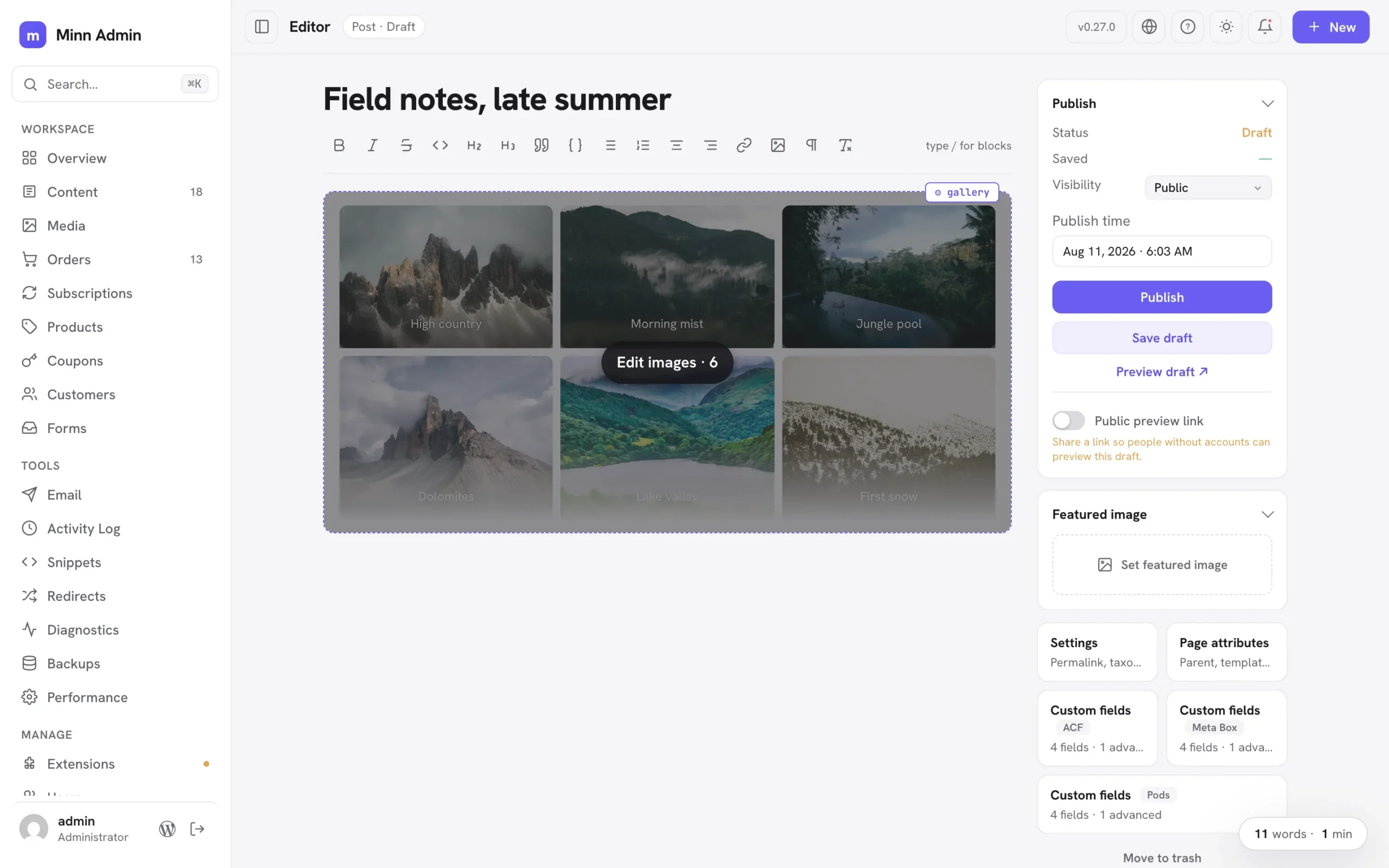
The images release. Every gallery-shaped block gets one images editor: a tile grid to reorder, replace, add, remove, duplicate and caption photos, covering sliders, fixed layouts and blocks that keep their pictures in settings. Each image moves as an exact unit, so captions and per-image tweaks travel with it. Columns, crop and random order sit on the gallery's ⚙ popover, dropped photos upload straight into the block, and Jetpack's tiled gallery can be built and edited outright. Groups of styled paragraphs open in an Edit content window, text first, with each block's other settings behind a toggle. Previews match the front end, and a security audit of v0.26.0 is complete with every finding fixed.
Added
- Gallery settings, the safe ones: a gallery's ⚙ popover now offers Columns, Crop images and Random order alongside Edit images. Columns and crop live in both the block's settings and its markup, so applying rewrites the two together and the change renders exactly as the block editor would have written it. Link, size and lightbox options rewrite every photo in the gallery, so those stay in the block editor and the popover says so.
- Previews lay galleries out correctly: a four-column gallery used to preview three across. The width each column reserves assumes the gap the theme actually uses, and that gap value only existed on a real page view; previews now receive it, so columns match the block's setting (this also tightens group and grid spacing in previews generally).
- You can always tell which block a ⚙ popover belongs to: the open popover's block wears an outline, hovering any ⚙ handle outlines the block it configures before you click, and nested handles that used to stack on the same corner now sit side by side. A group inside a group reads as two distinct controls instead of one button that seems to change its mind.
- Nested blocks edit in a roomy window, text first: a group of styled paragraphs used to unroll in the ⚙ settings popover as a text field plus a dozen schema inputs per block, so fixing a typo meant scrolling past walls of settings (GitHub #12). Containers holding several blocks now open an "Edit content" window instead: one card per block with its text front and center, and everything else tucked behind a small Settings toggle, exactly the shape the images editor already has. Reorder with the arrows, remove with ×, add another block from the footer. The popover keeps the container's own settings plus a "Content · N blocks" doorway; protected cards open the window from a click anywhere on them, with the block you clicked highlighted; and inserted designs open it directly, so placeholder copy is replaceable the moment it lands. Text you didn't touch is kept byte for byte. The same work fixed a quiet bug underneath: editing a live container's blocks through its ⚙ settings used to update only the stored copy, so the next keystroke inside the container could silently revert the change; applying now updates the container in place.
- Duplicate an image where it sits: the ⚙ popover on any editable image gains a duplicate button, so a photo inside a group or column can be copied in place without a trip to the block editor. The copy keeps the caption, size and the image itself, and lands directly below the original. Protected blocks keep their duplicate in the same place they always had it, the ⚙ settings popover. And for either kind, ⌥-clicking a block's ⚙ handle duplicates it outright instead of opening settings, while ⇧⌥-click removes it (⌘Z brings it back). Both are listed in the help dialog's shortcuts.
- Synced patterns open for editing: a synced pattern in a post is a reference to content that lives elsewhere, so Minn now says so and offers the way in: hovering one dims the whole card and names the action, and clicking anywhere on it saves the post you are on and opens that pattern in Minn's editor, where every editing tool works as usual. Changes there flow to every post using the pattern, which is what synced means.
- Two quiet ways into the block editor: while you are editing, the ⌘K palette offers "Edit in the block editor", and ⌥-clicking the WordPress button at the bottom of the sidebar opens the post you are editing in wp-admin's own editor. Both save your work first, so the tab that opens shows exactly what you were looking at. Without the modifier that button still goes to the dashboard, and the help dialog lists the shortcut.
- Less chatter around blocks: hovering a group or columns block no longer shows a label explaining that you can write inside it, and protected cards no longer carry one repeating the ⚙ button sitting right next to it. Cards explain themselves only where there is something to explain: a styled text block that looks typeable and isn't, and a card whose text can be edited in place.
- Block handles wait to be asked: the ⚙ handles on images, tables and code blocks used to sit on screen permanently, so a page of photos wore a row of chips. They now appear only on the block you are pointing at, and the image settings popover fits its actions on one line.
- Row layouts stay rows while you write: a group whose blocks sit side by side on the front end (a details strip of label and value pairs, a row of links) used to unroll into a tall stack of one-word lines in the editor. Those groups now lay out horizontally while you edit, honoring their alignment, so what you type looks like what visitors see. Groups set to stack vertically are unchanged, and the block’s saved settings are untouched either way.
- Sliders and carousels get the same image editing, and preview as one slide: carousel blocks wrap every image in its own slide block (Carousel Slider, and most slick or swiper based blocks), which used to leave them out of the images editor and listing every photo as a separate Replace row. Those blocks now offer "Edit images…" like any gallery: reorder, replace, add and remove, with each slide moved as an exact unit so its settings and captions travel with it. Their previews behave too: a slider is a stack of slides until its script runs, and the editor never runs a plugin's scripts, so a six-slide carousel used to render as six full-height images and bury the rest of the page. The preview now shows the first slide, the way the block does on the site, and the hover overlay says how many images are inside. That overlay dims the block now as well, so the images read as the button they are.
- Jetpack tiled galleries, built and edited in Minn: Tiled Gallery is in the slash menu now, so picking a set of photos builds the block for you, and existing ones can have photos added or removed rather than only swapped. The block works out its own rows and columns from the shapes of the images in it, so Minn had to learn those rules exactly; the result is checked against the block editor itself, which accepts what Minn writes as though it had written it.
- Blocks can teach Minn how their images work: a plugin whose block computes its own layout can now hand Minn a way to rebuild it, and the block then gets the full images editor plus a place in the slash menu. Nothing about a plugin's layout lives in the editor itself.
- Galleries with a fixed layout open too: some blocks don't keep a list of images, they keep a layout whose openings hold images, with column widths the plugin worked out from each photo's shape (Jetpack's tiled gallery is the common one). Those blocks used to fall back to replacing one photo at a time. They now open the images editor for what is safely theirs, reordering and replacing: the photos move through the openings and the layout stays exactly as the plugin built it. Adding and removing aren't offered there, since the layout holds a set number of images, and the editor says so.
- Sliders that keep their images in settings, too: some sliders save no image at all in the page's markup, keeping each slide's picture in the block's settings with a mirror list on the block itself (Gutenslider works this way). Those slides now get the same images editor as any gallery, and the mirror list travels with them, so reordering can't leave the slider showing one set of pictures while listing another.
- Captions, edited with the images: every tile in the images editor now carries its caption, typed straight in, so a gallery's captions are managed in the same place as its photos. Clearing one removes it rather than leaving an empty line behind, and a caption you didn't touch is left exactly as it was.
- The editor ignores full-screen section heights: a page built as a slide deck sets each section to fill the screen, which while writing reads as acres of empty space between two paragraphs. The editor now lays those sections out around their content. Your page is untouched: visitors still get the full-screen sections.
- Tall image blocks preview as a card: a gallery of two dozen photos used to render as a column of full-size images you had to scroll past to reach the rest of the post, with the editing button somewhere in the middle. Those previews now fade out at a readable height, with the number of images on the hover overlay and the editor one click away.
- Blocks that fetch their own styling now preview correctly: some blocks load the stylesheet their layout depends on from their own script, when a visitor opens the page. The editor never runs a plugin's scripts, so that stylesheet was simply missing and the block's pieces fell into a plain stack: a slider's caption, for instance, ended up just past the bottom of the slide and was cut off, leaving what looked like an empty box. Minn now takes those stylesheets from a real view of the page and applies them to the preview, so the block composes the way it does on the site. It happens once, only for a block showing the problem, and only ever affects previews. Your content is untouched.
- Images that are gone say so: an image whose file no longer exists used to show the browser's broken-file icon, which inside a styled block reads as though the whole block were broken. Previews and the images editor now draw a small illustration that says the image is missing, so the block still reads as itself and the tile is still there to click and replace. Nothing about it touches your content: the image's address is kept exactly as it was.
- Columns are editable where you are working: adding or removing one used to mean a trip to the block's settings. Inside a Columns block the slash menu now offers Column, which adds one beside the column you are in with the cursor ready in it, and right-clicking a column opens the same menu the table block has: add column before, add column after, remove column. Removing offers an Undo, since a column leaves with its content, and the last column stays put (an empty columns block is removed as a whole from its ⚙ instead). The slash menu also inserts a whole Columns row now, which was the missing way to start another row inside a group. Columns you didn't touch keep their content exactly, and a new column carries no width of its own, so it can't squeeze the row.
- Drop images straight into the images editor: dragging a photo onto the tile grid used to hand it to the media library and take you out of the post you were writing. Dropped images now upload into that block: they join the grid as new tiles and land in the block when you press Apply.
- Edit a slideshow or gallery’s images in place: gallery-shaped blocks (Jetpack Slideshow, core galleries and friends) get an "Edit images…" button in their ⚙ settings: a tile grid where you drag to reorder (or use the arrow buttons), remove with ×, and add images from the media library, mirroring the screen wp-admin offers for these blocks. Reordering and removing are byte-preserving: each image’s markup moves as an exact unit, so captions and per-image settings travel with their image and the block editor reopens the result cleanly. Hovering the block's images shows an "Edit images" overlay and clicking them opens that editor with the clicked image highlighted; clicking a tile swaps just that image, keeping its caption, and each tile can be duplicated in place. Blocks whose markup doesn’t map safely simply don’t offer the button, and blocks that hold a single image still open the picker straight from a click on the image.
Security
- A security audit of v0.26.0 found a set of access-control and disclosure issues, and this release fixes all of them. The two that matter most to a live site: a helper that stripped tags from text before displaying it parsed that text in a way that could run an image or SVG event handler hidden inside it, which meant a form submission or even a failed login attempt could plant something that ran when an administrator later opened the matching screen; and the debug-constant toggle on the System page left a copy of
wp-config.phpbeside the original under a name web servers hand out as plain text, exposing database credentials and security keys to anyone who asked for it. The backup is now written so it can never be served, and any copy left behind by an earlier version is removed the next time you open the System page. If you ever used those toggles, rotating your database password and salts is a sensible precaution. - Screens now enforce the same permissions the plugin they connect to would. Entry lists for Fluent Forms, WPForms and Everest Forms honour per-form access, so someone given entries for one form no longer sees or deletes another's. Backup jobs can only be started by users the backup plugin allows to start them, snippet types by users allowed to write that type of code, and job-listing fields that the job plugin reserves for administrators stay reserved. Custom field layouts are now read against the post they belong to, so an author cannot inspect the field structure of someone else's draft, and event venue and organizer suggestions offer published records to everyone while keeping unpublished ones to the people allowed to edit them. Site traffic on the dashboard follows each analytics plugin's own reporting permission, so contributors and authors no longer see visitor figures. Session lists, password-reset mail and Additional CSS moved to stricter, per-user checks, and the dashboard's recent-activity list no longer names other people's unpublished drafts.
- Smaller hardening throughout: the updater now pins where an update may come from and always verifies its checksum, a developer flag no longer disables certificate checking for the whole site, mail-provider settings mask credentials by default rather than only when recognised, and a Contact Form 7 entry containing certain text can no longer corrupt its own record.
Fixed
- Writing inside a cover block: a cover's background image sat on top of its own text, so clicking there placed no cursor. You could see the words but not edit them, and the "/" menu was unreachable inside one. The text sits above its background now, and a click always lands on the words.
- The "Edit images" overlay is a button: on a slider whose slides carry text, the middle of the card is editable text and took the press, which is exactly where the overlay sits, so the card felt unclickable. The overlay is now a real button wherever it appears, and while you hover editable text the card stops offering itself as one button, so what you see is what a click will do.
- The whole image card is clickable: a gallery or slider card dims and offers "Edit images" when you hover it, but only the photos themselves opened the editor. Pressing the space between them, a caption, or the block's own padding does it now too. Clicking a photo still opens the editor with that photo selected.
- Photos in a column get the space, not the frame: the editor draws a frame around every image, sized for one at full width, which inside a four-up column left the photo about a third smaller than its column with a lot of empty card around it. The frame is tighter in columns now, so a row of photos reads as the row it is.
- Galleries with a lot of images keep their tiles square: the Edit images grid collapsed its rows when the images ran past one screenful, so a thirty-image gallery showed as vertical strips of crushed photos. Rows now size from the tiles themselves.
- Replacing an image that lives only in a block's settings: some sliders keep no image in their saved markup at all, storing the photos in the block's settings instead, with two addresses for each picture (a sized copy and the original) and a mirror list on the parent block. Minn listed every address as a separate image and replaced only one of them, which left the block pointing at a mix of old and new. Those addresses now count as one image, and replacing it rewrites every copy along with the attachment ids.
- A replaced image no longer reverts on the next save: text inside a protected block stays ready for editing in place, measured against the markup it was read from. After changing that block another way (replacing an image, swapping an embed URL) the next save quietly wrote the old markup back. It now notices the block changed and re-reads it.
- Embeds fill the space they are given: a YouTube or Vimeo embed previewed at its raw oEmbed size, leaving a band of empty space beneath it inside the block. WordPress's responsive-embed rules are keyed to a class it puts on the front-end page body, which a preview can never carry, so Minn now states the aspect contract itself: the embed spans the column at its true proportions with nothing dead below.
- Blocks that wait for their own script now show in previews: some blocks hide their markup until their front-end script boots (Jetpack's Slideshow keeps the whole carousel invisible until it initializes), which left a correctly-sized but blank card in the editor, since Minn previews never run third-party scripts. When a preview has size but nothing visible, Minn now un-hides it, and the block's own no-script layout takes over: a Jetpack slideshow previews as its first slide. The saved markup stays byte-identical.