
v0.32.0 - August 18, 2026
The front-door release. Minn now travels with you onto the public site through its own quiet admin bar, putting search, creation, contextual editing, notifications and site status one click from the page you are looking at. Extensions gains a Translations tab too, turning language-pack notices into a real grouped update workflow with visible progress for large batches. Back inside daily work, custom post types become first-class creation targets and Amelia, LatePoint and Bookly gather into one Bookings inbox. Plausible, Squirrly, Breakdance Pro and WP Multi Network deepen the places Minn can meet a site's existing tools, while tighter permission boundaries keep that wider reach grounded.
Added
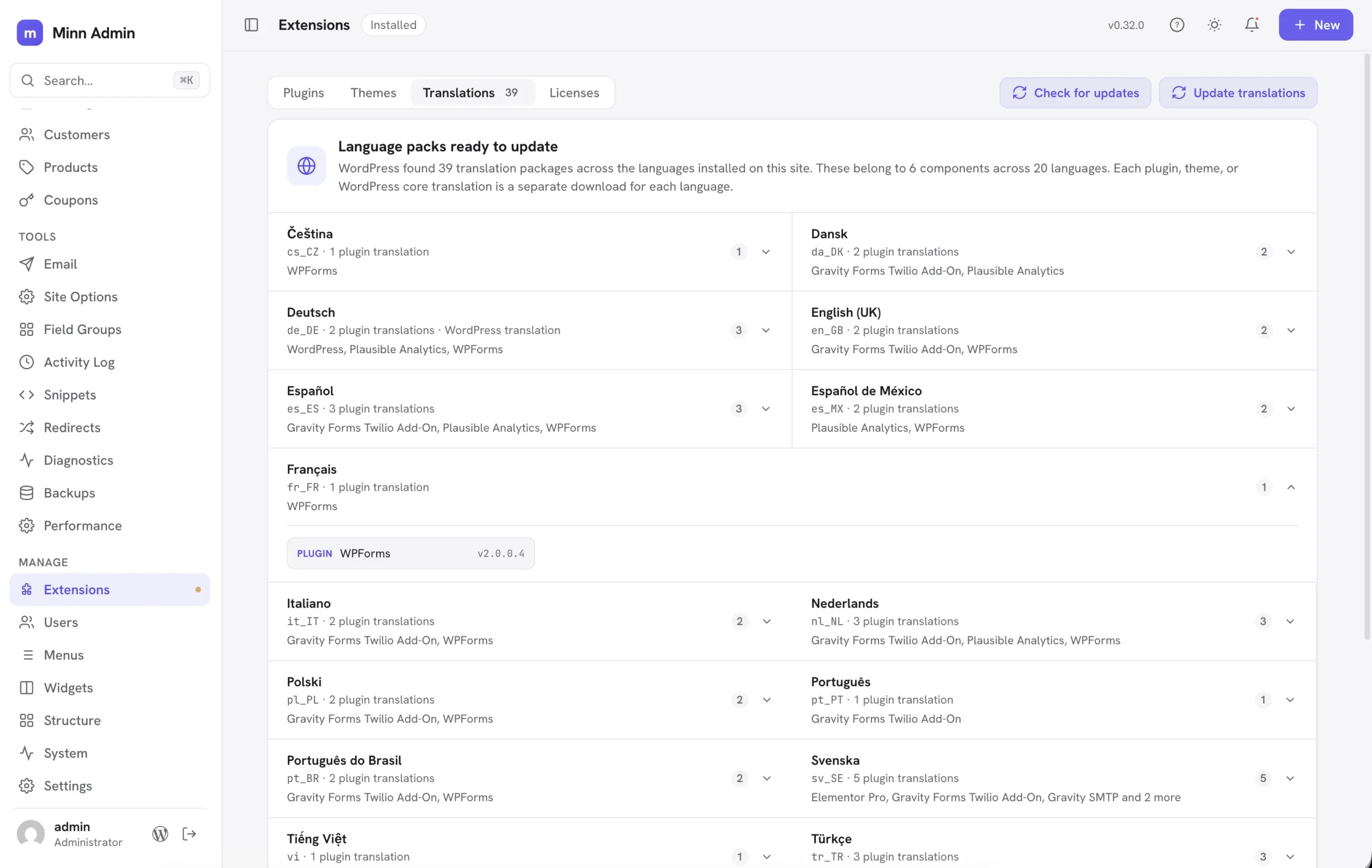
- Translations have a home in Extensions. Language-pack notices now open a Translations tab grouped by language, with the pending package count and an update action of its own. Each language names the plugins, themes or WordPress core package behind it, and the page explains why a multilingual site can have hundreds of separate downloads. A large update keeps a progress marker in the top bar and explains that it may take a few minutes. Check for updates keeps translations in sync with plugins and themes.
- Minn speaks Frysk. Frisian joins the language packs under its WordPress locale
fy, carrying the same per-user language switch, update flow and plural handling as the other twenty-three translations. - Breakdance Pro joins Minn. Extensions → Licenses reads Breakdance's locally stored Pro status and expiry, then activates, deactivates and re-verifies through Breakdance's own license manager. A rejected key restores the prior key and status. Pages and posts carrying
_breakdance_dataare fenced as builder-owned content, with a plain message and a direct Edit in Breakdance ↗ link to Breakdance's full-screen builder. The fence stays in place while an installed Breakdance is inactive and points to Extensions so it can be turned on safely. - Plausible Analytics joins the Traffic chart. Sites using Plausible's official WordPress plugin now see daily visitors and pageviews on Overview, with top pages and traffic sources when a chart bar opens. Minn reads through the same shared dashboard the plugin creates for its own WordPress screen, keeps that access grant on the server, and links the detail back to Plausible's full dashboard. Plausible stays ahead of broad fallbacks such as Site Kit and Jetpack Stats, while a local analytics plugin keeps precedence when both are active. It also appears with the other analytics choices in Add plugin.
- Squirrly SEO joins the editor SEO panel. Sites running Squirrly now get the same title, meta description, focus keyword and social thumbnail fields as Yoast, Rank Math, AIOSEO, SEOPress, SureRank and SiteSEO. Reads and writes go through Squirrly's own per-page SEO service, so the hash, the table and the sanitizers stay theirs. Scores and the Live Assistant stay one click away in Squirrly. Yoast remains the first-active-wins resident when more than one SEO plugin is on. The Add plugin dialog's SEO card now lists Squirrly and SureRank with the other wired SEO plugins.
- Amelia appointments join Minn. Sites running Amelia now have a Bookings item in Commerce: upcoming appointments in a list, filters for pending, today and canceled, search by customer or service, and a card with the customer, the service, the employee and the time. Approve, cancel and mark no-show go through Amelia itself, so the emails Amelia would send still go out. The calendar, employee hours and the booking form stay one click away in Amelia.
- LatePoint appointments join the same Bookings inbox. LatePoint Lite (and Pro) now sit beside Amelia under Bookings: upcoming appointments, pending / today / canceled filters, search, a contact card, and approve / cancel / no-show through LatePoint's own status update so its notifications still fire. Agents who can only see their own bookings stay scoped that way. The calendar, agents and the booking form stay one click away in LatePoint.
- Bookly appointments join the same Bookings inbox. Bookly now sits with Amelia and LatePoint: upcoming appointments, pending / today / canceled filters, search, a contact card, and approve / cancel through Bookly's own customer-appointment status so its emails still go out. Staff who are not supervisors only see their own bookings. Bookly has no no-show status, so that action is not offered. The calendar, staff and the booking form stay one click away in Bookly.
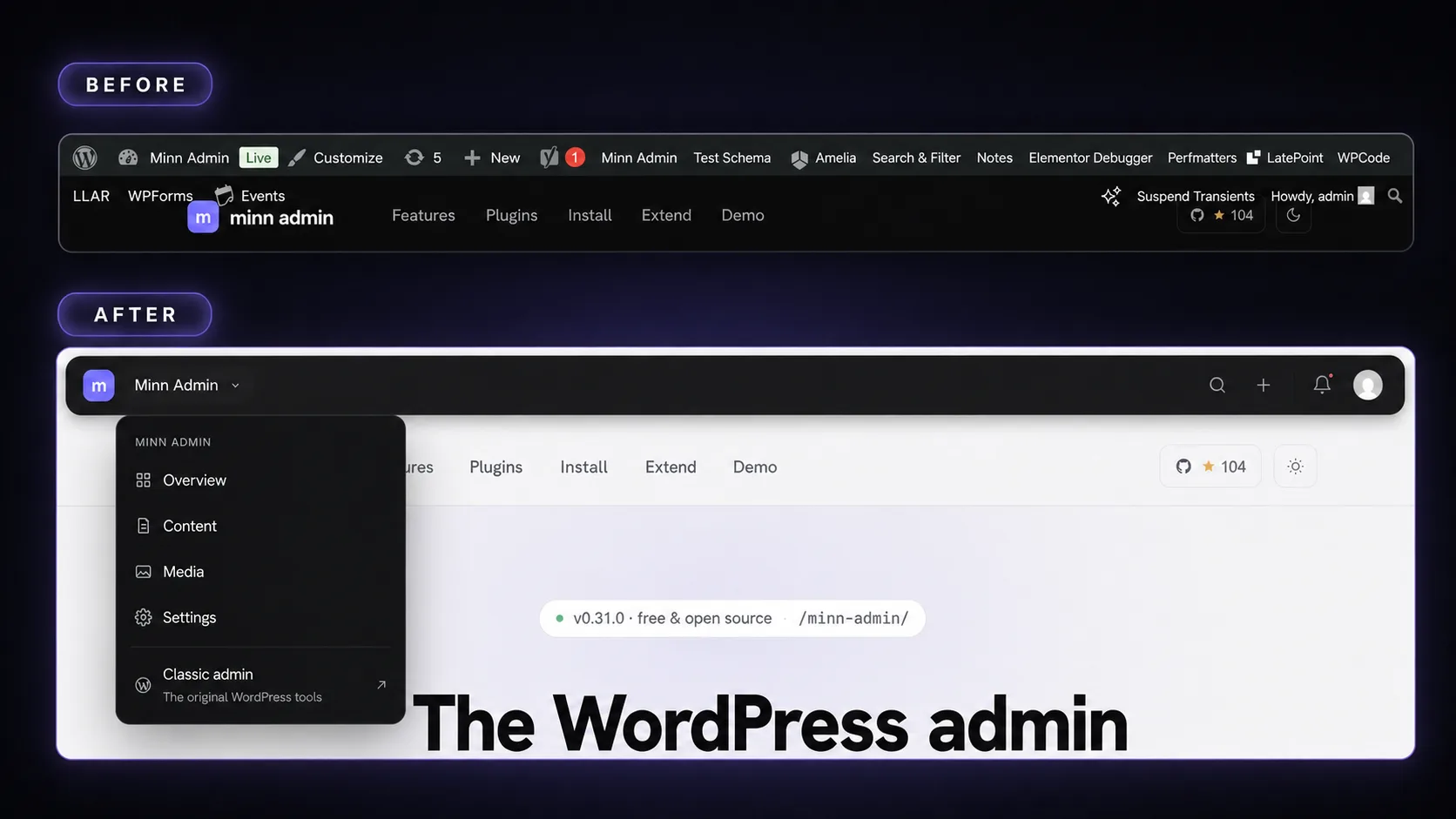
- A Minn admin bar for the site itself. Turn it on from Your profile and the public site swaps the classic admin bar for Minn's own quiet, floating bar. It carries only what matters on the front end: search that opens a command palette right on the page (go anywhere, run a command, or find your own content and jump to its editor), a create menu, an Edit button for the page you are looking at, notifications, and your account. Beside the site name sits a status chip that stays empty on a healthy public site and only appears when something needs attention, such as coming soon, maintenance mode, a password gate, hidden from search engines, or a staging environment, with a one-click way to turn the mode off. The bar slides out of the way while you scroll down and returns when you scroll up, so a theme's own sticky header keeps the top edge. Flipping between the site and Minn is one click in each direction: the m mark on the bar opens Minn, while in Minn's sidebar the site icon returns to the site and the site name goes to Overview. The topbar's separate View-site button is retired, since the sidebar icon is now the doorway. The notification peek is live: opening one marks it read and jumps to the thing it describes, so an update lands on Extensions and a comment lands in moderation. The bar claims no keyboard shortcuts, because the site's own pages may use them. It is strictly per person: everyone who has not opted in keeps the classic bar exactly as before, and wp-admin keeps the classic bar for everyone. The Edit button knows who really renders the page: a page built with Elementor, Beaver Builder or another canvas-owning builder says "Edit in Elementor" and opens that builder directly, while everything else opens the Minn editor. Administrators on a site with a wired cache plugin get a Clear site cache command in the page palette, running the same per-layer purge as the app. The bar also steps aside while a lightbox or full-screen menu is open instead of floating above it, and on phones the floating pill becomes a plain full-width strip.
- Custom post types are creatable everywhere the built-ins are. A post type registered by ACF, CPT UI, a theme, or Minn's own Post Types manager now appears under its own name in the + New menu, gets a Create new command in the palette, and opens a proper blank document at its own editor address. The blank document reads the type's registration for what belongs in the sidebar, so a type without excerpts or comments simply does not offer them, and only people allowed to edit that type see its entry. Previously these types could be browsed and edited but not created, and adding an item meant going back to wp-admin.
- WP Multi Network joins the Network workspace. When WP Multi Network is active, network administrators get a Networks directory with site and administrator counts, network creation with a root site, and guarded permanent deletion. An ordinary site can move to another network from its right-click menu or detail card through WP Multi Network's own API. The primary network, the network in use and every network main site stay protected, while domain and path changes remain in WP Multi Network's dedicated editor.
Improved
-
The help dialog teaches the flip. About Minn gained a "Flip to the site and back" section: the site tile and the m tile shown with a swap mark, and a plain explanation that the corner tile crosses over in both directions. The right-click section now calls itself one of Minn's hidden gems rather than the least discoverable thing.
-
A crowded form list becomes a picker instead of a pill hunt. A surface's tab strip (the per-form tabs on Entries, for example) already swapped to a searchable dropdown past six tabs, but the count was only half the story: six forms with long names overflowed just as badly, spilling across the status filters and search box with scroll arrows floating over the text. The switch now also considers how wide the labels actually are, so a strip that would not fit becomes the dropdown. Quiet filter strips also scroll properly when a row squeezes them instead of painting over their neighbors.
-
Markdown can become formatted content when pasted. Raw Markdown copied from a text editor, GitHub or an AI tool can arrive looking like a code block. Minn now recognizes clear Markdown and asks whether to format its headings, lists, quotes, tables, links, emphasis and fenced code or keep the clipboard exactly as it came. Ordinary prose and rich Word, Docs and web-page pastes keep their current behavior, and anything pasted inside an existing code block always stays literal.
-
The sidebar separates publishing from commerce. Workspace now stays focused on content, media, comments and form entries. A conditional Commerce group holds Orders, Subscriptions, Bookings, Customers, Products and Coupons in a stable workflow order, showing only what the site's plugin mix provides. Note composers also replace the cramped customer-visible checkbox with a clear Customer can see this note switch.
-
A subscription carries its daily work in the row menu. Right-click one to open it, glance at the quick view, reach its customer or parent order, jump to WooCommerce, activate it, put it on hold or cancel it. Cancellation asks first because it stops future renewals; existing orders and payments stay where they are.
-
The plugin catalog catches up with Minn's daily-work surfaces. Add plugin now has Bookings for Amelia, LatePoint and Bookly, Page builders for Breakdance Pro, plus Site visibility for the seven coming-soon, maintenance and password plugins Minn already watches. Ten vendor-distributed plugins that Minn covers deeply now carry ZIP badges instead of trying a WordPress.org install that cannot work: WooCommerce Subscriptions, Gravity Forms, Gravity SMTP, Perfmatters, ACF PRO, Elementor Pro, WPForms Pro, WP Rocket, AnalyticsWP and Breakdance Pro. Each explains where its package comes from and points back to the upload area; Gravity SMTP correctly notes that it comes with a qualifying Gravity Forms license rather than calling itself a standalone paid product.
-
A booking opens like an order. Clicking an appointment used to raise a small contact card with a raw UTC timestamp packed into one line. It now opens its own page in the same two-column shape as an order: the service and time on the left, the customer and notes on the right, dates written the way people read them, and Approve / Cancel sitting in the header.
-
Custom-field dropdowns match the rest of Minn. A choice field (select, radio, button group) in the Custom fields dialog used to open the operating system's own menu. It now uses the same searchable dropdown as settings and the field group builder: click to browse, type to filter. Clearing is still the blank row at the top. The same control is used inside repeater rows and on an ACF block's settings form.
-
Custom fields in a revision sit in the same comparison as the content. A field change used to stretch a sidebar row across the wide revision dialog, then a second card repeated This revision / Current above the content. Field rows now open the same comparison: one pair of column titles, a labeled Custom fields band, then the values (a color shows a swatch, and an empty value uses the same quiet empty state as a missing content block). The content follows under its own Content band, so it is always clear where the fields stop and the page begins, and the band labels stay pinned while you scroll a long comparison.
-
Coupons have a right-click menu. Right-click a coupon row to open it, copy the code, publish it or move it to draft, delete it behind the usual confirmation, or jump to WooCommerce's own editor, without opening the detail window first. The same convention products already follow.
Fixed
- The coupon window reads cleanly again. A style-name collision squeezed the two option checkboxes into overlapping labels that spilled onto the usage line, and the Save and Delete buttons stacked instead of sharing a row. Both render properly now, and the same collision is fixed in the order refund box's checkboxes.
- The Database health page no longer logs warnings on MySQL 8. MySQL 8 returns table metadata under different column names than MariaDB, so the storage engine, reclaimable space and auto-increment checks read fields that were not there and wrote a PHP warning to the site's log on every visit. The queries now name every column the same way on both servers.
- Quieter logs all around. Entering a time without seconds in an ACF time or date-and-time field wrote a PHP warning while saving fine; it no longer does. A feed request that asks only for Minn's builder or SEO detail, without the post id, answered with a warning in the log; both now answer quietly. On PHP 8.5, license checks for Gravity SMTP logged a deprecation notice on every run; that is gone too.
- The command palette no longer opens behind the About Minn dialog. Pressing the palette shortcut while the dialog was up put the palette underneath it. The dialog is informational, so it now steps aside and the palette opens on top.
- Adding an existing account to a site asks that person first. On a network, a site administrator could type a username into Add existing user and find out whether that account existed anywhere on the network, then attach it to their site without the account holder hearing about it. Network administrators are the only ones who can look an account up by username now, because an email address is something the person adding already has to know. Everyone else sends a confirmation link and waits, so joining a site stays the account holder's decision. Network administrators themselves cannot be pulled into a site this way at all, and adding an account works exactly as before for the network administrator doing it.
- Publishing a snippet counts as writing it. Turning a Custom Code snippet on runs its code, so the permission to author that kind of snippet is checked when it is switched on. One of the two ways to switch a snippet on was deciding that question from whether the request carried code, and the editor sends the on and off state with every save, so a save could switch on a snippet the same person had just been told they could not edit. Renaming a snippet that is already running is untouched. Minn also honours WPCode's own refusal of code it considers unsafe, which until now only applied when the snippet was written on WPCode's own screen.
- Which page builder runs the site is no longer public. A visitor reading the site's public content feed was told which page builder manages each page and given that page's builder editing address. It was a description of the admin rather than of the published page, and it is now visible only to someone who can edit the page, like every other detail Minn adds to that feed.
- Clearing a transient clears the one you picked. A saved value whose own name contained the words "site transient" was mistaken for the network's copy, so clearing it left the value you picked in place and cleared a network one instead. On a network, clearing a genuinely network-wide value is a network administrator's job now, since every site on the network shares it.
- A link field will not accept an address that runs code. The check for dangerous web addresses read the text exactly as typed, but a browser quietly ignores stray spaces and invisible characters before deciding what kind of address it has, so a few disguised spellings slipped past. Addresses are now read the way the browser reads them, and WordPress makes the final call. The plain address field, which had no check at all, is covered too.
- Site-wide options written by an editor are held to the same rule as the rest. Values saved on an options page are printed across the whole site, and the rich text field on those pages already refused unsafe markup from anyone without the raw-HTML permission while the plain text fields did not. They all follow the same rule now. Fields saved on a single post are unchanged.
- An options page that says nobody may see it is believed. A page can be locked down by declaring an empty permission, which WordPress reads as "no one". Minn read the same empty value as "nothing was declared" and fell back to showing it to anyone who can write posts.
- A picker no longer answers questions about email addresses. Searching for a person in a relationship field searched their email address as well as their name, so the picker could be used to ask whether a given address had an account. It now searches the names it actually shows, unless you have permission to browse users anyway.
- Field lists respect the kind of content they belong to. Asking a podcast, events, listings or podcast-hosting panel for its field list without naming a post returned the whole list to anyone who can write an ordinary post, including field names a site added itself. The question is now answered against the kind of content the panel belongs to.
- Importing a field group cannot overwrite something else. An import file could name the entry it landed on, and a hand-edited file could name a real post and overwrite it. What gets written is decided by the group's own key.
- Opening a rich text field no longer runs what is inside it. Editing a saved rich text value opened it in a way that let anything hidden in it run. It opens inertly now, with only the runnable parts removed, so tables, embeds, images and links come through exactly as they were saved.
- Snippets keep the permission they were given. Turning a snippet on through the editing screen skipped the check the dedicated on and off switch applies, and one kind of snippet was being saved with no check at all. Reading a snippet's code now asks the same permission as changing it, which matters on sites that split those permissions by snippet type.
- A design library that cannot be reached is retried. One unreachable fetch of the Stackable design library was remembered for a week, leaving the library empty until it expired.