



Mini EQ is a small system-wide parametric equalizer for PipeWire desktops. It uses GTK/Libadwaita for the UI, WirePlumber for routing/default-output control, PipeWire filter-chain with builtin biquad filters for the equalizer, and the JACK API on PipeWire plus NumPy FFT analysis for the analyzer.
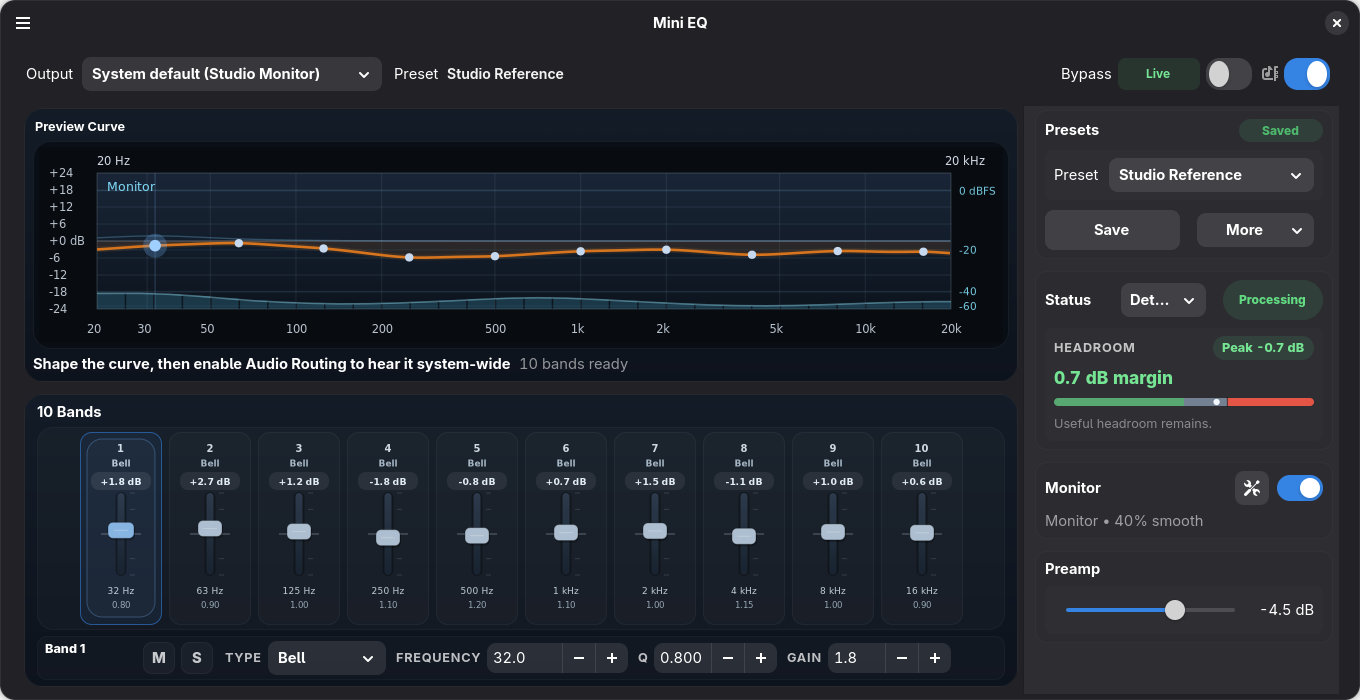
- System-wide parametric EQ for PipeWire desktop playback.
- GTK/Libadwaita interface with a compact 10-band fader workflow.
- WirePlumber routing and default-output tracking.
- PipeWire filter-chain DSP using builtin biquad filters.
- Optional spectrum analyzer through the PipeWire JACK compatibility layer.
- Equalizer APO preset import from the UI or
--import-apo.
Recommended install paths:
- Flathub once accepted. This will be the preferred desktop install path.
- PyPI, after the system desktop/audio dependencies below are installed.
- Source checkout, for development or testing unreleased changes.
Mini EQ depends on system desktop/audio packages that are not installed by Python packaging: GTK 4.12+ and Libadwaita 1.6+ GI bindings, WirePlumber introspection, PipeWire, and PipeWire JACK compatibility.
If your distro ships older GTK or Libadwaita builds, prefer the Flatpak build.
Package names vary by distro release. Mini EQ prefers WirePlumber 0.5 introspection when available and falls back to WirePlumber 0.4, which is what Ubuntu 24.04 provides.
These are good starting points:
# Ubuntu / Debian
sudo apt install \
  gir1.2-adw-1 \
  gir1.2-gtk-4.0 \
  gir1.2-wp-0.4 \
  pipewire \
  pipewire-jack \
  python3-cairo \
  python3-gi \
  wireplumber

# Fedora
sudo dnf install \
  gtk4 \
  libadwaita \
  pipewire \
  pipewire-jack-audio-connection-kit \
  python3-cairo \
  python3-gobject \
  wireplumber \
  wireplumber-libs

# Arch Linux
sudo pacman -S \
  gtk4 \
  libadwaita \
  libwireplumber \
  pipewire \
  pipewire-jack \
  python-cairo \
  python-gobject \
  wireplumber
Use gir1.2-wp-0.5 instead of gir1.2-wp-0.4 on distro releases that package
WirePlumber 0.5 introspection.
Install the Python package after the system packages are present:
python3 -m pip install mini-eq
mini-eq --check-deps
mini-eq
For a source checkout:
python3 -m pip install -e .
mini-eq --check-deps
mini-eq
For a source checkout without installing the package:
PYTHONPATH=src python3 -m mini_eq --check-deps
PYTHONPATH=src python3 -m mini_eq
Install the desktop launcher and icon for the current user:
mini-eq --install-desktoppython3 -m pip install -e '.[dev]'
python3 -m ruff check .
python3 -m ruff format --check .
python3 -m pytest -qSome integration tests are skipped automatically when optional PipeWire runtime tools are not installed.
Check the Ubuntu 24.04 WirePlumber 0.4 GI compatibility surface in Docker:
docker build -f docker/ubuntu-24.04-wp04.Dockerfile -t mini-eq:wp04 .
docker run --rm mini-eq:wp04The Flatpak manifest uses the GNOME runtime. It does not ship a full PipeWire daemon or session manager; it builds only the local PipeWire filter-chain module and SPA builtin filter-graph support that Mini EQ loads inside the app process. The analyzer uses the runtime JACK compatibility library with bundled Python JACK and NumPy dependencies.
Install the local build tools:
flatpak --user install flathub org.flatpak.Builder org.gnome.Sdk//50Build and install the local Flatpak:
flatpak run org.flatpak.Builder --user --install --force-clean --install-deps-from=flathub \
  flatpak-build io.github.bhack.mini-eq.yaml
flatpak run io.github.bhack.mini-eq --check-deps
flatpak run io.github.bhack.mini-eqRuntime data is stored under ~/.config/mini-eq.
pip install mini-eq installs only the Python package. The system packages
above are still required for the app to connect to GTK, WirePlumber, PipeWire,
and PipeWire JACK.
Mini EQ is inspired in part by EasyEffects and the broader PipeWire audio tooling ecosystem. Mini EQ is a separate project focused on a compact system-wide parametric EQ workflow.