Repository navigation
DLSS 5 Studio v2.0.0 ⚡

·
12 commits
to main
since this release
Immutable
release. Only release title and notes can be modified.
DLSS 5 Studio v2.0.0 ⚡
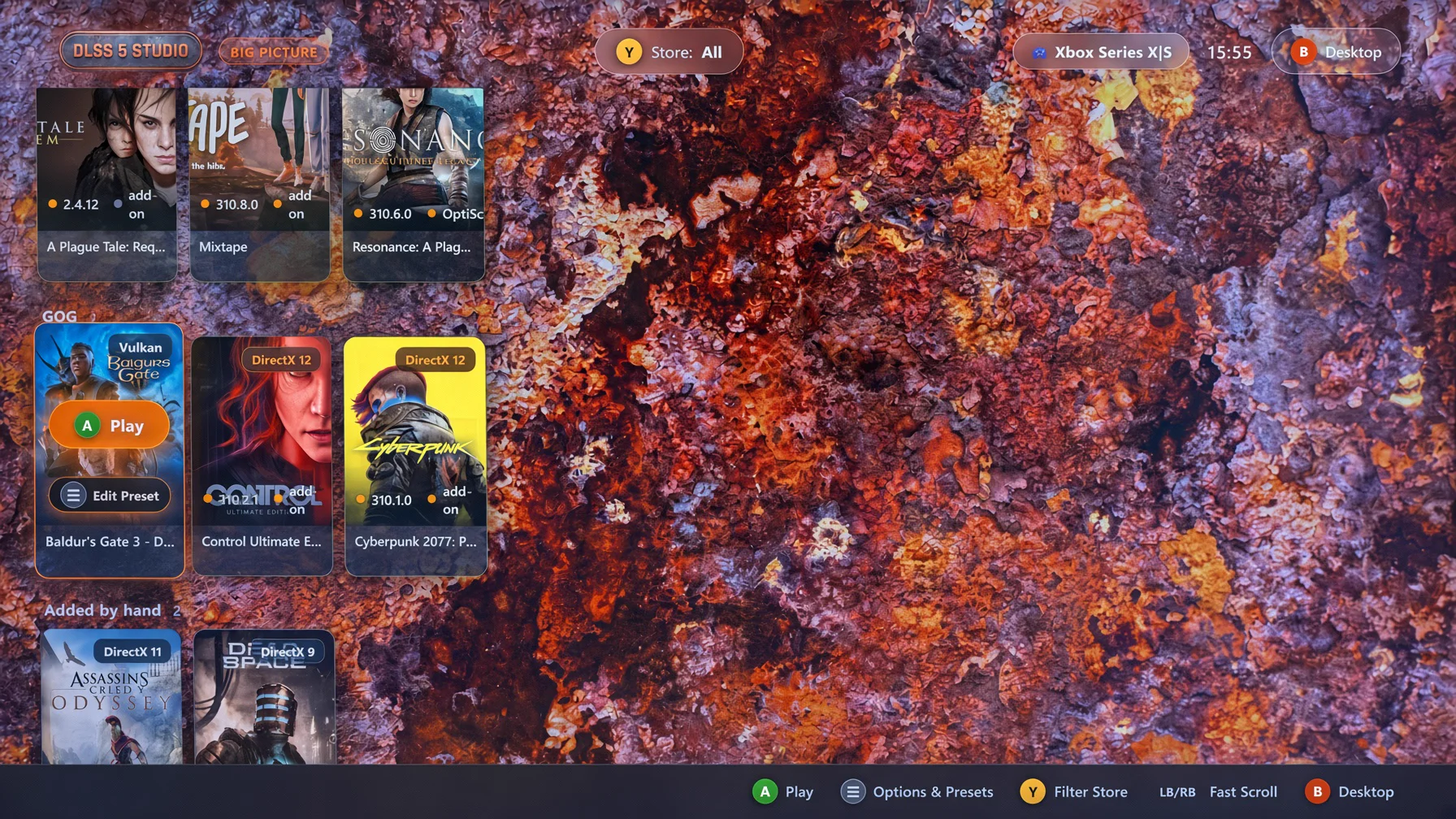
Major Release: Big Picture 10-foot television couch streaming mode, native XInput controller integration, automatic Vibepollo / Apollo Moonlight game streaming registration, and unified multilingual localization.
🚀 Highlights & Improvements
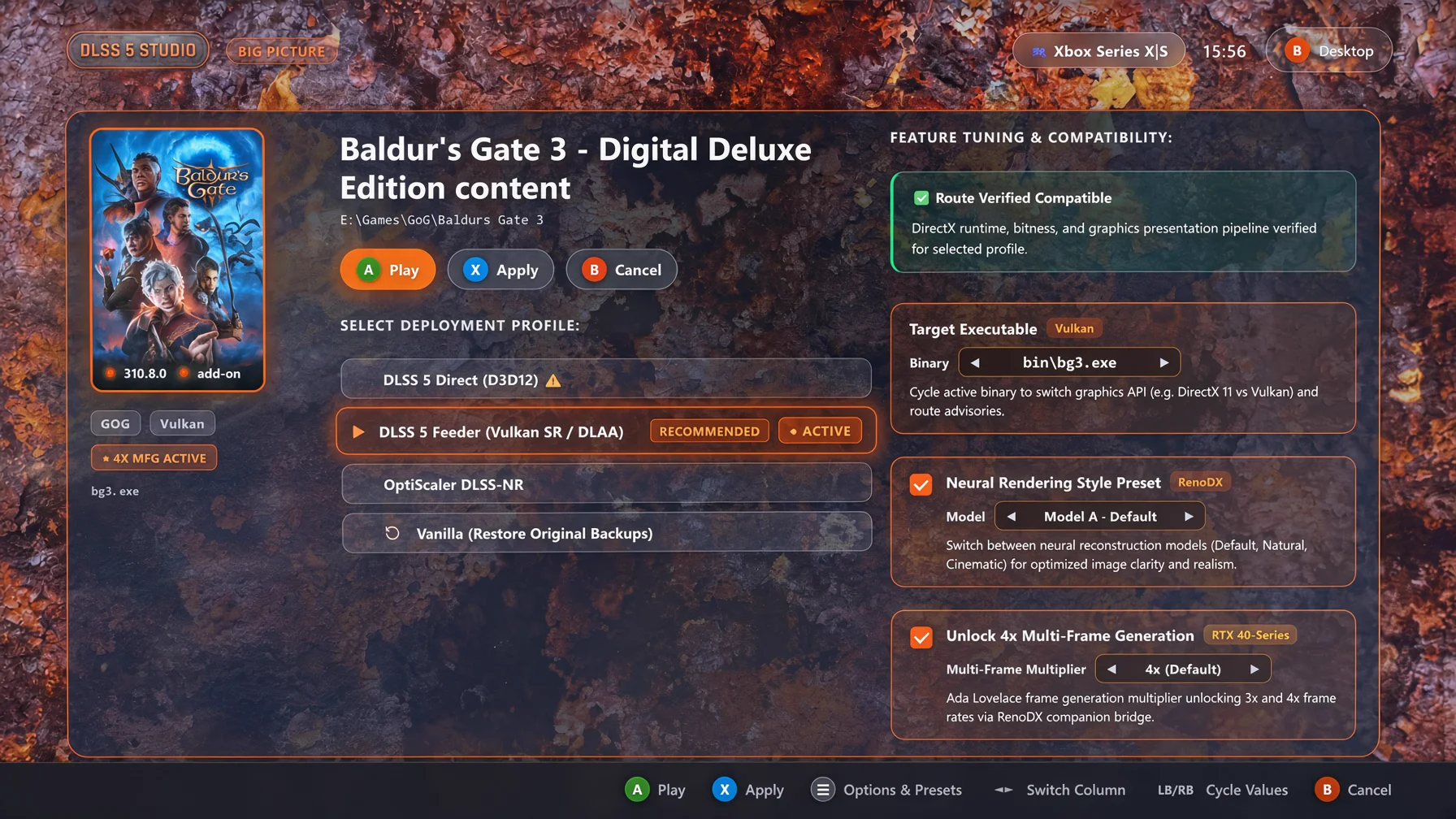
- Big Picture Mode (10-Foot Television & Gamepad Interface):
- Authentic console experience with native XInput gamepad navigation, dynamic hero backdrop vignetting, full-screen game showcase, and quick store filtering.
- Interactive profile options: One-click "Apply & Play" and instant "Play", Neural Rendering Style presets, OptiScaler Pre-SR multi-pass tuning, and 4x Multi-Frame Generation toggling.
- Safe exit confirmation modal requiring explicit confirmation before returning to the desktop view.
- Pure Rust D3D12 Mip Companion Add-on (
dlss-mip-fix.addon64):- Rebuilt the D3D12 Mip Companion Add-on in 100% pure Rust (
crates/addons/dlss-mip-addon/), replacing legacy C++ binaries. - Dynamically inspects and tunes texture descriptor mip biases and resource filters at runtime to eliminate mip degradation and blur during DLSS upscaling across multi-engine titles.
- Rebuilt the D3D12 Mip Companion Add-on in 100% pure Rust (
- Dynamic Startup Downloader Internationalization:
- Full reactive stage tracking (
Checking,Connecting,Downloading,Verifying,Retrying) localized across all 14 supported languages with live byte and total MB formatting.
- Full reactive stage tracking (
- Robust Uninstaller Trampoline Isolation:
- Completely isolated uninstaller execution using unique per-process temporary binaries (
dlss_studio_uninstall_{pid}_{timestamp}.exe) to prevent file locks during self-replacement, paired with automatic scheduled cleanup on exit.
- Completely isolated uninstaller execution using unique per-process temporary binaries (
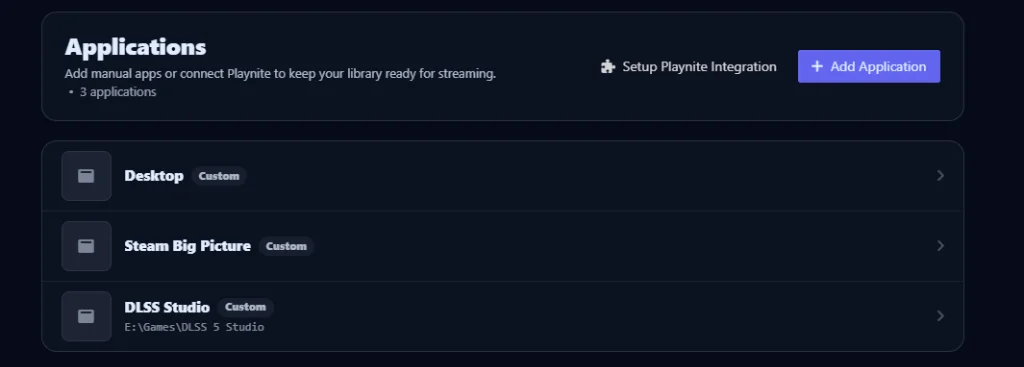
- Vibepollo / Apollo Streaming Integration:
- Automatically detects Sunshine / Apollo / Vibepollo host installations on Windows.
- Gated settings toggle in desktop settings: cleanly adds or removes DLSS Studio Big Picture mode (
--big-picture) inapps.jsonwith elevation handling and app art.
- Unified Multilingual Localization:
- Full Big Picture mode and core interface support integrated across all 14 languages leveraging the unified translation engine.

📦 Included Packages & Downloads
| File | Type | Description |
|---|---|---|
dlss-studio-v2.0.0-setup.exe |
Standalone Setup / Installer (Recommended) | Native Rust setup wizard with configurable install and data storage locations, in-place update detection, Start Menu & Desktop shortcuts, and Windows registration. |
dlss-studio-v2.0.0-portable.exe |
Portable Executable | Standalone self-contained executable. Run anywhere with no installation required. |
dlss-mip-fix.addon64 |
D3D12 Mip Companion Add-on | Standalone pure Rust ReShade companion add-on for D3D12 mip level bias tuning and texture filtering. |
📜 Previous Releases
DLSS 5 Studio v1.0.8 — Feeder Route MFG Detection & DirectX 11 Advisory Release
- Feeder Route Multi-Frame Generation Detection (Issue #7):
- Resolved a contradiction where games utilizing the DLSS 5 Feeder route showed "Unsupported (requires native DLSS-G)" in the specifications panel despite having MFG active via the Feeder path.
- The game detail panel now specifically inspects for active Feeder route deployments rather than checking solely for native DLSS-G.
- DirectX 11 Route Incompatibility Advisory & Anti-Suppression:
- When inspecting pure DirectX 11 games (such as A Plague Tale: Innocence), the UI now presents an explicit High Incompatibility Advisory banner explaining that Multi-Frame Generation and certain OptiScaler paths require DirectX 12 presentation pipelines and motion vectors.
- Added an anti-suppression architecture ensuring prior feeder manifests or proxy hooks cannot suppress compatibility warnings or falsely declare DX12-exclusive features supported.
- Includes a "Deploy with Force Override" button (
btn_deploy_override) with dedicated warning styles and complete localization across all 13 supported languages.
- 5-Manifest Backup Retention Engine (
prune_old_manifests):- Implemented an automatic journal pruning engine retaining the top 5 most recent
manifest.json.done-*backup records. - Automatically cleans orphaned
originals/{timestamp}backup directories no longer referenced by active or retained manifests, keeping backup storage lean and organized.
- Implemented an automatic journal pruning engine retaining the top 5 most recent
DLSS 5 Studio v1.0.7 — Window Drag Event Fix & Squircle Accordion Release
- Window Drag Event Fix Across All Screens: Bounded window dragging strictly to designated header surfaces (
.toolbar,.brand, and empty sidebar spacer). - Theme-Harmonious Accordion Trigger: 20×20px rounded squircle with razor-sharp SVG chevron matching feature checkboxes.
- High-Contrast Light Theme Styling: Eliminated glow washes with high-contrast rust and badge colors.
- Toast Feedback 2-Second Auto-Dismiss Timer: 2000ms dismiss timer with debounced multi-click reset.
- Complete Multilingual Translation: Localized strings across all 13 supported languages.
DLSS 5 Studio v1.0.6 — Route Advisory Engine & Deployment Reflection Release
- Route Advisory & Force Override Engine: Interactive advisory model with high incompatibility warnings and force override deployment.
- Automatic Deployment State Reflection: Restores UI controls from disk inspection.
- Intelligent Optimal Path Auto-Selection: Automatic optimal route selection for vanilla games.
- Dynamic Executable Switching: Route updates dynamically on executable switch for unpatched titles.
DLSS 5 Studio v1.0.5 — Graphics API Detection & Non-Game Filtering Release
- Dedicated Interactive Uninstaller & Clean Directory Purge: Dedicated uninstaller UI with temp trampoline worker pattern.
- ReShade Framework Suite & Feeder Verification: Bundled
DrawText.fxhandFontAtlas.png. - Non-Game Executable Filtering: Automatic filtering of
*config.exe,*settings.exe,*setup.exe, etc. - DirectX 9 vs DirectX 10 UE3 Detection: Fixed false positive detection on legacy Unreal Engine 3 games.
- Relic Modular Rendering Recognition: Supported modular render libraries (
spDx9.dll, etc.). - True "Undetected" Fallback Labeling: Replaced ambiguous DX11 fallbacks for bootstrap stubs.
- Automatic Artwork Resolution for Manually Added Games & Folders: Smart title inference for nested folders and boundary splitting for fused titles.
- Installer Upgrade & Process Handling: Registry check, in-place update mode, and graceful process shutdown.
- Runtime Component Updates: OptiScaler DLSS-NR v0.8.4, DLSS 5 Feeder v1.16.0-beta.3, MFGAdaUnlock-RenoDx 1.0.
- Legacy Pre-DirectX 10 (DirectX 8 & 9) dgVoodoo 2 Interop: Automated dgVoodoo 2 translation, 32-bit Large Address Aware (LAA) inspection and toggling.
- Versioned Deliverables: Version-stamped setup and portable executables.
DLSS 5 Studio v1.0.1 — Hotfix Release
Hotfix release restoring Neural Rendering on the DLSS 5 Feeder route and improving out-of-the-box installation defaults.
- DLSS 5 Feeder Neural Rendering:
- Restored
NeuralUplift=1inReShade.iniduring Feeder route deployments. - Resolves an issue where Neural Reconstruction (Feature 18) was initialized in a disabled state at launch, enabling seamless DLSS-NR execution across non-DX12 titles (such as DirectX 11 executables like
bg3_dx11.exe).
- Restored
- Setup & Installation Defaults:
- Defaulted install directory to
C:\DLSS 5 Studioand data directory toC:\DLSS 5 Studio\datafor smooth, permission-friendly installs on standard user accounts without requiring elevation prompts. - Added real-time visual warning banners in the setup wizard when protected system directories (
Program Files) are manually selected.
- Defaulted install directory to
- Documentation & Upstream Attribution:
- Updated OptiScaler attribution in
README.mdto creditwilsjo2/OptiScaler-DLSSNR-PreSR-Multipassfor the Pre-SR Multipass and DLSS-NR runtime implementation.
- Updated OptiScaler attribution in
Compatibility: Windows 10 (1903+) or Windows 11 (64-bit) • NVIDIA GeForce RTX 20/30/40/50-Series (RTX 40-Series required for 4x Multi-Frame Generation).