Repository navigation
Releases: bookamp/dlss-studio
Release list
DLSS 5 Studio v2.0.3 ⚡

Neural Rendering deployment gating, interactive Streamline guidance with RenoDX Discord access, Cloudflare R2 add-on CDN distribution, and Skynizz v1.2.1 DLSS 5 OptiScaler integration.
🧠 Neural Rendering & Streamline Deployment Gating
- Proactive Model Verification & Deployment Gating:
- Enforced strict deployment gating across all routes (OptiScaler, Native ReShade, and Feeder): deployment will not proceed if the Neural Rendering runtime (
nvngx_dlssnr.dll) is missing fromcomponents/streamline/. - The Game Detail "Deploy" button proactively checks cache status and brings up the guidance modal directly, preventing broken in-game injections.
- Enforced strict deployment gating across all routes (OptiScaler, Native ReShade, and Feeder): deployment will not proceed if the Neural Rendering runtime (
- Streamline Guidance Modal & RenoDX Discord Integration:
- Interactive modal providing clear instructions on completing the Streamline setup.
- Direct inline link to the RenoDX Discord server to obtain the modded Neural Rendering runtime for RTX 20/30/40 cards.
- Added a dynamic "Verify & Refresh" button that validates
is_streamline_complete()on demand and automatically dismisses the modal with a confirmation toast once the model is detected. - Includes a "Manual Open Folder" button directly opening the
components/streamline/directory in Windows Explorer.
- Visual Add-on Cache Status Badging:
- The Add-ons page Streamline card now displays a prominent yellow
⚠ Incompletebadge if base Streamline SDK files are cached butnvngx_dlssnr.dllis missing.
- The Add-ons page Streamline card now displays a prominent yellow
- Detached URL Launcher (Freeze Fix):
- External links now spawn in a detached background worker thread using Win32
CREATE_NO_WINDOW (0x08000000), completely resolving UI freezes when users close external browser windows.
- External links now spawn in a detached background worker thread using Win32
🔄 Priority-Based RenoDX Engine & Authentic PE Header Versioning
- Priority-Based Add-on Resolution:
- Runtime component discovery prioritizes modern
renodx-dlss.addon64(Priority 1) while seamlessly retaining backward compatibility with legacyrenodx-dlss5.addon64(Priority 2 fallback) for existing installations. - Automatically purges conflicting alternate add-on files in the target game directory upon deployment to ensure ReShade does not attempt dual hooks.
- Runtime component discovery prioritizes modern
- Authentic PE Version Inspection & In-App Updates:
- Inspects actual PE file headers directly from
.addon64binaries (detectingv0.2026.0827.2036on legacy files vsv0.2026.1016.1704on modern builds) rather than relying on stale"latest"entries in the manifest. - Older installations immediately show the
v0.2026.0827.2036 → v0.2026.1016.1704upgrade path with a one-click[ Update to v0.2026.1016.1704 ]button in Settings > Add-ons. - Directly resolves and downloads
renodx-dlss.addon64(~3.2 MB) from high-speed Cloudflare R2 storage without GitHub API latency or rate limits.
- Inspects actual PE file headers directly from
⚡ OptiScaler DLSS 5 v1.2.1 & Pre-SR Enhancements
- Skynizz OptiScaler DLSS 5 v1.2.1 Integration:
- Upgraded built-in OptiScaler component catalog to Skynizz's v1.2.1 release featuring advanced Neural Reconstruction INI tuning, luminance stability (
CacheLowTemporal), and x8 performance presets. - Direct Feature 18 parameter forwarding and robust proxy hooking.
- Upgraded built-in OptiScaler component catalog to Skynizz's v1.2.1 release featuring advanced Neural Reconstruction INI tuning, luminance stability (
- Dynamic Add-on Version Discovery:
- Eliminated hardcoded addon version tables in favor of dynamic runtime inspection and self-healing directory unwrapping.
🌐 Cloudflare R2 Add-on CDN Distribution
- High-Speed CDN Distribution:
- Migrated add-on asset hosting to dedicated Cloudflare R2 CDN storage (
pub-fc0eb49bf297443d8eb1e209c15135fe.r2.dev) for faster, rate-limit-free worldwide downloads. - Maintained automated fallback resolvers across all component downloaders to guarantee resilient multi-source asset acquisition.
- Migrated add-on asset hosting to dedicated Cloudflare R2 CDN storage (
🛡️ Journal Parity & Vanilla Backup Continuity
- Cryptographic File Parity & Snapshot Preservation:
- Preserves genuine unmodded vanilla backups through successive cross-route swaps without requiring an intermediate restore.
- Guaranteed clean uninstall and rollback with 100% byte-for-byte file parity, preventing mod proxies from corrupting backup directories.
📦 Included Packages & Downloads
| File | Type | Description |
|---|---|---|
dlss-studio-v2.0.3-setup.exe |
Standalone Setup / Installer (Recommended) | Native Rust setup wizard with configurable install and data storage locations, Start Menu & Desktop shortcuts, and Windows registration. |
dlss-studio-v2.0.3-portable.exe |
Portable Executable | Standalone self-contained executable. Run anywhere with no installation required. |
dlss-mip-fix.addon64 |
D3D12 Mip Companion Add-on | Standalone pure Rust ReShade companion add-on for D3D12 mip level bias tuning and texture filtering. |
📜 Previous Releases
DLSS 5 Studio v2.0.2 — Sunshine / Apollo Streaming Lifecycle & Smooth Big Picture Transitions
- Sunshine / Apollo Stream Lifecycle Management:
- Registered DLSS Studio in
apps.jsonwith canonical Sunshine options (auto-detach: false,wait-all: false,exit-timeout: 5). - Resolves an issue where exiting Big Picture left the Moonlight stream hanging on a frozen screen. Sunshine now detects process exit immediately, terminates the stream, destroys the virtual display, and returns Moonlight to the client menu.
- Registered DLSS Studio in
- Dual-Event Streaming Process Bridge:
- Spawning a secondary instance via
--big-picturesignals the running desktop window to switch to Big Picture mode and holds the stream session until exit without single-instance mutex collisions. - Monitors both the stream exit event and desktop process lifecycle with zero CPU polling via Win32
WaitForMultipleObjects.
- Spawning a secondary instance via
- Smooth Enter & Exit Transitions:
- Added dedicated blackout transition screens (
bp_entering_title,bp_exiting_titlelocalized across all 14 supported languages) to conceal desktop window repositioning and virtual display switching. - Cleaned and reset launch overlay signals on desktop return to prevent freezes.
- Added dedicated blackout transition screens (
- Refined Exit Confirmation Dialog:
- Simplified the Big Picture exit modal to two distinct action buttons (Exit Big Picture / Cancel).
- Core Domain Modularization:
- Restructured monolithic core architecture into 18 dedicated submodules (
routes/,advisories/,payloads/,scan/,steamart/,journal/,addons/,platform/,vibepollo/,utils/) for clean domain separation and improved maintainability.
- Restructured monolithic core architecture into 18 dedicated submodules (
- In-Process Setup Extraction:
- Replaced external process invocations during setup extraction with in-process Win32 registry and process APIs for instantaneous payload unbundling.
DLSS 5 Studio v2.0.1 — Universal RTX 40 MFG Module & DirectX 11 OptiScaler D3D11on12 Interop
- Universal RTX 40 Multi-Frame Generation (Dashdogy Core Module):
- Integrated Dashdogy's standalone
RTXMFG.dllas a first-class core component alongside RenoDX MFG Unlock. - Added live cache checking and dynamic GitHub API release resolution (
resolve_latest_dashdogy_mfg) with dedicated Add-on page UI cards. - Automatically deploys
version.dlland generates matchingRTXMFG-Universal.jsonandRTX40MFG-Universal.jsonconfiguration profiles. - Pre-configures
OptiScaler.ini([FrameGen] External = true,[Dx11withDx12] BuiltinMfgUnlock = true,UseDelayedInit = true, and interpolation count overrides).
- Integrated Dashdogy's standalone
- DirectX 11 OptiScaler D3D11on12 Interop & Streamline 2.14.1 Stack:
- Robust first-class DirectX 11 OptiScaler support bridging DX11 DLSS calls through
D3D11on12to modern DLSS 5 Neural Rendering. - Deploys verified Streamline 2.14.1 stack into
OptiScaler/streamline/andnvngx_dlssg.dllto root on DX11 titles, permanently eliminatingDXGI_ERROR_DEVICE_REMOVEDcrashes. - Injected non-blocking blue configuration notice (
AdvisorySeverity::Info) alerting users that DirectX 11 Multi-Frame Generation operates via D3D11on12 and requires an in-game DLSS setting.
- Robust first-class DirectX 11 OptiScaler support bridging DX11 DLSS calls through
- Cumulative Injected History (
added_history.json) & Backup Continuity:- Introduced cumulative
added_history.jsontracking immune to 5-manifest rollback pruning, guaranteeing 100% clean restoration with zero orphan DLLs. - Carries forward genuine unmodded vanilla backups through successive route hot-swaps without intermediate restore.
- Introduced cumulative
- Scanner Accuracy & Vulkan Gating:
- Gated Vulkan titles from reporting false positive Frame Generation support (
Unsupported (Vulkan API)). - Removed
sl.dlss.dllfrom the Frame Generation heuristic. - Prevented mod-deployed
nvngx_dlssg.dllfrom triggering false Native DLSS-G detection via journal verification. - Sandboxed test environment for
vulkan_layer.rsto prevent automated test runs from modifying host registry keys.
- Gated Vulkan titles from reporting false positive Frame Generation support (
- Dynamic Route Advisories Engine:
- Added
get_mfg_advisory_with_routeevaluating active route and backend limitations across Vulkan, Feeder, and DirectX 11 with zero user lockouts.
- Added
- Multilingual Copy Refresh:
- Refreshed
feature_mfg_descand notes across all 14 supported languages to reference the Universal RTX 40 MFG module.
- Refreshed
DLSS 5 Studio v2.0.0 — Big Picture Mode & Pure Rust Mip Companion Add-on
- Big Picture Mode (10-Foot Television & Gamepad Interface):
- Console experience with native XInput gamepad navigation, dynamic hero backdrop vignetting, full-screen game showcase, and quick store filtering.
- Profile options: One-click "Apply & Play" and instant "Play", Neural Rendering Style presets, OptiScaler Pre-SR multi-pass tuning, and 4x Multi-Frame Generation toggling.
- Safe exit confirmation modal requiring explicit confirmation before returning to the desktop view.
- Pure Rust D3D12 Mip Companion Add-on (
dlss-mip-fix.addon64):- Rebuilt the D3D12 Mip Companion Add-on in 100% pure Rust (
crates/addons/dlss-mip-addon/), replacing legacy C++ binaries. - Dynamically inspects a...
- Rebuilt the D3D12 Mip Companion Add-on in 100% pure Rust (
DLSS 5 Studio v2.0.2 ⚡
Sunshine / Apollo streaming session lifecycle synchronization, smooth Big Picture enter/exit transitions, refined exit dialog, and core domain modularization.
🎮 Big Picture & Streaming Changes
- Sunshine / Apollo Stream Lifecycle Management:
- Registered DLSS Studio in
apps.jsonwith canonical Sunshine options (auto-detach: false,wait-all: false,exit-timeout: 5). - Resolves an issue where exiting Big Picture left the Moonlight stream hanging on a frozen screen. Sunshine now detects process exit immediately, terminates the stream, destroys the virtual display, and returns Moonlight to the client menu.
- Registered DLSS Studio in
- Dual-Event Streaming Process Bridge:
- Spawning a secondary instance via
--big-picturesignals the running desktop window to switch to Big Picture mode and holds the stream session until exit without single-instance mutex collisions. - Monitors both the stream exit event and desktop process lifecycle with zero CPU polling via Win32
WaitForMultipleObjects.
- Spawning a secondary instance via
- Smooth Enter & Exit Transitions:
- Added dedicated blackout transition screens (
bp_entering_title,bp_exiting_titlelocalized across all 14 supported languages) to conceal desktop window repositioning and virtual display switching. - Cleaned and reset launch overlay signals on desktop return to prevent freezes.
- Added dedicated blackout transition screens (
- Refined Exit Confirmation Dialog:
- Simplified the Big Picture exit modal to two distinct action buttons (Exit Big Picture / Cancel).
🖥️ Core Desktop & Architecture Changes
- Core Domain Modularization:
- Restructured monolithic core architecture into 18 dedicated submodules (
routes/,advisories/,payloads/,scan/,steamart/,journal/,addons/,platform/,vibepollo/,utils/) for clean domain separation and improved maintainability.
- Restructured monolithic core architecture into 18 dedicated submodules (
- In-Process Setup Extraction:
- Replaced external process invocations during setup extraction with in-process Win32 registry and process APIs for instantaneous payload unbundling.
📦 Included Packages & Downloads
| File | Type | Description |
|---|---|---|
dlss-studio-v2.0.2-setup.exe |
Standalone Setup / Installer (Recommended) | Native Rust setup wizard with configurable install and data storage locations, Start Menu & Desktop shortcuts, and Windows registration. |
dlss-studio-v2.0.2-portable.exe |
Portable Executable | Standalone self-contained executable. Run anywhere with no installation required. |
dlss-mip-fix.addon64 |
D3D12 Mip Companion Add-on | Standalone pure Rust ReShade companion add-on for D3D12 mip level bias tuning and texture filtering. |
📜 Previous Releases
DLSS 5 Studio v2.0.1 — Universal RTX 40 MFG Module & DirectX 11 OptiScaler D3D11on12 Interop
- Universal RTX 40 Multi-Frame Generation (Dashdogy Core Module):
- Integrated Dashdogy's standalone
RTXMFG.dllas a first-class core component alongside RenoDX MFG Unlock. - Added live cache checking and dynamic GitHub API release resolution (
resolve_latest_dashdogy_mfg) with dedicated Add-on page UI cards. - Automatically deploys
version.dlland generates matchingRTXMFG-Universal.jsonandRTX40MFG-Universal.jsonconfiguration profiles. - Pre-configures
OptiScaler.ini([FrameGen] External = true,[Dx11withDx12] BuiltinMfgUnlock = true,UseDelayedInit = true, and interpolation count overrides).
- Integrated Dashdogy's standalone
- DirectX 11 OptiScaler D3D11on12 Interop & Streamline 2.14.1 Stack:
- Robust first-class DirectX 11 OptiScaler support bridging DX11 DLSS calls through
D3D11on12to modern DLSS 5 Neural Rendering. - Deploys verified Streamline 2.14.1 stack into
OptiScaler/streamline/andnvngx_dlssg.dllto root on DX11 titles, permanently eliminatingDXGI_ERROR_DEVICE_REMOVEDcrashes. - Injected non-blocking blue configuration notice (
AdvisorySeverity::Info) alerting users that DirectX 11 Multi-Frame Generation operates via D3D11on12 and requires an in-game DLSS setting.
- Robust first-class DirectX 11 OptiScaler support bridging DX11 DLSS calls through
- Cumulative Injected History (
added_history.json) & Backup Continuity:- Introduced cumulative
added_history.jsontracking immune to 5-manifest rollback pruning, guaranteeing 100% clean restoration with zero orphan DLLs. - Carries forward genuine unmodded vanilla backups through successive route hot-swaps without intermediate restore.
- Introduced cumulative
- Scanner Accuracy & Vulkan Gating:
- Gated Vulkan titles from reporting false positive Frame Generation support (
Unsupported (Vulkan API)). - Removed
sl.dlss.dllfrom the Frame Generation heuristic. - Prevented mod-deployed
nvngx_dlssg.dllfrom triggering false Native DLSS-G detection via journal verification. - Sandboxed test environment for
vulkan_layer.rsto prevent automated test runs from modifying host registry keys.
- Gated Vulkan titles from reporting false positive Frame Generation support (
- Dynamic Route Advisories Engine:
- Added
get_mfg_advisory_with_routeevaluating active route and backend limitations across Vulkan, Feeder, and DirectX 11 with zero user lockouts.
- Added
- Multilingual Copy Refresh:
- Refreshed
feature_mfg_descand notes across all 14 supported languages to reference the Universal RTX 40 MFG module.
- Refreshed
DLSS 5 Studio v2.0.0 — Big Picture Mode & Pure Rust Mip Companion Add-on
- Big Picture Mode (10-Foot Television & Gamepad Interface):
- Console experience with native XInput gamepad navigation, dynamic hero backdrop vignetting, full-screen game showcase, and quick store filtering.
- Profile options: One-click "Apply & Play" and instant "Play", Neural Rendering Style presets, OptiScaler Pre-SR multi-pass tuning, and 4x Multi-Frame Generation toggling.
- Safe exit confirmation modal requiring explicit confirmation before returning to the desktop view.
- Pure Rust D3D12 Mip Companion Add-on (
dlss-mip-fix.addon64):- Rebuilt the D3D12 Mip Companion Add-on in 100% pure Rust (
crates/addons/dlss-mip-addon/), replacing legacy C++ binaries. - Dynamically inspects and tunes texture descriptor mip biases and resource filters at runtime to eliminate mip degradation and blur during DLSS upscaling across multi-engine titles.
- Rebuilt the D3D12 Mip Companion Add-on in 100% pure Rust (
- Dynamic Startup Downloader Internationalization:
- Full reactive stage tracking (
Checking,Connecting,Downloading,Verifying,Retrying) localized across all 14 supported languages with live byte and total MB formatting.
- Full reactive stage tracking (
- Robust Uninstaller Trampoline Isolation:
- Completely isolated uninstaller execution using unique per-process temporary binaries (
dlss_studio_uninstall_{pid}_{timestamp}.exe) to prevent file locks during self-replacement, paired with automatic scheduled cleanup on exit.
- Completely isolated uninstaller execution using unique per-process temporary binaries (
- Vibepollo / Apollo Streaming Integration:
- Automatically detects Sunshine / Apollo / Vibepollo host installations on Windows.
- Gated settings toggle in desktop settings: cleanly adds or removes DLSS Studio Big Picture mode (
--big-picture) inapps.jsonwith elevation handling and app art.
- Unified Multilingual Localization:
- Full Big Picture mode and core interface support integrated across all 14 languages leveraging the unified translation engine.
DLSS 5 Studio v1.0.8 — Feeder Route MFG Detection & DirectX 11 Advisory Release
- Feeder Route Multi-Frame Generation Detection (Issue #7):
- Resolved an issue where games utilizing the DLSS 5 Feeder route showed "Unsupported (requires native DLSS-G)" in the specifications panel despite having MFG active via the Feeder path.
- The game detail panel now specifically inspects for active Feeder route deployments rather than checking solely for native DLSS-G.
- DirectX 11 Route Incompatibility Advisory & Anti-Suppression:
- When inspecting pure DirectX 11 games (such as A Plague Tale: Innocence), the UI presents an explicit High Incompatibility Advisory banner explaining that Multi-Frame Generation and certain OptiScaler paths require DirectX 12 presentation pipelines.
- Added an anti-suppression architecture ensuring prior feeder manifests or proxy hooks cannot suppress compatibility warnings.
- Includes a "Deploy with Force Override" button (
btn_deploy_override) with dedicated warning styles and complete localization across all 13 supported languages.
- 5-Manifest Backup Retention Engine (
prune_old_manifests):- Implemented an automatic journal pruning engine retaining the top 5 most recent
manifest.json.done-*backup records. - Automatically cleans orphaned
originals/{timestamp}backup directories no longer referenced by active or retained manifests.
- Implemented an automatic journal pruning engine retaining the top 5 most recent
DLSS 5 Studio v1.0.7 — Window Drag Event Fix & Squircle Accordion Release
- Window Drag Event Fix Across All Screens: Bounded window dragging strictly to designated header surfaces (
.toolbar,.brand, and empty sidebar spacer). - Theme-Harmonious Accordion Trigger: 20×20px rounded squircle with razor-sharp SVG chevron matching feature checkboxes.
- High-Contrast Light Theme Styling: Eliminated glow washes with high-contrast rust and badge colors.
- Toast Feedback 2-Second Auto-Dismiss Timer: 2000ms dismiss timer with debounced multi-click reset.
- Complete Multilingual Translation: Localized strings across all 13 supported languages.
DLSS 5 Studio v1.0.6 — Route Advisory Engine & Deployment Reflection Release
- Route Advisory & Force Override Engine: Interactive advisory model with high incompatibility warnings and force override deployment.
- Automatic Deployment State Reflection: Restores UI controls from disk inspection.
- Intelligent Optimal Path Auto-Selection: Automatic optimal route selection for vanilla games.
- Dynamic Executable Switching: Route updates dynamically on executable switch for unpatched titles.
DLSS 5 Studio v1.0.5 — Graphics API Detection & Non-Game Filtering Relea...
DLSS 5 Studio v2.0.1 ⚡
DLSS 5 Studio v2.0.1 ⚡
Maintenance & Enhancement Release: Universal RTX 40 MFG core integration (Dashdogy), DirectX 11 D3D11on12 OptiScaler bridge & Streamline 2.14.1 stack, cumulative history rollback hardening, Vulkan test sandboxing, dynamic route advisories, and scanner accuracy refinements.
🚀 Highlights & Improvements
- Universal RTX 40 Multi-Frame Generation (Dashdogy Core Module):
- Integrated Dashdogy's standalone
RTXMFG.dllas a first-class core component alongside RenoDX MFG Unlock. - Added live cache checking and dynamic GitHub API release resolution (
resolve_latest_dashdogy_mfg) with dedicated Add-on page UI cards. - Automatically deploys
version.dlland generates matchingRTXMFG-Universal.jsonandRTX40MFG-Universal.jsonconfiguration profiles. - Pre-configures
OptiScaler.ini([FrameGen] External = true,[Dx11withDx12] BuiltinMfgUnlock = true,UseDelayedInit = true, and interpolation count overrides).
- Integrated Dashdogy's standalone
- DirectX 11 OptiScaler D3D11on12 Interop & Streamline 2.14.1 Stack:
- Robust first-class DirectX 11 OptiScaler support bridging DX11 DLSS calls through
D3D11on12to modern DLSS 5 Neural Rendering. - Deploys verified Streamline 2.14.1 stack into
OptiScaler/streamline/andnvngx_dlssg.dllto root on DX11 titles, permanently eliminatingDXGI_ERROR_DEVICE_REMOVEDcrashes. - Injected non-blocking blue configuration notice (
AdvisorySeverity::Info) alerting users that DirectX 11 Multi-Frame Generation operates via D3D11on12 and requires an in-game DLSS setting.
- Robust first-class DirectX 11 OptiScaler support bridging DX11 DLSS calls through
- Cumulative Injected History (
added_history.json) & Backup Continuity:- Introduced cumulative
added_history.jsontracking immune to 5-manifest rollback pruning, guaranteeing 100% clean restoration with zero orphan DLLs. - Carries forward genuine unmodded vanilla backups through successive route hot-swaps without intermediate restore.
- Introduced cumulative
- Scanner Accuracy & Vulkan Gating:
- Gated Vulkan titles from reporting false positive Frame Generation support (
Unsupported (Vulkan API)). - Removed
sl.dlss.dllfrom the Frame Generation heuristic. - Prevented mod-deployed
nvngx_dlssg.dllfrom triggering false Native DLSS-G detection via journal verification. - Sandboxed test environment for
vulkan_layer.rsto prevent automated test runs from modifying host registry keys.
- Gated Vulkan titles from reporting false positive Frame Generation support (
- Dynamic Route Advisories Engine:
- Added
get_mfg_advisory_with_routeevaluating active route and backend limitations across Vulkan, Feeder, and DirectX 11 with zero user lockouts.
- Added
- Multilingual Copy Refresh:
- Refreshed
feature_mfg_descand notes across all 14 supported languages to reference the Universal RTX 40 MFG module.
- Refreshed
📦 Included Packages & Downloads
| File | Type | Description |
|---|---|---|
dlss-studio-v2.0.1-setup.exe |
Standalone Setup / Installer (Recommended) | Native Rust setup wizard with configurable install and data storage locations, in-place update detection, Start Menu & Desktop shortcuts, and Windows registration. |
dlss-studio-v2.0.1-portable.exe |
Portable Executable | Standalone self-contained executable. Run anywhere with no installation required. |
dlss-mip-fix.addon64 |
D3D12 Mip Companion Add-on | Standalone pure Rust ReShade companion add-on for D3D12 mip level bias tuning and texture filtering. |
renodx-dlss5.addon64 |
RenoDX DLSS 5 Companion Add-on | ReShade companion add-on for DLSS 5 Neural Reconstruction and Frame Generation. |
📜 Previous Releases
DLSS 5 Studio v2.0.0 — Big Picture Mode & Pure Rust Mip Companion Add-on
- Big Picture Mode (10-Foot Television & Gamepad Interface):
- Authentic console experience with native XInput gamepad navigation, dynamic hero backdrop vignetting, full-screen game showcase, and quick store filtering.
- Interactive profile options: One-click "Apply & Play" and instant "Play", Neural Rendering Style presets, OptiScaler Pre-SR multi-pass tuning, and 4x Multi-Frame Generation toggling.
- Safe exit confirmation modal requiring explicit confirmation before returning to the desktop view.
- Pure Rust D3D12 Mip Companion Add-on (
dlss-mip-fix.addon64):- Rebuilt the D3D12 Mip Companion Add-on in 100% pure Rust (
crates/addons/dlss-mip-addon/), replacing legacy C++ binaries. - Dynamically inspects and tunes texture descriptor mip biases and resource filters at runtime to eliminate mip degradation and blur during DLSS upscaling across multi-engine titles.
- Rebuilt the D3D12 Mip Companion Add-on in 100% pure Rust (
- Dynamic Startup Downloader Internationalization:
- Full reactive stage tracking (
Checking,Connecting,Downloading,Verifying,Retrying) localized across all 14 supported languages with live byte and total MB formatting.
- Full reactive stage tracking (
- Robust Uninstaller Trampoline Isolation:
- Completely isolated uninstaller execution using unique per-process temporary binaries (
dlss_studio_uninstall_{pid}_{timestamp}.exe) to prevent file locks during self-replacement, paired with automatic scheduled cleanup on exit.
- Completely isolated uninstaller execution using unique per-process temporary binaries (
- Vibepollo / Apollo Streaming Integration:
- Automatically detects Sunshine / Apollo / Vibepollo host installations on Windows.
- Gated settings toggle in desktop settings: cleanly adds or removes DLSS Studio Big Picture mode (
--big-picture) inapps.jsonwith elevation handling and app art.
- Unified Multilingual Localization:
- Full Big Picture mode and core interface support integrated across all 14 languages leveraging the unified translation engine.
DLSS 5 Studio v1.0.8 — Feeder Route MFG Detection & DirectX 11 Advisory Release
- Feeder Route Multi-Frame Generation Detection (Issue #7):
- Resolved a contradiction where games utilizing the DLSS 5 Feeder route showed "Unsupported (requires native DLSS-G)" in the specifications panel despite having MFG active via the Feeder path.
- The game detail panel now specifically inspects for active Feeder route deployments rather than checking solely for native DLSS-G.
- DirectX 11 Route Incompatibility Advisory & Anti-Suppression:
- When inspecting pure DirectX 11 games (such as A Plague Tale: Innocence), the UI now presents an explicit High Incompatibility Advisory banner explaining that Multi-Frame Generation and certain OptiScaler paths require DirectX 12 presentation pipelines and motion vectors.
- Added an anti-suppression architecture ensuring prior feeder manifests or proxy hooks cannot suppress compatibility warnings or falsely declare DX12-exclusive features supported.
- Includes a "Deploy with Force Override" button (
btn_deploy_override) with dedicated warning styles and complete localization across all 13 supported languages.
- 5-Manifest Backup Retention Engine (
prune_old_manifests):- Implemented an automatic journal pruning engine retaining the top 5 most recent
manifest.json.done-*backup records. - Automatically cleans orphaned
originals/{timestamp}backup directories no longer referenced by active or retained manifests, keeping backup storage lean and organized.
- Implemented an automatic journal pruning engine retaining the top 5 most recent
DLSS 5 Studio v1.0.7 — Window Drag Event Fix & Squircle Accordion Release
- Window Drag Event Fix Across All Screens: Bounded window dragging strictly to designated header surfaces (
.toolbar,.brand, and empty sidebar spacer). - Theme-Harmonious Accordion Trigger: 20×20px rounded squircle with razor-sharp SVG chevron matching feature checkboxes.
- High-Contrast Light Theme Styling: Eliminated glow washes with high-contrast rust and badge colors.
- Toast Feedback 2-Second Auto-Dismiss Timer: 2000ms dismiss timer with debounced multi-click reset.
- Complete Multilingual Translation: Localized strings across all 13 supported languages.
DLSS 5 Studio v1.0.6 — Route Advisory Engine & Deployment Reflection Release
- Route Advisory & Force Override Engine: Interactive advisory model with high incompatibility warnings and force override deployment.
- Automatic Deployment State Reflection: Restores UI controls from disk inspection.
- Intelligent Optimal Path Auto-Selection: Automatic optimal route selection for vanilla games.
- Dynamic Executable Switching: Route updates dynamically on executable switch for unpatched titles.
DLSS 5 Studio v1.0.5 — Graphics API Detection & Non-Game Filtering Release
- Dedicated Interactive Uninstaller & Clean Directory Purge: Dedicated uninstaller UI with temp trampoline worker pattern.
- ReShade Framework Suite & Feeder Verification: Bundled
DrawText.fxhandFontAtlas.png. - Non-Game Executable Filtering: Automatic filtering of
*config.exe,*settings.exe,*setup.exe, etc. - DirectX 9 vs DirectX 10 UE3 Detection: Fixed false positive detection on legacy Unreal Engine 3 games.
- Relic Modular Rendering Recognition: Supported modular render libraries (
spDx9.dll, etc.). - True "Undetected" Fallback Labeling: Replaced ambiguous DX11 fallbacks for bootstrap stubs.
- Automatic Artwork Resolution for Manually Added Games & Folders: Smart title inference for nested folders and boundary splitting for fused titles.
- Installer Upgrade & Process Handling: Registry check, in-place update mode, and graceful process shutdown.
- Runtime Component Updates: OptiScaler DLSS-NR v0.8.4, DLSS 5 Feeder v1.16.0-beta.3, MFGAdaUnlock-RenoDx 1.0.
- Legacy Pre-DirectX 10 (DirectX 8 & 9) dgVoodoo 2 Interop: Automated dgVoodoo 2 translation, 32-bit Large Address Aware (LAA) inspection and toggling.
- Versioned Deliverables: Version-stamped setup and portable executables.
DLSS 5 Studio v1.0.1 — Hotfix Release
DLSS 5 Studio v2.0.0 ⚡
DLSS 5 Studio v2.0.0 ⚡
Major Release: Big Picture 10-foot television couch streaming mode, native XInput controller integration, automatic Vibepollo / Apollo Moonlight game streaming registration, and unified multilingual localization.
🚀 Highlights & Improvements
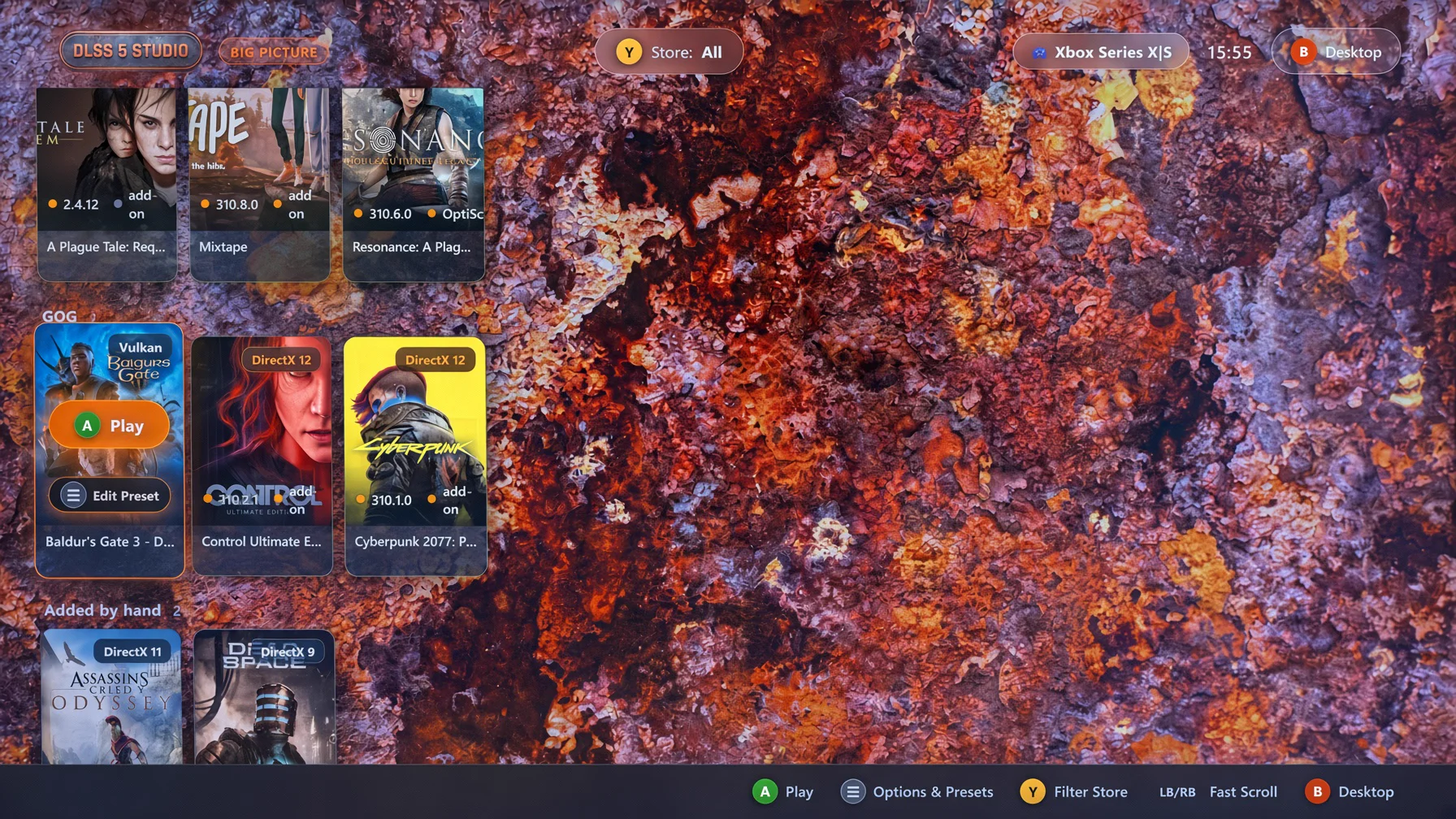
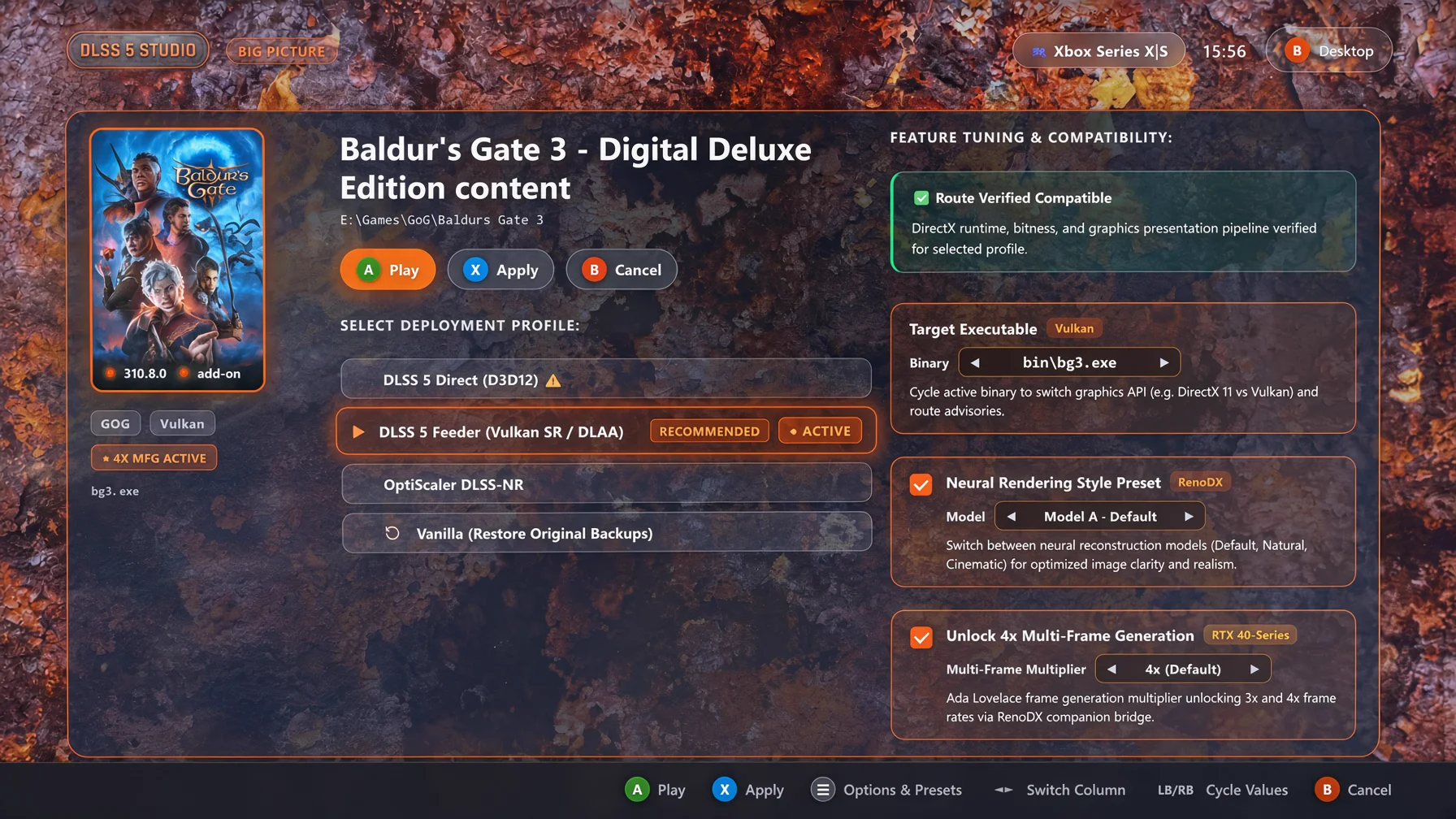
- Big Picture Mode (10-Foot Television & Gamepad Interface):
- Authentic console experience with native XInput gamepad navigation, dynamic hero backdrop vignetting, full-screen game showcase, and quick store filtering.
- Interactive profile options: One-click "Apply & Play" and instant "Play", Neural Rendering Style presets, OptiScaler Pre-SR multi-pass tuning, and 4x Multi-Frame Generation toggling.
- Safe exit confirmation modal requiring explicit confirmation before returning to the desktop view.
- Pure Rust D3D12 Mip Companion Add-on (
dlss-mip-fix.addon64):- Rebuilt the D3D12 Mip Companion Add-on in 100% pure Rust (
crates/addons/dlss-mip-addon/), replacing legacy C++ binaries. - Dynamically inspects and tunes texture descriptor mip biases and resource filters at runtime to eliminate mip degradation and blur during DLSS upscaling across multi-engine titles.
- Rebuilt the D3D12 Mip Companion Add-on in 100% pure Rust (
- Dynamic Startup Downloader Internationalization:
- Full reactive stage tracking (
Checking,Connecting,Downloading,Verifying,Retrying) localized across all 14 supported languages with live byte and total MB formatting.
- Full reactive stage tracking (
- Robust Uninstaller Trampoline Isolation:
- Completely isolated uninstaller execution using unique per-process temporary binaries (
dlss_studio_uninstall_{pid}_{timestamp}.exe) to prevent file locks during self-replacement, paired with automatic scheduled cleanup on exit.
- Completely isolated uninstaller execution using unique per-process temporary binaries (
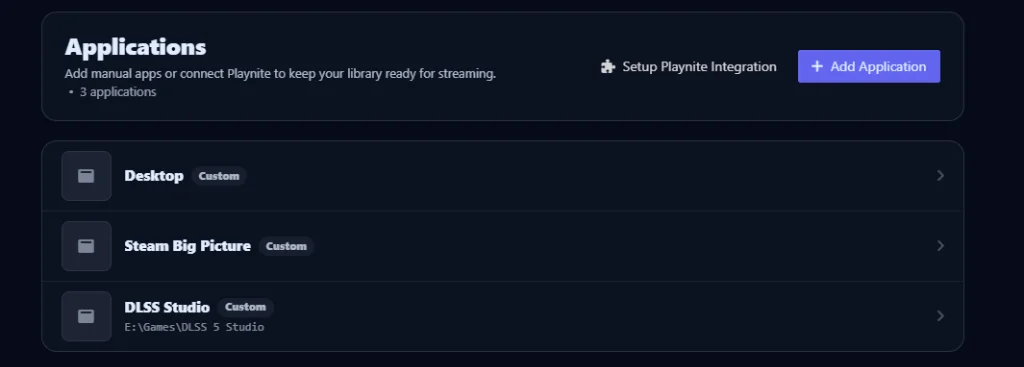
- Vibepollo / Apollo Streaming Integration:
- Automatically detects Sunshine / Apollo / Vibepollo host installations on Windows.
- Gated settings toggle in desktop settings: cleanly adds or removes DLSS Studio Big Picture mode (
--big-picture) inapps.jsonwith elevation handling and app art.
- Unified Multilingual Localization:
- Full Big Picture mode and core interface support integrated across all 14 languages leveraging the unified translation engine.

📦 Included Packages & Downloads
| File | Type | Description |
|---|---|---|
dlss-studio-v2.0.0-setup.exe |
Standalone Setup / Installer (Recommended) | Native Rust setup wizard with configurable install and data storage locations, in-place update detection, Start Menu & Desktop shortcuts, and Windows registration. |
dlss-studio-v2.0.0-portable.exe |
Portable Executable | Standalone self-contained executable. Run anywhere with no installation required. |
dlss-mip-fix.addon64 |
D3D12 Mip Companion Add-on | Standalone pure Rust ReShade companion add-on for D3D12 mip level bias tuning and texture filtering. |
📜 Previous Releases
DLSS 5 Studio v1.0.8 — Feeder Route MFG Detection & DirectX 11 Advisory Release
- Feeder Route Multi-Frame Generation Detection (Issue #7):
- Resolved a contradiction where games utilizing the DLSS 5 Feeder route showed "Unsupported (requires native DLSS-G)" in the specifications panel despite having MFG active via the Feeder path.
- The game detail panel now specifically inspects for active Feeder route deployments rather than checking solely for native DLSS-G.
- DirectX 11 Route Incompatibility Advisory & Anti-Suppression:
- When inspecting pure DirectX 11 games (such as A Plague Tale: Innocence), the UI now presents an explicit High Incompatibility Advisory banner explaining that Multi-Frame Generation and certain OptiScaler paths require DirectX 12 presentation pipelines and motion vectors.
- Added an anti-suppression architecture ensuring prior feeder manifests or proxy hooks cannot suppress compatibility warnings or falsely declare DX12-exclusive features supported.
- Includes a "Deploy with Force Override" button (
btn_deploy_override) with dedicated warning styles and complete localization across all 13 supported languages.
- 5-Manifest Backup Retention Engine (
prune_old_manifests):- Implemented an automatic journal pruning engine retaining the top 5 most recent
manifest.json.done-*backup records. - Automatically cleans orphaned
originals/{timestamp}backup directories no longer referenced by active or retained manifests, keeping backup storage lean and organized.
- Implemented an automatic journal pruning engine retaining the top 5 most recent
DLSS 5 Studio v1.0.7 — Window Drag Event Fix & Squircle Accordion Release
- Window Drag Event Fix Across All Screens: Bounded window dragging strictly to designated header surfaces (
.toolbar,.brand, and empty sidebar spacer). - Theme-Harmonious Accordion Trigger: 20×20px rounded squircle with razor-sharp SVG chevron matching feature checkboxes.
- High-Contrast Light Theme Styling: Eliminated glow washes with high-contrast rust and badge colors.
- Toast Feedback 2-Second Auto-Dismiss Timer: 2000ms dismiss timer with debounced multi-click reset.
- Complete Multilingual Translation: Localized strings across all 13 supported languages.
DLSS 5 Studio v1.0.6 — Route Advisory Engine & Deployment Reflection Release
- Route Advisory & Force Override Engine: Interactive advisory model with high incompatibility warnings and force override deployment.
- Automatic Deployment State Reflection: Restores UI controls from disk inspection.
- Intelligent Optimal Path Auto-Selection: Automatic optimal route selection for vanilla games.
- Dynamic Executable Switching: Route updates dynamically on executable switch for unpatched titles.
DLSS 5 Studio v1.0.5 — Graphics API Detection & Non-Game Filtering Release
- Dedicated Interactive Uninstaller & Clean Directory Purge: Dedicated uninstaller UI with temp trampoline worker pattern.
- ReShade Framework Suite & Feeder Verification: Bundled
DrawText.fxhandFontAtlas.png. - Non-Game Executable Filtering: Automatic filtering of
*config.exe,*settings.exe,*setup.exe, etc. - DirectX 9 vs DirectX 10 UE3 Detection: Fixed false positive detection on legacy Unreal Engine 3 games.
- Relic Modular Rendering Recognition: Supported modular render libraries (
spDx9.dll, etc.). - True "Undetected" Fallback Labeling: Replaced ambiguous DX11 fallbacks for bootstrap stubs.
- Automatic Artwork Resolution for Manually Added Games & Folders: Smart title inference for nested folders and boundary splitting for fused titles.
- Installer Upgrade & Process Handling: Registry check, in-place update mode, and graceful process shutdown.
- Runtime Component Updates: OptiScaler DLSS-NR v0.8.4, DLSS 5 Feeder v1.16.0-beta.3, MFGAdaUnlock-RenoDx 1.0.
- Legacy Pre-DirectX 10 (DirectX 8 & 9) dgVoodoo 2 Interop: Automated dgVoodoo 2 translation, 32-bit Large Address Aware (LAA) inspection and toggling.
- Versioned Deliverables: Version-stamped setup and portable executables.
DLSS 5 Studio v1.0.1 — Hotfix Release
Hotfix release restoring Neural Rendering on the DLSS 5 Feeder route and improving out-of-the-box installation defaults.
- DLSS 5 Feeder Neural Rendering:
- Restored
NeuralUplift=1inReShade.iniduring Feeder route deployments. - Resolves an issue where Neural Reconstruction (Feature 18) was initialized in a disabled state at launch, enabling seamless DLSS-NR execution across non-DX12 titles (such as DirectX 11 executables like
bg3_dx11.exe).
- Restored
- Setup & Installation Defaults:
- Defaulted install directory to
C:\DLSS 5 Studioand data directory toC:\DLSS 5 Studio\datafor smooth, permission-friendly installs on standard user accounts without requiring elevation prompts. - Added real-time visual warning banners in the setup wizard when protected system directories (
Program Files) are manually selected.
- Defaulted install directory to
- Documentation & Upstream Attribution:
- Updated OptiScaler attribution in
README.mdto creditwilsjo2/OptiScaler-DLSSNR-PreSR-Multipassfor the Pre-SR Multipass and DLSS-NR runtime implementation.
- Updated OptiScaler attribution in
Compatibility: Windows 10 (1903+) or Windows 11 (64-bit) • NVIDIA GeForce RTX 20/30/40/50-Series (RTX 40-Series required for 4x Multi-Frame Generation).
DLSS 5 Studio v1.0.8 ⚡
DLSS 5 Studio v1.0.8 ⚡
Feeder route Multi-Frame Generation detection (resolves Issue #7), DirectX 11 Technical Incompatibility Advisory with Anti-Suppression, and 5-manifest backup retention engine.
🚀 Highlights & Improvements
- Feeder Route Multi-Frame Generation Detection (Issue #7):
- Resolved a contradiction where games utilizing the DLSS 5 Feeder route showed "Unsupported (requires native DLSS-G)" in the specifications panel despite having MFG active via the Feeder path.
- The game detail panel now specifically inspects for active Feeder route deployments rather than checking solely for native DLSS-G.
- DirectX 11 Route Incompatibility Advisory & Anti-Suppression:
- When inspecting pure DirectX 11 games (such as A Plague Tale: Innocence), the UI now presents an explicit High Incompatibility Advisory banner explaining that Multi-Frame Generation and certain OptiScaler paths require DirectX 12 presentation pipelines and motion vectors.
- Added an anti-suppression architecture ensuring prior feeder manifests or proxy hooks cannot suppress compatibility warnings or falsely declare DX12-exclusive features supported.
- Includes a "Deploy with Force Override" button (
btn_deploy_override) with dedicated warning styles and complete localization across all 13 supported languages.
- 5-Manifest Backup Retention Engine (
prune_old_manifests):- Implemented an automatic journal pruning engine retaining the top 5 most recent
manifest.json.done-*backup records. - Automatically cleans orphaned
originals/{timestamp}backup directories no longer referenced by active or retained manifests, keeping backup storage lean and organized.
- Implemented an automatic journal pruning engine retaining the top 5 most recent
📦 Included Packages & Downloads
| File | Type | Description |
|---|---|---|
dlss-studio-v1.0.8-setup.exe |
Standalone Setup / Installer (Recommended) | Native Rust setup wizard with configurable install and data storage locations, in-place update detection, Start Menu & Desktop shortcuts, and Windows registration. |
dlss-studio-v1.0.8-portable.exe |
Portable Executable | Standalone self-contained executable. Run anywhere with no installation required. |
📜 Previous Releases
DLSS 5 Studio v1.0.7 — Window Drag Event Fix & Squircle Accordion Release
- Window Drag Event Fix Across All Screens: Bounded window dragging strictly to designated header surfaces (
.toolbar,.brand, and empty sidebar spacer). - Theme-Harmonious Accordion Trigger: 20×20px rounded squircle with razor-sharp SVG chevron matching feature checkboxes.
- High-Contrast Light Theme Styling: Eliminated glow washes with high-contrast rust and badge colors.
- Toast Feedback 2-Second Auto-Dismiss Timer: 2000ms dismiss timer with debounced multi-click reset.
- Complete Multilingual Translation: Localized strings across all 13 supported languages.
DLSS 5 Studio v1.0.6 — Route Advisory Engine & Deployment Reflection Release
- Route Advisory & Force Override Engine: Interactive advisory model with high incompatibility warnings and force override deployment.
- Automatic Deployment State Reflection: Restores UI controls from disk inspection.
- Intelligent Optimal Path Auto-Selection: Automatic optimal route selection for vanilla games.
- Dynamic Executable Switching: Route updates dynamically on executable switch for unpatched titles.
DLSS 5 Studio v1.0.5 — Graphics API Detection & Non-Game Filtering Release
- Dedicated Interactive Uninstaller & Clean Directory Purge: Dedicated uninstaller UI with temp trampoline worker pattern.
- ReShade Framework Suite & Feeder Verification: Bundled
DrawText.fxhandFontAtlas.png. - Non-Game Executable Filtering: Automatic filtering of
*config.exe,*settings.exe,*setup.exe, etc. - DirectX 9 vs DirectX 10 UE3 Detection: Fixed false positive detection on legacy Unreal Engine 3 games.
- Relic Modular Rendering Recognition: Supported modular render libraries (
spDx9.dll, etc.). - True "Undetected" Fallback Labeling: Replaced ambiguous DX11 fallbacks for bootstrap stubs.
- Automatic Artwork Resolution for Manually Added Games & Folders: Smart title inference for nested folders and boundary splitting for fused titles.
- Installer Upgrade & Process Handling: Registry check, in-place update mode, and graceful process shutdown.
- Runtime Component Updates: OptiScaler DLSS-NR v0.8.4, DLSS 5 Feeder v1.16.0-beta.3, MFGAdaUnlock-RenoDx 1.0.
- Legacy Pre-DirectX 10 (DirectX 8 & 9) dgVoodoo 2 Interop: Automated dgVoodoo 2 translation, 32-bit Large Address Aware (LAA) inspection and toggling.
- Versioned Deliverables: Version-stamped setup and portable executables.
DLSS 5 Studio v1.0.1 — Hotfix Release
Hotfix release restoring Neural Rendering on the DLSS 5 Feeder route and improving out-of-the-box installation defaults.
- DLSS 5 Feeder Neural Rendering:
- Restored
NeuralUplift=1inReShade.iniduring Feeder route deployments. - Resolves an issue where Neural Reconstruction (Feature 18) was initialized in a disabled state at launch, enabling seamless DLSS-NR execution across non-DX12 titles (such as DirectX 11 executables like
bg3_dx11.exe).
- Restored
- Setup & Installation Defaults:
- Defaulted install directory to
C:\DLSS 5 Studioand data directory toC:\DLSS 5 Studio\datafor smooth, permission-friendly installs on standard user accounts without requiring elevation prompts. - Added real-time visual warning banners in the setup wizard when protected system directories (
Program Files) are manually selected.
- Defaulted install directory to
- Documentation & Upstream Attribution:
- Updated OptiScaler attribution in
README.mdto creditwilsjo2/OptiScaler-DLSSNR-PreSR-Multipassfor the Pre-SR Multipass and DLSS-NR runtime implementation.
- Updated OptiScaler attribution in
Compatibility: Windows 10 (1903+) or Windows 11 (64-bit) • NVIDIA GeForce RTX 20/30/40/50-Series (RTX 40-Series required for 4x Multi-Frame Generation).
DLSS 5 Studio v1.0.7 ⚡
DLSS 5 Studio v1.0.7 ⚡
Window drag modal event fix across all screens, theme-harmonious squircle accordion trigger, high-contrast Light Theme contrast & badges, 2-second copy toast auto-dismiss timer, and complete multilingual translation coverage.
🚀 Highlights & Improvements
- Window Drag Event Fix Across All Screens:
- Resolved an issue where clicks, toggles, and switches on Add-ons, History, Settings, and About screens failed to register.
- Bounded window dragging strictly to designated header surfaces (
.toolbar,.brand, and empty sidebar spacer) with native CSS drag regions (-webkit-app-region: dragandno-drag !important).
- Theme-Harmonious Accordion Trigger (Detected Graphics Modules):
- Replaced the mismatched circular glowing coin with a 20×20px rounded squircle (
border-radius: 6px) that mirrors the shape, scale, and left-alignment of the feature checkboxes directly above it (chkNrStyle,chkMfg). - Rendered with a razor-sharp 12×12px SVG chevron polyline (
stroke-width: 2.8px) that smoothly rotates 90° on expand.
- Replaced the mismatched circular glowing coin with a 20×20px rounded squircle (
- High-Contrast Light Theme Styling:
- Eliminated blurry yellow glow washes on white backgrounds.
- Added dedicated high-contrast light theme colors for the chevron (
#9a3412rust with#b45309border) and summary badges (NVIDIA, AMD, Streamline, OptiScaler).
- Toast Feedback 2-Second Auto-Dismiss Timer:
- Added an automatic 2000ms dismiss timer with debounced multi-click reset and micro-animation for all copy actions across the application.
- Complete Multilingual Translation & Terminal Status:
- Localized the execution log terminal status (
@{status_ready}) and added complete translations across all 13 supported languages. - Cleaned up obsolete emulator references and refined modular engine runtime detection.
- Localized the execution log terminal status (
📦 Included Packages & Downloads
| File | Type | Description |
|---|---|---|
dlss-studio-v1.0.7-setup.exe |
Standalone Setup / Installer (Recommended) | Native Rust setup wizard with configurable install and data storage locations, in-place update detection, Start Menu & Desktop shortcuts, and Windows registration. |
dlss-studio-v1.0.7-portable.exe |
Portable Executable | Standalone self-contained executable. Run anywhere with no installation required. |
📜 Previous Releases
DLSS 5 Studio v1.0.6 — Route Advisory Engine & Deployment Reflection Release
- Route Advisory & Force Override Engine: Interactive advisory model with high incompatibility warnings and force override deployment.
- Automatic Deployment State Reflection: Restores UI controls from disk inspection.
- Intelligent Optimal Path Auto-Selection: Automatic optimal route selection for vanilla games.
- Dynamic Executable Switching: Route updates dynamically on executable switch for unpatched titles.
DLSS 5 Studio v1.0.5 — Graphics API Detection & Non-Game Filtering Release
- Dedicated Interactive Uninstaller & Clean Directory Purge: Dedicated uninstaller UI with temp trampoline worker pattern.
- ReShade Framework Suite & Feeder Verification: Bundled
DrawText.fxhandFontAtlas.png. - Non-Game Executable Filtering: Automatic filtering of
*config.exe,*settings.exe,*setup.exe, etc. - DirectX 9 vs DirectX 10 UE3 Detection: Fixed false positive detection on legacy Unreal Engine 3 games.
- Relic Modular Rendering Recognition: Supported modular render libraries (
spDx9.dll, etc.). - True "Undetected" Fallback Labeling: Replaced ambiguous DX11 fallbacks for bootstrap stubs.
- Automatic Artwork Resolution for Manually Added Games & Folders: Smart title inference for nested folders and boundary splitting for fused titles.
- Installer Upgrade & Process Handling: Registry check, in-place update mode, and graceful process shutdown.
- Runtime Component Updates: OptiScaler DLSS-NR v0.8.4, DLSS 5 Feeder v1.16.0-beta.3, MFGAdaUnlock-RenoDx 1.0.
- Legacy Pre-DirectX 10 (DirectX 8 & 9) dgVoodoo 2 Interop: Automated dgVoodoo 2 translation, 32-bit Large Address Aware (LAA) inspection and toggling.
- Versioned Deliverables: Version-stamped setup and portable executables.
DLSS 5 Studio v1.0.1 — Hotfix Release
Hotfix release restoring Neural Rendering on the DLSS 5 Feeder route and improving out-of-the-box installation defaults.
- DLSS 5 Feeder Neural Rendering:
- Restored
NeuralUplift=1inReShade.iniduring Feeder route deployments. - Resolves an issue where Neural Reconstruction (Feature 18) was initialized in a disabled state at launch, enabling seamless DLSS-NR execution across non-DX12 titles (such as DirectX 11 executables like
bg3_dx11.exe).
- Restored
- Setup & Installation Defaults:
- Defaulted install directory to
C:\DLSS 5 Studioand data directory toC:\DLSS 5 Studio\datafor smooth, permission-friendly installs on standard user accounts without requiring elevation prompts. - Added real-time visual warning banners in the setup wizard when protected system directories (
Program Files) are manually selected.
- Defaulted install directory to
- Documentation & Upstream Attribution:
- Updated OptiScaler attribution in
README.mdto creditwilsjo2/OptiScaler-DLSSNR-PreSR-Multipassfor the Pre-SR Multipass and DLSS-NR runtime implementation.
- Updated OptiScaler attribution in
Compatibility: Windows 10 (1903+) or Windows 11 (64-bit) • NVIDIA GeForce RTX 20/30/40/50-Series (RTX 40-Series required for 4x Multi-Frame Generation).
DLSS 5 Studio v1.0.6 ⚡
DLSS 5 Studio v1.0.6 ⚡
Route advisory engine, high-contrast incompatibility warnings, unrestricted force override deployment, automatic deployment state reflection, and intelligent optimal path selection.
🚀 Highlights & Improvements
- Route Advisory & Force Override Engine:
- Replaced hard-blocking route restrictions with an interactive advisory model.
- All backends (ReShade, OptiScaler) and routes (DLSS 5 Feeder, Native DLSS) remain fully selectable for every game in your library.
- Selecting an incompatible combination displays a prominent crimson alert card (
🚨 High Incompatibility Warning) outlining exact technical reasons and recommended alternatives. - Advanced users can bypass warnings at any time using the crimson
Deploy Anyway (Force Override) ⚠️action.
- Automatic Deployment State Reflection:
- Opening the game detail sheet now queries active game installations on disk and faithfully restores all UI controls (Backend, Route, Pre-SR, Passes, 4x MFG, and Neural Rendering Style) to reflect what is actually deployed instead of resetting to defaults.
- Intelligent Optimal Path Auto-Selection (Vanilla Games):
- Opening an unmodded game automatically selects the optimal compatible route based on its detected graphics API and bitness:
- DirectX 11, Vulkan, OpenGL, DirectX 9, or non-DLSS: Automatically defaults to DLSS 5 Feeder (no false warnings).
- 64-Bit DirectX 12 with native DLSS: Defaults to Native DLSS.
- 4x Multi-Frame Generation: Defaults to off for vanilla titles.
- Opening an unmodded game automatically selects the optimal compatible route based on its detected graphics API and bitness:
- Dynamic Executable Switching (Unpatched Games Only):
- Switching between game executables in the dropdown automatically updates the route to match the chosen executable's optimal API path if the title is unpatched. If an active deployment already exists, settings are strictly preserved.
📦 Included Packages & Downloads
| File | Type | Description |
|---|---|---|
dlss-studio-v1.0.6-setup.exe |
Standalone Setup / Installer (Recommended) | Native Rust setup wizard with configurable install and data storage locations, in-place update detection, Start Menu & Desktop shortcuts, and Windows registration. |
dlss-studio-v1.0.6-portable.exe |
Portable Executable | Standalone self-contained executable. Run anywhere with no installation required. |
📜 Previous Releases
DLSS 5 Studio v1.0.5 — Graphics API Detection & Non-Game Filtering Release
- Dedicated Interactive Uninstaller & Clean Directory Purge: Dedicated uninstaller UI with temp trampoline worker pattern.
- ReShade Framework Suite & Feeder Verification: Bundled
DrawText.fxhandFontAtlas.png. - Non-Game Executable Filtering: Automatic filtering of
*config.exe,*settings.exe,*setup.exe, etc. - DirectX 9 vs DirectX 10 UE3 Detection: Fixed false positive detection on legacy Unreal Engine 3 games.
- Relic Modular Rendering Recognition: Supported modular render libraries (
spDx9.dll, etc.). - True "Undetected" Fallback Labeling: Replaced ambiguous DX11 fallbacks for bootstrap stubs.
- Automatic Artwork Resolution for Manually Added Games & Folders: Smart title inference for nested folders and boundary splitting for fused titles.
- Installer Upgrade & Process Handling: Registry check, in-place update mode, and graceful process shutdown.
- Runtime Component Updates: OptiScaler DLSS-NR v0.8.4, DLSS 5 Feeder v1.16.0-beta.3, MFGAdaUnlock-RenoDx 1.0.
- Legacy Pre-DirectX 10 (DirectX 8 & 9) dgVoodoo 2 Interop: Automated dgVoodoo 2 translation, 32-bit Large Address Aware (LAA) inspection and toggling.
- Versioned Deliverables: Version-stamped setup and portable executables.
DLSS 5 Studio v1.0.1 — Hotfix Release
Hotfix release restoring Neural Rendering on the DLSS 5 Feeder route and improving out-of-the-box installation defaults.
- DLSS 5 Feeder Neural Rendering:
- Restored
NeuralUplift=1inReShade.iniduring Feeder route deployments. - Resolves an issue where Neural Reconstruction (Feature 18) was initialized in a disabled state at launch, enabling seamless DLSS-NR execution across non-DX12 titles (such as DirectX 11 executables like
bg3_dx11.exe).
- Restored
- Setup & Installation Defaults:
- Defaulted install directory to
C:\DLSS 5 Studioand data directory toC:\DLSS 5 Studio\datafor smooth, permission-friendly installs on standard user accounts without requiring elevation prompts. - Added real-time visual warning banners in the setup wizard when protected system directories (
Program Files) are manually selected.
- Defaulted install directory to
- Documentation & Upstream Attribution:
- Updated OptiScaler attribution in
README.mdto creditwilsjo2/OptiScaler-DLSSNR-PreSR-Multipassfor the Pre-SR Multipass and DLSS-NR runtime implementation.
- Updated OptiScaler attribution in
Compatibility: Windows 10 (1903+) or Windows 11 (64-bit) • NVIDIA GeForce RTX 20/30/40/50-Series (RTX 40-Series required for 4x Multi-Frame Generation).
DLSS 5 Studio v1.0.5 ⚡
DLSS 5 Studio v1.0.5 ⚡
Graphics API detection accuracy enhancements, non-game configuration and utility filtering, Relic modular rendering engine support, and true "Undetected" fallback labeling.
🔧 Fixes & Improvements
- Dedicated Interactive Uninstaller & Clean Directory Purge:
- Added dedicated
UninstallAppUI with confirmation screen, live progress bar, and completion screen. - Implemented temp trampoline worker pattern: launches
%TEMP%\dlss_studio_uninstall.exeand terminates the launcher so the entire installation directory can be completely purged without Windows file-locking conflicts. - Checkbox: "Also remove downloaded models, cache, and preferences (%APPDATA%\dlss-5-studio)" (checked by default; leaves original game backups inside game folders untouched).
- Routed setup and uninstaller WebView2 data directories to
%TEMP%, completely preventing.WebView2folders from cluttering the installation folder.
- Added dedicated
- ReShade Framework Suite & Feeder Verification (
DrawText.fxh):- Bundled
DrawText.fxh,FontAtlas.png, and the slim ReShade framework headers suite intofeeder-shaders\. - Ensures upstream verification script (
Verify-DLSS5Feeder.ps1) passes with 0 errors and 0 warnings.
- Bundled
- Non-Game Executable & Helper Filtering:
- Expanded
is_installer_or_helperto automatically filter configuration utilities, settings tools, registration, support, and setup binaries (*config.exe,*settings.exe,*setup.exe,*activation*.exe,*autorun*.exe,*registration*.exe,*support*.exe) from game directories and executable selection dropdowns (e.g.MassEffect2Config.exe).
- Expanded
- DirectX 9 vs DirectX 10 Detection & Unreal Engine 3 Marker Priority:
- Resolved false positive DirectX 10 / DirectX 11 detection on legacy Unreal Engine 3 games (such as Mass Effect 2
ME2Game.exe): prioritized actived3d9.dllandDirect3DCreate9/Direct3DCreate9Eximports over dormant Direct3D 10 engine headers.
- Resolved false positive DirectX 10 / DirectX 11 detection on legacy Unreal Engine 3 games (such as Mass Effect 2
- Relic Modular Rendering Engine Recognition:
- Added support for modular sibling graphics libraries in Relic engine games (such as Warhammer 40,000: Dawn of War Definitive Edition and Company of Heroes) recognizing
spDx9.dll,GraphicsDx9.dll, etc. while preventing auxiliary DXGI video player helpers from misleading 3D API detection.
- Added support for modular sibling graphics libraries in Relic engine games (such as Warhammer 40,000: Dawn of War Definitive Edition and Company of Heroes) recognizing
- True "Undetected" Fallback Labeling:
- Replaced ambiguous
"DirectX 11"fallback labeling with"Undetected"for executables lacking any 3D graphics imports, PE markers, or graphics sibling modules (such as launcher stubs and bootstrap wrappers likeMassEffect2.exe).
- Replaced ambiguous
- Candidate Scoring & Primary Game Executable Selection:
- Upgraded heuristic executable scoring to heavily prioritize real game binaries with verified 3D graphics imports (+5,000 pts) and substantial PE code size (+4,000 pts for files > 5 MB), while penalizing stubs (< 1 MB without graphics calls) by -5,000 pts.
📦 Included Packages & Downloads
| File | Type | Description |
|---|---|---|
dlss-studio-v1.0.5-setup.exe |
Standalone Setup / Installer (Recommended) | Native Rust setup wizard with configurable install and data storage locations, in-place update detection, Start Menu & Desktop shortcuts, and Windows registration. |
dlss-studio-v1.0.5-portable.exe |
Portable Executable | Standalone self-contained executable. Run anywhere with no installation required. |
📜 Previous Releases
DLSS 5 Studio v1.0.2 — Maintenance & dgVoodoo 2 Interop Release
- Automatic Artwork Resolution for Manually Added Games & Folders: Smart title inference for nested folders and boundary splitting for fused titles.
- Installer Upgrade & Process Handling: Registry check, in-place update mode, and graceful process shutdown.
- Runtime Component Updates: OptiScaler DLSS-NR v0.8.4, DLSS 5 Feeder v1.16.0-beta.3, MFGAdaUnlock-RenoDx 1.0.
- Legacy Pre-DirectX 10 (DirectX 8 & 9) dgVoodoo 2 Interop: Automated dgVoodoo 2 translation, 32-bit Large Address Aware (LAA) inspection and toggling.
- Versioned Deliverables: Version-stamped setup and portable executables.
DLSS 5 Studio v1.0.1 — Hotfix Release
Hotfix release restoring Neural Rendering on the DLSS 5 Feeder route and improving out-of-the-box installation defaults.
- DLSS 5 Feeder Neural Rendering:
- Restored
NeuralUplift=1inReShade.iniduring Feeder route deployments. - Resolves an issue where Neural Reconstruction (Feature 18) was initialized in a disabled state at launch, enabling seamless DLSS-NR execution across non-DX12 titles (such as DirectX 11 executables like
bg3_dx11.exe).
- Restored
- Setup & Installation Defaults:
- Defaulted install directory to
C:\DLSS 5 Studioand data directory toC:\DLSS 5 Studio\datafor smooth, permission-friendly installs on standard user accounts without requiring elevation prompts. - Added real-time visual warning banners in the setup wizard when protected system directories (
Program Files) are manually selected.
- Defaulted install directory to
- Documentation & Upstream Attribution:
- Updated OptiScaler attribution in
README.mdto creditwilsjo2/OptiScaler-DLSSNR-PreSR-Multipassfor the Pre-SR Multipass and DLSS-NR runtime implementation.
- Updated OptiScaler attribution in
Compatibility: Windows 10 (1903+) or Windows 11 (64-bit) • NVIDIA GeForce RTX 20/30/40/50-Series (RTX 40-Series required for 4x Multi-Frame Generation).
v1.0.2 — Initial Release: DLSS 5 Studio
DLSS 5 Studio v1.0.2 ⚡
Bug fix and maintenance update resolving automatic artwork downloads for manually added games, nested folder title resolution, installer upgrade handling, legacy pre-DirectX 10 (D3D8 & D3D9) dgVoodoo 2 translation with 32-bit LAA support, and core runtime updates.
🔧 Fixes & Improvements
-
Automatic Artwork Resolution for Manually Added Games & Folders:
- Fixed an issue where manually added game executables or custom folder scans did not automatically download vertical box art and banners from the Steam CDN.
- Smart Title Inference for Nested Folders: Fixed games located in subfolders (e.g.
Cyberpunk 2077/bin/x64) incorrectly displaying as"x64"or"bin"by climbing parent directories to resolve the actual game title. - Title Normalization & Fuzzy Splitting: Added boundary splitting for fused titles and numbers (e.g.
Cyberpunk2077->Cyberpunk 2077) so Steam artwork queries resolve successfully. - On-Demand Artwork Fetch: Added a "Fetch Artwork" action in the game detail sheet for manual titles that are missing artwork, with deduplication to prevent redundant network requests.
-
Installer Upgrade & Process Handling:
- Fixed installer behavior when upgrading an existing installation: now correctly checks the registry, switches the action to "Update", and safely closes running
dlss-studio.exeprocesses before copying files to preventERROR_SHARING_VIOLATIONlocks. - Preserves user data (
library.json, custom folders, settings) across updates.
- Fixed installer behavior when upgrading an existing installation: now correctly checks the registry, switches the action to "Update", and safely closes running
-
Runtime Component Updates:
- Updated bundled runtime components to their latest upstream releases:
- OptiScaler DLSS-NR v0.8.4 (
OptiScaler-NR-v0.8.4.zip) - DLSS 5 Feeder v1.16.0-beta.3 (
DLSS5-Feeder-1.16.0-beta.3.zip) - MFGAdaUnlock-RenoDx 1.0 (
renodx-mfgunlock.addon64)
- OptiScaler DLSS-NR v0.8.4 (
- Updated bundled runtime components to their latest upstream releases:
-
Legacy Pre-DirectX 10 (DirectX 8 & 9) dgVoodoo 2 Interop:
- Added automated dgVoodoo 2 translation for older pre-DirectX 10 titles (DirectX 8 and DirectX 9 via
d3d8.dll,d3d9.dll,dgVoodoo.conf), wrapping legacy graphics calls into modern Direct3D 11 swapchains to route into the DLSS 5 Feeder pipeline (DirectX 11 was already supported natively). - Automatically handles PE architecture selection between 32-bit (x86) and 64-bit binaries, configuring the
dlss5-feed-host64.exeinter-process bridge oraddon32fallback. - Added PE Large Address Aware (LAA) header inspection and safe toggling for 32-bit executables, allowing classic games to address up to 4 GB of virtual memory and preventing out-of-memory crashes with modern upscalers and shaders.
- Automated
dgVoodoo.confconfiguration (brief watermark confirmation, VRAM allocation, parser protection) and clean restoration during route switching or rollback.
- Added automated dgVoodoo 2 translation for older pre-DirectX 10 titles (DirectX 8 and DirectX 9 via
-
Build & Packaging:
- Release executables and installer packages are now version-stamped (
dlss-studio-v1.0.2-setup.exeanddlss-studio-v1.0.2-portable.exe). - Automated build scripts now clean up unversioned binaries from
target/release.
- Release executables and installer packages are now version-stamped (
📦 Included Packages & Downloads
| File | Type | Description |
|---|---|---|
dlss-studio-v1.0.2-setup.exe |
Standalone Setup / Installer (Recommended) | Native Rust setup wizard with configurable install and data storage locations, in-place update detection, Start Menu & Desktop shortcuts, and Windows registration. |
dlss-studio-v1.0.2-portable.exe |
Portable Executable | Standalone self-contained executable. Run anywhere with no installation required. |
📜 Previous Releases
DLSS 5 Studio v1.0.1 — Hotfix Release
Hotfix release restoring Neural Rendering on the DLSS 5 Feeder route and improving out-of-the-box installation defaults.
- DLSS 5 Feeder Neural Rendering:
- Restored
NeuralUplift=1inReShade.iniduring Feeder route deployments. - Resolves an issue where Neural Reconstruction (Feature 18) was initialized in a disabled state at launch, enabling seamless DLSS-NR execution across non-DX12 titles (such as DirectX 11 executables like
bg3_dx11.exe).
- Restored
- Setup & Installation Defaults:
- Defaulted install directory to
C:\DLSS 5 Studioand data directory toC:\DLSS 5 Studio\datafor smooth, permission-friendly installs on standard user accounts without requiring elevation prompts. - Added real-time visual warning banners in the setup wizard when protected system directories (
Program Files) are manually selected.
- Defaulted install directory to
- Documentation & Upstream Attribution:
- Updated OptiScaler attribution in
README.mdto creditwilsjo2/OptiScaler-DLSSNR-PreSR-Multipassfor the Pre-SR Multipass and DLSS-NR runtime implementation.
- Updated OptiScaler attribution in
Compatibility: Windows 10 (1903+) or Windows 11 (64-bit) • NVIDIA GeForce RTX 20/30/40/50-Series (RTX 40-Series required for 4x Multi-Frame Generation).
What's Changed
- Release v1.0.2: Automatic artwork resolution, nested title inference, installer update safety, pre-DX10 support, and runtime updates by @bookamp in #2
New Contributors
Full Changelog: v1.0.1...v1.0.2
Contributors

Assets 4
v1.0.1 — Initial Release: DLSS 5 Studio
DLSS 5 Studio v1.0.1 — Hotfix Release ⚡
Hotfix release restoring Neural Rendering on the DLSS 5 Feeder route and improving out-of-the-box installation defaults.
🔧 Fixes & Improvements
- DLSS 5 Feeder Neural Rendering:
- Restored
NeuralUplift=1inReShade.iniduring Feeder route deployments. - Resolves an issue where Neural Reconstruction (Feature 18) was initialized in a disabled state at launch, enabling seamless DLSS-NR execution across non-DX12 titles (such as DirectX 11 executables like
bg3_dx11.exe).
- Restored
- Setup & Installation Defaults:
- Defaulted install directory to
C:\DLSS 5 Studioand data directory toC:\DLSS 5 Studio\datafor smooth, permission-friendly installs on standard user accounts without requiring elevation prompts. - Added real-time visual warning banners in the setup wizard when protected system directories (
Program Files) are manually selected.
- Defaulted install directory to
- Documentation & Upstream Attribution:
- Updated OptiScaler attribution in
README.mdto creditwilsjo2/OptiScaler-DLSSNR-PreSR-Multipassfor the Pre-SR Multipass and DLSS-NR runtime implementation.
- Updated OptiScaler attribution in
📦 Included Packages & Downloads
| File | Type | Description |
|---|---|---|
dlss-studio-setup.exe |
Standalone Setup / Installer (Recommended) | Native Rust setup wizard with configurable install and data storage locations, Start Menu & Desktop shortcuts, and Windows registration. |
dlss-studio-portable.exe |
Portable Executable | Standalone self-contained executable. Run anywhere with no installation required. |
Compatibility: Windows 10 (1903+) or Windows 11 (64-bit) • NVIDIA GeForce RTX 20/30/40/50-Series (RTX 40-Series required for 4x Multi-Frame Generation).
Full Changelog: v1.0.0...v1.0.1