Releases: brainiacweb-tech/cedikit
Release list
cedikit 1.3.0 — web API for any language

🌍 cedikit 1.3.0: web API for any language
cedikit can now be used from JavaScript, PHP, Java, Kotlin, Flutter, C#, Go or any other
language that can send HTTP requests, not just Python.
pip install --upgrade "cedikit[api]"
cedikit api          # http://127.0.0.1:8000, interactive docs at /docs
What's new
cedikit apistarts a web API with endpoints for phone numbers, money, SMS parsing,
fraud checks, ledgers, fees, IDs and screenshots, and interactive documentation at/docs.- 💵 Money is always a string (
"1200.50"), never a JSON number, so no language rounds it wrongly. - 🔒 Nothing is stored. It listens on your own computer only by default. If you share it
(--host 0.0.0.0), setCEDIKIT_API_KEYso every request needs anX-API-Keyheader;
CEDIKIT_API_CORScontrols which websites may call it. - 📘 Full guide with PHP, Python and Flutter examples: Web API.
The desktop app, web app and library work the same as in
1.2.1.
⬇️ Download
| File | For |
|---|---|
cedikit-app.exe |
🪟 Windows users: download and double-click. No Python needed. |
cedikit-1.3.0-py3-none-any.whl · cedikit-1.3.0.tar.gz |
👩💻 Python developers (the same files as on PyPI) |
Windows SmartScreen: the first time you open
cedikit-app.exe, Windows may say it's from
an "unknown publisher", because the program isn't code-signed. Click More info → Run anyway.
Only do this for the file downloaded from this page.
🔐 SHA-256 checksums
64eeb12a9176906aad6bbf201a5d7c2eb24ed6ed972ac0c3470b409e7c0523f1 *cedikit-app.exe
ca4fd6e8fccdd0cd2e049a39c6f58c2a64e78d2506ae0a2b3994bafa0d033c81 *cedikit-1.3.0-py3-none-any.whl
8fef3c68e081e8e92cb67d2cc308e44606eea861bc5d2f054e6532c101a3d6b8 *cedikit-1.3.0.tar.gz
cedikit 1.2.1 — documentation fix
🧹 cedikit 1.2.1: documentation fix
A small maintenance release. A command-line example in the documentation used a real phone
number taken from a scam screenshot; it now uses a made-up number. No code changes:
everything from 1.2.0,
including reading MoMo messages from screenshots, works the same.
⬇️ Download
| File | For |
|---|---|
cedikit-app.exe |
🪟 Windows users: download and double-click. No Python needed. |
cedikit-1.2.1-py3-none-any.whl · cedikit-1.2.1.tar.gz |
👩💻 Python developers (the same files as on PyPI) |
pip install --upgrade "cedikit[app]"Windows SmartScreen: the first time you open
cedikit-app.exe, Windows may say it's from
an "unknown publisher", because the program isn't code-signed. Click More info → Run anyway.
Only do this for the file downloaded from this page.
🔐 SHA-256 checksums
207dabe36748e7c5b187c433e9d5db91532fe74daa5b273b054693e624bab29d  cedikit-app.exe
6e11052e2f19e616d2082ec7daa80fbab2f138cd062e62be489d6f22fe221927  cedikit-1.2.1-py3-none-any.whl
886a9dbbcf5ee60d520a692f73617a24a5b9cf25afb81a234851b89122231567  cedikit-1.2.1.tar.gz
cedikit 1.2.0 — just take a screenshot
📷 Just take a screenshot
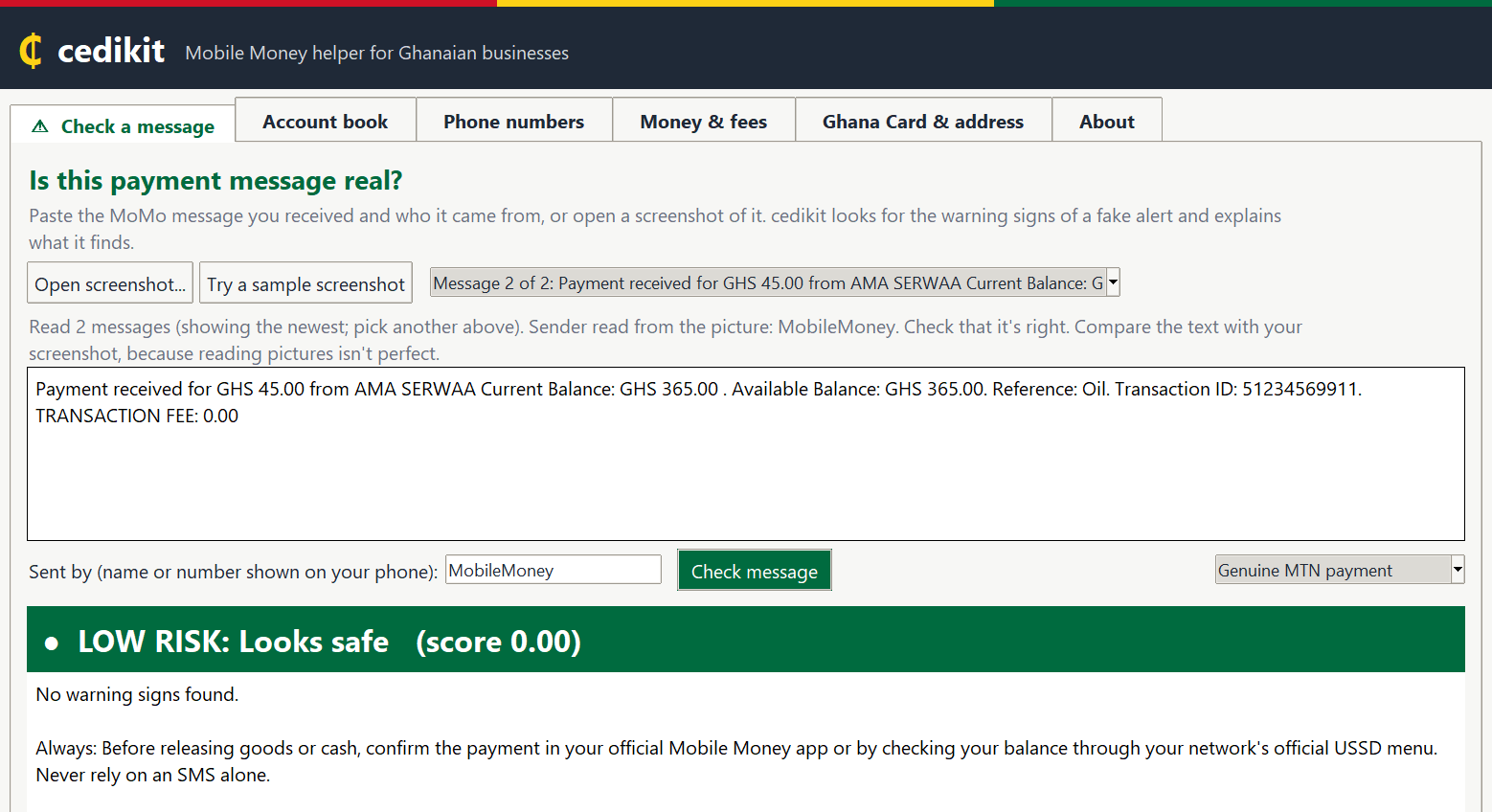
cedikit can now read MoMo messages straight from a screenshot: open the picture, and it reads
the message, fills in who sent it, and checks it for scams. No typing, no copying.
⬇️ Download
| File | For |
|---|---|
cedikit-app.exe |
🪟 Windows users: download and double-click. No Python needed. |
cedikit-1.2.0-py3-none-any.whl · cedikit-1.2.0.tar.gz |
👩💻 Python developers (the same files as on PyPI) |
Windows SmartScreen: the first time you open
cedikit-app.exe, Windows may say it's from
an "unknown publisher", because the program isn't code-signed. Click More info → Run anyway.
Only do this for the file downloaded from this page.
✨ What's new in 1.2.0
- 📷 Screenshots in the desktop and web apps:
- Check a message → Open screenshot...: reads the message, fills in the sender from the top of
the chat, and checks it. If a picture shows several messages, pick the one you want. - Account book → Open screenshots...: build your account book from many screenshots at once.
- Try a sample screenshot to see it working straight away.
- Check a message → Open screenshot...: reads the message, fills in the sender from the top of
- For developers:
cedikit.ocr.read_screenshot("shot.png")(pip install "cedikit[ocr]"). - Reading happens on your own computer (Windows' built-in text recognition; RapidOCR on Mac and
Linux). Nothing is uploaded. It fixes common slips (GHS50.OO→GHS50.00), ignores phone clutter
(clock, "Sender can't accept replies"...), and handles phones with large text. - On real (anonymised) screenshots: every complete message read correctly, the sender found every
time it was visible, genuine alerts rated LOW and scam messages rated HIGH. - The README has a new feature tour:
a screenshot and a test for every feature.
📦 Also on PyPI for the first time
Everything from 1.1.0 (the
desktop app, the web app and python -m cedikit) is now installable with pip:
pip install "cedikit[app]"    # then: cedikit app
pip install "cedikit[web]"    # then: cedikit web
🔒 Privacy
Everything runs on your own computer. Nothing you type or open is sent anywhere.
cedikit is a helper, not a bank: always confirm a payment in your official MoMo app before
handing over goods.
🔐 SHA-256 checksums
5140ee597733d3cb779ac8a58250460b916e14154420478278143a11388828a0  cedikit-app.exe
e68705c0abbd1b2ce282f2d7f33b46cb79ec07e60163fa618956a5148b538606  cedikit-1.2.0-py3-none-any.whl
824f5ecb0071310566829eb391864f29ac1c206785c839f0aeb3bc80ce0e40bd  cedikit-1.2.0.tar.gz
Full details: CHANGELOG ·
Documentation
cedikit 1.1.0 — desktop app, Windows program & web app
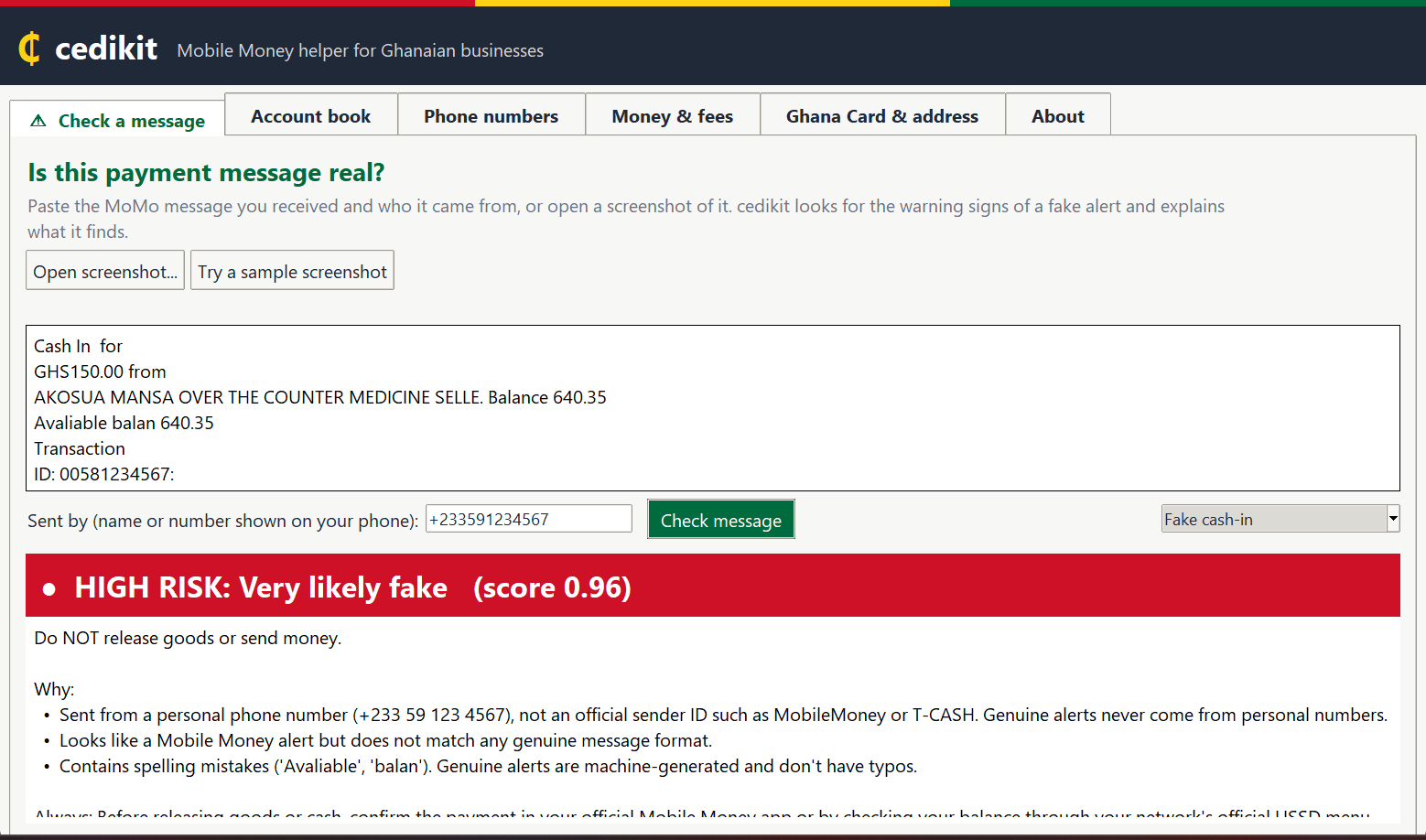
🖥️ cedikit is now an app, too
Check payment messages for scams, turn your MoMo messages into an Excel account book, and
clean up customers' phone numbers, without writing any code.
⬇️ Download
| File | For |
|---|---|
cedikit-app.exe |
🪟 Windows users: download and double-click. No Python needed. |
cedikit-1.1.0-py3-none-any.whl · cedikit-1.1.0.tar.gz |
👩💻 Python developers (the same files as on PyPI) |
Windows SmartScreen: the first time you open
cedikit-app.exe, Windows may say it's from
an "unknown publisher", because the program isn't code-signed. Click More info → Run anyway.
Only do this for the file downloaded from this page.
✨ What's new
-
🪟 Desktop app (
cedikit-app.exe, orcedikit appwith Python). Six tabs:- Check a message: LOW / MEDIUM / HIGH risk, with the reasons
- Account book: MoMo messages → totals, a table of payments, Save as Excel / CSV
- Phone numbers: cleaned numbers, likely networks, bad numbers flagged
- Money & fees: amounts in words, fee and E-Levy estimates
- Ghana Card & address: format checks with district and region names
- About
"Try with samples" buttons throughout. Sharp on high-resolution screens.
-
🌐 Web app: the same tabs in your browser:
pip install "cedikit[web]", then
cedikit web. It runs on your own computer only, with Streamlit's usage statistics
switched off. -
python -m cedikitworks like thecedikitcommand, even when it isn't on PATH. -
cedikit.ledger.read_messages()andsplit_messages()for loading message files.
⚠️ Changed
- Glo (023) numbers are no longer accepted; supported networks are MTN, Telecel and AT.
🔒 Privacy
Everything runs on your own computer. Nothing you type or open is sent anywhere.
cedikit is a helper, not a bank: always confirm a payment in your official MoMo app before
handing over goods.
🔐 SHA-256 checksums
e6734db2177d043c8f0511de980c37f029395f2af2a91d6448d91b8d33b2bba6  cedikit-app.exe
b0984dc74040f8c720e804d0fb3493836152c76506d2924f7117df7e6aeec565  cedikit-1.1.0-py3-none-any.whl
bcd68b8906e5f1d47d0e40df84f4303db673e3cf5c8791aa1f9b23b95a0b33f3  cedikit-1.1.0.tar.gz
Full details: CHANGELOG ·
Documentation