Repository navigation
Harness.WinUI 1.0.5

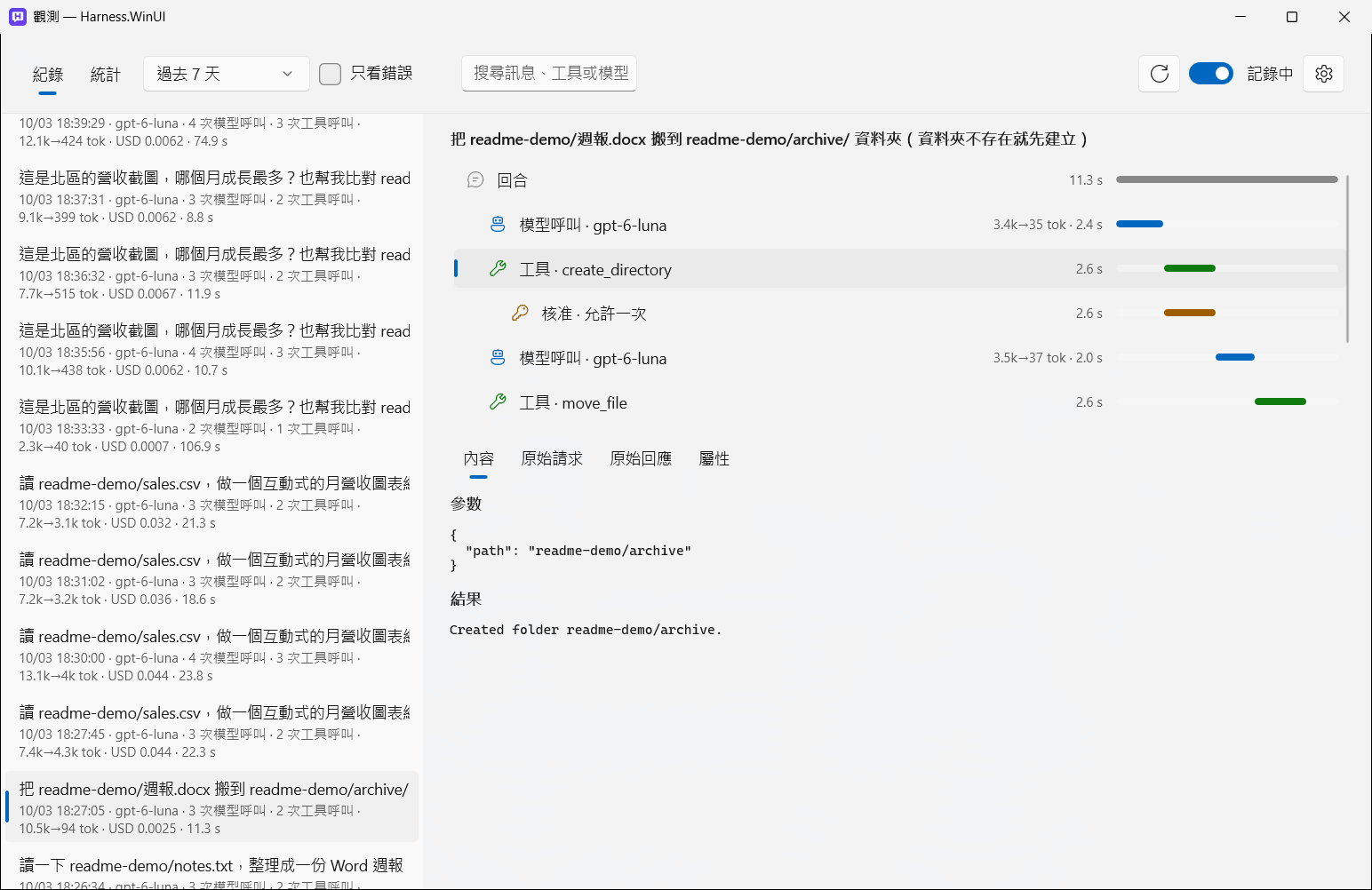
Observability: see exactly what goes to the model and what comes back. Harness.WinUI can now record every turn — the model calls, tool calls and approval waits, the exact request and response sent to your provider, tokens, cost and timing — show it in a native window, total it up, and let your own model analyze it. Recording is off until you turn it on; everything stays on your PC unless you set up an export.
What's new
- Observability window (toolbar). Turn on Recording there; records are kept in
trace.dbfor 30 days by default (adjustable, or delete them all).- Log: every turn with its model, number of model and tool calls, tokens, cost and duration. Each turn as a timeline (model calls, tool calls, approval waits). For each step: the messages as the model saw them, the raw HTTP request and response, and every attribute. Click a recorded reply's footer to jump to its turn.
- Statistics: per model (median and P95 duration, time to first token, tokens, cost, size of the tool definitions sent each call), per tool (offered vs. called, failures, time, result size — tools never used stand out), per skill, MCP server and approval decision.
- AI analysis: ask your model about the records ("Which step is slowest? Which tools could I turn off?"). It reads them through read-only tools; its own calls aren't recorded.
- OTLP export (optional): send the records to Aspire Dashboard, Langfuse, an OpenTelemetry Collector and the like. Off until you set the endpoint (headers are kept encrypted). Raw HTTP exchanges never leave the PC.
- Built on Microsoft.Extensions.AI's own OpenTelemetry instrumentation (GenAI semantic conventions). With recording off it adds no work; with it on, about 1.6 ms per model call on a long conversation.
- "Record message content" can be turned off to keep only timing, tokens and status — for local records and export alike.
Fixes
- With the artifact panel open (or a narrow window), the toolbar squeezed the message box to a sliver. Buttons that don't fit now move into the More (…) menu until there's room.
- Tables in replies now have a frame, header divider, row lines and shading.
Download
| File | For |
|---|---|
Harness.WinUI-1.0.5-win-x64.zip |
Most Intel / AMD PCs |
Harness.WinUI-1.0.5-win-arm64.zip |
ARM PCs (e.g. Snapdragon Copilot+ PCs) |
Unzip to any folder and run Harness.WinUI.exe. Requires Windows 10 1809+ and the WebView2 Runtime (built into Windows 11). The executable is not code-signed, so SmartScreen may warn the first time: choose More info → Run anyway. Verify downloads with SHA256SUMS.txt.
可觀測性:看清楚送給模型的是什麼、回來的又是什麼。 Harness.WinUI 現在可以記錄每個回合:模型呼叫、工具呼叫、核准等待、送給供應商的原始請求與回應、token、費用與時間,並在原生視窗中呈現、統計,還能請你自己的模型分析。記錄預設關閉;除非你設定匯出,所有資料都留在本機。
- 觀測視窗(工具列):在視窗中開啟「記錄」,紀錄存在
trace.db,預設保留 30 天(可調整或全部刪除)。- 紀錄:每個回合的模型、呼叫次數、token、費用與耗時;每個回合以時間軸呈現;每一步可看模型實際看到的訊息、原始 HTTP 請求與回應及所有屬性。點回覆下方的用量資訊可直接跳到該回合。
- 統計:各模型的耗時中位數與 P95、首字時間、token、費用、每次附帶的工具定義大小;各工具的提供與呼叫次數、失敗、耗時、結果大小(從沒用過的工具一目了然);以及技能、MCP server、核准決定的統計。
- AI 分析:直接問模型「哪一步最慢?哪些工具可以關掉?」,它透過唯讀工具讀取紀錄,分析本身不會被記錄。
- OTLP 匯出(選用):送到 Aspire Dashboard、Langfuse、OpenTelemetry Collector 等;沒設定端點就不會送出,headers 加密保存,原始 HTTP 內容只留在本機。
- 以 Microsoft.Extensions.AI 內建的 OpenTelemetry instrumentation 為基礎;關閉記錄時沒有額外負擔,開啟時長對話每次模型呼叫約多 1.6 ms。
- 修正:成品面板打開或視窗較窄時,工具列會把輸入框擠扁,現在放不下的按鈕會自動收進「⋯」;回覆中的表格加上框線與斑馬紋。
下載後解壓縮,執行 Harness.WinUI.exe 即可。