Node.md
Progress : 4/5
Executes the next node. It can be configured using Main game, Flight Plan or Maneuver Node Controller Maneuver Node Controller

- The Node info gives quick infos on the next node.
can be hidden using settings :

- Start/Stop : Start or Stop the pilot
- Pause : Pause the game when the node is executed
- Pilot Infos : gives information on the current pilot Phase
The Pilot is divided in a succession of phases.
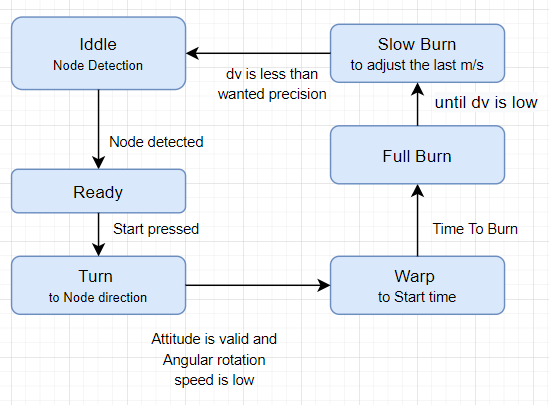
Iddle : wait for a Node to be detected Ready : a Node is found, just wait for start
The SAS is used to point in the direction of the Node.

- Max Angle : accepted angle difference before starting burn Phase. You can adjust this if your ship can't not reach the awaited precision
- Max Angular speed : accepted angular speed before starting burn Phase. Use higher values to if you can't stop your vessel from moving (it won't be really precise :) )
Uses Time warp to be the closer to Node start execution time.

(Settings also used in Landing Pilot)
- Auto Warp : Warp can be skipped. the Burn phase start then with a wait for burn time phase, where manuam time warp is accepted
- Warp Speed : how speed depends on remaining time. The 2 value (default) is quite a good compromise to avoid missing the start
- Before : a small amount of second before the next phase. very usefull for time warp to come back to x1 and for attitude to point to the good direction. Add some seconds for heavy vessels to let it have the time to turn
Burn the main Thust to reach the wanted dV

- Adjusting rate : is a ratio how to slow down throttle during this Slow-Burn phase
- Precision : is the accepted remaining dv threshold.
Those settings are mainly use using debug.

-
Start Burn At : let you choose when to burn.
- at T0 : at the exact time the node start (the défault and mainly the best option for hand created nods)
- before : before some configurables seconds.
- mid-duration : half of the duration of the burn phase. Can bo better for Lift-off circularize.
-
Rotate During Burn : continue to follow the Node direction during burn. From my opinion this lead to more trouble than precision.
The pilot is coupled with the Flight Plan Mod
If no Node is detected and if Flight Plan is installed you could add node to circularize the orbit.
This option is still in debugging phase... sometime it creates very invalids nodes and I can't figure why for the moment. use it with caution and check the node in the Map View.
If the node is still invalid, (unpaused) wait for a few second, pause again and add a new node again.
- Running several nodes
- Bug With Flight plan creation.