Release v8.0

weewx-celestial 8.0
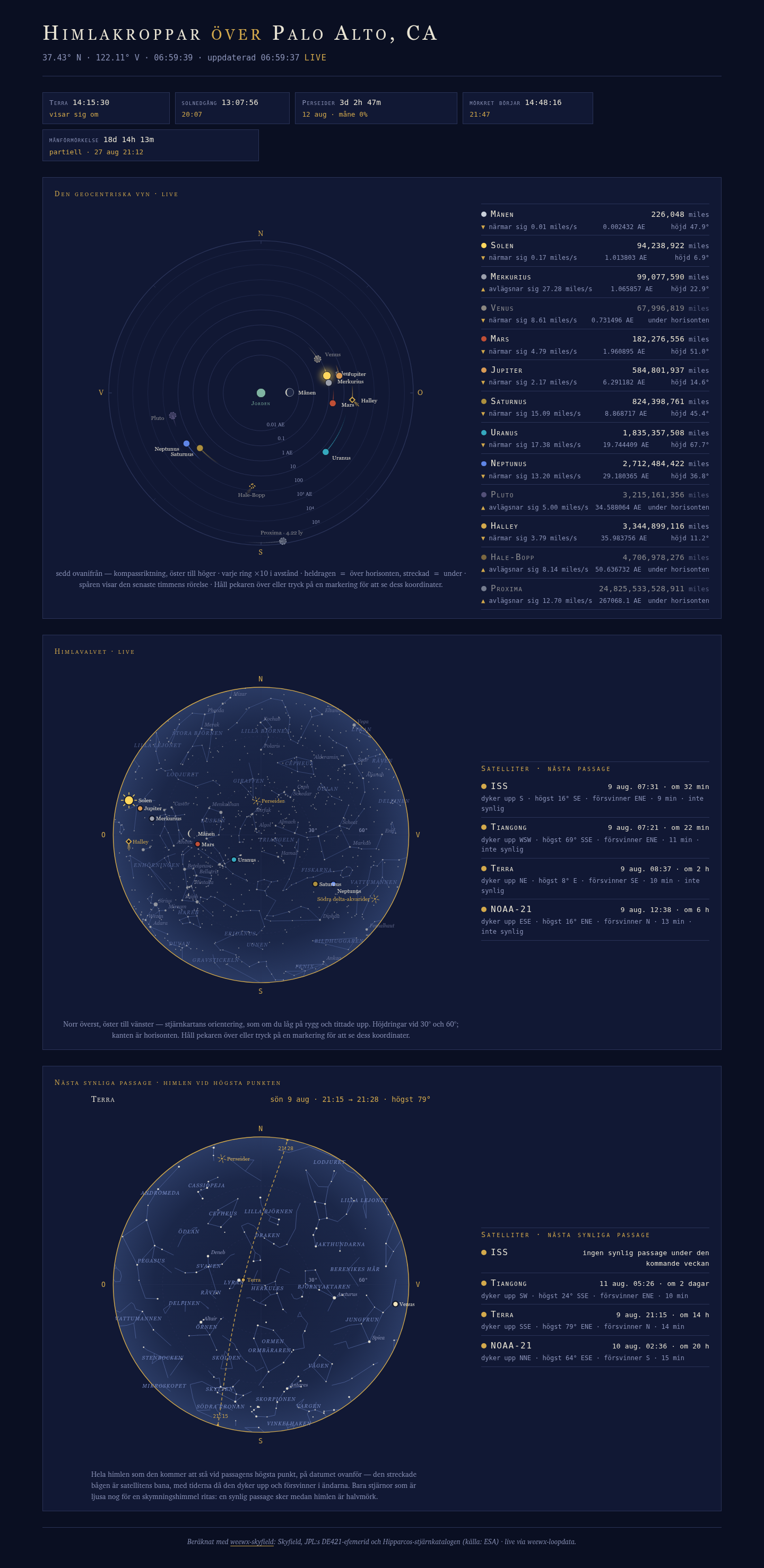
The page gains two panels: the live sky dome with satellite tracking,
and the Next Visible Pass chart. The dome backdrop is weewx-skyfield's full
sky chart — the complete Hipparcos star field, the constellation
figures, sun, moon and
planets — kept honest on an open page by once-a-minute backdrop steps and
live nudging, and with weewx-skyfield 2.0's satellites configured it carries
the class of things up there that genuinely moves fast: low-Earth
satellites crossing your sky at up to a degree per second, tracked in
real time — every satellite you configure, with the ISS and Tiangong
preconfigured out of the box. The Next Visible Pass
chart is the sky as it will stand at the coming pass's highest point,
the pass's arc dashed across it — and its stage during the show, the
satellite's dot swept live along the drawn arc. Drop-in upgrade
from 7.x — install over it and the page works exactly as before, dome
included; the satellite layer lights up when you add its loop-data
fields. Released alongside weewx-skyfield 2.0, whose satellite engine
serves everything this page shows, and weewx-loopdata 6.9, whose
event-expiry fix keeps the pass rows rolling forward the moment a pass
ends. Also in this release: Italian,
Norwegian and Swedish translations join the bundle, matching
weewx-skyfield 2.0's, and the Danish page
title reverts to Gert Andersen's original "Himlen over" (7.8 shipped a
misreading).
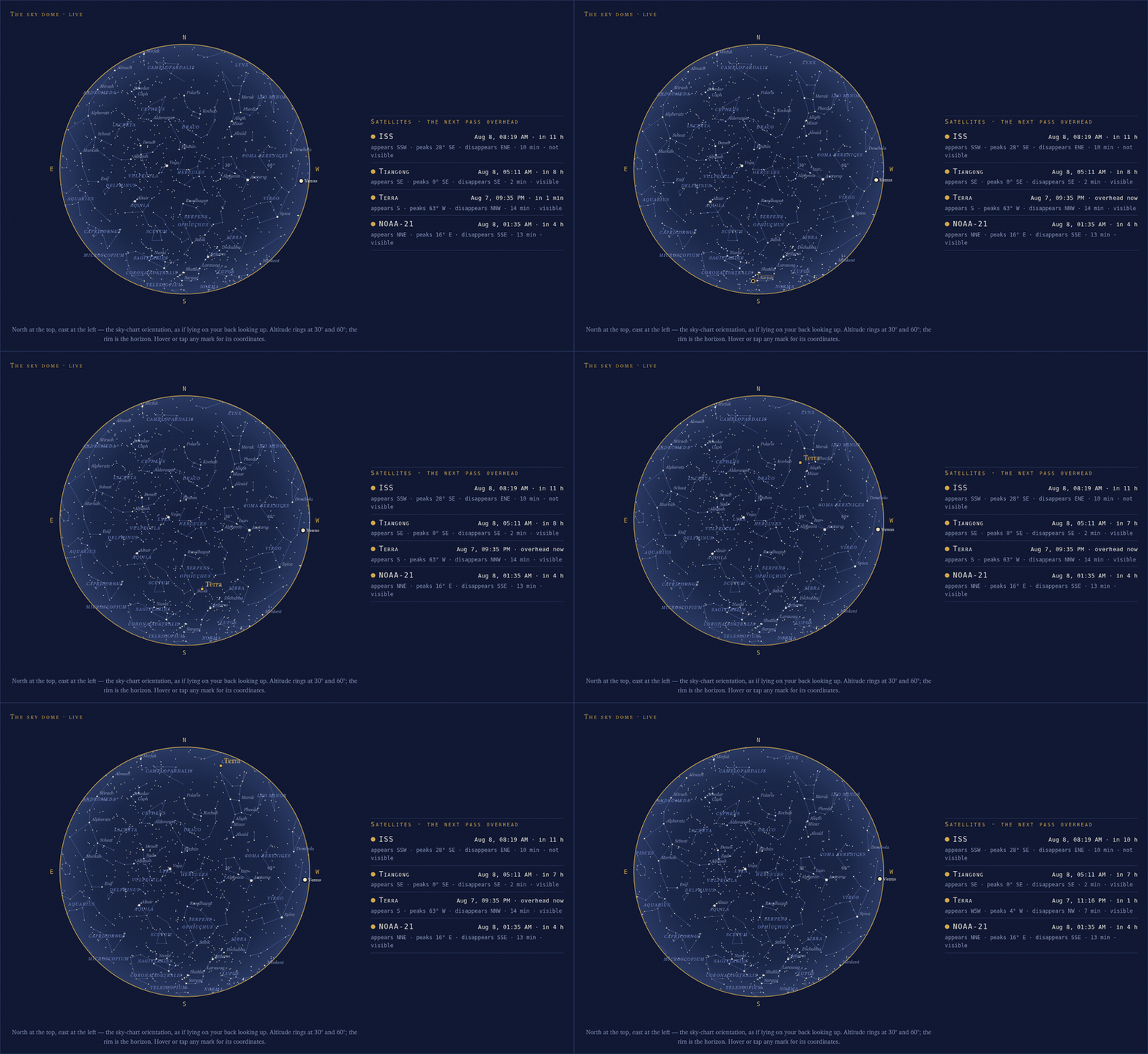
The dome during Terra's August 7 evening pass over Palo Alto, captured
live from the running page (2-second frames played at about 30× speed).
Terra rises in the south already inside Earth's shadow — the hollow
in-shadow ring climbing a dark sky — and near 12° it crosses the
shadow's edge and snaps solid at full brightness: the flare, the moment
the satellite catches the sun:
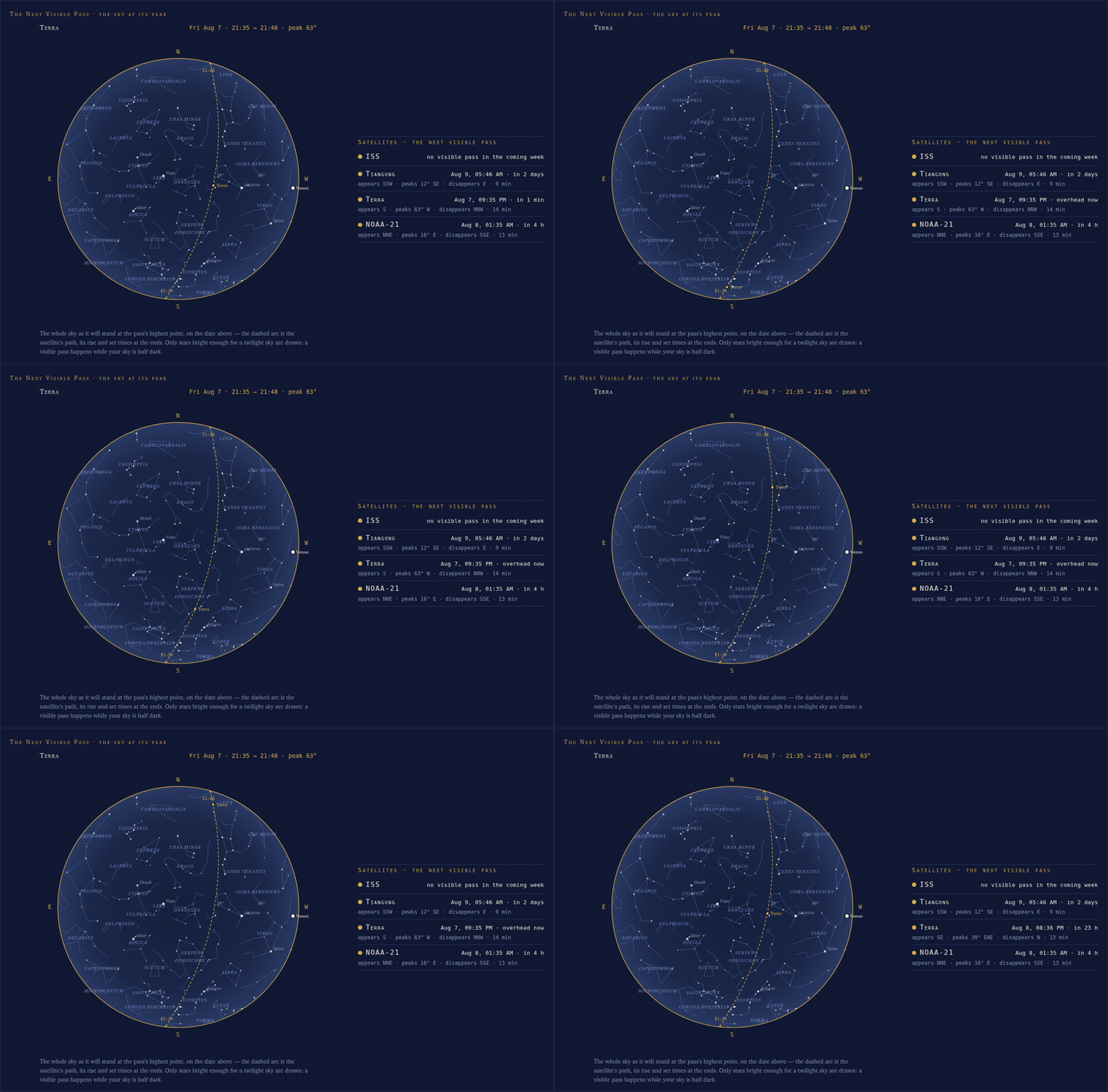
…and the same pass on the Next Visible Pass panel, the sweep dot riding
up the drawn arc from rise to set under the dated head line:
What's new
-
The sky dome, live. Everything above the horizon right now, in
sky-chart orientation (north up, east left, as if lying on your back
looking up) — drawn by weewx-skyfield's own dome chart, so celestial
inherits the star catalog, the constellations and every future
improvement. Each report cycle renders a staggered set of backdrops
a minute apart (the sky rotates 15°/hour), and the open page steps to
the one covering the current minute — a quarter-degree step instead
of a visible five-minute lurch — while the sun, moon and planet marks
are nudged every second at loop-derived rates through the dome's new
machine hooks (weewx-skyfield 2.0). Any archive interval works: the
fragments describe their own spacing and the page adapts. -
Satellite tracking. With
[[Satellites]]configured in
weewx-skyfield 2.0 (its installer defaults to the ISS and Tiangong)
and the newalmanac.iss.*/almanac.tiangong.*loop-data fields,
the dome shows the live layer: the satellite marker — dot and name —
repositioned every second, smooth through zenith passes, drawn
whenever the satellite is up and dimmed unless the eye could actually
find it (satellite sunlit, sky dark). Beside the dome, a satellite
roster counts down to each satellite's next pass of ANY kind ("in
15 h" rolling into "overhead now" during the show) over the
appears/peaks/disappears line, each row tagged visible or not
visible — so the dome's dimmed daytime crossings are announced too.
The rows are honest: "no pass
in the coming week" and "no usable orbital elements — see the weewxd
log" say so when that is the truth. The satellite set follows your
[[Satellites]]configuration — every satellite you add gets its
roster row and live tracking automatically (the new--add-satellite
utility, below, does the config work).
Most of the day a marker is simply absent — a handful of passes a
day, about ten minutes each — so the panel is really an always-there
next-pass countdown plus the occasional live show. -
The Next Visible Pass panel. The visible-pass story: the whole sky as it
will stand at the culmination of the soonest upcoming visible pass,
the pass's arc
dashed across it with rise and set times at the ends, under a dated
head line — one chart, one epoch, so the arc crosses the stars it
will actually cross (the dome deliberately draws no arc: an undated
future track on the now-sky reads as tonight's) — beside a roster of
each satellite's next VISIBLE pass, the ones worth stepping outside
for. During the pass
itself the chart's moment is only minutes away, and the page sweeps
the satellite's dot live along the drawn arc. The dot is the chart's
own culmination mark, so it keeps the culmination's solid-or-ring
sunlit state for the whole ride; the dome beside it carries the live
solid/ring truth, shadow entries and flares included. When no visible pass
is coming the chart hides and the roster's honest rows say why; the
chart refetches every five minutes, and rolls over to the next pass
by itself. -
Tooltips work on touch screens. Every mark on the dome and the
pass chart carries a tooltip, and browsers show those only on
hover — on an iPad they were simply dead. The skin now ships
weewx-skyfield 2.0'ssky.js: a tap on or near a mark shows the
same text as a floating chip, a tap on empty sky (or Escape)
dismisses it, and mouse users lose nothing — hover still works, a
click just pins the chip too. The Geocentric dial joins in: every
body's dot answers a hover or tap with its name, live altitude and
live distance, in the roster's own translated vocabulary. Because
this page is live, an open chip is dismissed whenever the dome or
the chart refreshes under it: a chip is a transient answer, never a
stale overlay. -
Graceful on every almanac. A new guard-only search list serves
the dome and the chart only when weewx-skyfield is installed: PyEphem
and built-in almanac stations get an install hint in the panel, never
a broken
page. An older weewx-skyfield draws the dome without satellites; a
loop feed without the satellite keys hides that layer. -
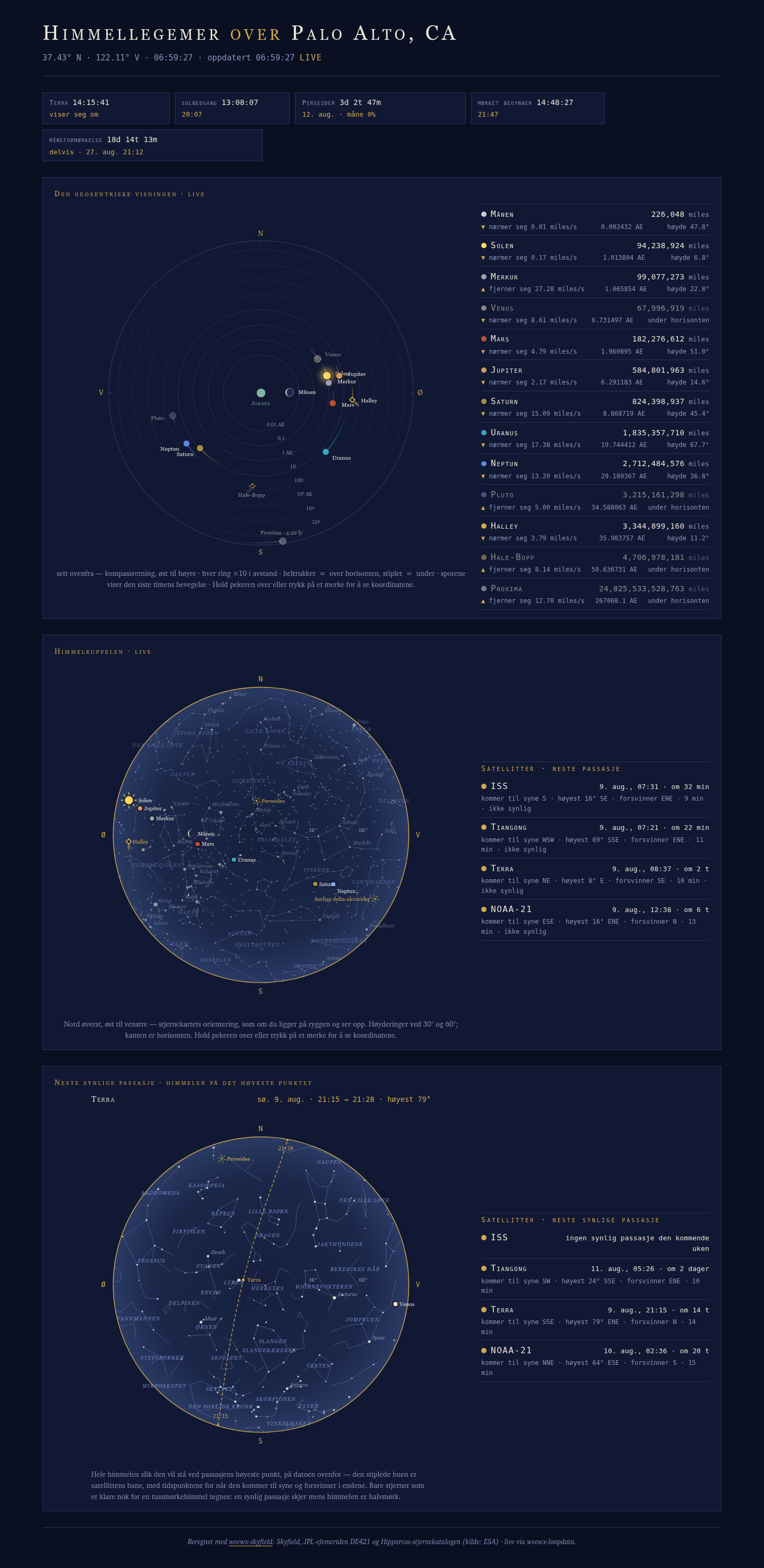
Italian, Norwegian and Swedish translations (Beta, awaiting their
native-speaker reviews) join the German, French, Danish, Dutch and
Spanish — nine languages bundled, matching weewx-skyfield 2.0.
lang = it,no(Bokmål), orsvon the report stanza turns one
on: the whole page, labels and live values alike. Corrections are
welcome, and a native speaker's review graduates a Beta, as the
Danish showed.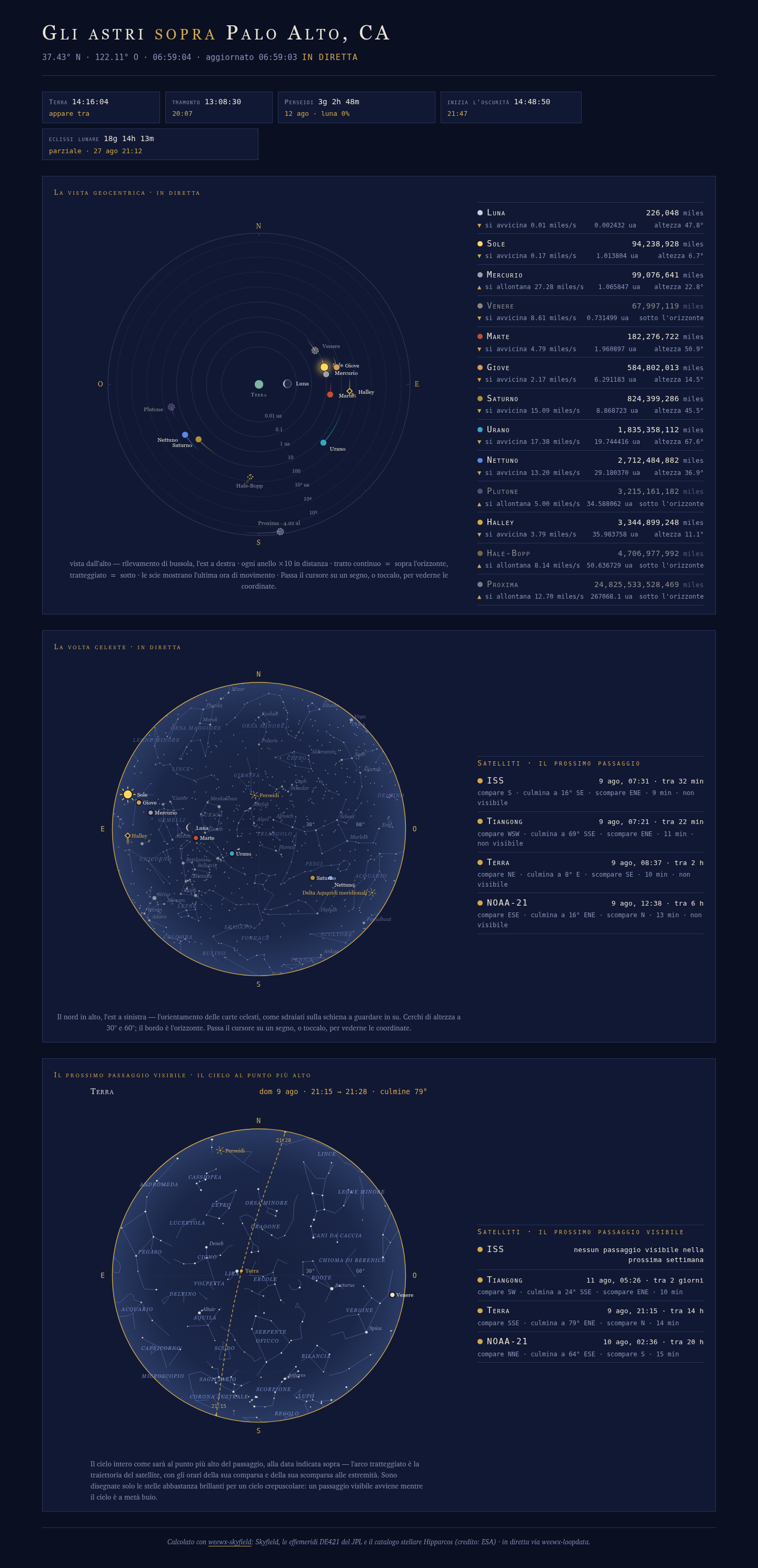
-
Translated everywhere. The dome, satellite and pass-chart
strings ship in all nine languages, the shared vocabulary verbatim
from weewx-skyfield's translations, and each language now names the
well-known satellites (iss = ISS,tiangong = Tiangong,
hst = HST) the same way it names the planets. -
One-command satellites. A satellite beyond the installer's two
takes three separate weewx.conf edits — the[Skyfield]
[[Satellites]]entry, nineteen fields-line entries, the display
name — so the new--add-satelliteutility makes them all at once,
one satellite per run:python -m user.celestial --add-satellite zenit23088=23088 --name 'Zenit-2 23088' --config /home/weewx/weewx.conf --in-placeEvery edit is idempotent — a satellite already configured per
weewx-skyfield's manual just gains its fields, and re-running
updates the number or name in place.--remove-satelliteis the
exact inverse (it works on the installer defaults too, with a
warning that a weewx-skyfield upgrade re-adds the[[Satellites]]
entry). Same write modes as the migrator:--in-placebacks the
original up first;--output FILEnever touches it. Adding several
satellites with--in-placeis one run each, and the second run
stops until you move the first run's.bak-celestial-8.0aside — it
never overwrites your only backup;--outputsidesteps this. -
The migrator follows your satellites, and the installer tells you
when to run it.--migrate-loopdata-fieldsnow reads[Skyfield]
[[Satellites]]from the weewx.conf it rewrites and appends fields
for exactly the satellites you have configured — a customized set
gets entries for its own tags, a deliberately emptied set is never
resurrected, and only a station with no[[Satellites]]at all gets
the installer defaults. And the install itself now checks: when your
fields line is missing entries the page reads (or carries outdated
spellings),weectl extension installprints the exact migrator
commands, tailored to your machine — your config path, your bin
directory, the running python, and a word-diff review command,
because the fields line is one long comma-separated value that a
plaindiffrenders as two unreadable lines. A hint only: the
installer never edits[LoopData]itself, and it stays silent when
the line is complete. -
Danish title fix. The page title in Danish is "Himlen over
{location}", Gert Andersen's original wording — 7.8 shipped
"Himmellegemer over", a misreading of his message.
Lighting up the satellite layer
Append the satellite entries to the fields line of [LoopData] [[Include]] in weewx.conf (the README shows the complete line, and
--migrate-loopdata-fields appends them for you, following your
[[Satellites]] so a customized satellite set gets its own tags'
entries), and run
weewx-skyfield 2.0 with its default [[Satellites]]. The entries are
safe to add on any almanac: one that cannot serve them simply omits them
from loop-data.txt (one weewxd log line per field) and the page hides
its satellite layer.
Requirements
- Python 3.9 or later
- WeeWX 5.2 or later
- weewx-loopdata
6.9 or later (released alongside; earlier versions were required at
5.0 — 8.0 depends on 6.9's almanac-field fixes, most visibly the
event expiry that rolls a satellite's next pass forward the moment it
ends instead of serving the day's first pass until midnight) - weewx-skyfield
2.0 for the dome's live nudging and the satellite layer; any
weewx-skyfield for the dome itself; strongly recommended in general
(required for Proxima Centauri), or PyEphem for the Geocentric alone
Installing/upgrading
Download weewx-celestial.zip from this release, then install right over
the existing 7.x:
weectl extension install weewx-celestial.zip
Restart WeeWX. If a report cycle lands between the install and the
restart, the log may show ERROR lines for the new templates ("cannot
find 'pass_chart_html'") — harmless: the page keeps its old copy and
the restart clears them. No weewx.conf changes are needed when upgrading from 7.x
— the satellite fields line addition above is only for the new layer.
(Upgrading from 6.x or earlier follows the README's upgrade instructions —
those paths do need the uninstall step, and from 5.x the migration
utility.)