Releases: chaunceygardiner/weewx-loopdata
Release list
Release v6.7

weewx-loopdata 6.7
A complete Spanish translation of the sample report ships (Beta).
Drop-in upgrade — install over 6.x; no configuration changes, and every
existing fields line produces the same values as before. Released
alongside weewx-skyfield 1.16 and weewx-celestial 7.7, which ship the
same Spanish for their pages.
What's new
-
Spanish ships (Beta).
lang/es.confis a complete Spanish
translation of the sample report — gauge headings after the Spanish
labels of WeeWX's own Seasons skin (Punto de rocío, Barómetro,
Lluvia, Radiación solar), the ninetrend.barometer.desc
descriptions in the tendency vocabulary of Spanish weather bulletins
(en ascenso, estable, en descenso), and, for a loopdata
instance whose target report is Spanish, the compass ordinates
(N/E/S/O, SSO for SSW), moon phases, body and all 88 constellation
names — the shared vocabulary in step with weewx-skyfield's and
weewx-celestial's Spanish (the same cross-repo test that pins the
German, French and Dutch). Select it withlang = eson the
report's stanza. Beta pending native-speaker review — corrections
welcome.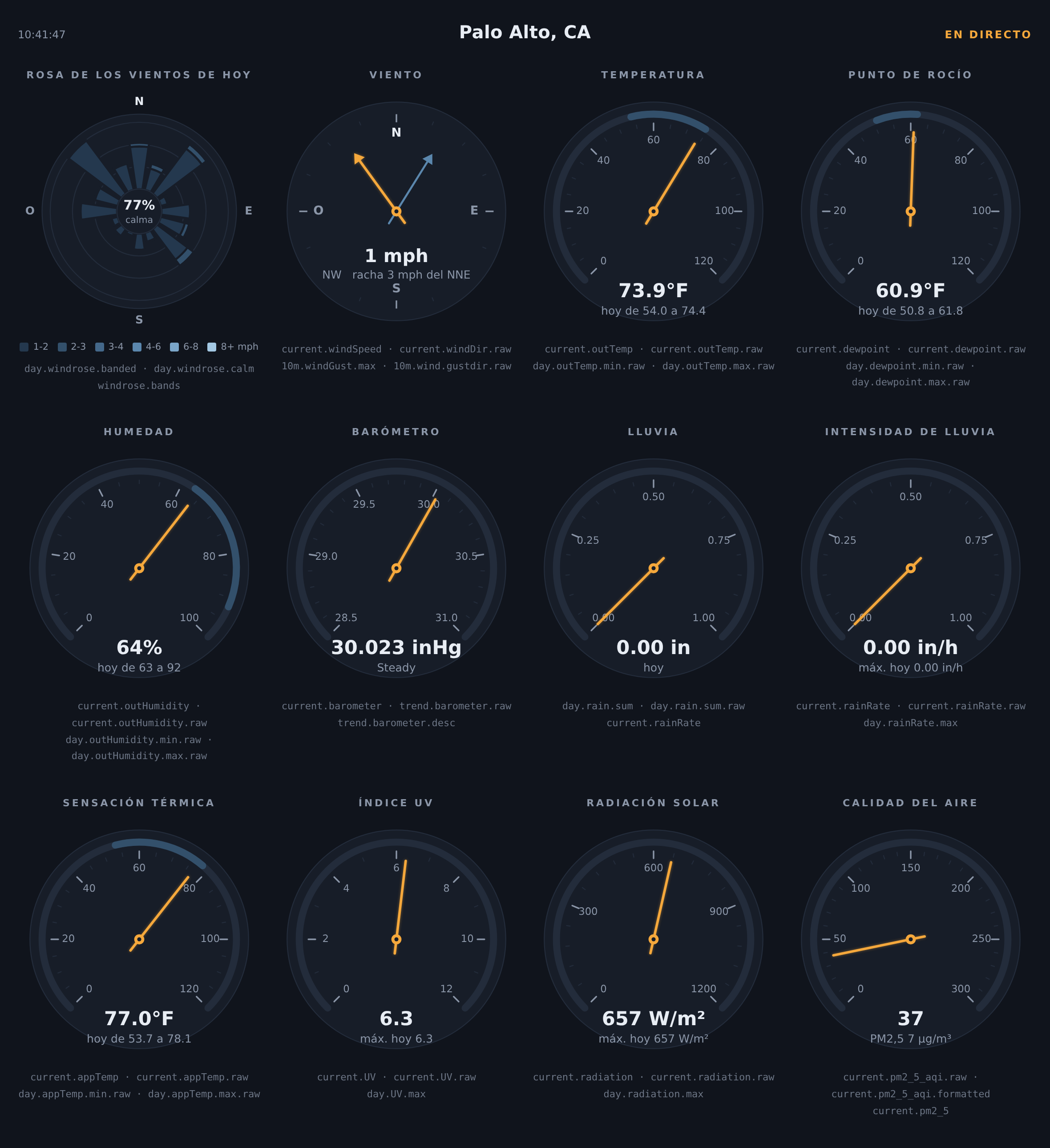
Requirements
- WeeWX 4 or 5 (translations need WeeWX 4.6 or later)
- Python 3.7 or later
- No third-party Python packages required
Installing/upgrading
Download weewx-loopdata.zip
and install it over your existing copy, then restart weewxd:
weectl extension install weewx-loopdata.zip
(or wee_extension --install weewx-loopdata.zip on WeeWX 4).
Release v6.6
weewx-loopdata 6.6
Almanac fields can now pin their units, attribute chains walk exactly
as Cheetah walks a report tag, the French translation is out of
Beta, and a complete Dutch translation ships (Beta). Drop-in upgrade —
install over 6.x; no configuration changes,
and every existing fields line produces the same values as before.
Released alongside weewx-celestial 7.5, whose migration utility now
emits the pinned spellings.
What's new
-
Unit segments on almanac fields. Almanac fields complete the
grammar: like observation fields (day.outTemp.avg.degree_C) and
station fields (station.altitude.meter.raw) before them, an almanac
field can carry a unit segment:almanac.sunrise.unix_epoch.raw,
almanac.sun.visible.second.raw,
almanac.sun.visible.hour.round(2).raw(the unit sits before
round(n)and the format spec). It pins the unit no matter what the
target report's unit settings say. Without one,.rawfollows the
target report's converter — by design, that is report-tag parity — so
a target report with[Units][[Groups]]overrides (say
group_deltatime = hour) turnsalmanac.sun.visible.rawfrom seconds
into hours. Pin the unit on any.rawfield your javascript consumes
numerically. The manual's
Almanac fields page
has the full story. -
Cheetah-exact attribute walking. Almanac and station field chains
now auto-call exactly as Cheetah's NameMapper walks a tag: a segment
that resolves to a method or function is called at every dot, not only
at the end of the chain, and a callable instance is never auto-called
(Cheetah leaves those alone). Concretely: under weewx-skyfield ≤ 1.14,
almanac.moon.parallactic_angle.degreesworked as a report tag but
failed as a loopdata field; now both behave identically. -
French is out of Beta.
lang/fr.confhas been native-speaker
reviewed, in step with weewx-skyfield's and weewx-celestial's reviewed
French (a test keeps the three extensions' shared vocabulary
identical). Select it withlang = fron the report's stanza. -
Dutch ships (Beta).
lang/nl.confis a complete Dutch
translation of the sample report — gauge headings after the Dutch
labels of WeeWX's own Seasons skin, the ninetrend.barometer.desc
descriptions in the tendency vocabulary of Dutch weather reports
(stijgend, gelijkblijvend, dalend), and, for a loopdata
instance whose target report is Dutch, the compass ordinates, moon
phases, body and all 88 constellation names — the shared vocabulary
in step with weewx-skyfield's and weewx-celestial's Dutch (the same
cross-repo test that pins the German and French). Select it with
lang = nl. Beta pending native-speaker review — corrections
welcome.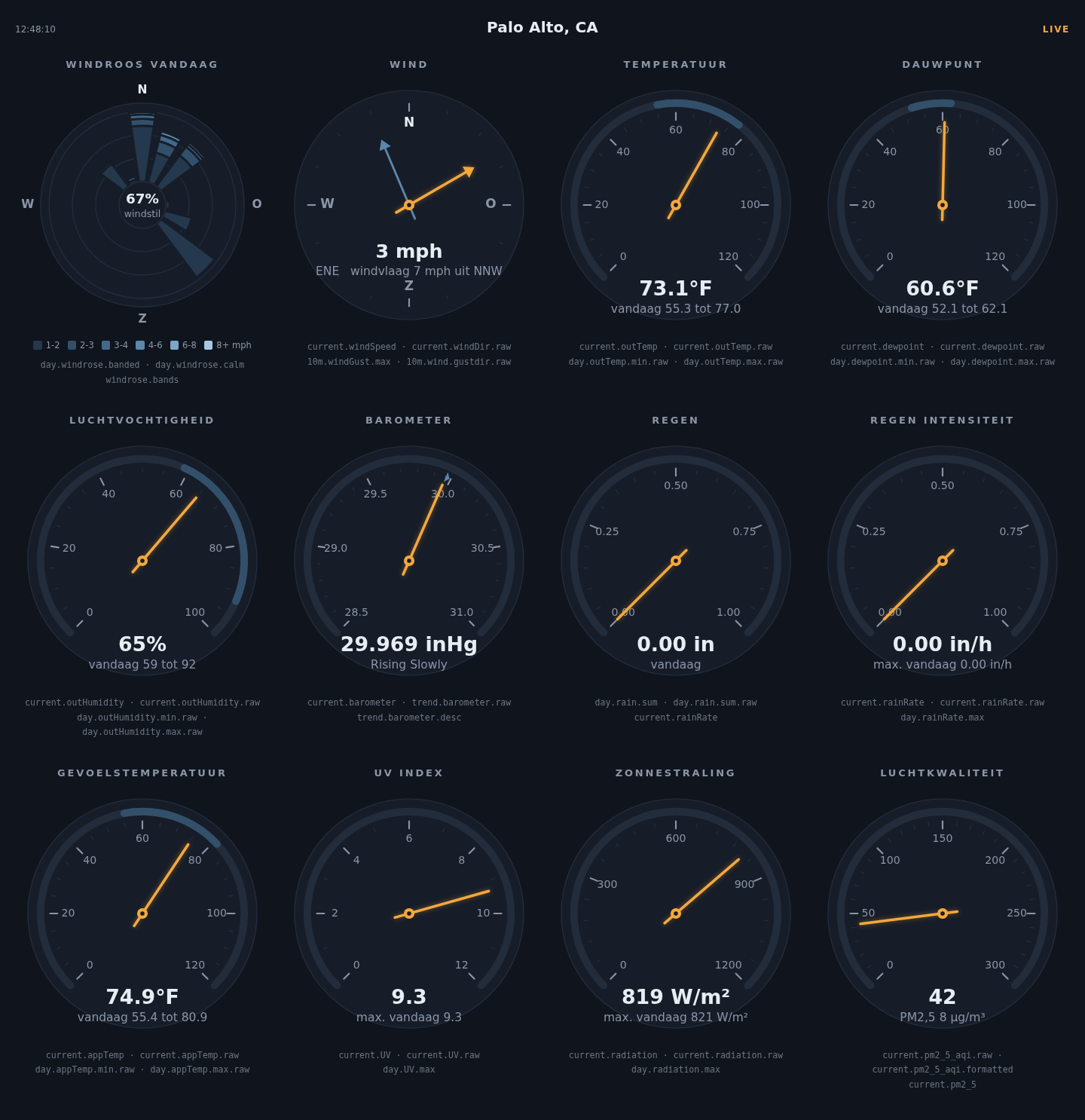
Requirements
- WeeWX 4 or 5 (translations need WeeWX 4.6 or later)
- Python 3.7 or later
- No third-party Python packages required
Installing/upgrading
Download weewx-loopdata.zip
and install it over your existing copy, then restart weewxd:
weectl extension install weewx-loopdata.zip
(or wee_extension --install weewx-loopdata.zip on WeeWX 4).
Release v6.5
weewx-loopdata 6.5
A translation release: a complete French translation of the sample
report ships (Beta, awaiting native-speaker review — corrections and
reviewers very welcome). Drop-in upgrade — install over 6.x; an English
or German report looks exactly as before, and there are no field or
configuration changes. Released alongside weewx-skyfield 1.14 and
weewx-celestial 7.4, which add French to their pages.
What's new
- French ships (Beta).
lang/fr.confis a complete translation:
the gauge headings follow the French labels of WeeWX's own Seasons
skin (Point de Rosée, Pression Atmosphérique, Taux de
Précipitations, …), the ninetrend.barometer.descdescriptions use
the tendency vocabulary of French weather bulletins (en hausse rapide,stationnaire,en baisse lente, …), and the value-side
sections a French target report serves — compass ordinates, moon
phases, body and all 88 constellation names — are copied verbatim
from weewx-skyfield's and weewx-celestial's French (a test keeps the
three extensions in step, as it does for the German). Select it with
lang = fron the report's stanza; as always, the page's labels
follow the sample report'slangand the live values follow
loopdata's target report — out of the box the same report, so one
line switches both (the manual's
Translations page
has the full story). Beta until a native speaker has reviewed it;
corrections are very welcome as issues or pull requests.
Requirements
- WeeWX 4 or 5 (translations need WeeWX 4.6 or later)
- Python 3.7 or later
- No third-party Python packages required
Installing/upgrading
Download weewx-loopdata.zip
and install it over your existing copy, then restart weewxd:
weectl extension install weewx-loopdata.zip
(or wee_extension --install weewx-loopdata.zip on WeeWX 4).
Release v6.4
weewx-loopdata 6.4
A feature release: the sample report is translatable through WeeWX lang
files, and a complete German translation ships. Drop-in upgrade — install
over 6.x; an English report looks exactly as before. The one action
required: if you customized [[BarometerTrendDescriptions]], see below —
that section is removed.
What's new
- The sample report speaks your language. Every string the page
renders — gauge headings, the LIVE badge, the readout lines under the
dials, the compass and windrose cardinal letters — is now a gettext-style
[Texts]key, translated through WeeWX's own lang-file mechanism. The
English string is the key, so a partial translation falls back to English
one string at a time.skins/LoopData/lang/en.confis the reference
dictionary; strings the live javascript composes are translated at
generation time and fed to the script, so a translation touches no code. - German ships.
lang/de.confis a complete translation whose shared
vocabulary is copied verbatim from the native-speaker-reviewed German of
weewx-skyfield and weewx-celestial (a test keeps the three extensions in
step). Select it withlang = deon the report's stanza in weewx.conf. - The two-language coupling, documented. The page's labels follow the
sample report'slang, but the live values in loop-data.txt
(.ordinal_compass,moon_phase,almanac.<body>.label, …) follow the
language of loopdata's[LoopData]target report. Out of the box the
two are the same report, and the shipped lang files carry the value-side
sections (compass ordinates, moon phases, body and all 88 constellation
names), solang = deon[[LoopDataReport]]switches both; with a
different target report,[StdReport] [[Defaults]] lang = desets every
report at once. The manual's new
Translations page
has the full story. trend.barometer.desctranslates the same way — and
[[BarometerTrendDescriptions]]is gone. The descriptions (Falling Slowly,Steady, …) are now gettext-style keys into the target
report's[Texts], shipped in German inlang/de.conf, so they follow
the target report's language like every other value.
Action required (only if you customized barometer trend descriptions)
The [LoopData] [[BarometerTrendDescriptions]] section in weewx.conf is
removed and now ignored — delete it. If you had custom wording, put it on
the target report's stanza instead:
[StdReport]
    [[LoopDataReport]]
        [[[Texts]]]
            "Steady" = "Holding steady"
If you never touched the section, there is nothing to do: the English
defaults are unchanged.
Requirements
- WeeWX 4 or 5 (translations need WeeWX 4.6 or later)
- Python 3.7 or later
- No third-party Python packages required
Installing/upgrading
Download weewx-loopdata.zip
and install it over your existing copy, then restart weewxd:
weectl extension install weewx-loopdata.zip
(or wee_extension --install weewx-loopdata.zip on WeeWX 4).
Release v6.3
weewx-loopdata 6.3
A feature release: $station report tags can now be listed as fields, most
usefully a live WeeWX/server uptime that is correct within a packet or two
of a restart. Drop-in upgrade — install over 6.x, no config changes; new
station.* fields are opt-in via the fields line.
What's new
- Station fields. Any
$stationreport tag can be listed as a field
with the$removed:station.uptime.raw,
station.uptime.long_form(),station.os_uptime.raw,
station.version,station.location,station.altitude.meter.raw, and
so on. Values are evaluated against the exact object behind the
report's$stationtag, with loopdata's usualround(n)and format
specs, so they render as the report would render them. - Live, restart-correct uptime.
uptimeandos_uptimeare
recomputed on every loop packet. The report-cycle workaround — shipping
$station.uptime.rawin a template and extrapolating in page
javascript — shows the pre-restart uptime still climbing until the next
report cycle; astation.uptime.rawloop field is correct within one
packet. Every other$stationattribute is constant for the life of
the weewxd process and is computed once. - Tuple endpoints render as json arrays. A field whose endpoint is a
tuple of scalars is now emitted as a json array instead of Python's
str()of the tuple:station.latituderenders as
["37", "24.00", "N"]— the same (degrees, minutes, hemisphere) parts a
template indexes — and an almanac field ending in, e.g.,moon_phases
gets the same treatment.
Requirements
- WeeWX 4 or 5
- Python 3.7 or later
- No third-party Python packages required
Installing/upgrading
Download weewx-loopdata.zip
and install it over your existing copy, then restart weewxd:
weectl extension install weewx-loopdata.zip
(or wee_extension --install weewx-loopdata.zip on WeeWX 4).
Release v6.2
weewx-loopdata 6.2
A small quality release for the sample skin: when the instrument panel
cannot fetch its loop data, it now says so on the page instead of sitting
silently dead. Drop-in upgrade — install over 6.x, no config changes.
(The loopdata service itself is unchanged from 6.1.)
What's new
- A failed loop-data fetch shows up in the LIVE indicator. When the
poll forloop_data_filereturns anything but the json — the classic
case being the web server's 404 page, because loopdata writes outside
HTML_ROOT (say/dev/shm) and nothing on the web server serves that
path — the indicator now readsNO DATA (HTTP 404) — check loop_data_file(orBAD DATA — check loop_data_filefor a response
that isn't json). A network-level failure showsOFFLINE. Previously
the only trace was a JSON.parse error in the browser console, and the
panel just looked dead. A later successful poll rewrites the indicator
to LIVE, as always. (weewx-celestial 7.1 ships the same change for its
Geocentric page.)
Requirements
- WeeWX 4 or 5
- Python 3.7 or later
- No third-party Python packages required
Installing/upgrading
Download weewx-loopdata.zip
and install it over your existing copy, then restart weewxd:
weectl extension install weewx-loopdata.zip
(or wee_extension --install weewx-loopdata.zip on WeeWX 4).
Release v6.1
weewx-loopdata 6.1
A bug-fix release: a dead or hanging rsync remote can no longer stall loop
processing. Drop-in upgrade — no config changes required, though users who
set ssh_options themselves get a real fix (see below).
What's new
- A hanging rsync remote no longer stalls loop processing. The
timeout = 1setting only ever reached rsync's--timeout, which bounds
rsync protocol I/O — not the phases ssh owns. A black-holed TCP connect,
a stalled ssh handshake, or an authentication prompt could each block the
loop processing thread for minutes per attempt; loop-data.txt kept being
written, but minutes behind the packets inside it, so live pages (the
sample panel, weewx-celestial's Geocentric dial) froze with a growing
"Ns ago" badge. LoopData now folds ssh-side bounds into the rsync
transport:ConnectTimeout=<timeout>,ServerAliveInterval=<timeout>,
ServerAliveCountMax=2andBatchMode=yes. Each is applied only if
your ownssh_optionsdoesn't already set that keyword, so anything you
set wins. Settingtimeout = 0(rsync's "no timeout") omits the time
bounds;BatchModeis still applied, because an interactive prompt can
never be answered under weewxd. - Your
ssh_optionsno longer silently discards the connect bound.
Previously the 1-secondConnectTimeoutlived in the default value of
ssh_options, so settingssh_optionsat all — a key file, a port —
replaced it and left connects unbounded. Now the bounds are merged with
whatever you set, andConnectTimeout/ServerAliveIntervalfollow your
timeoutvalue instead of a hardcoded 1.
Requirements
- WeeWX 4 or 5
- Python 3.7 or later
- No third-party Python packages required
Installing/upgrading
Download weewx-loopdata.zip
and install it over your existing copy, then restart weewxd:
weectl extension install weewx-loopdata.zip
(or wee_extension --install weewx-loopdata.zip on WeeWX 4).
Release v6.0
weewx-loopdata 6.0
A major release with three headline features: a live NOAA-style windrose,
full report-tag parity for the fields grammar (unit overrides, round(n),
and the format()/nolabel()/string()/long_form() call specs), and a new
sample skin — a live instrument panel of canvas gauges. The loopdata
service itself is a drop-in upgrade, but three things need checking before
you restart: if you publish the sample report, you must update your
fields line (the new panel replaces the old tables page and reads new
fields — see the first action-required section below); the experimental
windrun_<dir> fields are removed (replaced by windrose); and day/hour/week
time-of-event fields now format per period, as WeeWX report tags do (see the
check-your-pages section).
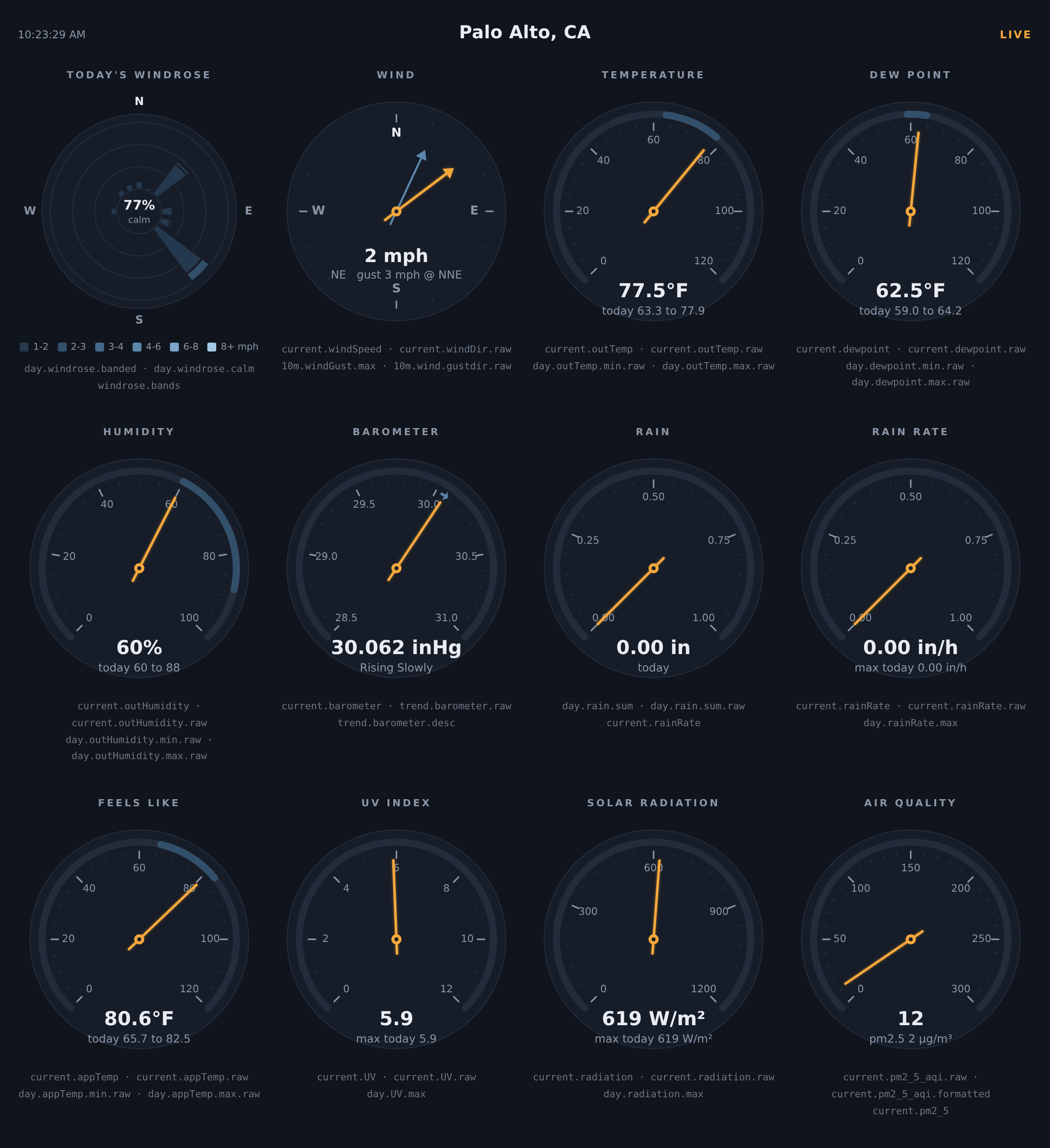
The new sample skin, live on real data:
What's new
- windrose — a first-class observation type for building a live windrose.
Per period, loopdata accumulates 16 compass bins by N speed bands (time and
distance per cell, plus a directionless calm total) and projects the matrix
through four aggregates:.sum(16 distances, the classic windrun rose),
.time(16 durations),.banded(the 16xN NOAA matrix) and.calm.
Works with every period exceptcurrentandtrend— includingweek,
month,year,rainyearandalltime, whichwindrun_<dir>never
supported — and every period seeds fully from the archive at startup, with
a single SQL aggregate per period. Band edges default to the classic
WRPLOT/NOAA bands and are configurable via[LoopData] windrose_bands; a
windrose.bandskey is emitted automatically so page legends never
hardcode them. The windrose is the centerpiece of the new sample skin
(next bullet). - A new sample skin: a live instrument panel — a NOAA windrose plus
eleven canvas gauges in three rows of four: temperature, dew point,
feels-like and humidity dials wearing today's min–max as a band, a wind
compass with a ghost needle at the 10-minute gust direction, a barometer
with the 3-hour trend drawn as an arc, rain and rain-rate dials that
rescale themselves on a big day, and UV, solar radiation and air quality
(weewx-purple'spm2_5_aqi) that hide themselves on stations without
the sensor. The gauges scale with the window width, fonts and all. A
few hundred lines of dependency-free javascript to crib from, replacing
the old tables page..rawfields drive the geometry,
report-formatted fields supply every readout, andunit.labelfields
pick the dial scales, so the panel follows the target report's units
(metric or US) automatically. - Unit override in the fields grammar. A field may name a unit between
the aggregation and the format spec —
period.obstype[.agg_type][.unit][.format_spec]— exactly as WeeWX report
tags allow ($current.outTemp.degree_C). Any unit WeeWX knows for the
observation's unit group is accepted, whatever the report's configured
units. Examples:current.windSpeed.beaufort,day.outTemp.avg.degree_C.raw,
10m.windGust.max.knot.raw,trend.barometer.mbar.formatted. Gauges and
widgets frequently want a fixed unit — a Beaufort wind dial, a hPa
barometer — even when the surrounding report is in °F and inHg; now that's
a per-field choice and the rest of the report is unaffected. Overrides
work everywhere a value is produced — current, every rolling and span
period, and trend. Trend endpoints are converted to the requested unit
before the difference is taken, so a temperature trend indegree_Cis a
true 5° change for a 9°F change, not a mis-converted number. Value fields
only, matching WeeWX:unit.labelis obstype-only and has no override,
and a unit incompatible with the observation's group
(e.g.day.outTemp.avg.beaufort) simply omits the field. - Call-syntax format specs. The formatting methods a report tag can call
are now format specs with the same names, arguments and output:
day.outTemp.maxtime.format("%H:%M"),current.outTemp.format(add_label=False),
day.windGust.max.nolabel("%.0f"),day.rain.sum.string(),
day.sunshineDur.sum.long_form(). Time fields take a strftime format,
numeric fields a %-format, positional arguments bind exactly as the report
tag's do, and a bare name (day.rain.sum.string) is a zero-argument call,
just as Cheetah renders it. The unit override composes
(day.outTemp.avg.degree_C.nolabel("%.2f")), and the calls work on almanac
fields too (almanac.sunrise.format("%H:%M")). One quoting rule: a call
containing a comma must be quoted on the fields line, or ConfigObj splits
the entry at the comma —
fields = ..., 'day.rain.sum.format("%.2f", add_label=False)', .... - round(n) — round a value before rendering, exactly as report tags
allow:day.outTemp.max.round(1).rawpublishes72.1instead of
72.09999847412109. It sits between the unit override and the format
spec (day.barometer.max.mbar.round(1).raw), composes with every
formatting call (round(2).format("%.3f")renders the rounded value), and
works on almanac fields (almanac.sun.az.round(1).raw). - Always-present keys with
string(). By default loopdata omits a field
with no data (say a trend during the first minutes after startup).
string(), or an explicitNone_stringargument to any formatting call,
makes the field emit its None rendering instead (N/A, or your string) —
handy for pages that want every element populated from the very first
packet, e.g.trend.outTemp.string("n/a"). - Time-of-event fields format per period —
day.outTemp.maxtimenow
renders with the target report's[Units][TimeFormats]entry forday,
exactly as$day.outTemp.maxtimedoes (12:00:00 instead of
07/01/20 12:00:00 with the standard formats). See the check-your-pages
section below for every period. - Fixes — hour/continuous windrun buckets no longer start empty after a
weewxd restart (fixed via the windrose rework); the target report's
options are now assembled with WeeWX's ownbuild_skin_dictwhen present
(a stale function name meant loopdata always used its own fallback), with
ConfigObj interpolation disabled exactly as WeeWX does — without this,
%(hour)d-style delta-time format strings misparse andlong_form()
cannot render. - A README that leads with the point — the introduction now opens with a
complete four-step example: report tags, the same tags on thefields
line, the loop-data.txt they produce, and the javascript that makes the
page live.
Action required if you publish the sample report: update your fields line
Upgrading replaces the sample skin's page with the new instrument panel, but
keeps your existing [LoopData] fields line in weewx.conf (only fresh
installs get the new default). The panel reads fields the old default never
included — .raw fields for the needle and petal geometry, unit.label
fields for the dial scales, and day.windrose.* for the rose — so with an
old fields line the new page serves half-dead: the LIVE indicator and text
readouts work, but the dials have no needles or min–max bands and the
windrose stays blank.
To fix it, replace the fields line under [LoopData] → [[Include]] with
the one from the README's sample configuration — exactly the fields the
panel reads:
fields = current.dateTime.raw, current.outTemp, current.outTemp.raw, day.outTemp.min.raw, day.outTemp.max.raw, day.outTemp.min.formatted, day.outTemp.max.formatted, current.outHumidity, current.outHumidity.raw, day.outHumidity.min.raw, day.outHumidity.max.raw, current.windSpeed, current.windSpeed.raw, current.windDir.raw, current.windDir.ordinal_compass, 10m.windGust.max, 10m.wind.gustdir.raw, 10m.wind.gustdir.ordinal_compass, current.barometer, current.barometer.raw, trend.barometer.raw, trend.barometer.desc, current.rainRate, current.rainRate.raw, day.rain.sum, day.rain.sum.raw, day.rainRate.max, day.rainRate.max.raw, current.dewpoint, current.dewpoint.raw, day.dewpoint.min.raw, day.dewpoint.max.raw, day.dewpoint.min.formatted, day.dewpoint.max.formatted, current.appTemp, current.appTemp.raw, day.appTemp.min.raw, day.appTemp.max.raw, day.appTemp.min.formatted, day.appTemp.max.formatted, current.UV, current.UV.raw, day.UV.max, current.radiation, current.radiation.raw, day.radiation.max, current.pm2_5, current.pm2_5_aqi.raw, current.pm2_5_aqi.formatted, day.windrose.banded, day.windrose.calm, unit.label.outTemp, unit.label.barometer, unit.label.rain, unit.label.rainRate, unit.label.windSpeed
then restart weewxd. If other pages read your loop-data.txt too, keep their
fields by appending them to this list rather than dropping them. Gauges for
sensors your station does not report (appTemp, UV, radiation, pm2_5) hide
their cells automatically. And note that wind below the calm threshold
accumulates as calm time, not directional distance, so on a near-calm day
the rose is legitimately empty with calm near 100%.
Action required: windrun_ fields are removed
The experimental windrun_N ... windrun_NNW observation types are gone,
replaced by windrose. Fields naming them are now ignored. To migrate:
day.windrun_N.sum is element 0 of day.windrose.sum, day.windrun_NNE.sum
element 1, and so on clockwise through NNW (element 15).
Check your pages: day/hour/week event times render differently
Through 5.0, every time-of-event field (maxtime, mintime, firsttime,
lasttime) was formatted with the current time format (typically
%x %X → 07/01/2020 12:00:00), no matter the period. WeeWX report tags
instead format times with the **period as ...
Release v5.0
weewx-loopdata 5.0
A major release: loop-data.txt can now carry almanac values. Any WeeWX
report almanac tag can be listed in the fields line — written exactly as
it appears in a Cheetah template, minus the $ — and loopdata computes it
on every loop cycle with whatever almanac WeeWX has registered
(weewx-skyfield, PyEphem, or WeeWX's built-in fallback), converted and
formatted per the target report, exactly as the report tag would render.
This is a drop-in upgrade: no weewx.conf changes are required, existing
fields behave identically, and the new capability costs nothing until you
list an almanac.* field.
What's new
- Almanac fields.
almanac.sunrise,almanac.sunrise.raw,
almanac.moon_phase,almanac.sun.az,almanac.sun.visible.raw
(length of daylight),almanac.moon.rise.raw,
almanac.next_solstice.raw,almanac.mars.earth_distance,
almanac(horizon=-6).sun(use_center=1).rise.raw(civil dawn; -12
nautical, -18 astronomical) — if it works as a report tag, it works
here, including the.raw/.formatted/.ordinal_compasssuffixes.
Element ids can match the json keys as usual, so page javascript drops
the values straight into HTML. See the new "Almanac fields" section of
the README for the full tour. almanac(days=±N). One loopdata extension to the report grammar:
evaluate the almanac at the same wall-clock time N local calendar
days away —almanac(days=1).sunrise.rawis tomorrow's sunrise,
almanac(days=-1).sun.visible.rawis yesterday's length of day.
(Reports express this with$almanac(almanac_time=$time_ts+86400),
which needs Cheetah variables a config line doesn't have;days=is
also DST-correct where ±86400 is not.)- Cost is managed automatically. Positions and distances recompute
every loop packet; rise/set/transit/daylight once per local day;
next_*/previous_*events are computed once and kept until the local
day advances past the event, so a page can show today's event for the
rest of its day. All almanac work runs on loopdata's processor thread,
never the WeeWX engine thread. - weewx-celestial's loop fields are no longer needed. Every loop
field that extension injects has an almanac equivalent (e.g.,
current.sunrise.raw→almanac.sunrise.raw,
current.daylightDur.raw→almanac.sun.visible.raw,
current.tomorrowSunrise.raw→almanac(days=1).sunrise.raw,
current.civilTwilightStart.raw→
almanac(horizon=-6).sun(use_center=1).rise.raw). The README has the
migration mapping, and weewx-celestial 6.0 — released alongside — ships
a utility that rewrites your fields line automatically. Two notes for
migrating pages: distances arrive in AU (as reports show them) rather
than miles/km, and waxing/waning is a one-line derivation (the moon is
waxing whenalmanac.next_full_moon.raw<almanac.next_new_moon.raw).
Requirements
- Python 3.7 or later
- WeeWX 4 or 5
- For almanac fields: whatever almanac you want serving them. With
weewx-skyfield
(WeeWX 5.2+) or PyEphem installed you get the full tag set; WeeWX's
built-in fallback serves sunrise, sunset and moon phase only. No
almanac fields listed, no requirement at all.
Installing/upgrading
Download weewx-loopdata.zip from this release, then:
weectl extension install weewx-loopdata.zip
Restart WeeWX. No weewx.conf changes are needed when upgrading; to use
the new capability, add almanac.* entries to
[LoopData] [[Include]] fields and restart.
Release v4.1
weewx-loopdata 4.1
WeeWX could fail to shut down if the stop signal arrived while LoopData
was starting up. Nothing else changes: no weewx.conf edits, no fields
changes, and loop-data.txt output is identical. This is a drop-in
upgrade.
What's new
- Shutdown can no longer be swallowed at startup. WeeWX stops by
raising an exception from its TERM signal handler, inside whatever code
is running when the signal lands. If that was LoopData's startup —
reading the target report configuration, or priming its accumulators
from the database on the first loop cycle — the broad error handlers
there swallowed the exception and weewx failed to stop. They now pass
it through. (Steady-state operation was never affected: per-packet
accumulation runs in LoopData's own worker thread, which the signal
cannot reach.)
Requirements
- Python 3.7 or later
- WeeWX 4 or 5
- No third-party Python packages
Installing/upgrading
Download weewx-loopdata.zip from this release, then:
weectl extension install weewx-loopdata.zip
(On WeeWX 4: sudo /home/weewx/bin/wee_extension --install weewx-loopdata.zip)
Restart WeeWX. No weewx.conf changes are needed when upgrading from 4.0.
Note that upgrading replaces the bundled skin (skins/LoopData/) — if you
customized index.html.tmpl or realtime_updater.inc, save a copy first.