Release v6.0

weewx-loopdata 6.0
A major release with three headline features: a live NOAA-style windrose,
full report-tag parity for the fields grammar (unit overrides, round(n),
and the format()/nolabel()/string()/long_form() call specs), and a new
sample skin — a live instrument panel of canvas gauges. The loopdata
service itself is a drop-in upgrade, but three things need checking before
you restart: if you publish the sample report, you must update your
fields line (the new panel replaces the old tables page and reads new
fields — see the first action-required section below); the experimental
windrun_<dir> fields are removed (replaced by windrose); and day/hour/week
time-of-event fields now format per period, as WeeWX report tags do (see the
check-your-pages section).
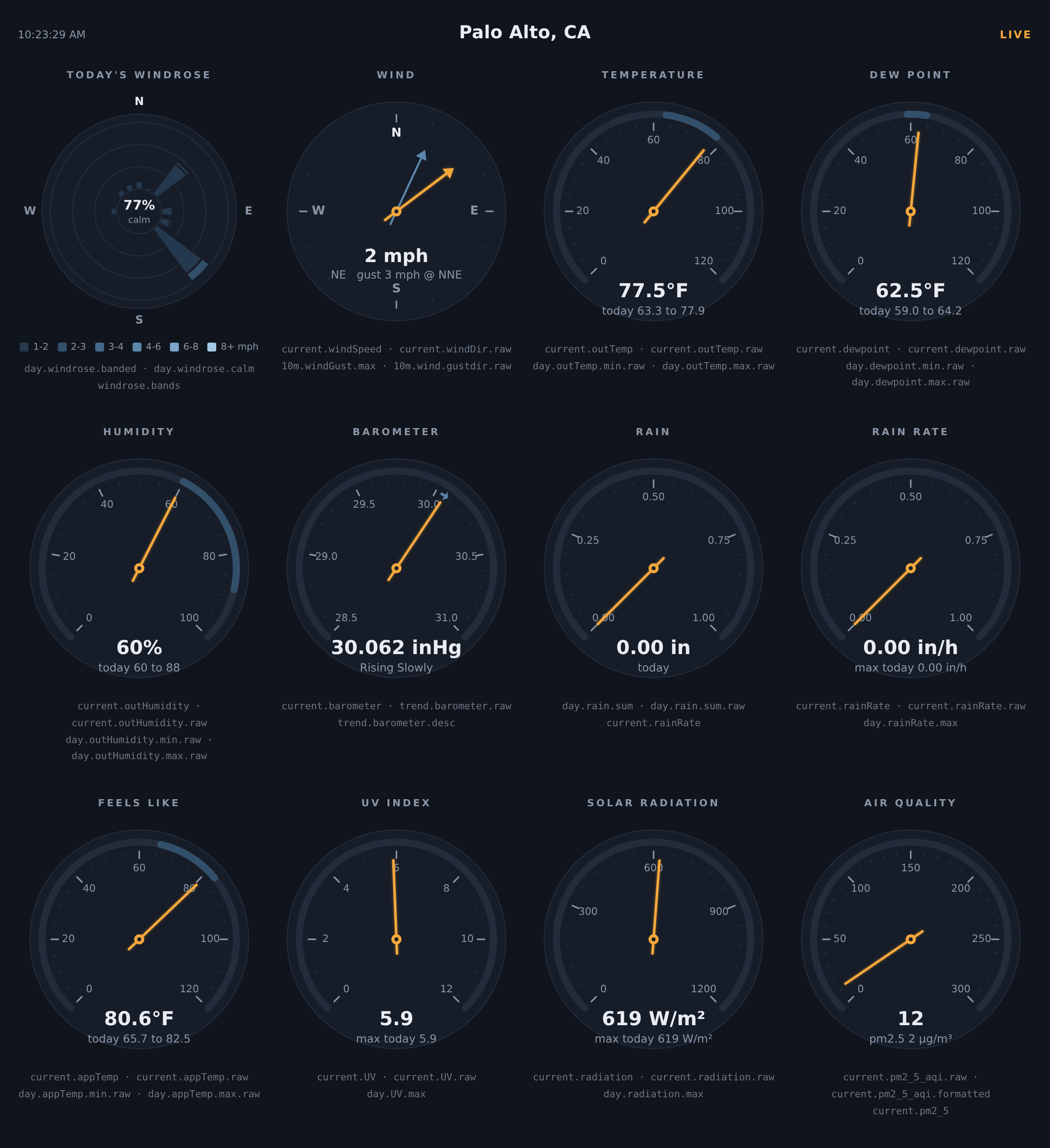
The new sample skin, live on real data:
What's new
- windrose — a first-class observation type for building a live windrose.
Per period, loopdata accumulates 16 compass bins by N speed bands (time and
distance per cell, plus a directionless calm total) and projects the matrix
through four aggregates:.sum(16 distances, the classic windrun rose),
.time(16 durations),.banded(the 16xN NOAA matrix) and.calm.
Works with every period exceptcurrentandtrend— includingweek,
month,year,rainyearandalltime, whichwindrun_<dir>never
supported — and every period seeds fully from the archive at startup, with
a single SQL aggregate per period. Band edges default to the classic
WRPLOT/NOAA bands and are configurable via[LoopData] windrose_bands; a
windrose.bandskey is emitted automatically so page legends never
hardcode them. The windrose is the centerpiece of the new sample skin
(next bullet). - A new sample skin: a live instrument panel — a NOAA windrose plus
eleven canvas gauges in three rows of four: temperature, dew point,
feels-like and humidity dials wearing today's min–max as a band, a wind
compass with a ghost needle at the 10-minute gust direction, a barometer
with the 3-hour trend drawn as an arc, rain and rain-rate dials that
rescale themselves on a big day, and UV, solar radiation and air quality
(weewx-purple'spm2_5_aqi) that hide themselves on stations without
the sensor. The gauges scale with the window width, fonts and all. A
few hundred lines of dependency-free javascript to crib from, replacing
the old tables page..rawfields drive the geometry,
report-formatted fields supply every readout, andunit.labelfields
pick the dial scales, so the panel follows the target report's units
(metric or US) automatically. - Unit override in the fields grammar. A field may name a unit between
the aggregation and the format spec —
period.obstype[.agg_type][.unit][.format_spec]— exactly as WeeWX report
tags allow ($current.outTemp.degree_C). Any unit WeeWX knows for the
observation's unit group is accepted, whatever the report's configured
units. Examples:current.windSpeed.beaufort,day.outTemp.avg.degree_C.raw,
10m.windGust.max.knot.raw,trend.barometer.mbar.formatted. Gauges and
widgets frequently want a fixed unit — a Beaufort wind dial, a hPa
barometer — even when the surrounding report is in °F and inHg; now that's
a per-field choice and the rest of the report is unaffected. Overrides
work everywhere a value is produced — current, every rolling and span
period, and trend. Trend endpoints are converted to the requested unit
before the difference is taken, so a temperature trend indegree_Cis a
true 5° change for a 9°F change, not a mis-converted number. Value fields
only, matching WeeWX:unit.labelis obstype-only and has no override,
and a unit incompatible with the observation's group
(e.g.day.outTemp.avg.beaufort) simply omits the field. - Call-syntax format specs. The formatting methods a report tag can call
are now format specs with the same names, arguments and output:
day.outTemp.maxtime.format("%H:%M"),current.outTemp.format(add_label=False),
day.windGust.max.nolabel("%.0f"),day.rain.sum.string(),
day.sunshineDur.sum.long_form(). Time fields take a strftime format,
numeric fields a %-format, positional arguments bind exactly as the report
tag's do, and a bare name (day.rain.sum.string) is a zero-argument call,
just as Cheetah renders it. The unit override composes
(day.outTemp.avg.degree_C.nolabel("%.2f")), and the calls work on almanac
fields too (almanac.sunrise.format("%H:%M")). One quoting rule: a call
containing a comma must be quoted on the fields line, or ConfigObj splits
the entry at the comma —
fields = ..., 'day.rain.sum.format("%.2f", add_label=False)', .... - round(n) — round a value before rendering, exactly as report tags
allow:day.outTemp.max.round(1).rawpublishes72.1instead of
72.09999847412109. It sits between the unit override and the format
spec (day.barometer.max.mbar.round(1).raw), composes with every
formatting call (round(2).format("%.3f")renders the rounded value), and
works on almanac fields (almanac.sun.az.round(1).raw). - Always-present keys with
string(). By default loopdata omits a field
with no data (say a trend during the first minutes after startup).
string(), or an explicitNone_stringargument to any formatting call,
makes the field emit its None rendering instead (N/A, or your string) —
handy for pages that want every element populated from the very first
packet, e.g.trend.outTemp.string("n/a"). - Time-of-event fields format per period —
day.outTemp.maxtimenow
renders with the target report's[Units][TimeFormats]entry forday,
exactly as$day.outTemp.maxtimedoes (12:00:00 instead of
07/01/20 12:00:00 with the standard formats). See the check-your-pages
section below for every period. - Fixes — hour/continuous windrun buckets no longer start empty after a
weewxd restart (fixed via the windrose rework); the target report's
options are now assembled with WeeWX's ownbuild_skin_dictwhen present
(a stale function name meant loopdata always used its own fallback), with
ConfigObj interpolation disabled exactly as WeeWX does — without this,
%(hour)d-style delta-time format strings misparse andlong_form()
cannot render. - A README that leads with the point — the introduction now opens with a
complete four-step example: report tags, the same tags on thefields
line, the loop-data.txt they produce, and the javascript that makes the
page live.
Action required if you publish the sample report: update your fields line
Upgrading replaces the sample skin's page with the new instrument panel, but
keeps your existing [LoopData] fields line in weewx.conf (only fresh
installs get the new default). The panel reads fields the old default never
included — .raw fields for the needle and petal geometry, unit.label
fields for the dial scales, and day.windrose.* for the rose — so with an
old fields line the new page serves half-dead: the LIVE indicator and text
readouts work, but the dials have no needles or min–max bands and the
windrose stays blank.
To fix it, replace the fields line under [LoopData] → [[Include]] with
the one from the README's sample configuration — exactly the fields the
panel reads:
fields = current.dateTime.raw, current.outTemp, current.outTemp.raw, day.outTemp.min.raw, day.outTemp.max.raw, day.outTemp.min.formatted, day.outTemp.max.formatted, current.outHumidity, current.outHumidity.raw, day.outHumidity.min.raw, day.outHumidity.max.raw, current.windSpeed, current.windSpeed.raw, current.windDir.raw, current.windDir.ordinal_compass, 10m.windGust.max, 10m.wind.gustdir.raw, 10m.wind.gustdir.ordinal_compass, current.barometer, current.barometer.raw, trend.barometer.raw, trend.barometer.desc, current.rainRate, current.rainRate.raw, day.rain.sum, day.rain.sum.raw, day.rainRate.max, day.rainRate.max.raw, current.dewpoint, current.dewpoint.raw, day.dewpoint.min.raw, day.dewpoint.max.raw, day.dewpoint.min.formatted, day.dewpoint.max.formatted, current.appTemp, current.appTemp.raw, day.appTemp.min.raw, day.appTemp.max.raw, day.appTemp.min.formatted, day.appTemp.max.formatted, current.UV, current.UV.raw, day.UV.max, current.radiation, current.radiation.raw, day.radiation.max, current.pm2_5, current.pm2_5_aqi.raw, current.pm2_5_aqi.formatted, day.windrose.banded, day.windrose.calm, unit.label.outTemp, unit.label.barometer, unit.label.rain, unit.label.rainRate, unit.label.windSpeed
then restart weewxd. If other pages read your loop-data.txt too, keep their
fields by appending them to this list rather than dropping them. Gauges for
sensors your station does not report (appTemp, UV, radiation, pm2_5) hide
their cells automatically. And note that wind below the calm threshold
accumulates as calm time, not directional distance, so on a near-calm day
the rose is legitimately empty with calm near 100%.
Action required: windrun_ fields are removed
The experimental windrun_N ... windrun_NNW observation types are gone,
replaced by windrose. Fields naming them are now ignored. To migrate:
day.windrun_N.sum is element 0 of day.windrose.sum, day.windrun_NNE.sum
element 1, and so on clockwise through NNW (element 15).
Check your pages: day/hour/week event times render differently
Through 5.0, every time-of-event field (maxtime, mintime, firsttime,
lasttime) was formatted with the current time format (typically
%x %X → 07/01/2020 12:00:00), no matter the period. WeeWX report tags
instead format times with the period as the time context, using that
period's [Units][TimeFormats] entry — 6.0 now matches them. With the
standard TimeFormats:
day.*times:12:00:00(was07/01/2020 12:00:00)hour.*times:12:00week.*times:12:00:00 (Wednesday)month/year/rainyeartimes: unchangedalltimetimes: theyearformat (the context WeeWX binds for the
$alltimetag) — unchanged with the standard TimeFormats- rolling periods (
1m–1440m,1h–24h): unchanged (currentformat)
If a page relied on the old full date-time for day/hour/week events,
adjust the page — or set that period's entry in the target report's
[Units][TimeFormats] to the format you want; loopdata follows it.
Additionally, .formatted on a time-of-event field now yields this same
context-formatted time instead of an unusable raw number.
Requirements
- WeeWX 4 or 5
- Python 3.7 or later
- No third-party Python packages required
Installing/upgrading
Download weewx-loopdata.zip
and install it over your existing copy, then restart weewxd:
weectl extension install weewx-loopdata.zip
(or wee_extension --install weewx-loopdata.zip on WeeWX 4).