Release v2.0

weewx-xtide 2.0
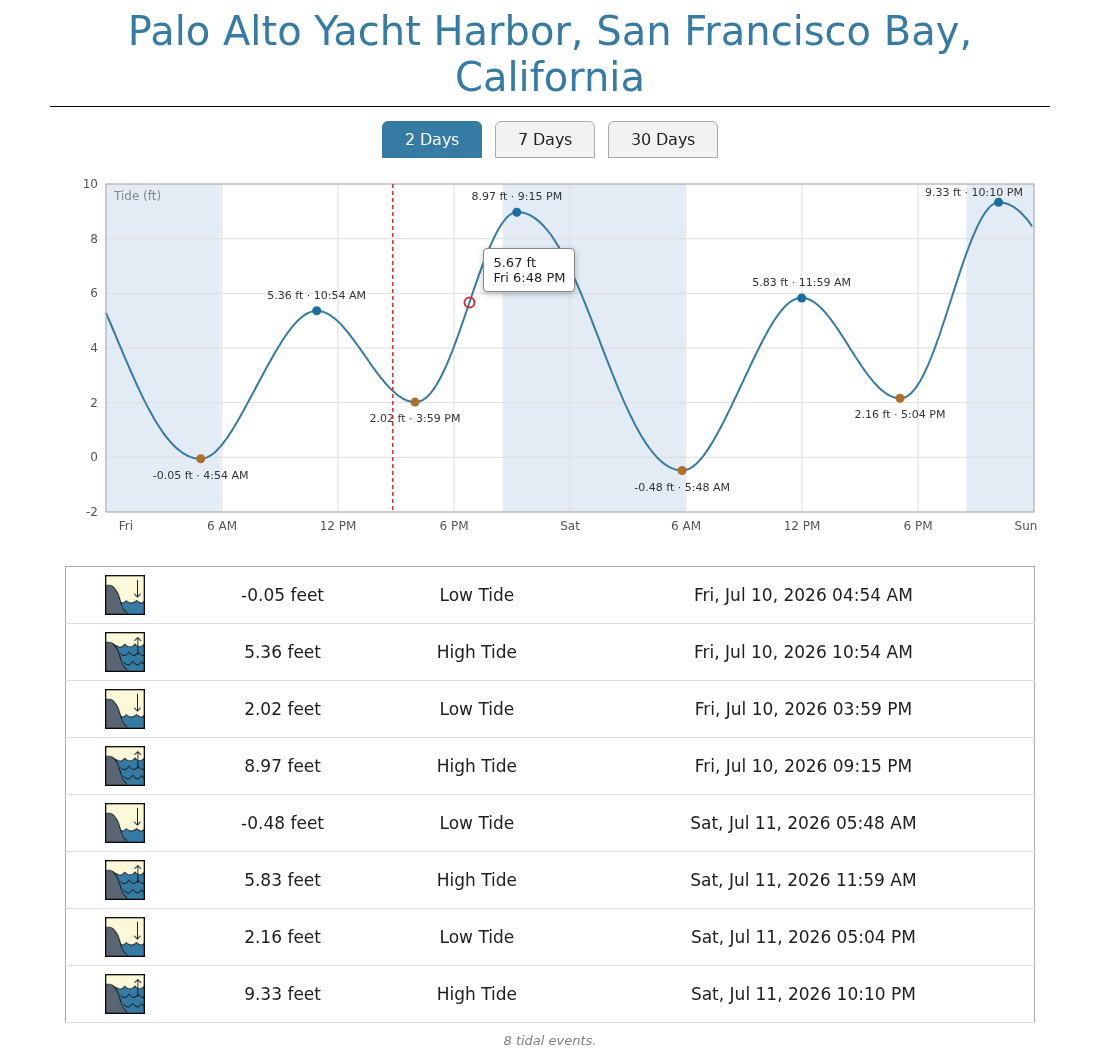
The sample report is now an interactive tide graph. Instead of a list of tidal
events, you get continuous tide levels with the highs and lows marked — and you
can click (or hover) anywhere on the curve to see the exact time and tide level.
What's new
- Interactive tide graph in the sample report:
- Three views: 2 days (today and tomorrow), 7 days, and 30 days — switched with
tabs, no page reload. - Click or hover (tap on a phone) anywhere on the curve for a tooltip with the
exact time and tide level; near a high or low it snaps to that event. - High and low tides are marked on the curve (with level and time labels on the
2-day view). - Night is shaded (sunset to sunrise), and a dashed "now" line tracks the
current time. - The familiar tidal-event list appears below the graph, filtered to the
selected view. - The page is fully self-contained: inline SVG, no javascript libraries,
nothing fetched at run time. Tooltip times are shown in the station's
timezone.
- Three views: 2 days (today and tomorrow), 7 days, and 30 days — switched with
- The sample report now runs the tide program itself at report time and always
covers 30 days. It no longer reads the events database, so it is not limited
by thedayssetting.$xtide.events()and the database are unchanged for
use in your own reports. - New skin files
xtide.cssandxtide.js; all styles and colors now live in
the css file rather than the template. - A test suite (pytest) covering both tide output formats (2.15 and 2.16), all
tide failure paths, the graph geometry, and an end-to-end render of the
sample template — mostly against fake tide executables for determinism.
Integration tests then verify the real tide program's output format still
matches what the extension expects — worth running after any xtide or
harmonics upgrade. A missing or non-working tide fails the suite: either
one is an early signal that the extension will not work in production.
What's fixed
- A defective return-code check meant failures of the tide program were never
properly reported. Failed runs now log XTide's actual error message —
including unknown station names, which the tide program reports with exit
code 0 and which previously produced no log message at all. - The tide invocation now has a 10-second timeout so a wedged tide program
cannot hang the polling thread (normal runs take well under a second).
Requirements
- Python 3.10 or later
- WeeWX 4 or 5
- XTide's
tideprogram built and installed (see the README for step-by-step
instructions, including the latest harmonics data)
Installing/upgrading
Download weewx-xtide.zip from this release, then:
weectl extension install weewx-xtide.zip
Restart WeeWX. No weewx.conf changes and no database changes are needed when
upgrading from 1.x. Note that upgrading replaces the sample skin
(skins/xtide/) — if you customized index.html.tmpl, save a copy first.