SQLite database ᴾᴴᴾ
JavaScript | PHP
This example shows how you can use zig-sqlite to retrieve from a SQLite database.
We'll start by creating the basic directory structure:
mkdir sqlite
cd sqlite
mkdir src zig
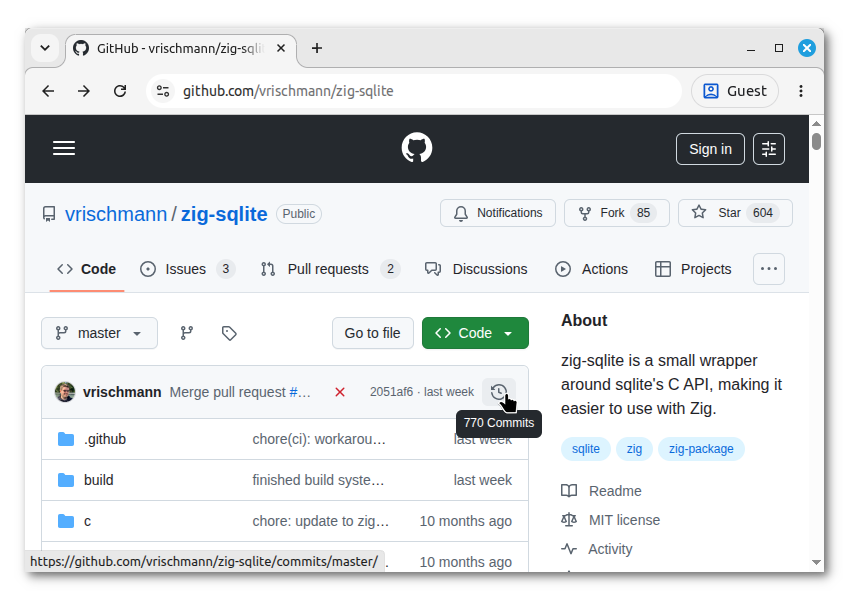
Next, we'll install zig-sqlite, a Zig package that provides a wrapper around the SQLite C API. As there is currently no central repository for Zig packages, you'll need to obtain zig-sqlite from the source. First, go to the project's Github page. Because Zigar is currently a version behind Zig, you need to choose an old version of the package.
First, click the commit history icon:
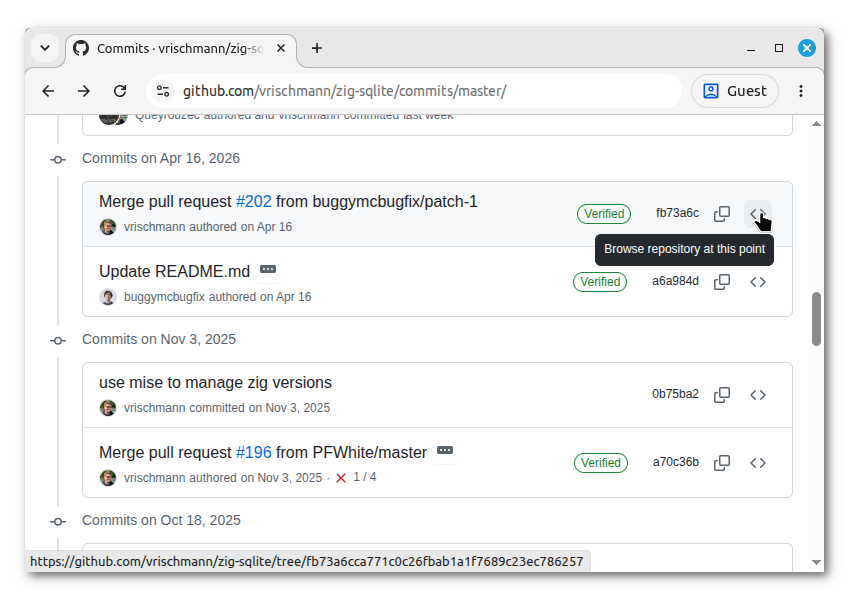
Scroll down to the April 16, 2026 commit and click the < > "Browse repository at this point"
button:
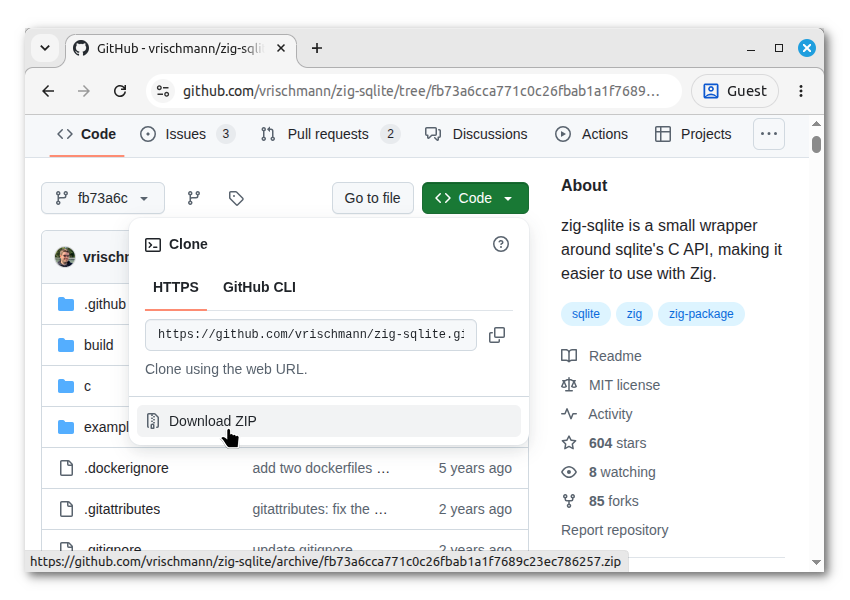
Click the "Code" button, right-click on "Download ZIP" and select "Copy link address":
Go back to the terminal, create the sub-directory zig, and cd to it:
mkdir zig
cd zig
Create an empty build.zig:
touch build.zigType "zig fetch --save " then paste the copied URL and press ENTER:
zig fetch --save https://github.com/vrischmann/zig-sqlite/archive/fb73a6cca771c0c26fbab1a1f7689c23ec786257.zipThat'll fetch the package and create a build.zig.zon listing it as a dependency. The empty
build.zig only exists to enable the fetch --save command. It won't be used.
To import the package, create build.extra.zig in zig and add the code for getImports():
const std = @import("std");

pub fn getImports(b: *std.Build, args: anytype) []const std.Build.Module.Import {
    const sqlite = b.dependency("sqlite", .{
        .target = args.target,
        .optimize = args.optimize,
    }).module("sqlite");
    return &.{
        .{ .name = "sqlite", .module = sqlite },
    };
}
For this example we're going to use the sample database provided by sqlitetutorial.net:
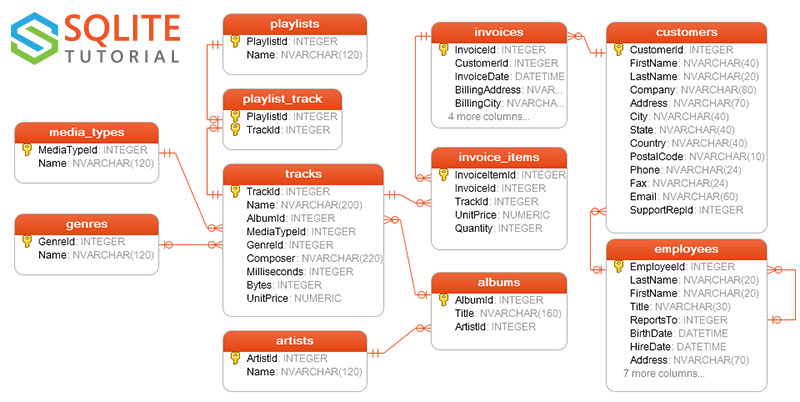
Download chinook.zip
and unzip the file into sqlite.
In your text editor, create search.zig in the zig sub-directory. Add the following code:
const std = @import("std");

const sqlite = @import("sqlite");

pub const Album = struct {
    AlbumId: ?u32 = null,
    Title: []const u8,
    ArtistId: ?u32 = null,
    Artist: []const u8,
};

pub fn search(allocator: std.mem.Allocator, path: [:0]const u8, keyword: []const u8) ![]Album {
    var db = try sqlite.Db.init(.{
        .mode = .{ .File = path },
        .open_flags = .{},
        .threading_mode = .SingleThread,
    });
    defer db.deinit();
    const sql =
        \\SELECT a.AlbumId, a.Title, b.ArtistId, b.Name AS Artist
        \\FROM albums a
        \\INNER JOIN artists b ON a.ArtistId = b.ArtistId
        \\WHERE a.Title LIKE '%' || ? || '%'
    ;
    var stmt = try db.prepare(sql);
    defer stmt.deinit();
    return try stmt.all(Album, allocator, .{}, .{keyword});
}
The search function is fairly straight forward. It opens a SQLite database and prepares a SQL
statement. It then executes the statement and retrieves all the rows using the statement object's
all method.
After creating the zig file, create index.php in src:
<?php

$m = zigar_use(__DIR__ . '/../zig/search.zig');

$path = __DIR__ . '/../chinook.db';
$keyword = $_GET['q'] ?? '';
$results = ($keyword) ? $m->search($path, $keyword) : [];
header('Content-Type: text/html; charset=utf-8');

?>
<html>
<head>
    <title>Album Search</title>
</head>
<body>
    <form>
        <input name="q"> <button>Search</button>
    </form>
    <hr>
    <ul>
        <?php foreach($results as $album): ?>
            <li>
                <b><?= $album->Title ?></b>
                by <i><?= $album->Artist ?></i>
            </li>
        <?php endforeach; ?>
    </ul>
</body>
</html>
Now run the PHP development server:
php -S localhost:8080Then open http://localhost:8080/src/ in a browser. It'll take a while for the compiler to create the module. When the form finally appears, search for "music". You should see something like this:
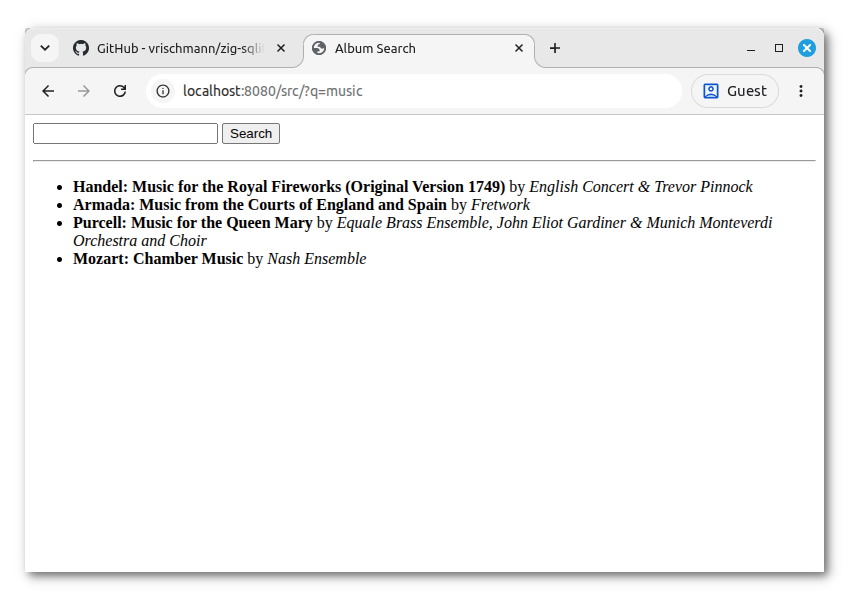
Suppose we want the search results to be JSON instead. In src, create search.php:
<?php

$m = zigar_use(__DIR__ . '/../zig/search.zig');

$path = __DIR__ . '/../chinook.db';
$keyword = $_GET['q'] ?? '';
$result = $m->search($path, $keyword);
header('Content-Type: application/json; charset=utf-8');
echo json_encode($result, JSON_PRETTY_PRINT);
When you go to http://localhost:8080/src/search.php?q=music, this is what you'll see:
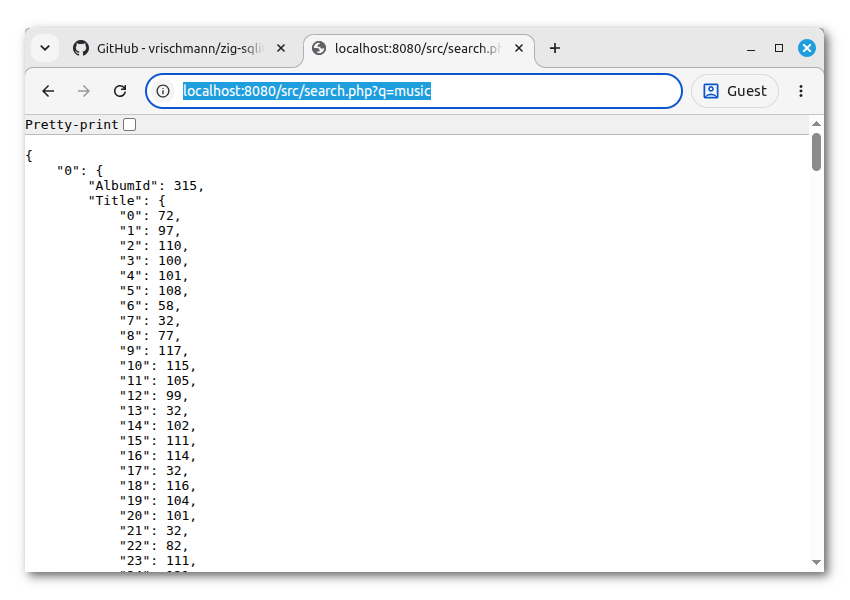
That's not what we want. Because []const u8 is a pointer to a slice of u8, json_encode()
turns the Title field to an array of numbers. We need to attach a meta type
to the field to change its JSON representation. In search.zig, add the following at the bottom:
pub const @"meta(zigar)" = struct {
    pub fn isFieldString(comptime T: type, comptime _: std.meta.FieldEnum(T)) bool {
        return true;
    }
};
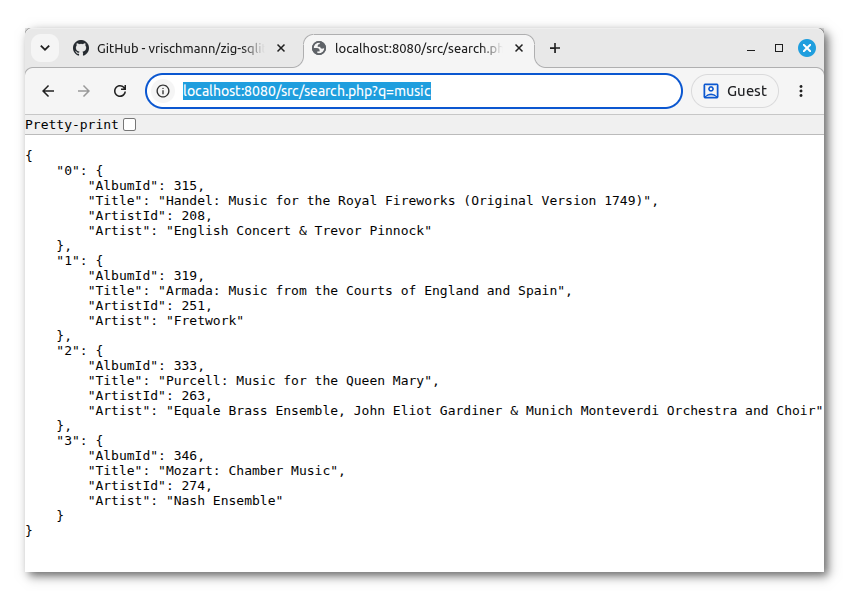
This implementation of isFieldString() tells Zigar that all occurences of u8 and u16 should
be treated as text strings. After its addition the script will give us the correct results:
The function we wrote in the previous section is blocking. While the search is being conducted, PHP cannot do anything else. For traditional PHP programming, this is perfectly fine. That's how PHP has always worked. For newer PHP applications structured around the async model, however, blocking the event loop is unacceptable. The code is also incompatible with Nope.js, which has always relied on async IO.
To keep the function from blocking, we need to offload the work to a separate thread. Zigar lets you do this easily with its work queue.
In zig, create async.zig:
const std = @import("std");

const zigar = @import("zigar");

const worker = @import("search.zig");
pub const @"meta(zigar)" = worker.@"meta(zigar)";

var work_queue: zigar.thread.WorkQueue(worker) = .{};

pub const search = work_queue.promisify(worker.search);
pub const startup = work_queue.promisify(.startup);
pub const shutdown = work_queue.promisify(.shutdown);WorkQueue's promisify method turns
regular functions into async ones by running them in a thread pool. When given the special enum
literals .startup and .shutdown, it generates shart-up and shutdown functions for the queue
respectively.
In src, create async.php, which makes use of the new Zig code:
<?php

$m = zigar_use(__DIR__ . '/../zig/async.zig');

$path = __DIR__ . '/../chinook.db';
$keyword = $_GET['q'] ?? '';
$result = $m->search($path, $keyword);
header('Content-Type: application/json; charset=utf-8');
echo json_encode($result, JSON_PRETTY_PRINT);
$m->shutdown();
This is nearly identical to what we had before except for the call to shutdown(). Here, we're
utilizing Zigar's
temporary event loop
to run an async function in a non-async context. While the search happens, PHP will simply run the
event loop and do nothing else.
The work queue will automatically start up one thread when we use it without calling its startup function.
When you go to http://localhost:8080/src/async.php?q=music, you'd see the same contents as before:
{
    "0": {
        "AlbumId": 315,
        "Title": "Handel: Music for the Royal Fireworks (Original Version 1749)",
        "ArtistId": 208,
        "Artist": "English Concert & Trevor Pinnock"
    },
    "1": {
        "AlbumId": 319,
        "Title": "Armada: Music from the Courts of England and Spain",
        "ArtistId": 251,
        "Artist": "Fretwork"
    },
    "2": {
        "AlbumId": 333,
        "Title": "Purcell: Music for the Queen Mary",
        "ArtistId": 263,
        "Artist": "Equale Brass Ensemble, John Eliot Gardiner & Munich Monteverdi Orchestra and Choir"
    },
    "3": {
        "AlbumId": 346,
        "Title": "Mozart: Chamber Music",
        "ArtistId": 274,
        "Artist": "Nash Ensemble"
    }
}
To see the code used in an actual async context, you'd need to first install a real event loop:
composer require revolt/event-loopThen in src, create revolt.php:
<?php

require __DIR__ . '/../vendor/autoload.php';

use Revolt\EventLoop;

ini_set('zigar.event_loop', 'revolt');

EventLoop::defer(function (): void {
    $m = zigar_use(__DIR__ . '/../zig/async.zig');
    $m->startup(4);
    $path = __DIR__ . '/../chinook.db';
    $keyword = $_GET['q'] ?? '';
    $result = $m->search($path, $keyword);
    header('Content-Type: application/json; charset=utf-8');
    echo json_encode($result, JSON_PRETTY_PRINT);
    $m->shutdown();
});
EventLoop::defer(function (): void {
    echo "[doing something else]\n";
});
EventLoop::run();
The code above is entirely artifical. This is not how an async PHP application is structured. The script is supposed to run continually as opposed to terminating after a single request. The code is for demonstration purpose only.
When you go to http://localhost:8080/src/revolt.php?q=music, you're going to see slightly different output:
[doing something else]
{
    "0": {
        "AlbumId": 315,
        "Title": "Handel: Music for the Royal Fireworks (Original Version 1749)",
        "ArtistId": 208,
        "Artist": "English Concert & Trevor Pinnock"
    },
    // ...
}
While PHP is waiting for waiting for the search to finish, it's able to run the code in the second deferred function.
You can find the complete source code for this example here.
I hope this example gave you a pretty good idea on what you can and cannot do with zig-sqlite. The library is very much designed with Zig programming in mind. A lot of things happen at comptime. As such, using it only makes sense if you're going to write most of your backend code in Zig. You can't really expose zig-sqlite's functionalities piecemeal to the JavaScript side.
In the next and final lesson, you'll learn how to use the Zig compiler to repurpose an old C program.