A Python wrapper for utilizing the LMIC library to transmit data from a Raspberry Pi 4 using the RFM95 module.
This code is adapted and modified from lmic-rpi-fox. This library provides an interface between hardware and software, consisting of a LoRa chip RFM95 modified to operate at a frequency of 865 MHz and two indicator LEDs, one for indicating power on and the other for indicating data sending activity.
- Format the SD card with SD Memory Card Formatter
- Install the Raspbian operating system on the Raspberry Pi, which can be installed via Imager/Baleno Etcher
- Enable the SPI interface in preferences => Raspberrry pi configuration => interfaces
The complete WiringPi pin mapping can be seen here
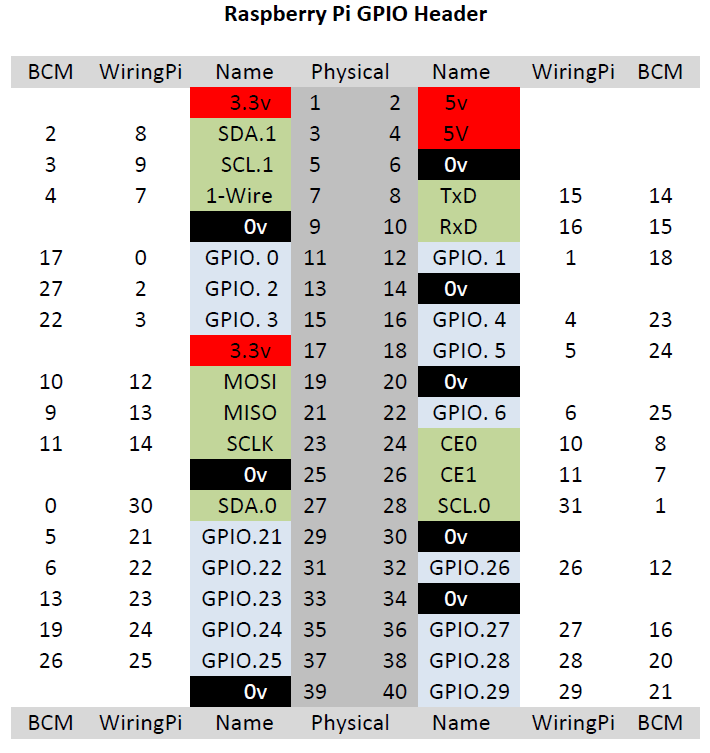
| WiringPi Pin | Function |
|---|---|
| 0 | Reset |
| 4 | DIO0 |
| 5 | DIO1 |
| 1 | DIO2 (Not used) |
| 12 | MOSI |
| 13 | MISO |
| 14 | SCK |
| 6 | SS |
| 2 | STATUS LED |
| 3 | DATE SENT LED |
| GND | GND |
| 3.3V | +3.3V |
The WiringPi library provides the Raspberry Pi GPIO interface. Follow the instructions in that repository or do the following.
# Clone the repository
$ git clone https://github.com/WiringPi/WiringPi.git

# Access the wiringPi folder
$ cd wiringPi

# Build the library
$ ./build
Compile LoraWANPi
# Clone the repository
$ git clone https://github.com/cksajil/LoraWANPi.git

# Access the lmic_rpi folder
$ cd lmic_rpi/examples/ttn-abp-send

# Make the project
$ make

# Running the program
$ ./ttn-abp-send # LED flag (0/1) can be used as an indication for device activity and data sending
./ttn-abp-send <DevAddr> <Nwkskey> <Appskey> <Rain_mm> <LED_FLAG>
# Example
./ttn-abp-send AB0096CD 1A2B80150C4ED6DADA2B2CFD822C6378 12345678972908DA7A6C09771181A21C 3.12 1Content is licensed under the MIT License. See License File for more information.