Repository navigation
Properties
Why do I need to read about properties?
Visual-Studio-gtkmm projects heavily depend on properties, they help configure settings that are common to all projects or to certain projects.
To read more what they are see This link
In Visual-Studio-gtkmm each project inherits multiple properties, some of these are common to all projects within solution (solution level property) some are common to dll's, some are common to debug/release build, some of them are common to all solutions and so on and so forth.
The difference between building so many projects without properties or with them is significant, they save us a lot of time, because you don't need to reconfigure all projects (ie. to link to static C runtime), you do so in one place only - that is a base property page which all projects inherit by default.
Here is an example how this inheritance looks like in Properties manager, in Visual Studio:
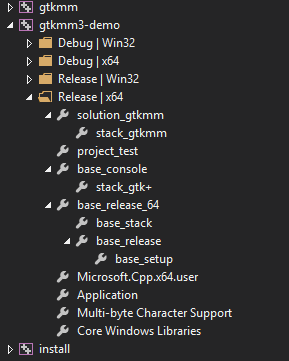
Here is short description of the above image for each property page:
- base_setup: defines macros which define directory locations, drive letter and so on.
- base_release: defiens settings that apply to all release builds, regardless of architecture.
- base_stack: defiens settings that apply to all projects, regardless of configuration type
- base_release_64: in this example defines builds for 64 bit architecture settings
- stack_gtk+: defines settings common to GTK+ stack including all dependencies.
- base_dll: defines settings for project type. in this example the DLL
- project_test: defines settings common to all test projects
- stack_gtkmm: defines settings common to C++ bindings of GTK+ (gtkmm, atkmm ...)
- solution_gtkmm: defines settings common to all projects within solution
- Release | x64: finally project itself, if you need to override anything specific to project do so here.
How properties inherit each other all together is best explained by looking at the image below:
HINT: right click on image and "open in new tab" to see enlarged version! Alternatively save the image to desktop and open with image viewer to enlarge.
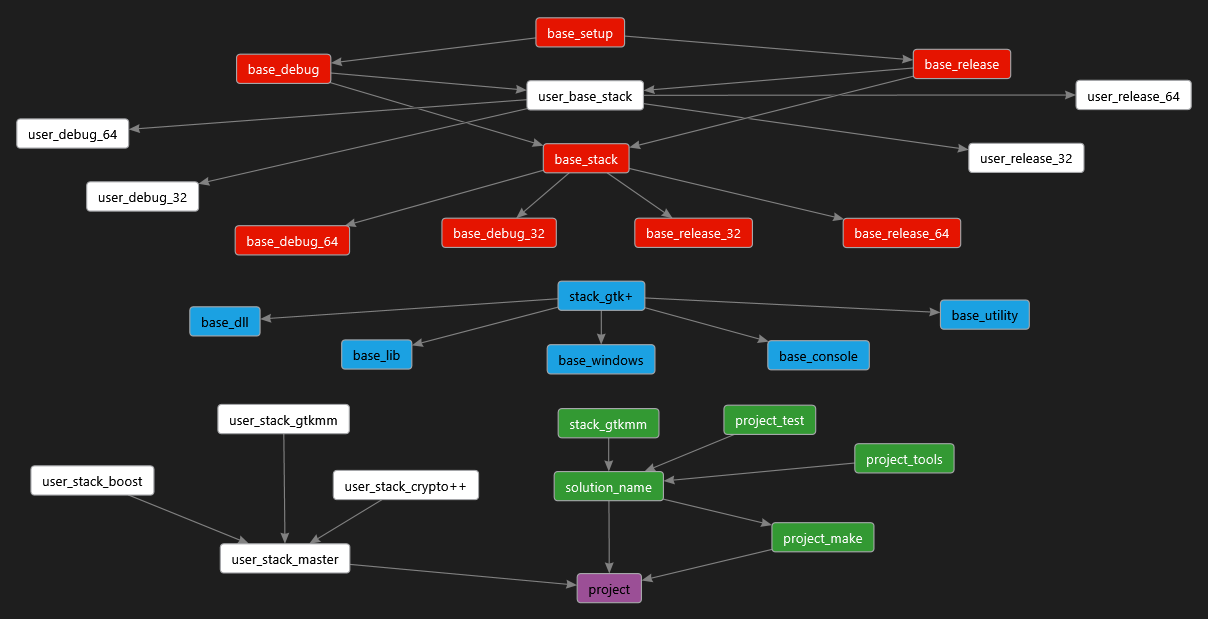
Each solution/project you found in "projects" folder inherits exactly the same settings and properties in certain order depending on different things:
- The target against which you compile (x64 or x86)
- Build type (debug or release)
- Output type (exe, dll or lib)
- Group of projects (library, test, tool)
We "Read" the above graph like so:
NOTE: following steps are already set, no need to change anything
- Red colored properties are first which are added first to the project, of course we do not add them all, instead we choose our target and build type, ie. debug x64, and then add the base_debug_64.props to the project, which will automatically "pull" other needed properties.
- In second step (blue colored) we choose what kind of application we build, ie. DLL, and then we add base_dll.props to the project, which will automatically "pull" the gtk_stack property.
- Afterwards (green colored) either add solution_name.props, ie. solution_fontconfig.props, which you then edit with settings specific to that solution, or one specialized property (ex. project_test) before solution property.
- Finally at the top is project property page, which inherits values from child properties.
- Of course not all settings apply to entry solution but there are times when some project can not pass tests or it needs a setting specific to that project only, Only in that case we modify project settings individually, all other settings MUST be inherited by the project.
- White colored properties are not used during compilation, their purpose is to build projects once all the libraries are built. There are Visual Studio project templates which you can use to build final projects, these templates use only white colored properties.
Remember, if project does not inherit all the setting then all this has absolutely no sense! If project does not respect inherited values our compilation will be fooled by "hidden" settings, and debugging will be extremely hard.
And of course here are the benefits of this approach:
- When you open project settings or solution level property page you are able to quickly see bold settings, and figure out on which flags projects fails, or what is special about this project.
- all outputs share the same CRT
- all libraries/dll's share common naming converntion and extension:
   $(TargetName).lib     (static library)
   $(TargetName).dll.lib (import library)
   $(TargetName).dll.exp (export library)
   $(TargetName).dll     (shared library)
- only one compiler version is used to compile
- all outputs share exactly the same compiler settings
- single setting modification on low level properties has indirect impact on all the projects, therefore saving us a lot of time.
All this said so far is just to let you have a basic image of how properties work.
make sure you modify only those settings you understand to avoid inavoidable circle of problems!
Copyright (C) 2015 codekiddy
Permission is granted to copy, distribute and/or modify this document under the terms of the
GNU Free Documentation License, Version 1.3
or any later version published by the Free Software Foundation; with no Invariant Sections, no Front-Cover Texts, and no Back-Cover Texts. A copy of the license can be found on the GNU site
