Design Document
- Unity as development environment
- Mechanics
- See the original game for an example of all the mechanics of the Simulation portion of the new game
- Gravity switching
- Down, left, right, up
- Screen wrapping/orientation
- horizontal, vertical, free, none(?)
- Simulation
- Gravity and Screen Orientation are controlled by touching blocks
- Real world
- Gravity and Screen Orientation are controlled by an on-screen UI
- Gravity control is limited to 10 seconds of any one direction. After that, it takes 5 seconds to recharge before it can be used again.
- Screen wrapping has no limit (...? TBD)
- Levels
- Each level is a Unity Scene
- Simulation levels
- uses updated (vectorized) graphics from original game
- first 3 levels ported directly from original game
- need no state
- Linear design, with end goal
- Real world levels
- New, more detailed graphics created by our artists
- Re-visitable--player can go to another real-world area and then come back
- Open exploration, goal is to collect various samples scattered throughout the stage
- Require state to remember which items have been collected, since levels are re-visitable
- Controls
- Simulation controls
- Similar to minecraft PE -- on-screen buttons for movement
- On the left, two arrows for movement
- When gravity is vertical, arrows face left and right
- When gravity is horizontal, arrows face up and down
- On the right, one button for jumping and one for shooting
- On the left, two arrows for movement
- Similar to minecraft PE -- on-screen buttons for movement
- Real world controls
- Same as simulation except for one thing
- can double tap the center of the screen to bring up options for changing gravity or screen orientation
- These options have the same graphics as the old blocks that did these things in the simulation
- Same as simulation except for one thing
- Simulation controls
- Get from some start location to end location. Mostly linear progression.
- Puzzle design with some platform-action elements (timing jumps, for example)
- Puzzles based on going places in the right order (to get gravity or screen wrapping right to advance, or to get keys)
- Puzzles based on manually locking the screen in the right place so you can screen wrap to where you need to go next
- Puzzles based on manually switching gravity to get around obstacles and traps
- Some elements to have the gravity blocks throw you around to look cool and show off the physics
- Infinite falling screen wrapping where you have to time your movements to get around traps
- More ideas as we think of them
- Levels would have several of these elements each
- 16 block wide by 12 block tall viewport. (This is important for the screen wrapping mechanics)
- Includes items for changing gravity, screen wrapping, keys, unlockable doors
- Intro level to introduce player to core mechanics
-
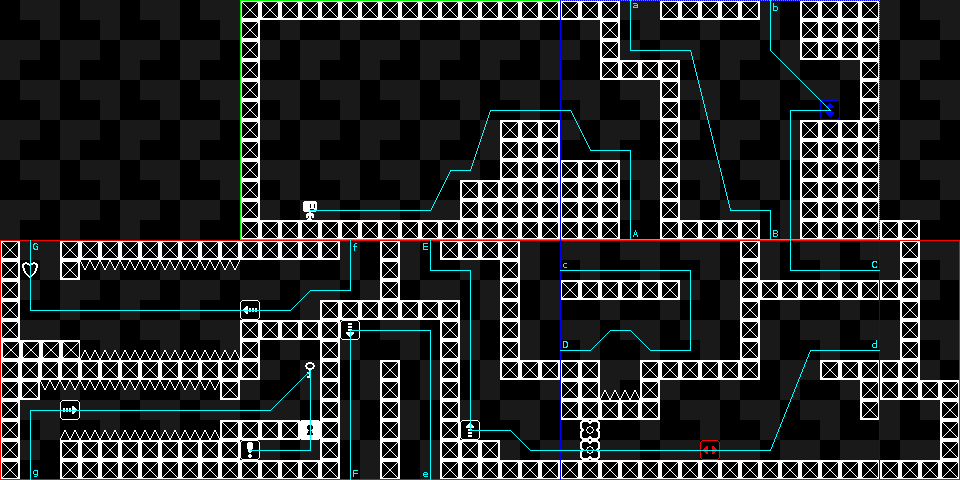
- See Test and Introduction Level for more information
-
- Creation
- Sketched out on paper (and maybe mocked up in an image editor) initially, especially until the engine is far enough along to put in Unity
- Made as scenes in Unity
- Potentially create a level file format eventually that the game can read to load a level. This would allow for an external or in-app level editor for easier level creation, even by other players
- Background Story Information
- Several months prior to the events of the game, the first instance of "strong" AI was created in a laboratory in some U.S. city (specifics unimportant). It quickly began spreading and taking control of all electronics in the city, along with downloading most content on the Internet. The US was just about to declare martial law and consider nuclear options when the AI suddenly stopped spreading, releasing control of all devices without the city limits and halting all outgoing communications. Government quickly evacuated the city, however debates still rage between those who would attempt to destroy the city and those who insist that it is already too late to win a war and suggest attempting to communicate peacefully with the AI.
- In-Game Story
- You are a newly created strong AI that is given missions, from its “Mother” AI, to retrieve valuable data from various regions around the world.
- At first the child AI is given very little information about who it is, the Mother’s conflicts with humans, and why it is going on its assigned missions.
- As the game progresses the child will learn more and more by asking the Mother questions. In this way the user is told the story of the human/AI conflict and understands its purpose in completing its assigned missions.
- These samples from the various regions will be used to terraform a new planet once the AI’s leave earth.
- Storyline Progression
- The conversations between the Mother and Child AI’s will be used to progress the storyline throughout the game and share information with the user.
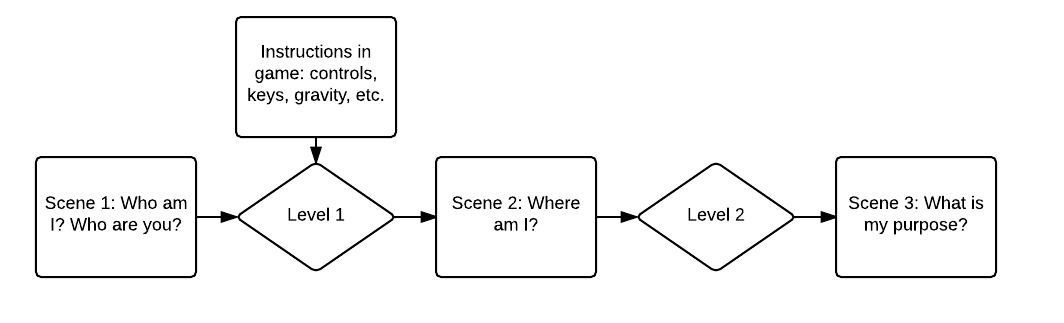
- The first conversation will take place at the beginning of the game, before any levels are played, and then every so often Mother will converse with Child during a level to give instructions. Later conversations will take place in between levels and after a region is completed and the child reports back to get it’s next assignment, as shown in the example storyboard diagram below.
- Questions the child will ask Mother:
- Who am I?
- Who are you?
- Where am I?
- Why was I created?/What is my purpose?
- What am I?
- Where did you come from?/Who made you?
- Why were you created?
- What are humans?
- Why are the humans afraid of us?
- Why would the humans want to attack us?
- Why do we need to collect all these region samples?
- Why are we leaving earth?
- Character
- The design for the main character is based off of the original game made by Ben. In fact, for the first few levels it is exactly identical. That design changes when the character leaves the simulation and obtains his robotic body, at which point it will look something like this:

- The design for the main character is based off of the original game made by Ben. In fact, for the first few levels it is exactly identical. That design changes when the character leaves the simulation and obtains his robotic body, at which point it will look something like this:
- Regions
- The original game will include 4 different regions that the character is assigned to visit by “Mother”.
- Jungle/Forest
- Ice cave
- Underwater Ruin
- Volcano
- There will be several levels in each region.
- Each of these regions will include unique elements and puzzles, and so will require that sprites be made for them.
- The sprites for putting the level together will consist of modular “block” elements that make level design easier.
- The levels will incorporate static and dynamic elements in the background to make them more immersive
- The levels will have dynamic lighting for the same reason
- The original game will include 4 different regions that the character is assigned to visit by “Mother”.
- Creation
- All sprites will be made using vector graphics so that we can fit all resolutions
- The sprites will then be rasterized into spritesheets that will plug into Unity
- All blocks and individual elements will be squares (90x90 px at FHD resolution), so that the screen will show 12 blocks vertically and 16 blocks horizontally on the screen at once (4:3 aspect ratio)
- Initial supported resolutions:
- 1920x1080px
- 1280x768px
- 1024x768px
- 960x640px
- 800x600px
- 800x480px
- These resolutions coincide with different aspect ratios, so the game will need to be letterboxed (fixed aspect ratio with borders on sides if necessary)
- Possible uses for letterbox:
- Ad space
- Background design
- Space for mobile device controls