Repository navigation
English
Final feature release: 1.9.0. Development has ended: WordPress and modern builders now cover the plugin’s original tasks, and workflows have changed. Only necessary security updates may follow, no later than December 31, 2027. New features and ongoing compatibility maintenance are not planned.
Deutsch · Release and download · Repository
- Purpose and scope
- Requirements and installation
- Supported libraries
- Builder Categories and WordPress categories
- Creating and assigning categories
- Lists and filters
- Patterns in the main admin menu
- Permissions and privacy
- Updates, deactivation and data
- Multisite
- FAQ by topic
- Developer notes
- Security and other plugins
Builder Template Categories adds a shared collection of Builder Categories to supported template libraries in WordPress admin. Use it to organize headers, landing pages or content blocks and find them in template lists.
It organizes existing templates. It does not create layouts, replace a builder or change the conditions that determine where a template appears on your website. Categories are not automatically added to a builder’s internal library filters. Assigning a Builder Category changes neither template content nor display conditions.
Updater 2.2.1 fixes update handling when older updater copies are also loaded. Library 1.1.0, features, settings and minimum requirements remain unchanged.
Version 1.9.1 adds deckerweb Library 1.1.0 and deckerweb Updater 2.2.0 as a maintenance exception. PHP 8.1 or later is now required; WordPress 7.0 remains the minimum. The feature freeze and security maintenance deadline of December 31, 2027 remain unchanged.
The shared Library is available through Add Plugins; it can be hidden in Settings → deckerweb Library. Its online catalog is off by default. Enabling it retrieves a public catalog from GitHub. Installing a selected plugin downloads its approved package; activation is separate. Native updates may contact GitHub and download release ZIPs. These endpoints can see the requesting IP address; no telemetry is added. Public updates need no token.
Shared Library settings survive deactivation and remain by default after uninstall. Removing the final embedding host cleans component caches and temporary files; optional settings deletion follows the Library preference. Other installed plugins, categories and content remain.
This plugin bundles deckerweb Library 1.1.0 and deckerweb Updater 2.2.1 by David Decker – DECKERWEB under GPL-2.0-or-later. Sources: https://github.com/deckerweb/deckerweb-plugin-library and https://github.com/deckerweb/deckerweb-updater.
A failed manual single-plugin update can leave the installed plugin deactivated even when its files are preserved. Check the Plugins screen and reactivate it if needed. Native bulk rejection preserved activation in the tested workflow. If Git Updater is active, follow the shared conflict notice; do not permanently disable another update provider until every affected plugin and theme has a reliable replacement.
- WordPress 7.0 or later.
- PHP 8.1 or later.
- For builder integrations: the relevant builder or theme and its template library.
These minimum requirements do not promise compatibility with all future releases.
- Back up your database and plugin files, especially before updating.
- Download
builder-template-categories-1.9.2.zipfrom the GitHub release. - Install it through Plugins → Add Plugin → Upload Plugin, or replace the existing version.
- Activate it and open a supported template library.
Use the explicitly provided installable ZIP. GitHub’s automatically generated “Source code” archives contain the repository source and additional files. The graphics archive is not an installable plugin.
| Integration | Post type |
|---|---|
| Saved WordPress patterns | wp_block |
| Elementor templates | elementor_library |
| Bricks templates | bricks_template |
| Beaver Builder / Beaver Themer |
fl-builder-template / fl-theme-layout
|
| Divi library | et_pb_layout |
| Oxygen Classic | ct_template |
| Avada |
fusion_template / fusion_element
|
| GeneratePress Elements | gp_elements |
| Astra Pro Custom Layouts | astra-advanced-hook |
An integration appears only when it is detected on this website and its post type exists. The plugin does not unlock paid features. Oxygen 6 is not included. Support for forms, fields, snippets, scripts, niche themes and numerous add-ons was removed in 1.9.0.
In Builder Categories management, “Available on this website” lists the libraries currently active and attached to this taxonomy. Names link to their lists when the user can edit that post type. Expand “Technical details: post types” when needed. Only users with category permissions see this panel.
| Label | Origin and purpose |
|---|---|
| Builder Categories | This plugin’s shared taxonomy for supported template libraries. |
| Pattern Categories | WordPress’s own taxonomy for saved patterns. |
Both panels may appear in the WordPress pattern editor. WordPress categories use a tag-like input, but their official name is still Pattern Categories. Our Builder Categories are hierarchical and support parent categories.
The two systems are independent. Categories with identical names are not automatically the same; no synchronization occurs. Renaming our labels to Builder Categories changes neither stored terms nor assignments. The technical taxonomy identifier remains builder-template-category.
- Open Builder Categories in a supported library’s submenu. For WordPress patterns: Patterns → Builder Categories.
- Enter a name; optionally add a slug, parent category and description.
- Save the category.
- Edit a template in WordPress admin and select the relevant Builder Category. In the block editor, the panel is in the document settings sidebar.
- Save or update the template.
In supported WordPress lists, you can also assign categories through Quick Edit or Bulk Edit. WordPress bulk editing normally adds assignments; it is not a tool for clearing every existing category at once.
Choose understandable names and keep the collection manageable. A single category can organize templates from different libraries; it does not need to be created again for each builder.
Template lists include a Builder Categories column and an All Builder Categories dropdown. Choose a category and click Filter to show matching templates in that library. Clicking a category link in the column also opens the filtered list. A dash means no category is assigned.
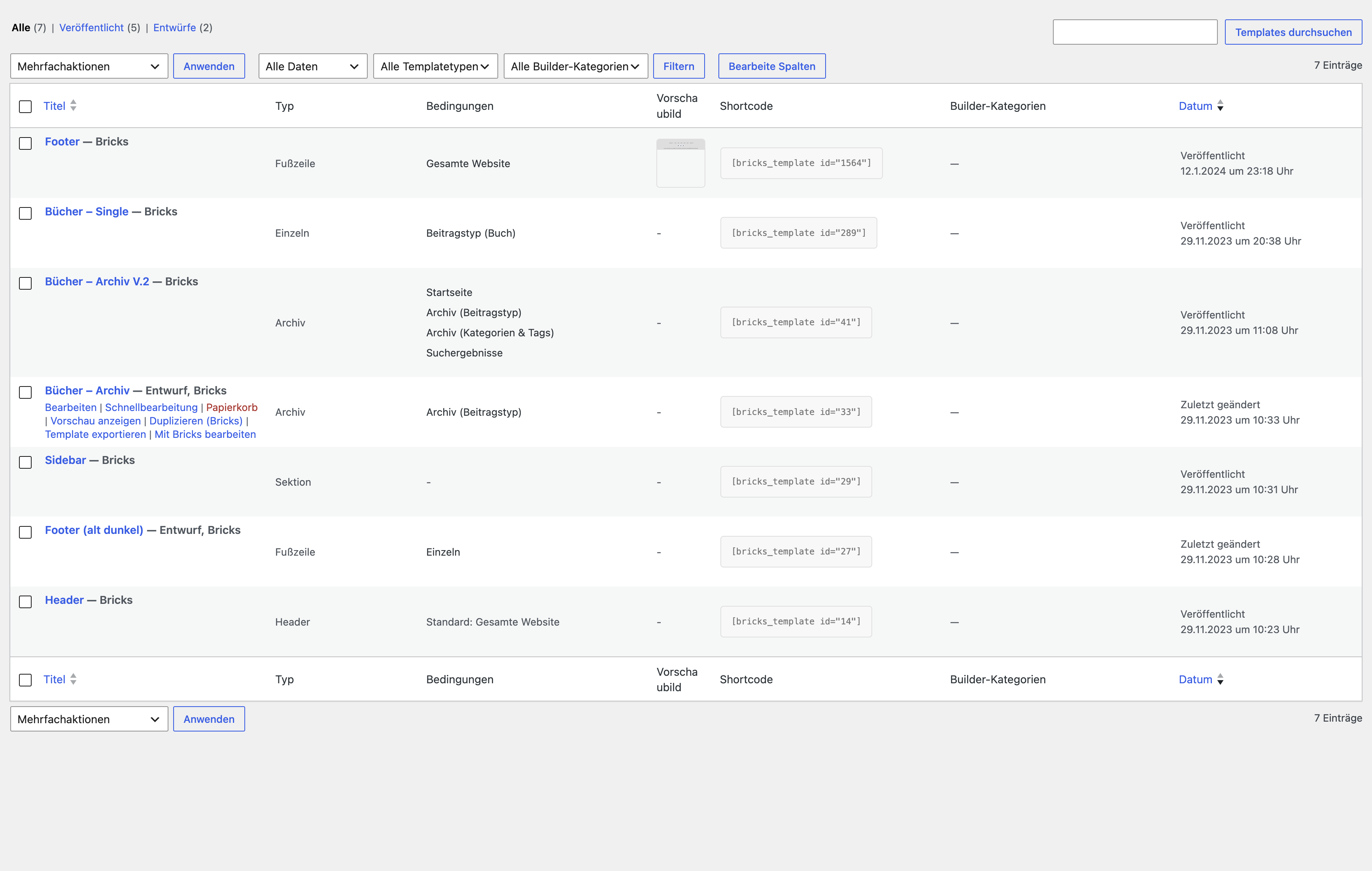
Version 1.9.0 on a real Bricks test website. Existing Bricks columns are preserved and Builder Categories are added. The screenshot uses German: “Builder-Kategorien” means Builder Categories, and “Alle Builder-Kategorien” means All Builder Categories.
The Count in category management is calculated by WordPress for the shared taxonomy, rather than separately for the builder you currently have open. For example, five counted Elementor templates and ten Astra layouts can produce a total of 15, while the Elementor filter returns five results. Visibility and counted post statuses also follow WordPress rules.
By default, the plugin adds a top-level Patterns menu:
- All Patterns — the native WordPress list of saved patterns.
- Add Pattern — create a pattern, if permitted.
- Builder Categories — our category management, if permitted.
The list contains patterns saved in WordPress, whether synced or unsynced. Patterns registered by themes or plugins only for the inserter are not saved wp_block posts and do not automatically appear here. Native Site Editor pattern management remains available as well. An existing top-level menu with the same destination is not added a second time.
By default, managing and assigning Builder Categories requires the WordPress capability edit_theme_options. Administrators normally have it; ordinary editors normally do not. Custom roles and capability filters can change that.
The WordPress pattern list keeps its native editing permissions. An editor may therefore view or create patterns without being allowed to manage Builder Categories. The plugin does not automatically expand those permissions.
Our taxonomy is private. REST access to its categories is protected as well. The plugin adds no frontend scripts or styles and performs no telemetry. Categories and relationships are stored in WordPress taxonomy tables. Documentation and other-plugin links are opened only when you follow them.
Version 1.9.0 removes 72 previous integration files. Check the supported-library list before updating and test important workflows on staging.
Existing categories and assignments are retained, including after plugin deactivation or uninstall. Removed integrations lose their user interface; stored relationships are not automatically deleted or migrated to another taxonomy.
Default categories are created only when the category collection is empty. Custom or already translated categories are not refilled or automatically renamed on reactivation. Changing the website language later does not translate stored category names.
If you explicitly delete a category in WordPress, that category and its relationships are removed across all libraries on this website. The templates themselves are not deleted. Before deleting, consider whether another library uses the same category.
A rollback requires the previous plugin package and a database backup. Reinstalling an older version does not automatically reverse changes to data or permissions.
Single-site activation and network activation are supported. Each website has its own categories. “Shared” means across libraries within one website, not across the entire network.
Network activation initializes empty collections. Newly created websites are also handled while the plugin is network-active. Reactivation preserves existing categories.
A menu or the categories are missing. Check plugin activation, your permissions and whether the relevant library is active. Reload admin after updating. Users without category permissions do not see the category column, filter or submenu.
The filter appears but the column is missing. Version 1.9.0 restores the category column after builders customize their column lists. Also check Screen Options and any column-management plugin: an explicitly hidden column is not forcibly shown. Make sure you installed the published 1.9.0 package.
The category exists but filtering returns no results. Creating a category does not assign it to a template. Check the saved assignment and other filters such as date, search, status or template type. Each template list shows only its own post type.
Category management shows more items than my builder. The category collection and WordPress counter span the attached libraries. The template list filters its own post type; see Lists and filters.
The editor contains two category panels. This is expected for patterns: native Pattern Categories and our Builder Categories are separate taxonomies. Their labels are distinct in 1.9.0.
Where are my theme patterns? Only saved patterns appear in the new Patterns list. Registered theme and plugin patterns remain in the native inserter or Site Editor.
Does assigning a category change where a template is displayed? No. Categories organize admin lists. Builder conditions and template content are unchanged.
Are all current or future builders supported? No. The integrations above define the frozen feature scope. Future builder-version compatibility is not promised, and new integrations are not planned.
What was actually tested? WordPress 7.0 with PHP 8.1.29 and WordPress 7.1.3 with PHP 8.4.5, both using SQLite, including REST, roles, menus, data preservation and Multisite. Elementor Finder was tested with Elementor 4.3.4; the corrected Bricks column was confirmed on a real test website. Other premium integrations were tested with post-type fixtures. An exact PHP 8.0 runtime test and complete premium-builder or MySQL/MariaDB tests were not performed.
The taxonomy identifier remains builder-template-category. These PHP filters are intended for trusted extension code:
| Filter | Purpose |
|---|---|
btc/filter/integrations/all |
Add or modify integrations. |
btc/filter/capability/submenu |
Change the required management and assignment capability. |
btc/filter/taxonomy/labels |
Customize taxonomy labels. |
btc/filter/taxonomy/args |
Customize registration arguments. |
The integration filter receives and returns an array keyed by integration ID. Each entry requires string values for label, submenu_hook, post_type, template_label and admin_url. Register the filter before init priority 20. Missing post types and malformed entries are skipped; late post-type registration is also handled.
Lowering the capability changes access to internal categories. Review roles and REST behavior carefully. Do not casually make the taxonomy public through custom arguments. Historical wiki snippets may depend on earlier integrations and must be checked against 1.9.0.
Fixed: Reliable GitHub updates when another plugin has already loaded an older deckerweb Updater.
- Shared Library 1.1.0 and Updater 2.2.0, verified update packages and PHP 8.1 minimum.
- Improved final output escaping and missing bundled translations after locale changes.
- Feature freeze and security deadline remain unchanged.
Final feature release: reduced integrations, Builder Categories labels, a native Patterns menu, restored template columns and the active-library overview.
Full published changelog, including earlier releases.
Report security issues privately through GitHub Private Vulnerability Reporting, if available. Otherwise, first request a private reporting channel through deckerweb.de/kontakt. Do not post exploit details or credentials in public issues. See the security policy.
Another feature release is not planned. Security updates will be issued only if needed, and no later than December 31, 2027. No security maintenance is planned after that date.
Other tools by deckerweb:
- Builder Content Guide: an independent plugin for understandable editing notes and links to website components. There is no automatic category migration; see its repository for the published status.
- Builder Shortcode Extras.
- Bricks QuickNav.
- Breakdance QuickNav.
Documentation: version 1.9.2, October 22, 2026.