Repository navigation
Releases: desenyon/ManwhaTrack
Release list
ManwhaTrack 1.2.2 — Chrome Web Store submission kit

ManwhaTrack 1.2.2
Prepares the existing extension for a Chrome Web Store submission. Reading behavior, storage schema and permissions are unchanged.
- Updated public privacy policy with an explicit Chrome Web Store Limited Use statement, local data handling, direct source requests, retention/deletion and support contact. The extension ZIP includes the same policy.
- Added copy-ready listing text, permission justifications, data disclosures and reviewer instructions.
- Added five actual extension screenshots at 1280×800, a 440×280 promotional graphic and the existing 128×128 icon. Screenshot data uses an isolated fictional library and original procedural cover art.
- Added
npm run package:storeto validate and create a complete submission bundle.
Download manwhatrack-1.2.2.zip for the Chrome Developer Dashboard's package upload. Download and extract manwhatrack-store-submission-1.2.2.zip for the Store graphics, copy-ready fields and UPLOAD.md instructions. The outer bundle is not itself an extension package.
The developer must complete their publisher-account fields and submit the item through Google's review process. This release does not publish a Chrome Web Store listing.
ManwhaTrack 1.2.1
ManwhaTrack 1.2.1
- Corrects Novel/Manhwa detection: translation notes around comic pages no longer replace the image reader, explicit format metadata outranks shared site routes, and ambiguous landing pages preserve an established label. Tapas episodes distinguish prose from image readers. Comic-only platform adapters preserve their format.
- Revisiting a reading page repairs an older automatically detected label without creating another series. Manual format choices remain authoritative in Series details → Format.
- Removes the footer subtitle and extra separator. Centers the collection caption, retains the motion control, and keeps format labels readable on compact covers.
- Analytics refreshes during continuous reading, ignores stale asynchronous responses, and reports failed refreshes with a Retry action. Short reading measurements show seconds. Calendar month labels and explicit analysis-period labels make the charts easier to inspect.
- Fixes ALL history when only backlog or update observations exist, sessions crossing week boundaries, zero-duration boundary sessions, and update deduplication across sources. Floating-point rounding no longer labels fresh measurements as undated historical time.
Install or update
Extract manwhatrack-1.2.1.zip into a permanent folder and use Load unpacked in chrome://extensions with Developer mode enabled.
For an existing installation, replace the files in the same folder and click Reload on the existing extension card, then refresh reading tabs. Keep the existing installation to preserve the local library. Older automatic format mistakes correct when the series is revisited; a manual correction can be made immediately in its details.
No new permissions, storage schemas, accounts or external services. Daily reading time and sessions started recording in v1.2.0; earlier undated totals remain preserved but cannot populate historical daily charts.
ManwhaTrack 1.2.0
ManwhaTrack 1.2.0
- Faster background clouds with the same dimness, reduced-motion behavior and pause controls.
- A simpler sidebar heading with a compact timer beside Your Library. Reading facts and source labels use less framing; format badges distinguish novels and manhwa.
- Expanded series details prioritize reading actions and the chapter timeline, with organization controls in a secondary column.
- Web novel detection recognizes substantial prose readers and Royal Road/Webnovel URL templates. Visible chapter labels take priority over opaque database IDs. Format and genre corrections remain user-owned. Novels use the existing local progress, saved-position Resume, covers, lists and backup system.
- Analytics adds weekly measurements, keyboard-accessible activity heatmaps, reading-time and backlog graphs, time of day, reading pace, series drill-downs, retention, genre/source breakdowns, neglected titles, reading fingerprints and dated milestones.
- Database schema 6 and backup format 5 preserve older libraries and totals. Dated measurements start with this version; undated historical time is never assigned invented dates or sessions. Backlog estimates are rough, and release timing means first observed updates rather than publisher release dates.
- Backup merges adopt growing minute measurements without counting the same activity twice.
Install or update
Extract manwhatrack-1.2.0.zip into a permanent folder. Enable Developer mode in chrome://extensions and choose Load unpacked with that folder.
For an existing installation, replace the files in the same folder and click Reload on the existing extension card, then refresh reading tabs. Keep the existing extension installation to preserve its local library. Export a backup from Settings → Import & export before updating if desired.
No new permissions, accounts, external services or runtime dependencies. Novel template fixtures and local browser flows are tested; protected or unusual readers may need local rules or manual correction.
ManwhaTrack 1.1.2
ManwhaTrack 1.1.2
Changes
- Personal lists have a direct Add series picker with local search and cover previews. Save membership from the list page, or cancel without changing it. Manually tracked series are also assigned to the list currently open.
- Cover cards have contained borders, spacing and predictable widths. Personal lists no longer repeat the featured Continue banner. Compact, comfortable and large card sizes are available in settings.
- Expanded navigation groups the main views, personal lists and tools. Additional reading-status views live under More views.
- Large-screen outer margins have quiet, animated pixel scenery using the extension's existing local artwork. It stays outside the application, pauses on hidden pages, respects reduced motion and can be disabled.
- Scrollbars are hidden by default; wheel, trackpad and keyboard scrolling still work. Settings can restore scrollbar visuals.
- Settings use labeled Appearance, Library layout, Reading and New chapters sections with On/Off switches. New preferences control card size, expanded layout, background scenery, timer visibility and the featured Continue panel. Per-source checks and local site rules also use switches.
- Queues preference writes within a settings page so quick changes to multiple controls keep both values.
- Includes the 1.1.1 Nano Machine chapter repair, saved-position Resume in a separate browser window, and conservative active reading-time fixes.
Install or update
Download manwhatrack-1.1.2.zip and extract it into a permanent folder. In chrome://extensions, enable Developer mode and choose Load unpacked with that folder.
For an existing installation, replace the build in the same folder and click Reload on the existing extension card. Refresh open reading tabs. Keep the existing installation to preserve its local library; removing the extension can erase its data. Settings → Import & export provides local backups.
The ZIP contains an unpacked Chrome extension. No account, server or additional permissions are required.
ManwhaTrack 1.1.0
ManwhaTrack 1.1.0
A local-only Chrome extension for tracking manhwa, manga and webtoon reading.
Install or update
- Download
manwhatrack-1.1.0.zipfrom this release and extract it into a permanent folder. - Open
chrome://extensions, enable Developer mode, choose Load unpacked, and select the extracted folder containingmanifest.json. - Pin ManwhaTrack and click its bookmark icon to open the side panel. Expand library opens the full library in a tab.
For an existing unpacked installation, replace its files in the same folder and click Reload on its existing extension card. Export a backup from Settings → Import / export first. Removing and reinstalling the extension can remove its local data.
The ZIP is an unpacked extension build, not a Chrome Web Store installation. No account or server is required.
Changes
- Violet engraving theme, simpler bookmark logo, clearer series rows, chapter/progress/source chips, and rebuilt expanded series details and list forms.
- Visibly moving hand/cloud layers and a bridge landscape with drifting clouds and water. The sidebar footer responds to both window height and library size. Play/Pause and General → Artwork motion provide explicit control, with System respecting reduced motion.
- A measured session timer beneath the library heading. It pauses when the chapter loses focus, the reader is outside the viewport, or activity stops for 90 seconds. The expanded Time tracking page shows locally recorded totals by series and chapter. Totals survive browser restarts; the live clock starts fresh.
- Exact Resume for scroll readers, persistent custom lists, searchable/filterable local tags, and bulk assignment.
- Storage, import, cover, tracking-lifecycle and privacy hardening, plus chapter-list extraction scoped to exclude recommendations on Madara and MangaThemesia pages.
Limits
Detection and update checks depend on source-page markup. Paged/canvas readers resume the chapter rather than automatically selecting a page. Historical daily time cannot be reconstructed from older chapter totals. Existing chapter and history records are preserved rather than automatically rewritten.
ManwhaTrack 1.0.0
The first release of ManwhaTrack: a Chrome extension that tracks your manhwa, manga and webtoon reading automatically and keeps everything on your device.
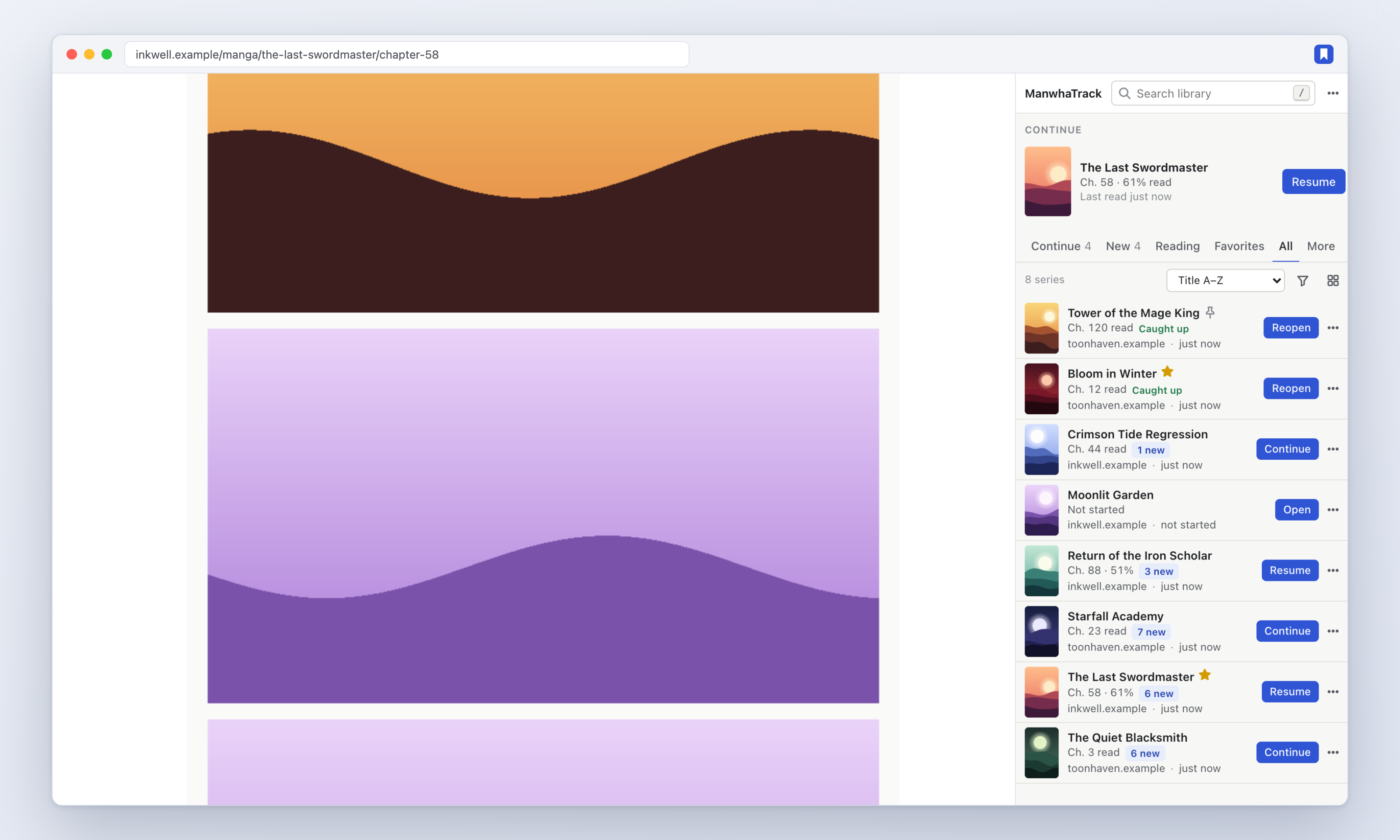
Install
- Download manwhatrack-1.0.0.zip below and unzip it.
- Open
chrome://extensions, turn on Developer mode, click Load unpacked and choose the unzipped folder. - Pin ManwhaTrack and click it to open the side panel. Then just read — series and chapters appear on their own.
Highlights
- Automatic tracking of series, chapters, progress and covers — no adding, no URLs to paste.
- Honest progress: a chapter counts as read when you reach the end of the reader or click the site's Next button, never just by opening it.
- One-click Continue to the next chapter after your last finished one.
- Supported sites: webtoons.com (Originals & Canvas), Tapas, MangaDex and MANGA Plus via dedicated adapters; sites on the Madara and MangaThemesia themes; and a generic detector for everything else.
- Side panel library with Continue / New / Reading / Favorites views, filters, sorting, grid or list, typo-tolerant search, queue, batch actions and a command palette.
- New chapter checks that go straight to each site, with an optional badge and notifications.
- Backups: JSON (with or without covers), CSV, and a validated, previewed import.
- Private by design: no account, no server, no analytics, works offline.
Verified with 121 unit tests, a Chromium end-to-end suite (including browser restart and service-worker termination), and a live run against each supported site.