Repository navigation
Login limits
Login limits stops password guessing. It counts failed logins per visitor address and per account. An address that fails too often is locked out, for longer each time. An account under attack is paused only for devices that never logged into it, so an attacker cannot lock the owner out of their own account from a browser they already use.
| Module ID | login_limits |
| Default | On |
| Available | Unless Wordfence brute force protection is on. SafeHouse then shows "Wordfence brute force protection is on and already limits login attempts." |
| WP-CLI |
wp shouse login (only while the module runs) |
| Since | 0.1.0 |
Login limits checks every login with a username and password that goes through WordPress's authenticate filter:
wp-login.php- login forms made with
wp_login_form() - the WooCommerce My Account login form
- XML-RPC (when Hardening has not turned XML-RPC off)
- any plugin that logs users in with
wp_signon()orwp_authenticate()
Application passwords (REST API Basic auth) count against the visitor address only, never against an account. A locked address cannot use an application password either, even a valid one: the request gets the error "Too many failed login attempts from your address. Try again later." with HTTP status 429.
Logins without a username, such as cookie logins, are not checked.
With the default settings:
- Five failed logins from one address within 15 minutes lock that address out for 15 minutes. The 15 minutes start at the first failure; after that the count starts again.
- Each further lockout of the same address lasts four times longer: 15 minutes, 1 hour, 4 hours, 16 hours, then 24 hours, which is the maximum.
- A successful login clears the address's failed attempts but not its lockout history. The history is forgotten after 30 days without activity, or when you lift the lockout.
IPv4 addresses count one by one. IPv6 addresses count by their /64 network, because one device usually has many addresses in its /64.
While an address is locked out, every login from it is refused, even with the right password. The form shows:
Too many failed login attempts from your address. Try again in 15 minutes.
Attackers often spread their guesses over many addresses. To catch that, Login limits also counts failures per account name:
- After 10 failed logins for one account within an hour, the account is paused for one hour.
- The pause applies only to browsers that have never logged into that account. A browser that has logged in before carries a signed device cookie and logs in as usual.
- Failures from a browser that carries the device cookie never count toward a pause.
A login from a browser without the cookie is refused during the pause, even with the right password:
This account is paused for new devices after many failed attempts. Log in from a device you used before, or try again in an hour.
This also applies to the real owner on a new phone or a fresh browser. They can log in from a device they used before, wait for the hour to pass, or ask an administrator to lift the pause.
The name is counted as typed, in lower case. A login name and an e-mail address are counted separately, even when they belong to the same user. Names are stored only as keyed hashes, never in plain text.
When the typed name belongs to an existing user and E-mail when an account is paused is on, the alert recipients get one e-mail per pause, with the subject [SafeHouse] SITE NAME: Account LOGIN paused for new devices.
After every successful login, SafeHouse sets a cookie for the user's login name and another for their e-mail address:
| Name |
shouse_device_ followed by 20 hexadecimal characters |
| Lifetime | 180 days |
| Flags |
HttpOnly, SameSite=Lax, Secure on HTTPS |
| Content | An expiry time and a signature made with the site's AUTH_KEY and AUTH_SALT
|
Changing AUTH_KEY or AUTH_SALT in wp-config.php makes every device cookie invalid. Browsers get a new one at their next successful login.
On SafeHouse → Modules → Login limits, select Details.
| Setting | Default | What it does |
|---|---|---|
| Failures before an address is locked out | 5 | From 2 to 50. |
| Counted over (minutes) | 15 | From 1 to 1440. |
| First lockout (minutes) | 15 | From 1 to 1440. "Each further lockout of the same address lasts four times longer, up to 24 hours." |
| Failures per account in an hour before new devices are paused | 10 | From 3 to 100. The pause always lasts one hour. |
| Never lock out these addresses | Empty | "One IP address or range per line, for example 203.0.113.7 or 198.51.100.0/24." |
| E-mail when an account is paused | On | Sends the alert e-mail described above. |
While the module runs, Details also shows what is locked out right now, with the time each lockout ends (UTC), and the Lift all lockouts button.
Login limits needs the real visitor address. If the site is behind Cloudflare, a load balancer or another proxy, every visitor seems to come from the proxy's address.
SafeHouse protects you from the worst case on its own. It turns the address rule off, and keeps only the account rule, when requests come:
- from a Cloudflare address while SafeHouse is not set up for Cloudflare, or
- from a private address (such as
10.0.0.5) andSHOUSE_TRUSTED_PROXIESis not set.
In that case Tools → Site Health shows "Login limits cannot block by address on this server", and Details explains why:
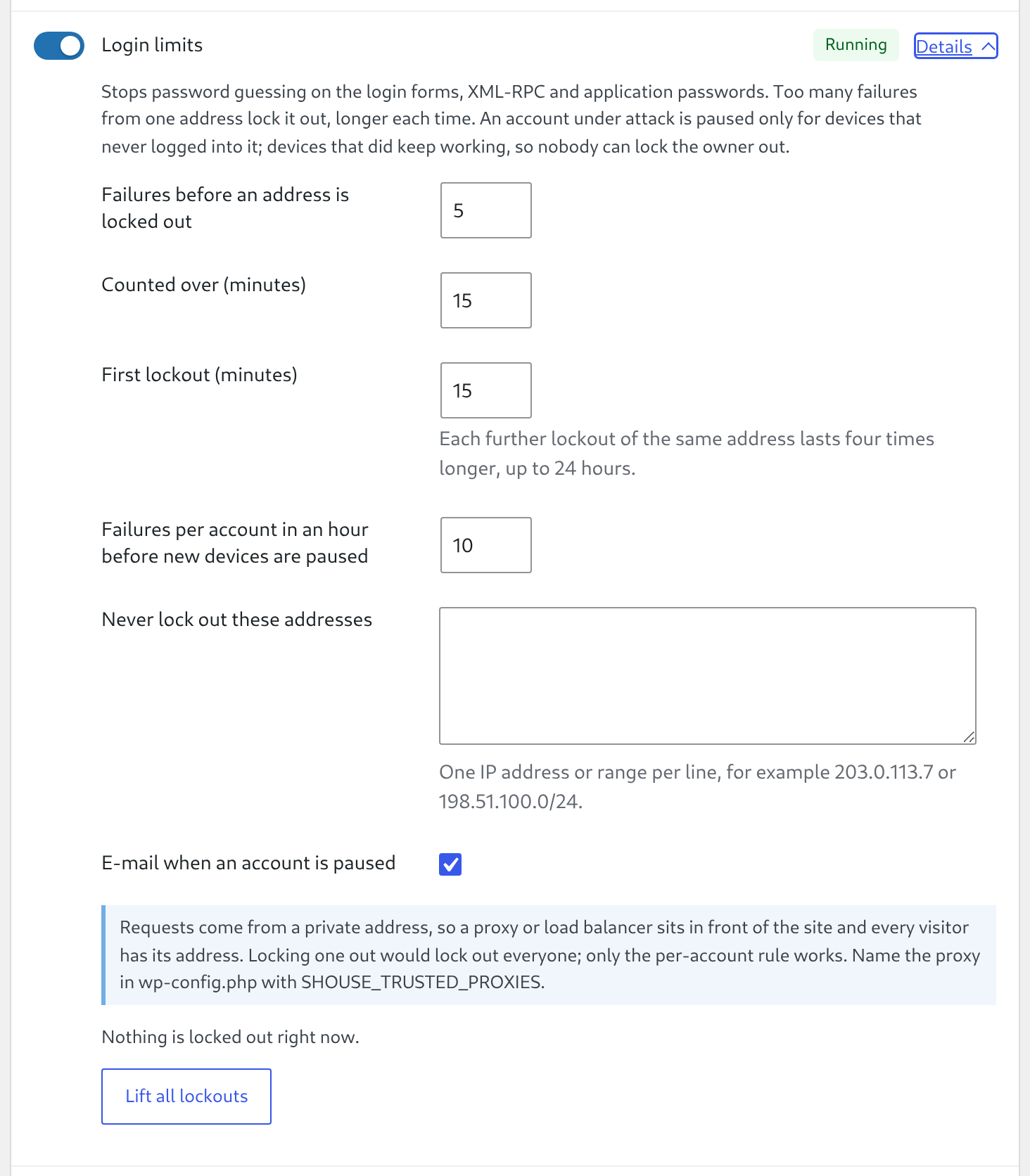
A proxy on a public address that is not Cloudflare's is not detected. SafeHouse then treats the proxy as the visitor and can lock it out, which locks out everyone behind it. If your site is behind such a proxy, set it up before you rely on this module. For both cases, see Behind Cloudflare or a proxy.
Addresses on the allowlist are never counted, never locked out and never paused, for any account.
To allow an address:
-
Go to SafeHouse → Modules → Login limits and select Details.
-
In Never lock out these addresses, enter one address or range per line, for example:
203.0.113.7 198.51.100.0/24 2001:db8:1234::/48 -
Select Save Changes.
To keep the allowlist in code instead, define SHOUSE_LOGIN_ALLOWLIST in wp-config.php. SafeHouse uses both lists together.
define( 'SHOUSE_LOGIN_ALLOWLIST', [ '203.0.113.7', '198.51.100.0/24' ] );Allow only addresses you control, such as your office's fixed address. Allowing a proxy's range turns login limits off for everyone behind that proxy.
In wp-admin:
-
Go to SafeHouse → Modules → Login limits and select Details.
-
Select Lift all lockouts.
SafeHouse shows "All lockouts lifted." and writes the action to the activity log.
With WP-CLI, see what is locked out:
wp shouse login statusThe output lists the kind (address or account (new devices)), the address (account names show as (hashed)), the end time in UTC and the number of lockouts so far.
Lift the lockout of one address:
wp shouse login unlock 203.0.113.7Lift a pause by naming the account exactly as the attacker typed it. A login name and an e-mail address are separate entries, so lift both if you are not sure:
wp shouse login unlock jan
wp shouse login unlock jan@example.com
Lift everything:
wp shouse login unlock --allEach command prints how many records it cleared, for example Success: 1 lockout record(s) cleared. Lifting a lockout also forgets that address's lockout history, so its next lockout starts again at the first duration.
If you are locked out and cannot reach wp-admin or WP-CLI, see Recover from a lockout.
- While Wordfence's Brute Force Protection (in its firewall options) is on, Login limits is Unavailable and does not run. Wordfence limits logins instead. Set
SHOUSE_IGNORE_OVERLAPStotrueto run both. - Hardening's generic login error never hides the lockout and pause messages, so people learn why they cannot log in.
- A failed Cloudflare Turnstile check on
wp-login.php(Bot protection) counts as a failed login.
- Table
{prefix}shouse_login: one row per address or account name with the failure count, the number of lockouts and the lockout end. Rows that lock nothing and were not touched for 30 days are deleted daily. - Cookies
shouse_device_*in the browsers of users who logged in (180 days). - Activity log entries:
login_lockedwhen an address is locked out,login_pausedwhen an account is paused,login_unlockedwhen someone lifts lockouts.
Uninstalling SafeHouse drops the table. Device cookies stay in browsers until they expire.
- An address lockout does not send an e-mail. Only account pauses do.
- Login limits does not stop attacks that do not log in, such as requests for every page of a site. Use a firewall for that (see Scope and limits).
- During a pause, the owner on a device they never used before is refused too.
- SafeHouse has no two-factor login. Use Wordfence Login Security or another 2FA plugin for that.