Repository navigation
Releases
StandUp Pal 1.7.2: a better voice

🗣️ A better voice for warm-ups
- Warm-ups are read by the best voice installed on your Mac (Premium, then Enhanced, then basic) instead of whichever one macOS hands out first. Basic voices speak a little slower, and emoji are no longer read out loud.
- Settings › Warm-up › Voice is new: click Listen, or pick any installed voice for the app's language. If you only have a basic voice, it points you to System Settings › Accessibility › Read & Speak, where you can download Enhanced voices.
- Ukrainian: macOS only has the robotic compact Lesya, and there is no Enhanced Ukrainian voice to download. So the built-in exercises and warm-up phrases are now read by Mykyta, a neural voice pre-rendered into the app: 26 short clips, about 400 KB, made with the CC0 Piper voice
uk_UA-ukrainian_tts-medium. Your own exercises still use the system voice. If you pick a system voice in the picker, the clips turn off.
🐾 The walking pet, per Mac
- The walking pet toggle moved from Habits to Settings › Pet.
- Each Mac keeps its own choice, so the pet can walk on your home Mac and stay off at work. iCloud sync leaves this setting alone.
Smaller things
- The Habits tab is tidier: eye breaks and the weekly card on the left, the pet's day on the right.
📦 Install
- Download StandUp-Pal-1.7.2.dmg, open it, and drag StandUp Pal onto Applications.
- The app isn't notarized by Apple. On first launch, either go to System Settings › Privacy & Security and click Open Anyway, or run this once:
xattr -dr com.apple.quarantine "/Applications/StandUp Pal.app" - If you use iCloud sync, click Allow when macOS asks about iCloud Drive.
Updating keeps your progress. Requires macOS 14 or later. Universal build for Apple silicon and Intel.
SHA-256 (StandUp-Pal-1.7.2.dmg): aa1e022e4ec7b0b83cddfdd5ad2502d4c3e668d35904e7d055d39879efb46237
SHA-256 (StandUp-Pal-1.7.2.zip): 95b6414b66747528127650808bee35393051d5a40b1511a6e4977a3ed331126a
If it gets you off your chair, a coffee keeps the pets fed: ko-fi.com/deus42 ☕
StandUp Pal 1.7.0
🐾 Play with the Dock pet
Turn on Settings › Habits › Walking pet, and the pet above the Dock becomes a toy.
- Drag it anywhere. It dangles from the cursor and swings as you move.
- Toss it: let go while moving and it flies. It spins in the air and bounces off the bottom and edges of the screen. A hard throw leaves it dizzy, with swirly eyes and stars over its head.
- Double-click for a backflip. A single click is a boop.
- Stroke it by moving the cursor back and forth over it, and it cheers up.
- Its eyes follow the cursor.
- After bedtime it sleeps in its own little bed above the Dock.
🌙 Time to log off
The bedtime card now tells a short story.
- The pet types on its laptop and shuts the lid. It yawns, walks across the room and hops into bed in its nightcap, pulling the blanket up to its chin.
- The lamp goes out and the moon shines through the window. The blanket rises and falls while it sleeps.
- A soft goodnight chime plays with the card.
- Still at the Mac half an hour later? The next card asks Still at the computer?, and the pet is already asleep in it.
- Off to bed turns the screen off. Use it 7 times to unlock the new Sleepyhead badge.
- To see the card any time, go to Settings › Habits › Pet's day › Send me to bed too and click Show.
💧 Water tracking removed
- Removed: the water row, the A glass of water menu item, the water settings in Habits, the water option on reminders and the water badge. The weekly card shows extras done instead of glasses.
- The app ignores saved water counts. The rest of your progress is unchanged.
Smaller things
- The Habits tab has a moon icon.
- New things for the pet to say, in all three languages.
📦 Install
- Download StandUp-Pal-1.7.0.dmg, open it, and drag StandUp Pal onto Applications.
- The app isn't notarized by Apple. On first launch, either go to System Settings › Privacy & Security and click Open Anyway, or run this once:
xattr -dr com.apple.quarantine "/Applications/StandUp Pal.app" - If you use iCloud sync, click Allow when macOS asks about iCloud Drive.
Updating keeps your progress. Requires macOS 14 or later. Universal build for Apple silicon and Intel.
SHA-256 (StandUp-Pal-1.7.0.dmg): b562a6a3ec0fe54f3b946a61598806055aa14382ebc07a1a17f952155c39c176
SHA-256 (StandUp-Pal-1.7.0.zip): bf76f96b601ea95cac63ab93887b1e0db3ce4588af96d472d0694a99977638b7
If it gets you off your chair, a coffee keeps the pets fed: ko-fi.com/deus42 ☕
StandUp Pal 1.6.0: the pet's day
🌙 The pet's day
The pet now follows your day and changes its look to match.
- At work: a shirt collar, a tie and round glasses. It keeps the headband or dumbbells you picked.
- In the morning: pyjamas and a steaming cup of coffee. On days off, the slow morning lasts until 11:00.
- In the evening: pyjamas. It's off work but still awake.
- At bedtime (20:00 by default): it puts on a nightcap and goes to sleep.
- If you're still at the Mac, a small card asks you to step away too. It asks again every half hour while you stay.
- Off to bed turns the screen off, and A bit longer closes the card.
- The card never appears during a call or while you're away.
- Booty's pyjamas have a butt flap. 🍑
- To change any of this, go to Settings › Habits › Pet's day. You can turn the outfits off, set bedtime anywhere from 19:00 to 23:30, or turn off the bedtime card.
Smaller things
- The pet now sleeps only after bedtime or while reminders are paused. Before that, it stays awake in the morning and evening.
- New things for the pet to say in each part of the day, in all three languages.
📦 Install
- Download StandUp-Pal-1.6.0.dmg, open it, and drag StandUp Pal onto Applications.
- The app isn't notarized by Apple. On first launch, either go to System Settings › Privacy & Security and click Open Anyway, or run this once:
xattr -dr com.apple.quarantine "/Applications/StandUp Pal.app" - If you use iCloud sync, click Allow when macOS asks about iCloud Drive.
Updating keeps your progress. Requires macOS 14 or later. Universal build for Apple silicon and Intel.
SHA-256 (StandUp-Pal-1.6.0.dmg): 476d3d0ffde82c0e2846194c096ada333cc66084f69e435ed670ac1435a3a9b6
SHA-256 (StandUp-Pal-1.6.0.zip): 7847bca0c19432caaed0ff077072a55c9af5241aac27350ba6914a4bcd174377
If it gets you off your chair, a coffee keeps the pets fed: ko-fi.com/deus42 ☕
StandUp Pal 1.5.1 🏋️ Coach, programs and healthy habits
This release covers everything since 1.2.
🏋️ A pet that coaches you
- Every exercise has its own animation. The pet reaches, marches, twists, side-bends, squats, rolls its shoulders and breathes along with you.
- Five new desk and physio exercises: chin tucks, shoulder-blade squeeze, standing back bend, ankle circles and desk push-ups.
- Programs for reminders. Give a reminder (say, your physiotherapy) a list of exercises with durations, sets and rest, or start from a ready-made program: neck & shoulders, lower back, wrists & eyes, or legs. When the reminder pops up, Start the program runs it with a timer.
💧 Small healthy habits
- Water: tap + in the menu bar popover after each glass. The goal is 8 by default, and a reminder can count glasses too.
- Eye breaks (20-20-20): every 30 minutes, a small silent card asks you to look into the distance for 20 seconds. It never appears during a call or right before a stand-up.
- 18 achievements to collect, shown in Stats.
- Weekly card: after work on Friday you get a card with your week. Copy it or save it as a PNG and share it.
- Walking pet: optionally, let the pet stroll along the top of your Dock.
- These live in a new Habits tab in Settings, which, like every tab, fits without scrolling.
🔁 One-click updates between your own Macs
For people who build from source:
scripts/make-signing-cert.shcreates a personal signing certificate, so macOS keeps the app's permissions across updates.build-app.sh --publish-updateoffers a new build to your other Macs through iCloud Drive. They show Update, check that the build is signed with the same certificate, swap themselves and relaunch. No network is involved.
Smaller things
- The stand-up card's "Stood up" button is now "Done, no warm-up", which says what it does.
- Previews in Settings no longer award XP.
📦 Install
- Download StandUp-Pal-1.5.1.dmg, open it, and drag StandUp Pal onto Applications.
- The app isn't notarized by Apple, so on first launch go to System Settings › Privacy & Security › Open Anyway, or run once:
xattr -dr com.apple.quarantine "/Applications/StandUp Pal.app" - With iCloud sync on, click Allow when macOS asks about iCloud Drive.
Updating keeps your progress. Requires macOS 14 or later. Universal build: Apple silicon and Intel.
SHA-256 (StandUp-Pal-1.5.1.dmg): 3f5b6a546fdab006155ba45c201d7f1aa381354e53eed4904bafdfa8d96b2252
SHA-256 (StandUp-Pal-1.5.1.zip): 16f0b5b4b2a32fd76864f9a7126ede2bcd46e72ca6f8156fa2c81d9106290136
If it gets you off your chair, a coffee keeps the pets fed: ko-fi.com/deus42 ☕
StandUp Pal 1.2.0 ☁️ Sync across your Macs
☁️ Sync across your Macs
Your settings, reminders and pet progress now follow you to every Mac signed in to the same Apple Account.
- No login and no server. StandUp Pal keeps a small StandUp Pal folder in your iCloud Drive.
- Nothing gets lost. Each Mac adds its own XP and stats, so working on two Macs on the same day keeps everything. Settings follow the Mac where you last changed them.
- New Macs catch up. A newly installed Mac picks up your existing pet and settings instead of starting over. Resetting progress on one Mac resets it everywhere.
- Turn it on or off in Settings › General › iCloud sync, with a status line and a button that opens the folder in Finder.
📦 Install
- Download StandUp-Pal-1.2.0.dmg, open it, and drag StandUp Pal onto Applications. A zip is available too.
- The app is ad-hoc signed and not notarized, so on first launch macOS says it can't verify it. Open System Settings › Privacy & Security › Open Anyway, or run once:
xattr -dr com.apple.quarantine "/Applications/StandUp Pal.app" - With sync on, macOS asks once whether StandUp Pal may access iCloud Drive. Click Allow. It asks again after each update, because builds aren't signed with a paid Apple certificate.
Updating from 1.1 keeps your progress. Requires macOS 14 or later. Universal build: Apple silicon and Intel.
SHA-256 (StandUp-Pal-1.2.0.dmg): 0531d8ae672278b685647bc530c97bfa11905ddeec390a2b589f841d508dbdbc
SHA-256 (StandUp-Pal-1.2.0.zip): f4c9d0f52ef975dcc307c52bd75b4e0844e50b8fab0456fb69400779c5a0a9af
If it gets you off your chair, a coffee keeps the pets fed: ko-fi.com/deus42 ☕
StandUp Pal 1.1.0 🐾
A tiny fitness pet in your Mac's menu bar that gets you out of your chair before every hour ends. First public release.
✨ What's inside
- 🧍 Stand-up reminders at :55 of every working hour, in a floating card that never steals keyboard focus.
- 🤸 Guided 2/3/5-minute warm-ups from 16 desk-friendly exercises, plus your own.
- 💪 Your own exercise reminders with Done / +1 hour / +2 hours / Skip.
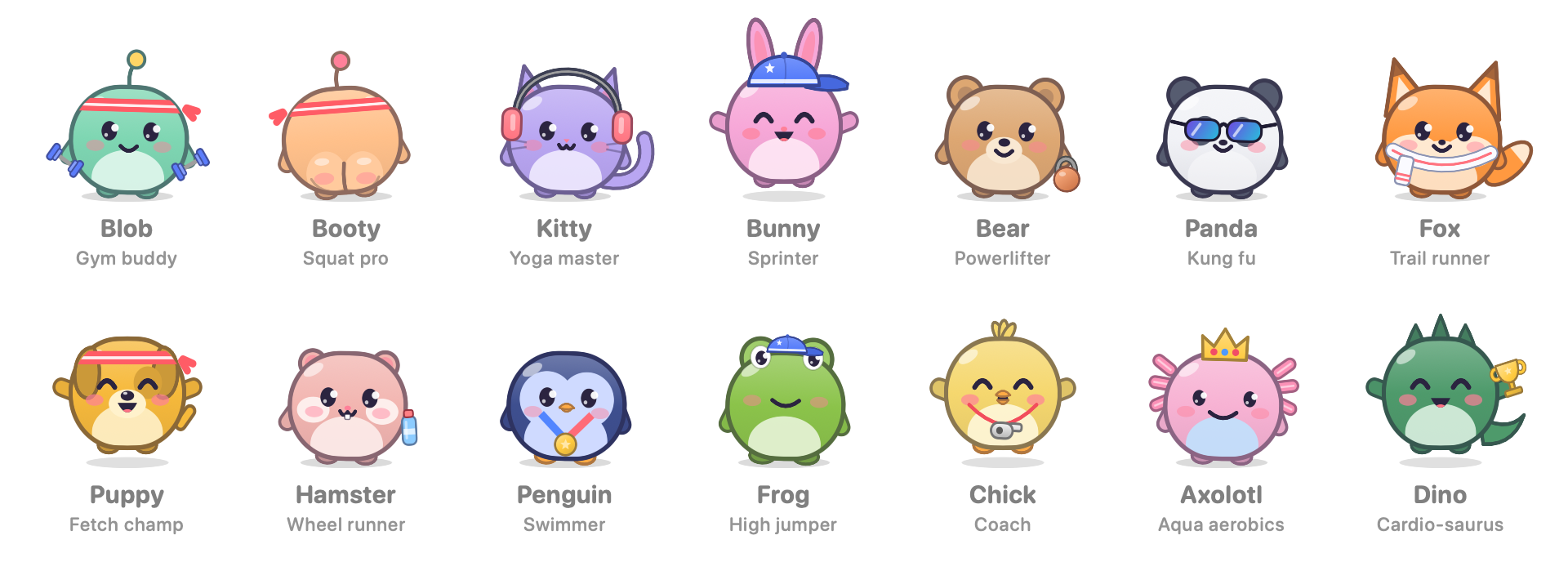
- 🐾 14 fitness pets, Booty 🍑 included, plus 7 animated moods and 28 two-tone palettes.
- 🏋️ Fitness gear unlocked by levelling up: sweatband, cap, headphones, shades, crown, water bottle, dumbbells, kettlebell, trophy, towel, whistle, medal.
- 🧠 Skips the reminder if you're already away, waits while you're on a call, and handles sleep without piling up reminders.
- 🌍 English, Українська, Русский, switchable live.
- 🔒 No accounts, no network, no analytics.
📦 Install
- Download StandUp-Pal-1.1.0.dmg below, open it, and drag StandUp Pal onto the Applications folder in the window. (A zip is there too.) The disk image has a short "If it won't open.txt" note in English, Ukrainian and Russian.
- The app is ad-hoc signed and not notarized by Apple, so on first launch macOS will say it can't verify it. Either:
- open System Settings › Privacy & Security, scroll down and click Open Anyway, or
- run once in Terminal:
xattr -dr com.apple.quarantine "/Applications/StandUp Pal.app"
- Find the pet in your menu bar. Click it for your stats; right-click it for options and the language.
Requires macOS 14 Sonoma or later. Universal: Apple silicon and Intel.
SHA-256 (StandUp-Pal-1.1.0.dmg): cc7a53e2446d8a221228268d06264ea116c80a8c6cd71b3ba2f2ff8d427d303c
SHA-256 (StandUp-Pal-1.1.0.zip): 7153acf630ef259a0d2ea0fc74100de7d319d4c4a07b202dbdd0eb5dd8ac8cbc
If it gets you off your chair, a coffee keeps the pets fed: ko-fi.com/deus42 ☕