Auctions is a Decentralized Application (DApps) developed using Truffle Integrated Development.
This project is an attempt to replicate an Chinese/Penny Social Auction DApp on Ethereum, using Solidity Smart Contract.
Project was developed using Truffle Suite based Test Driven Development approach.
Following assumptions were taken into consideration in desgining the Smart Contract;
- Fixed number of bidders, initialized to 4. All 4 need to self-register. Funds transfer from bidder is automatically done and is not in the scope of this application.
- Fixed number of items to be auctioned off, initialized to 3.
- Items auctioned are indexed from 0..N-1 where N is the number of items for auction. N is 2.
- Each bidder buys just 1 sheet of tickets or tokens; each sheet has only 5 tokens.
- Assume simple number for the serial numbers for the sheet of tickets: 0,1,2,3. Here we show the tokens of bidder 0 and 1.
The Auction smart contract has Item and Person structs and other data items such as array of Items, array of Persons, array of winners, mappings, and beneficiary address.
Constructor that initializes the owner, register that allows (decentralized person) to register online to get the tokens and start bidding, bid function that lets a person bid, and finally revealWinner, to randomly choose the winner for the item auctioned. Here is the design.
Clone the repo (https://github.com/devendran-m/Auction.git) to get you a copy of the project on your local machine.
Please note that this is a project developed for learning purposes only.
npm install truffle -gTo integrate and track the transactions in an interactive way, Ganache UI is used. Follow the instructions in the below link to download the appropriate version for your OS. Ganache*
After cloning the repo to your local machine, go to the Auctions folder
cd AuctionOnce in the folder, and assuming you have installed Truffle, initialize Truffle
truffle initUpon successfully initializing Truffle, compile the Smart Contract.
truffle compileIf you haven't changed the Smart Contract and/or there are no issues with the compilation, you will see an output like below;
laptop:~/myprojects/Auction$ truffle compile
Warning: Both truffle-config.js and truffle.js were found. Using truffle-config.js.

Compiling your contracts...
===========================
> Everything is up to date, there is nothing to compile.

laptop:~/myprojects/Auction$
Utilize Truffle Suite's TDD approach to test the Smart Contract.
truffle testAssuming there are no issues with the Smart Contract, the test should result in something like below;
laptop:~/myprojects/Auction$ truffle test
Warning: Both truffle-config.js and truffle.js were found. Using truffle-config.js.
Using network 'test'.


Compiling your contracts...
===========================
> Everything is up to date, there is nothing to compile.

Warning: Both truffle-config.js and truffle.js were found. Using truffle-config.js.


  Contract: AuctionContract
    ✓ Contract deployment
    ✓ Should set bidders (145ms)
    ✓ Should NOT allow to bid more than remaining tokens (259ms)
    ✓ Should NOT allow non owner to reveal winners (80ms)
    ✓ Should set winners (888ms)


  5 passing (1s)

laptop:~/myprojects/Auction$
Once the Contract is compiled successfully, you can use Truffle Develop to spin up a development blockchain locally on port 9545 for testing and blockchain interactions.
Refer Link for more details.
truffle developIf you choose to use local blockchain using Truffle CLI, you can use the following Accounts, Private Keys and Mnemonics for your testing. Please note that these are generated by Truffle for development and testing purposes in your local and testnet environments ONLY. DO NOT use this in the Mainnet.
Truffle Develop started at http://localhost:9545/

Accounts:
(0) 0x627306090abab3a6e1400e9345bc60c78a8bef57
(1) 0xf17f52151ebef6c7334fad080c5704d77216b732
(2) 0xc5fdf4076b8f3a5357c5e395ab970b5b54098fef
(3) 0x821aea9a577a9b44299b9c15c88cf3087f3b5544
(4) 0x0d1d4e623d10f9fba5db95830f7d3839406c6af2
(5) 0x2932b7a2355d6fecc4b5c0b6bd44cc31df247a2e
(6) 0x2191ef87e392377ec08e7c08eb105ef5448eced5
(7) 0x0f4f2ac550a1b4e2280d04c21cea7ebd822934b5
(8) 0x6330a553fc93768f612722bb8c2ec78ac90b3bbc
(9) 0x5aeda56215b167893e80b4fe645ba6d5bab767de

Private Keys:
(0) c87509a1c067bbde78beb793e6fa76530b6382a4c0241e5e4a9ec0a0f44dc0d3
(1) ae6ae8e5ccbfb04590405997ee2d52d2b330726137b875053c36d94e974d162f
(2) 0dbbe8e4ae425a6d2687f1a7e3ba17bc98c673636790f1b8ad91193c05875ef1
(3) c88b703fb08cbea894b6aeff5a544fb92e78a18e19814cd85da83b71f772aa6c
(4) 388c684f0ba1ef5017716adb5d21a053ea8e90277d0868337519f97bede61418
(5) 659cbb0e2411a44db63778987b1e22153c086a95eb6b18bdf89de078917abc63
(6) 82d052c865f5763aad42add438569276c00d3d88a2d062d36b2bae914d58b8c8
(7) aa3680d5d48a8283413f7a108367c7299ca73f553735860a87b08f39395618b7
(8) 0f62d96d6675f32685bbdb8ac13cda7c23436f63efbb9d07700d8669ff12b7c4
(9) 8d5366123cb560bb606379f90a0bfd4769eecc0557f1b362dcae9012b548b1e5

Mnemonic: candy maple cake sugar pudding cream honey rich smooth crumble sweet treat

⚠️  Important ⚠️  : This mnemonic was created for you by Truffle. It is not secure.
Ensure you do not use it on production blockchains, or else you risk losing funds.
If you have installed Ganache, you can use Ganache for integrating the Smart Contract and testing using Ganache UI. You can link your Truffle Project to Ganache using the instructions the Link
Linking the Truffle Project with Ganache CLI
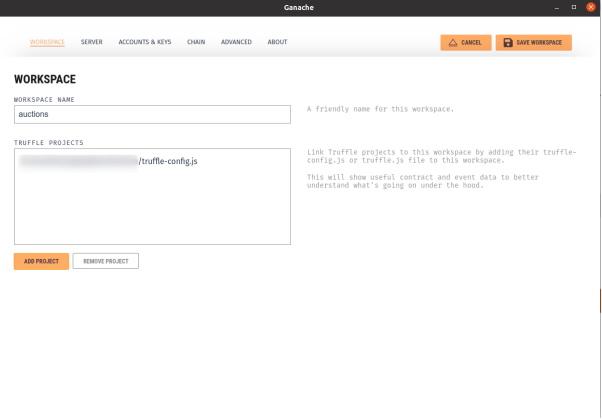
Click ‘ADD PROJECT’, choose truffle-config.js from Auction project folder and ‘SAVE WORKSPACE’.
NOTE: The above steps will only linking the Truffle Project with Ganache UI. The Smart Contracts are not deployed yet on to the Blockchain. To deploy the Smart Contracts in this Truffle project, go back to the terminal where you executed truffle develop and issue the deploy command.
truffle(develop)> deployThis will deploy the Smart Contract(s) on to the local Blockchain network. Smart Contracts deployment output will look sommething like below;
truffle(develop)> deploy

Compiling your contracts...
===========================
> Everything is up to date, there is nothing to compile.


Starting migrations...
======================
> Network name:    'develop'
> Network id:      5777
> Block gas limit: 6721975 (0x6691b7)


1_initial_migration.js
======================

   Replacing 'Migrations'
   ----------------------
   > transaction hash:    0x56c52a246432a49ea0e6287143fb82b19ba4417d216401dc84a756c63d9a093f
   > Blocks: 0            Seconds: 0
   > contract address:    0xa29DF41FDAD68d86eaF4E114c9235967a3B240AD
   > block number:        1
   > block timestamp:     1637517488
   > account:             0xC79372BF5961d7a4Ba075D2C32264EB94a70a58B
   > balance:             99.999549526
   > gas used:            225237 (0x36fd5)
   > gas price:           2 gwei
   > value sent:          0 ETH
   > total cost:          0.000450474 ETH


   > Saving migration to chain.
   > Saving artifacts
   -------------------------------------
   > Total cost:         0.000450474 ETH


2_deploy_contracts.js
=====================

   Replacing 'Auction'
   -------------------
   > transaction hash:    0x1dbb6d4e50f6fa387f5daab860c2684e4f563882607f7a0e991cdfa896b730f9
   > Blocks: 0            Seconds: 0
   > contract address:    0x74BC442926e29d861982887B3865714E322488B5
   > block number:        3
   > block timestamp:     1637517488
   > account:             0xC79372BF5961d7a4Ba075D2C32264EB94a70a58B
   > balance:             99.998287502
   > gas used:            588649 (0x8fb69)
   > gas price:           2 gwei
   > value sent:          0 ETH
   > total cost:          0.001177298 ETH


   > Saving migration to chain.
   > Saving artifacts
   -------------------------------------
   > Total cost:         0.001177298 ETH


Summary
=======
> Total deployments:   2
> Final cost:          0.001627772 ETH


Warning: Both truffle-config.js and truffle.js were found. Using truffle-config.js.
Warning: Both truffle-config.js and truffle.js were found. Using truffle-config.js.
Warning: Both truffle-config.js and truffle.js were found. Using truffle-config.js.
Warning: Both truffle-config.js and truffle.js were found. Using truffle-config.js.
- Blocks: 0            Seconds: 0
- Saving migration to chain.
- Blocks: 0            Seconds: 0
- Saving migration to chain.

truffle(develop)>
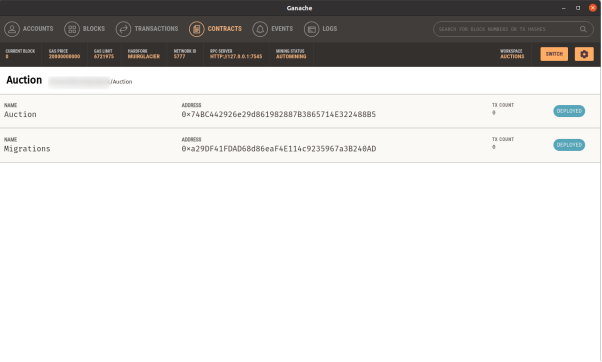
Now, if you go back to Ganache UI and navigate to 'Contracts' section, you will see that the status of the related Smart Contracts as 'Deployed'. You can also see the Contract address there.
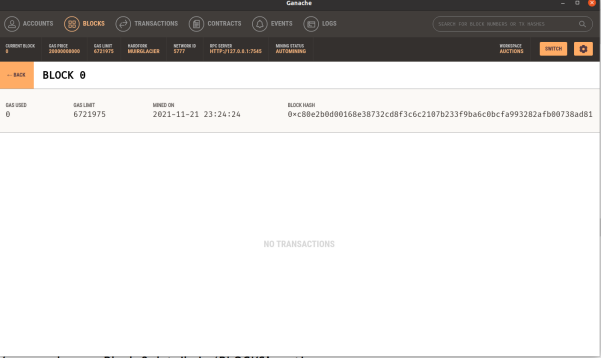
You can also see Block 0 details in ‘BLOCKS’ section.
In order to interact with the deployed Smart Contract using web3.js, initialize npm and install web3 in your project folder. For instance;
$ cd Auction
~/Auction$ npm init
Install web3.js in the same project folder. Use --save, to save the configuration;
npm install web3 --saveInteract with deployed contract using Truffle Console by using the instructions in the Link here