

-
|
Hi people, Is there any way to replace a bunch of different words at one search-and-replace operation? Say I have two lists of words: one for search criteria, and another one for corresponding substitutions... Like so: List: Example1, Example2, Example3.... The long way is to search one by one: Search for: Example2 etc... Can it be done with one go? Search for: (list) Help appreciated. |
Beta Was this translation helpful? Give feedback.
Replies: 5 comments 9 replies

-
|
Not as it stands, but Doug is thinking about adding a scripting feature in a future release #755 (comment) |
Beta Was this translation helpful? Give feedback.

-
|
I too would like to be able to do a SAR with delimited literal text in non-overlapping search via lists or .csv etc. |
Beta Was this translation helpful? Give feedback.

-
|
This can be done in batch via the command line using a neighboring program on the Windows side called FNR (Find and Replace). I've currently got something to highlight words in a document (markdown highlighting using two equals signs):
I generate these using a simple spreadsheet that puts the find and replace into separate columns. I can post that if anyone's interested. Then you save it as a batch file and run it. Works crazy fast. Note that it doesn't work if you need to replace a " character. I've been meaning to post a bug report about that. |
Beta Was this translation helpful? Give feedback.

-
|
Sounds good, I'd like to see your file. :) |
Beta Was this translation helpful? Give feedback.

-
Sure thing ... the spreadsheet is linked below. It's in LibreOffice format but should open fine in whatever spreadsheet program you've got: ... and please do let me know if or how you use it. I feel like I'm on to something with this but lack the time to really dig into it. As far as the non-overlapping SAR, I really don't know. That's a bit above my expertise. |
Beta Was this translation helpful? Give feedback.
-
|
Thanks for posting that. I will have to see if I can base a non-overlapping SAR on this formula. If I can manage it I'll post back :) |
Beta Was this translation helpful? Give feedback.
-
|
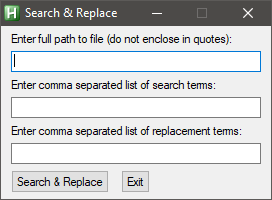
Here's a simple AutoHotkey script. You can either use single search and replace terms or use lists of comma separated terms. It will create a copy of the original file appended with
Click to reveal script#NoEnv
#SingleInstance, Force
SendMode, Input
SetBatchLines, -1
SetWorkingDir, %A_ScriptDir%
Gui, Add, Text,,% "Enter full path to file (do not enclose in quotes):"
Gui, Add, Edit, w250 vFile
Gui, Add, Text,,% "Enter comma separated list of search terms:"
Gui, Add, Edit, w250 vSearch
Gui, Add, Text,,% "Enter comma separated list of replacement terms:"
Gui, Add, Edit, w250 vReplace
Gui, Add, Button, gSearchAndReplace,% "Search && Replace"
Gui, Add, Button, xp+110 yp,% "Exit"
Gui, Show,,% "Search & Replace"
Return
SearchAndReplace:
Gui, Submit, NoHide
Search := StrSplit(Search, ",")
Replace := StrSplit(Replace, ",")
If (Search.Count() != Replace.Count())
MsgBox,% "Different number of search and replace terms."
FileRead, content,% file
Loop,% Search.count()
content := StrReplace(content, Search[A_Index], Replace[A_Index])
FileAppend,% content,% file ".SaR"
MsgBox,% "Finished."
Return
ButtonExit:
GuiEscape:
GuiClose:
ExitAppAttached is a compiled version of the script if you don't have AutoHotkey installed. |
Beta Was this translation helpful? Give feedback.
-
|
This is useful. What do you recommend for non-overlapping terms & through multiple files? |
Beta Was this translation helpful? Give feedback.

-
|
I'm by no means an expert in using AHK, but there's a wealth of excellent help and advice to be found on the AutoHotkey Community. |
Beta Was this translation helpful? Give feedback.
-
|
Coincidentally I've just started looking at that. :) |
Beta Was this translation helpful? Give feedback.
-
|
It's all in the documentation ;) https://www.autohotkey.com/docs/commands/IfExpression.htm |
Beta Was this translation helpful? Give feedback.
-
|
That does look like it might do what I'd like it to. :) |
Beta Was this translation helpful? Give feedback.

-
|
v3.1.197 has been released with scripting. Using scripts, you can do multiple searches and replaces with different search patterns and replace text. Each search and replace is a separate operation, mainly because of how dnGrep modifies the files during a replace, but also to avoid any problems with overlapping search results. A dnGrep script may look like: |
Beta Was this translation helpful? Give feedback.
-
|
Great news! Thanks! Sounds like I need to start playing with this right away :) |
Beta Was this translation helpful? Give feedback.


Not as it stands, but Doug is thinking about adding a scripting feature in a future release #755 (comment)