Community fork of BitMaker-hub/NerdMiner_v2 adding optional features on top of the original miner. All upstream functionality is preserved — additions are gated behind compile flags so you opt in only to what you want.
The bulk of the new logic lives in dedicated axehub_* files; upstream
files (mining.cpp, monitor.cpp, wManager.cpp, NerdMinerV2.ino.cpp,
display drivers, …) are modified only with thin hooks needed to wire
those in. Future upstream rebases will likely need manual conflict
resolution at those hook points.
| Miner | Network | TimeChart |
|---|---|---|
 |
 |
 |
AXEHUB_API_ENABLED — local HTTP API on port 80 (/api/axehub/v1/*)
for remote monitoring and control. Full spec: AXEHUB_API.md.
Endpoints include:
/info— full device snapshot (firmware / hashing / pool / hardware sections)/pool/set+/pool/set_fallback— change primary / fallback pool over HTTP, persisted to NVS/pool/stats_api— point the bottom-screen workers / diff / hashrate display at any custom stats URL (CKpool dashboards, public-pool, …)/coin— switch chain (BTC/BC2(BitcoinII) pre-configured, pluscustomwith per-endpoint URL overrides for any SHA-256 fork)/display/{mode,brightness,sleep_window}— cycle screens, dim TFT, schedule nightly backlight off/buzzer/{test,tone}— identify a board in a rack, custom alerts/system/restart+/system/reset_stats+/wifi/reset— soft reboot, NVS stats wipe, reprovisioning escape hatch/webhook/set— outbound push for boot / pool connect / share-above-threshold / block-found events
AXEHUB_DISPLAY — alternative TFT layout with three cyclable screens:
- Miner — current hashrate, uptime, pool best / local best diff, workers, accepted shares
- Network — coin price, NTP time, block height, halving / retarget countdown, network hashrate + difficulty
- TimeChart — local clock + date, 24h price sparkline (coloured per-segment by trend) with min / max overlays and 24h delta %
Two driver variants share the same screens and data plumbing:
- CYD ESP32-2432S028R / S024 (ILI9341 320×240) — touch-cyclable, full-detail layout
- M5StickC Plus 2 (ST7789v2 240×135) — button-cyclable (BtnA), compact layout for the small screen (Network drops
Difficultyfor space, still available via API)
Coin-aware: rendering and data sources follow the active axhCoinTicker
(BTC / BC2 / custom). Screen index can be cycled via touch / button or
set explicitly through the API.
Pool fallback — automatic failover when the primary pool stops responding. Configured via the HTTP API or via any client that speaks it.
web-flasher/ — browser-based flasher for sideloading prebuilt
firmware without esptool/PlatformIO. Static site, deployable as-is to
GitHub Pages (or any static host). Requires Chrome or Edge — flashing
uses the Web Serial API, which Firefox / Safari do not implement.
Pool-effective hashrate (accepted shares × pool difficulty / time) on a private
BC2 (BitcoinII) test pool, diff floor 0.001, 100% acceptance ratio. CPU @ 240
MHz, no overclocking. The on-screen current_khs counter tracks SHA peripheral
iteration speed and converges to the effective rate after a few minutes of
warm-up.
| Board | Chip | Pool-effective |
|---|---|---|
| ESP32-CAM | ESP32-D0 | ~670 kH/s |
| CYD 2.8 (ESP32-2432S028R) | ESP32-D0 | ~670 kH/s |
| CYD 2.4 (ESP32-2432S024) | ESP32-D0 | ~670 kH/s |
| M5StickC Plus 2 | ESP32-PICO | ~660 kH/s |
| ESP32-S3 (DevKitC N16R8) | ESP32-S3R8 | ~350 kH/s |
git clone https://github.com/dwespl/nerdminer-axehub.git
cd nerdminer-axehub
# the AXEHUB_* flags are already enabled in platformio.ini for the
# included envs — pick the one matching your board:
pio run -e ESP32-2432S028R     # CYD 2.8" — display + touch verified, primary target
pio run -e ESP32-2432S024      # CYD 2.4" — display verified, touch only on XPT2046 variant
pio run -e M5Stick-C-Plus2     # M5StickC Plus 2 — display verified, BtnA cycles screens
pio run -e ESP32-S3-devKitv1   # ESP32-S3 N16R8 — verified, no display
pio run -e esp32cam            # ESP32-CAM — API only (no display)

# then build + flash (always pass -e — without it PIO builds every env):
pio run -e ESP32-2432S028R --target upload   # add --upload-port COMx if PIO doesn't auto-detect
# or open web-flasher/ in Chrome/Edge to flash via USB Web Serial
To build a stock upstream image without these additions, remove
-D AXEHUB_API_ENABLED=1 and -D AXEHUB_DISPLAY=1 from the env's
build_flags in platformio.ini. The fork is purely additive — with
those flags off, the binary behaves identically to upstream.
Same as upstream — MIT (see LICENSE). Fork additions are
released under the same terms.
This fork has no separate donation address. If you want to support the underlying NerdMiner project, please use the upstream donation links below. To support the fork specifically, a star on the firmware repo is the best signal.
The rest of this README is from the upstream project.
The NerdSoloMiner v2
This is a free and open source project that let you try to reach a bitcoin block with a small piece of hardware.
The main aim of this project is to let you learn more about minery and to have a beautiful piece of hardware in your desktop.
Original project https://github.com/valerio-vaccaro/HAN

- TTGO T-Display S3 or any supported boards (check Build tutorial 👇)
- 3D BOX here
ESP32 implementing Stratum protocol to mine on solo pool. Pool can be changed but originally works with public-pool.io (where Nerdminers are supported).
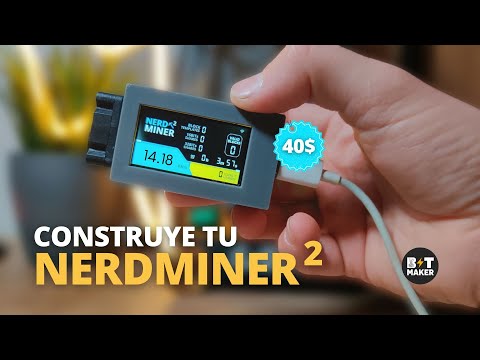
This project was initialy developed using ESP32-S3, but currently support other boards. It uses WifiManager to modify miner settings and save them to SPIFF. The microMiner comes with several screens to monitor it's working procedure and also to show you network mining stats. Currently includes:
- NerdMiner Screen > Mining data of Nerdminer
- ClockMiner Screen > Fashion style clock miner
- GlobalStats Screen > Global minery stats and relevant data
This miner is multicore and multithreads, both cores are used to mine and several threads are used to implementing stratum work and wifi stuff. Every time an stratum job notification is received miner update its current work to not create stale shares.
IMPORTANT Miner is not seen by all standard pools due to its low share difficulty. You can check miner work remotely using specific pools specified down or seeing logs via UART.
Current project is still in developement and more features will be added
- LILYGO T-Display S3 (original one) or any other supported boards
- 3D BOX here
- LILYGO T-Display S3 (Aliexpress link*)
- ESP32-WROOM-32, ESP32-Devkit1.. (Aliexpress link*)
- LILYGO T-QT pro (Aliexpress link*)
- LILYGO T-Display 1.14 (Aliexpress link*)
- LILYGO T-Display S3 AMOLED (Aliexpress link*)
- LILYGO T-Display S3 AMOLED Touch (Board Info)
- LILYGO T-Dongle S3 (Aliexpress link*)
- ESP32-2432S028R 2,8" (Aliexpress link* / Dev support: @nitroxgas / ⚡jadeddonald78@walletofsatoshi.com)
- ESP32-cam (Board Info / Dev support: @elmo128)
- M5-StampS3 (Aliexpress link* / Dev support: @gyengus)
- Wemos Lolin S3 Mini (Board Info)
- Wemos Lolin S2 Mini (Board Info)
- Weact S3 Mini (Board Info)
- Weact ESP32-D0WD-V3 (Board Info)
- ESP32-S3 Devkit (Board Info)
- ESP32-C3 Devkit (Board Info)
- ESP32-C3 Super Mini (Board Info)
- Waveshare ESP32-S3-GEEK (Board Info)
- LILYGO T-HMI (Aliexpress link*) / Dev support: @cosmicpsyop
- ESP32-C3 0.42 Inch OLED (Aliexpress link* / Dev support: @mrthiti / ⚡ wallet@thiti.dev)
- ESP32-S3 0.42 Inch OLED (Aliexpress link* / Dev support: @mrthiti / ⚡ wallet@thiti.dev)
*Affiliate links
Easyiest way to flash firmware. Build your own miner using the folowing firwmare flash tool:
- Get a TTGO T-display S3 or any other supported board
- Go to NM2 flasher online: https://flasher.bitronics.store/ (recommend via Google Chrome incognito mode)
Create your own miner using the online firwmare flash tool ESPtool and one of the binary files that you will find in the bin folder.
If you want you can compile the entire project using Arduino, PlatformIO or Expressif IDF.
- Get a TTGO T-display S3 or any supported board
- Download this repository
- Go to ESPtool online: https://espressif.github.io/esptool-js/
- Load the firmware with the binary from one of the sub-folders of
bincorresponding to your board. - Plug your board and select each file from the sub-folder (
.binfiles).
Update NerdMiner firmware following same flashing steps but only using the file 0x10000_firmware.bin.
- Online ESP Tool works with chrome, chromium, brave
- ESPtool recommendations: use 115200bps
- Build errors > If during firmware download upload stops, it's recommended to enter the board in boot mode. Unplug cable, hold right bottom button and then plug cable. Try programming
- In extreme case you can "Erase all flash" on ESPtool to clean all current configuration before uploading firmware. There has been cases that experimented Wifi failures until this was made.
- In case of ESP32-WROOM Boards, could be necessary to put your board on boot mode. Hold boot button, press reset button and then program.
After programming, you will only need to setup your Wifi and BTC address.
Note: when BTC address of your selected wallet is not provided, mining will not be started.
-
Connect to NerdMinerAP
- AP: NerdMinerAP
- PASS: MineYourCoins
-
Set up your Wifi Network
-
Add your BTC address
-
Change the password if needed
- If you are using public-pool.io and you want to set a custom name to your worker you can append a string with format .yourworkername to the address
- Format a SD card using Fat32.
- Create a file named "config.json" in your card's root, containing the the following structure. Adjust the settings to your needs:
{
  "SSID": "myWifiSSID",
  "WifiPW": "myWifiPassword",
  "PoolUrl": "public-pool.io",
  "PoolPort": 21496,
  "PoolPassword": "x",
  "BtcWallet": "walletID",
  "Timezone": 2,
  "SaveStats": false
}
- Insert the SD card.
- Hold down the "reset configurations" button as described below to reset the configurations and/or boot without settings in your nvmemory.
- Power down to remove the SD card. It is not needed for mining.
Recommended low difficulty share pools:
| Pool URL | Port | Web URL | Status |
|---|---|---|---|
| public-pool.io | 21496 | https://web.public-pool.io | Open Source Solo Bitcoin Mining Pool supporting open source miners |
| pool.nerdminers.org | 3333 | https://nerdminers.org | The official Nerdminer pool site - Mantained by @golden-guy |
| pool.nerdminer.io | 3333 | https://nerdminer.io | Mantained by CHMEX |
| pool.pyblock.xyz | 3333 | https://pool.pyblock.xyz/ | Mantained by curly60e |
| pool.sethforprivacy.com | 3333 | https://pool.sethforprivacy.com/ | Mantained by @sethforprivacy - public-pool fork |
| pool.stompi.de | 3333 | http://web.stompi.de | Mantained by @odinstar - public-pool fork |
| pool.solomining.de | 3333 | https://pool.solomining.de/ | Mantained by https://x.com/solo_mining |
Other standard pools not compatible with low difficulty share:
| Pool URL | Port | Web URL |
|---|---|---|
| solo.ckpool.org | 3333 | https://solo.ckpool.org/ |
| btc.zsolo.bid | 6057 | https://zsolo.bid/en/btc-solo-mining-pool |
| eu.stratum.slushpool.com | 3333 | https://braiins.com/pool |
- One click > change screen.
- Double click > change screen orientation.
- Tripple click > turn the screen off and on again.
- Hold 5 seconds > reset the configurations and reboot your NerdMiner.
With the USB-C port to the right:
TOP BUTTON
- One click > change screen.
- Hold 5 seconds > top right button to reset the configurations and reboot your NerdMiner.
- Hold and power up > enter configuration mode and edit current config via Wifi. You could change your settings or verify them.
BOTTOM BUTTON
- One Click > turn the screen off and on again
- Double click > change orientation (default is USB-C to the right)
- Current project was adapted to work with PlatformIO
- Current project works with ESP32-S3 and ESP32-wroom.
- Partition squeme should be build as huge app
- All libraries needed shown on platform.ini
- Move project to platformIO
- Bug rectangle on screen when 1milion shares
- Bug memory leaks
- Bug Reboots when received JSON contains some null values
- Implement midstate sha256
- Bug Wificlient DNS unresolved on Wifi.h
- Code refactoring
- Add blockHeight to screen
- Add clock to show current time
- Add new screen with global mining stats
- Add pool support for low difficulty miners
- Add best difficulty on miner screen
- Add suport to standard ESP32 dev-kit / ESP32-WROOM
- Code changes to support adding multiple boards
- Add support to TTGO T-display 1.14
- Add support to Amoled
- Create a daisy chain protocol via UART or I2C to support ESP32 hashboards
- Create new screen like clockMiner but with BTC price
- Add support to control BM1397
- Add password field in web configuration form
If you would like to contribute and help dev team with this project you can send a donation to the following LN address ⚡teamnerdminer@getalby.com⚡ or using one of the affiliate links above.
If you want to order a fully assembled Nerdminer you can contribute to my job at 🛒bitronics.store🛒
Enjoy