Repository navigation
Pouchy 1.0.0

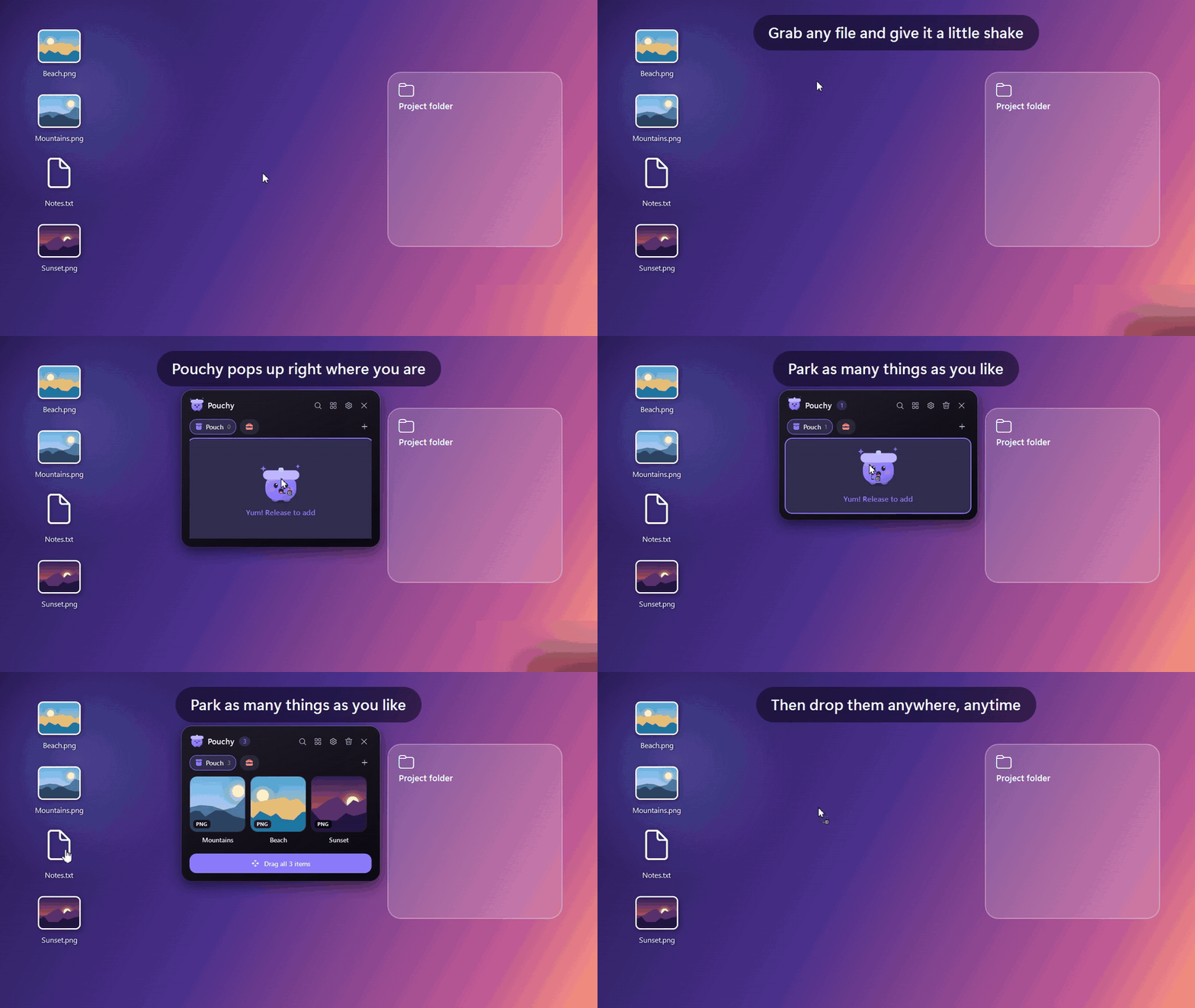
The first public release. 🎉
Highlights
- Shake to summon. Grab any file, shake the mouse a little, and Pouchy pops up right where you are. You can also bump the screen edge or press Alt + Shift + Z.
- Park anything. Files, folders, multi-file stacks, images, text, links and colour values.
- Drop anywhere. Drag items out to any app. Files are copied by default (hold Shift to move), and a picture of the tile follows the cursor.
- Meet Pouchy. A reactive mascot that gets excited while you drag, hops happily when fed, and looks puzzled when a search finds nothing.
Added
- Shelves
- Coloured tabs with 40 icons. They collapse to icons when space is tight.
- Move items between shelves by dragging them onto a tab.
- Search, labels and undo
- Search every shelf with Ctrl + F.
- Finder-style colour labels that tint the tile.
- Pin items so Clear keeps them.
- Undo removals (Ctrl + Z).
- Thumbnail grid using real Windows thumbnails for photos, videos, PDFs and Office files. Stacks show a fanned preview. Grid, List and Compact views.
- Right-click menu
- Open, Open with, Quick Look, Show in folder.
- Copy path, Rename, Move or Copy to.
- ZIP and unzip.
- Image convert and resize, text extraction (OCR) and Set as wallpaper.
- Note editing and case tools.
- The Windows share sheet.
- The full Explorer menu (7-Zip, Send to and so on).
- Smart items:
- URLs become link cards with the page title and icon.
#hexandrgb()values become colour swatches you can copy as HEX, RGB or HSL.
- Themes: Midnight Glass, Frost, Sunset, Paper, Terminal and Follow Windows, plus your own themes as JSON files that reload live (guide).
- Customisation: tile size, columns, background opacity, open animations, reduce motion, gesture sensitivity, ignored apps and your own hotkey.
- Keyboard support: Enter, Space, F2, Del, Ctrl + A/C/V/N/P/G/T, Ctrl + 1–9, and the menu key.
- Tray menu with quick actions, shelf, theme and view switching, and Pause gestures.
- Update notifications: Pouchy checks GitHub for a new release about once a day. You can turn this off in Settings → About.
- Start with Windows, single instance, and items saved between sessions.
Download
| Your PC | Download |
|---|---|
| Most Windows PCs (Intel / AMD) | Pouchy-1.0.0-win-x64.exe |
| Windows on ARM (Snapdragon, Surface Pro X) | Pouchy-1.0.0-win-arm64.exe |
No installer and no .NET needed: download it and run it. Pouchy lives in the system tray. Turn on Settings → Run at Windows startup to keep it around.
"Windows protected your PC"? Pouchy isn't code-signed yet, so SmartScreen warns about new downloads. Click More info → Run anyway. You can check the download against SHA256SUMS.txt below.
Requirements: Windows 10 (version 2004 or later) or Windows 11.
Full changelog: CHANGELOG.md