Tutorial Demo App
In the remainder of this tutorial we will deal with the GenApp generated Demo web application representing an "Einstein calculator": it computes the energy based on the user supplied value of the mass (E = mc^2^).
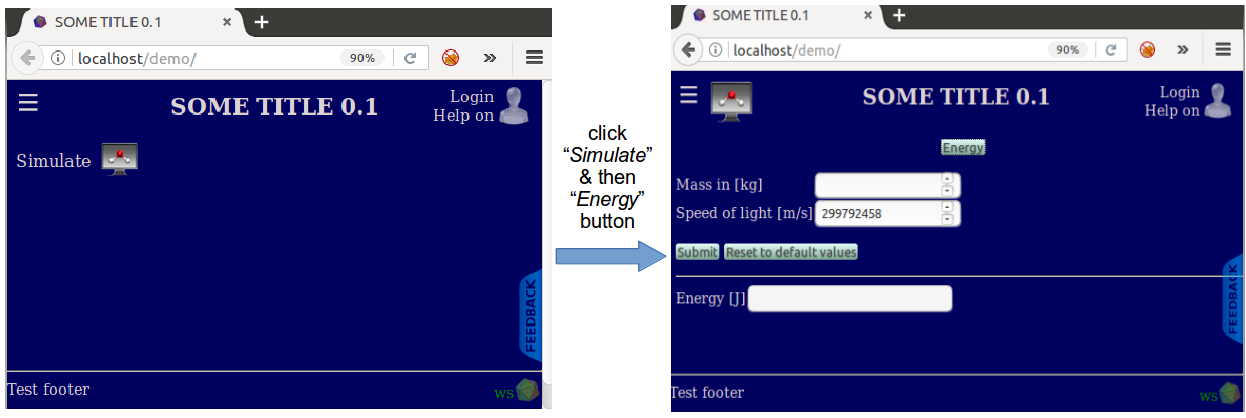
Demo represents a simple web-GUI whose computational module has two input fields (mass and speed of light, the latter is non-editable for obvious reasons :)) and one output field (computed energy); see pictures below.
NOTE: A minimalist example of the Demo application serves to only cover some GenApp basics; we will NOT address any of the advanced GenApp UI capabilities available through the use of arbitrarily nested repeaters, dynamically calculated fields, interactive plots etc. Similarly, we will NOT cover GenApp execution models (job staging, execution on managed cloud resources etc.) and advanced user credentials management. Advanced GenApp topics will be covered elsewhere.
'What we want to accomplish in this section:
- set up a GenApp generated Demo science gateway
- gain familiarity with JSON data file format & GenApp's JSON definitions controlling Demo application
- demonstrate how Demo's GUI appearance can be altered by modifying GenApp's global and module definition files
- learn how to regenerate Demo application after modifying GenApp's JSON definitions
-
This tutorial is preserved from the previous documentation. The GenApp framework source is now on GitHub, but the Demo application template has not yet been mirrored into the GitHub source tree.
-
Treat this page as a historical walkthrough until the Demo template is imported into GitHub and the setup command is replaced with a current GitHub-based workflow.
-
To run Demo application, point your browser to:
http://your-ip-address/demo
- where your-ip-address is replaced by the ip address of the server running GenApp You should see the following:
- NOTE: the historical setup script pulled Demo from the old application template store and called the GenApp installation script which "compiled" the application. In the upcoming sections it will be necessary to manually regenerate Demo every time we perform modifications in the control definition files (see e.g. Modifying the Module section).