




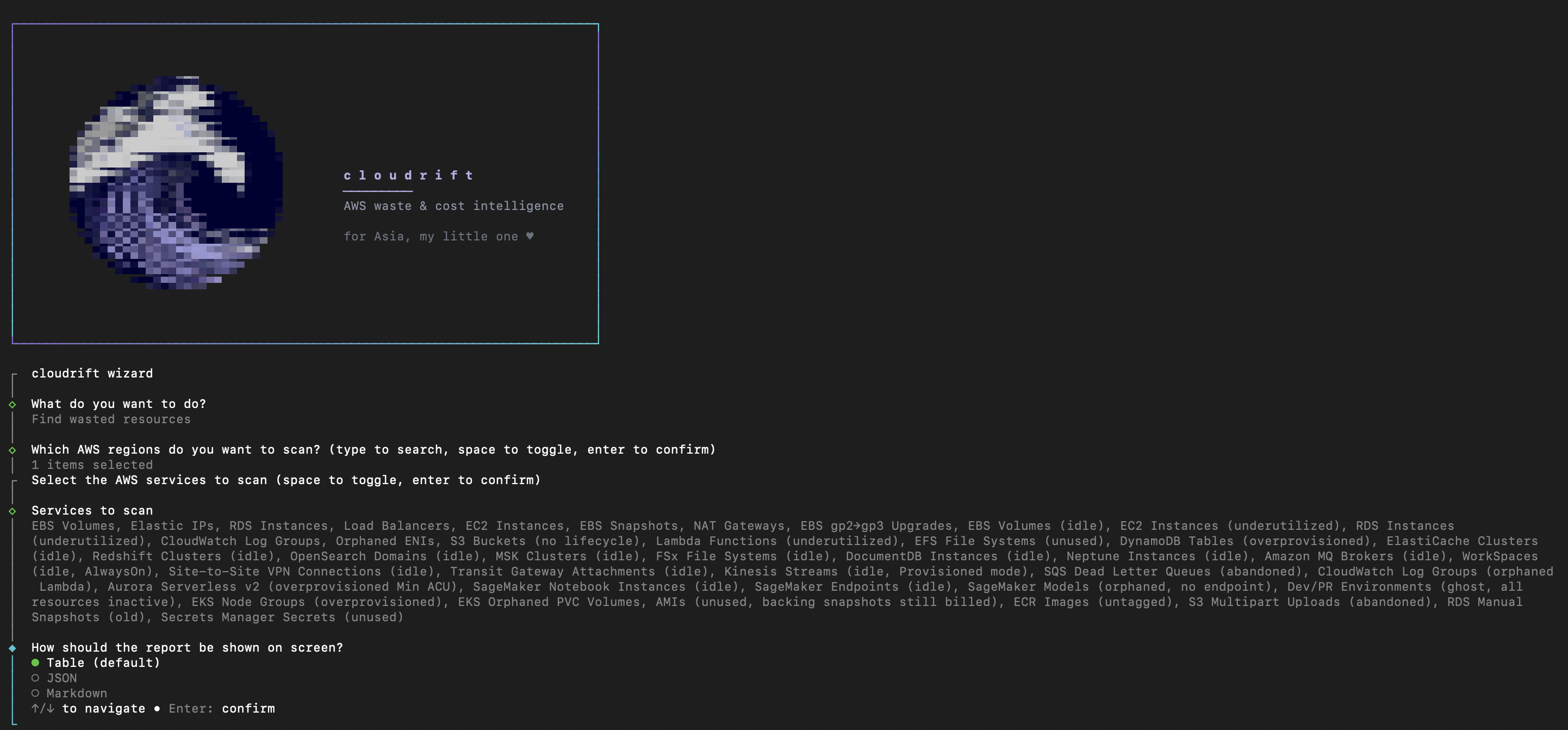
Scans AWS accounts for wasted resources and estimates the monthly cost of that waste.
Read-only. No telemetry. Never deletes, modifies, or stops anything — reports only.
npm install -g @cloudrift/cli
cloudrift
macOS/Linux via Homebrew: brew install elleVas/cloudrift/cloudrift
That's it — no subcommand needed, the interactive wizard walks you through region and scanner selection. Requires Node.js 20+ and AWS credentials with read-only IAM permissions (aws configure, or env vars — see full setup below if you need that first).
Prefer flags over the wizard (scripts, CI)? Same tool, same output:
cloudrift analyze -r us-east-1 eu-west-1 --pdfSee docs/en/usage.md for every flag.
⚠️ Disclaimer: cloudrift reports estimated waste and recommendations only — it never deletes, modifies, or stops any AWS resource. All findings should be validated by your infrastructure team before taking action. The maintainers assume no liability for actions taken based on this report. Contact: raffaelevasini@gmail.com · GitHub · LinkedIn
📑 Table of contents
Full setup — fresh AWS credentials, from source
npm install -g @cloudrift/cli
# or run it once-off, without installing:
npx @cloudrift/cli analyze
Or via Homebrew (macOS/Linux):
brew install elleVas/cloudrift/cloudriftFrom source (for contributing, or to run unreleased changes):
git clone <repo-url>
cd cloudrift
pnpm install
pnpm nx build cli # output compiled to apps/cli/dist/Three options, in order of preference:
Option A — AWS CLI (recommended if you already have it installed)
aws configure
# enter: Access Key ID, Secret Access Key, default region (e.g. us-east-1), output format (json)
This creates ~/.aws/credentials with the default profile.
Option B — Edit ~/.aws/credentials manually
[default]
aws_access_key_id     = AKIAIOSFODNN7EXAMPLE
aws_secret_access_key = wJalrXUtnFEMI/K7MDENG/bPxRfiCYEXAMPLEKEY
Option C — Environment variables
export AWS_ACCESS_KEY_ID=AKIAIOSFODNN7EXAMPLE
export AWS_SECRET_ACCESS_KEY=wJalrXUtnFEMI/K7MDENG/bPxRfiCYEXAMPLEKEY
export AWS_DEFAULT_REGION=us-east-1
Verify:
aws sts get-caller-identityshould return your account ID without errors.
The AWS user/role must have the policy listed in Required IAM permissions. If using an IAM user, attach it from the IAM Console → User → Add permissions → Create inline policy.
# npm install:
cloudrift                                      # no subcommand, in a real terminal: interactive wizard
cloudrift analyze                              # scan us-east-1 (default)
cloudrift analyze -r us-east-1 eu-west-1       # scan multiple regions

# From source:
node apps/cli/dist/main.js analyze
node apps/cli/dist/main.js analyze -r us-east-1 eu-west-1
The account ID is auto-detected via STS. If everything is configured correctly you'll see tables listing the wasted resources found and an estimated total cost. If the account has no wasted resources you'll see "No wasted resources found".
| Resource | Waste condition | Estimated cost (us-east-1) |
|---|---|---|
| EBS Volumes | Unattached (state: available) |
gp3: $0.08/GB-mo · gp2: $0.10/GB-mo · io1: $0.125/GB-mo |
| Elastic IPs | Unassociated (no EC2/NAT binding) | $3.60/month fixed |
| RDS Instances | Stopped (still billed for storage) | gp2/gp3: $0.115/GB-month |
| Load Balancers | No registered targets (ALB/NLB) | ~$16.20/month fixed |
| EC2 Instances | Stopped — attached EBS volumes keep billing | Sum of attached EBS volumes |
| EBS Snapshots | Source volume deleted (orphan snapshots) | $0.05/GB-month |
| NAT Gateways | Zero outbound traffic in the last 48h | ~$32.40/month fixed |
| EBS gp2→gp3 | In-use gp2 volume upgradeable to gp3 (savings, not waste) | Saving: gp2 − gp3 price × GB (≈ $0.02/GB-mo) |
| EBS Volumes (idle) | Attached (in-use) but zero I/O in the last 48h | gp3: $0.08/GB-mo · gp2: $0.10/GB-mo · io1: $0.125/GB-mo |
| EC2 Instances (underutilized) | Running, max CPU ≤ 5% over 14 days — rightsizing candidate, requires --live-pricing |
Saving: ~50% of the instance's monthly cost (estimate — verify RAM/network before acting) |
| RDS Instances (underutilized) | Available, max CPU ≤ 5% over 14 days — rightsizing candidate, requires --live-pricing |
Saving: ~50% of the instance's monthly cost (estimate — verify storage I/O/connections before acting) |
| CloudWatch Log Groups | No retention policy configured (logs grow forever) | $0.03/GB-month |
| Orphaned ENIs | Status: available (not attached to any instance) |
$0 (hygiene flag, not a direct cost) |
| S3 Buckets (no lifecycle) | No lifecycle configuration — rightsizing candidate | Saving: ~40% of Standard storage cost (estimate — verify access patterns before acting) |
| Lambda Functions (underutilized) | (Near-)zero invocations over 7 days | $0 (hygiene flag — pay-per-use Lambda has no direct cost when unused) |
| EFS File Systems (unused) | No mount targets, or mounted with zero I/O in the last 48h | $0.30/GB-month (Standard storage) |
| DynamoDB Tables (overprovisioned) | PROVISIONED mode, read/write capacity utilization < 10% over 7 days — rightsizing candidate | Saving: ~50% of the provisioned RCU/WCU monthly cost (estimate — verify traffic spikes before acting) |
| ElastiCache Clusters (idle) | Zero client connections in the last 48h, requires --live-pricing |
Full node-hour cost (node billed regardless of usage) |
| Redshift Clusters (idle) | Zero database connections in the last 48h, requires --live-pricing |
Full node-hour cost × number of nodes |
| OpenSearch Domains (idle) | Near-zero search/indexing requests in the last 48h (below the internal cluster-chatter threshold — health checks/ISM polling never hit literal zero), requires --live-pricing |
Full instance-hour cost × instance count |
| MSK Clusters (idle) | Provisioned mode, zero broker traffic in the last 48h, requires --live-pricing |
Full broker-hour cost × number of brokers |
| FSx File Systems (idle) | Zero read/write I/O in the last 48h | $0.093–$0.14/GB-month depending on file system type |
| DocumentDB Instances (idle) | Zero database connections in the last 48h, requires --live-pricing |
Full instance-hour cost |
| Neptune Instances (idle) | Zero query traffic in the last 48h, requires --live-pricing |
Full instance-hour cost |
| Amazon MQ Brokers (idle) | Zero network traffic in the last 48h, requires --live-pricing |
Full broker-hour cost (×2 for ACTIVE_STANDBY_MULTI_AZ) |
| WorkSpaces (idle) | AlwaysOn, no user connection in the last 30 days, requires --live-pricing |
Full bundle monthly cost |
| Site-to-Site VPN Connections (idle) | Zero tunnel traffic in the last 48h | ~$36.50/month fixed |
| Transit Gateway Attachments (idle) | Zero traffic in the last 48h | ~$36.50/month fixed |
| Kinesis Streams (idle, Provisioned mode) | Zero incoming records in the last 48h (On-Demand mode out of scope — pay-per-use) | ~$10.95/month per shard |
| SQS Dead Letter Queues (abandoned) | Identified as a DLQ (RedrivePolicy/naming), oldest unconsumed message older than 14 days | $0 (hygiene flag — SQS has no storage cost) |
| CloudWatch Log Groups (orphaned Lambda) | /aws/lambda/* log group whose function no longer exists |
$0.03/GB-month (stored log data) |
| Aurora Serverless v2 (overprovisioned Min ACU) | Min ACU floor set well above the observed peak ACU over 7 days — rightsizing candidate | Saving: (Min ACU − suggested Min ACU) × $87.60/ACU-month |
| SageMaker Notebook Instances (idle) | InService, max CPU ≤ 2% over 7 days, requires --live-pricing |
Full instance-hour cost |
| SageMaker Endpoints (idle) | InService, zero invocations over 7 days, requires --live-pricing |
Full instance-hour cost × instance count |
| SageMaker Models (orphaned, no endpoint) | Not referenced by any endpoint config — model-namespace hygiene | Estimated S3 Standard storage cost |
| Dev/PR Environments (ghost, all resources inactive) | Resources grouped by tag or naming pattern, all inactive for 7+ days | Estimated total cost of the resource group |
| EKS Node Groups (overprovisioned) | CPU requested < 30% of allocatable per Container Insights, requires --live-pricing |
Saving: (nodes − suggested nodes) × instance price |
| EKS Orphaned PVC Volumes | Kubernetes-provisioned EBS volume unattached, or its owning cluster no longer exists | gp3: $0.08/GB-mo · gp2: $0.10/GB-mo (same table as EBS Volumes) |
| AMIs (unused) | Self-owned AMI not referenced by any instance or launch template | Cost of the backing EBS snapshot(s), $0.05/GB-month |
| ECR Images (untagged) | Dangling image (no tag) in any repository | $0.10/GB-month |
| S3 Multipart Uploads (abandoned) | Incomplete multipart upload, never completed or aborted | $0.023/GB-month (Standard storage rate on the uploaded parts) |
| RDS Manual Snapshots (old) | Manual snapshot older than the grace period | $0.095/GB-month |
| Secrets Manager Secrets (unused) | Never accessed, or not accessed in the last 30 days | $0.40/secret/month fixed |
| CodePipeline Pipelines (stale) | No execution within the grace period (or never executed since creation) | $1.00/month fixed per pipeline |
Every finding is also tagged waste or optimization: waste is money being spent now and feeds the headline total and the CI gate; optimization (gp2→gp3, EC2/RDS underutilized, S3 no-lifecycle, Lambda underutilized, DynamoDB overprovisioned, Aurora Serverless overprovisioned, SageMaker Models orphaned, EKS Node Groups overprovisioned) is a saving opportunity that keeps the resource, shown separately and never gated. EC2/RDS Instances (underutilized), S3 Buckets (no lifecycle), DynamoDB Tables (overprovisioned), Aurora Serverless v2 (overprovisioned Min ACU), SageMaker Models (orphaned) and EKS Node Groups (overprovisioned) are additionally estimates — verify before acting.
Honest caveat (Lambda): we only check invocation count over the lookback window, nothing else. We do not rightsize memory allocation — that requires Lambda Insights (extra cost, must be enabled per-function), which isn't part of a zero-extra-IAM read-only scan. A function with zero invocations has, by definition, $0 direct cost (pay-per-use); the value of this finding is hygiene (dead code, unnecessary IAM roles/event sources), not a dollar saving. It also won't catch idle Provisioned Concurrency, which is billed regardless of invocations — out of scope for now.
Honest caveat (rightsizing): the underutilized check is a single-metric heuristic — max CPU below a threshold over the lookback window, nothing else. It does not look at RAM, network throughput, IOPS or connection counts, so it can't tell you which smaller instance type actually fits. We do this because it requires no extra IAM permissions and works the same on every account; we don't replace AWS Compute Optimizer, which models multiple metrics and recommends a specific target type. Treat our finding as "go check this instance," not as a sizing recommendation — cross-check with Compute Optimizer (or your own metrics) before resizing.
Honest caveat (EKS): the node-overprovisioned check reads Container Insights' node-level CPU/memory aggregates (
node_cpu_request/node_cpu_limit) via the AWS API only — it never sees individual Pod requests/limits and never talks to the Kubernetes API (no kubeconfig, see ADR-0066). If Container Insights isn't enabled on the cluster, the scanner reports nothing rather than guessing. Treat the suggested node count as a starting point for investigation, not a sizing recommendation. Separately, the orphaned-PVC-volume check can only recover the owning cluster's name from the legacykubernetes.io/cluster/<name>tag — CSI-driver-provisioned volumes without--extra-tagswon't carry it, so those volumes are only ever flagged via the unattached check, never the deleted-cluster check.
Honest caveat (real-AWS verification): 36 of the 44 scanners have found real waste against a live AWS account (33 original +
ami-unused,ecr-image-untagged,s3-multipart-upload-abandoned, confirmed 2026-07-22). A further 2 —rds-manual-snapshot-old,secretsmanager-unused— ran end-to-end against the same real account with zero SDK/IAM/parsing errors, but found nothing to flag (no manual snapshot existed to list; the test secret was younger than the 30-day grace period), so the call and response-shape are confirmed live but the finding-and-policy path isn't yet. The next 5 —rds-underutilized,environment-ghost,sqs-dlq-abandoned,aurora-serverless-overprovisioned,eks-node-overprovisioned— are unverified by design, not oversight: they need resources that have accumulated real, organic usage patterns over 7–14 days, which a short-lived synthetic test stack can't produce. One more,codepipeline-pipeline-stale(added 2026-07-23), hasn't had a real-AWS run at all yet — pending the next verification cycle. All 44 are covered by unit tests and fixture-replay contract tests (mocked AWS responses) regardless of live-verification status. See docs/en/testing.md for the full breakdown.
False-positive guards (waste policies):
- Grace period — resources younger than 7 days (configurable via
--min-age-days) are never reported. For EC2 the stop time is reconstructed fromStateTransitionReason; for NAT Gateways and Load Balancers the creation time is used. - Exclusion tag — any resource tagged
cloudrift:ignore(configurable via--ignore-tag) is skipped. Caveat: anyone with tag-write access to a resource can apply this tag to hide it from scans — the same trust boundary as any other AWS permission, see SECURITY.md. - AMI-bound snapshots — orphan snapshots referenced by a registered AMI are not reported (they cannot be deleted anyway).
Prices vary by region. The tool uses region-specific pricing for:
us-east-1,us-west-2,eu-west-1,eu-central-1,ap-southeast-1,ap-northeast-1. Every report states the date the price table was last verified (prices as of).
Beyond waste detection, cloudrift can also compare and chart your actual AWS bill via Cost Explorer:
cloudrift cost                          # this month so far vs. the same days last month, by service
cloudrift trend --months 12             # monthly spend over the last 12 months, ANSI bar chart
⚠️ Unlike every scanner above (free describe/list calls),cost/trendcall AWS Cost Explorer, which bills $0.01 per request — the only commands in cloudrift that can incur an AWS charge. Both ask for confirmation before the first call (skip it with-y/--yes); closed billing periods are cached on disk so repeat runs for the same dates don't bill you again. See docs/en/usage.md for the full flag reference.
A separate hygiene scan, deliberately outside the cost-waste model above: things left dead or unused in the account that cost $0 (so they're invisible to analyze's cost-based criteria) but are still worth cleaning up or reviewing.
cloudrift dead-resources                              # every check, us-east-1
cloudrift dead-resources -r us-east-1 eu-west-1        # multiple regions (regional checks only — see below)
cloudrift dead-resources --scanners iam-user-inactive # only one check| Check | Flags | Severity | Default threshold |
|---|---|---|---|
| EC2 Key Pairs (unused) | Not referenced by any running/stopped instance | info | 7-day grace period (--min-age-days) |
| EC2 Reserved Instances (expiring soon) | Active, term ends within the threshold | warning | 30 days |
| EC2 Security Groups (unused) | Not referenced by any network interface (default group excluded) |
info | none — no creation date exposed by the API |
| CloudWatch Log Groups (empty) | Never stored any events | info | 7-day grace period (--min-age-days) |
| ACM Certificates (unused) | Not attached to any AWS resource | info | 7-day grace period (--min-age-days) |
| CloudFormation Stacks (stuck) | CREATE_FAILED/ROLLBACK_FAILED/DELETE_FAILED/UPDATE_ROLLBACK_FAILED |
critical | 7-day grace period (--min-age-days) |
| CloudWatch Alarms (orphaned) | Stuck in INSUFFICIENT_DATA |
warning | 7-day grace period (--min-age-days) |
| IAM Users (inactive) | No console login or access-key use | warning | 90 days (or never, past the 7-day creation grace period) |
| IAM Policies (unattached) | Customer-managed, zero attachments (AWS-managed policies excluded — you can't delete those anyway) | info | 7-day grace period (--min-age-days) |
| IAM Roles (unused) | Never assumed, or not within the threshold (service-linked roles excluded) | warning | 90 days (or never, past the 7-day creation grace period) |
| IAM Access Keys (stale) | Active key not rotated within the threshold | warning | 90 days |
| Route53 Hosted Zones (empty) | No records beyond the default NS/SOA pair | info | none — no creation date exposed by the API |
| S3 Buckets (empty) | Zero objects | info | 7-day grace period (--min-age-days) |
| IAM Instance Profiles (unattached) | Not attached to any EC2 instance in any AWS region | info | 7-day grace period (--min-age-days) |
| SNS Topics (no subscriptions) | Zero subscriptions | info | none — no creation date exposed by the API |
| EventBridge Rules (no targets) | No targets configured (default event bus only) | info | none — no creation date exposed by the API |
| ECR Repositories (empty) | Zero images | info | 7-day grace period (--min-age-days) |
| Step Functions State Machines (never executed) | STANDARD-type, zero executions (EXPRESS excluded) | info | 7-day grace period (--min-age-days) |
IAM, Route53, and (for this command) S3 are global AWS services: those seven checks run once per scan regardless of how many --regions you pass, never once per region — the other eleven checks are genuinely regional. See ADR-0078/ADR-0079 for the design behind this split, --format json/csv/--pdf for machine-readable/shareable output. See docs/en/usage.md for the full flag reference.
A third, separate domain: risky configuration on resources that are actively in use (unlike dead-resources above, which finds abandoned ones) — IAM/account hygiene, network exposure, public storage, encryption at rest, and visibility/audit. All 14 checks are read-only (Describe*/Get*/List* only). See ADR-0081.
cloudrift resource-security                                    # every check, us-east-1
cloudrift resource-security -r us-east-1 eu-west-1              # multiple regions (regional checks only — see below)
cloudrift resource-security --scanners iam-root-mfa-disabled # only one check| Check | Flags | Severity |
|---|---|---|
| Root Account (MFA disabled) | iam:GetAccountSummary → AccountMFAEnabled |
critical |
| IAM Users (MFA disabled) | No MFA device registered | warning |
| IAM Access Keys (rotation overdue) | Active key older than 90 days (CIS 1.14) | warning |
| Root Account (active access key) | AccountAccessKeysPresent |
critical |
| Account Password Policy (weak or missing) | Short of the CIS baseline, or absent | warning |
| EC2 Security Groups (open ingress on sensitive ports) | 0.0.0.0/0/::/0 on SSH/RDP/database ports |
critical |
| EC2 Default Security Groups (permissive) | Default VPC security group still has rules | warning |
| S3 Buckets (public) | Public via ACL and/or bucket policy | critical |
| EC2 Snapshots (public) | createVolumePermission granted to all |
critical |
| EBS Volumes (unencrypted) | Not encrypted at rest | warning |
| RDS Instances (unencrypted) | Storage not encrypted at rest | warning |
| S3 Buckets (default encryption missing) | No default server-side encryption | warning |
| RDS Instances (publicly accessible) | Reachable from outside its VPC | critical |
| CloudTrail (no multi-region trail) | No trail with multi-region logging | warning |
IAM, S3 (bucket listing), and CloudTrail are global for this command: those eight checks run once per scan regardless of how many --regions you pass, never once per region — the other six checks are genuinely regional. --format json/csv/--pdf for machine-readable/shareable output, no --min-age-days (a security misconfiguration is a risk from the moment it exists). See docs/en/usage.md for the full flag reference.
Run cloudrift as a local MCP server over stdio, so an AI agent — Claude Code, Kiro, VS Code Copilot Chat (Agent mode) — can call analyze_cloudrift, get_resource_types, and get_required_iam_permissions directly instead of you running the CLI by hand. It inherits the same AWS credentials as every other command; see ADR-0082.
cloudrift mcpSee docs/en/mcp-server.md for client configuration (Kiro, VS Code, Claude Code) and docs/en/usage.md for the CLOUDRIFT_DISABLE_MCP kill switch.
The full reference — flags, config file, pricing sources, CI/CD, IAM permissions, contributing, architecture — lives in docs/: English in docs/en/, Italian in docs/it/.
| Guide | Content |
|---|---|
| docs/en/usage.md | CLI flags, examples, PDF report, partial-failure handling |
| docs/en/configuration.md | cloudrift.config.json fields, overrides, false-positive tuning |
| docs/en/pricing-sources.md | Static table, live AWS Pricing API, your overrides |
| docs/en/ci-cd.md | GitHub Actions examples, the budget gate, Policy as Code (OPA) |
| docs/en/iam-permissions.md | The read-only IAM policy cloudrift needs |
| docs/en/development.md | Watch mode, per-library tests, lint, typecheck |
| docs/en/releasing.md | How @cloudrift/cli is built and published to npm |
| docs/en/architecture.md | Architectural decisions, layers, multi-cloud path |
| docs/en/technical-choices.md | Nx, pnpm, TypeScript, AWS SDK v3, Result pattern, jest |
| docs/en/how-it-works.md | End-to-end execution flow, code walkthrough |
| docs/en/testing.md | Test pyramid, real-AWS verification status |
| docs/en/vertical-scanners.md | The Phase 6 vertical scanners (Serverless, Aurora, SageMaker, Dev/PR, EKS) |
| docs/en/adding-a-resource.md | Step-by-step guide to adding a new resource type |
| docs/en/mcp-server.md | Connecting Kiro, VS Code Copilot Chat, and Claude Code to cloudrift mcp |
| docs/en/remediation-effort.md | The low/medium/high effort rating behind the PDF's "Top quick wins" ranking |
Apache License 2.0 — see LICENSE.md. Free to use, modify, and distribute, including commercially.