Repository navigation
Content Security Policy
Tip
TL;DR Every raw response carries a strict CSP. Relax it per share in the Files sidebar or by rules in the config file.
When no rule matches a request, the app sends this hardcoded policy:
sandbox; default-src 'none'; style-src data: 'unsafe-inline'; img-src data:; media-src data:; font-src data:; frame-src data:
It is built into the app, not stored in config.php.
The app checks these selectors in order and uses the first that matches:
| # | Selector | Matches |
|---|---|---|
| 1 |
token (config) |
exact public share token in raw_csp['token']
|
| 2 | per-share CSP | the policy stored in the Files sidebar or through the API, if the share is raw-enabled |
| 3 |
path_prefix (config) |
longest matching prefix, absolute (starting with /raw or /rss) or relative (the path after the token or user) |
| 4 |
path_contains (config) |
substring of the full request path or of the path after the token or user |
| 5 |
extension (config) |
file extension, for example html, json
|
| 6 |
mimetype (config) |
MIME type, for example text/html, application/json
|
| 7 | default | the policy above |
Important
Private URLs (/raw/u/...) carry no share token, so neither token nor a per-share CSP can match them.
The config selectors are set in config/raw.config.php and described in CSP configuration.
In the ⋯ (three dots) menu of the raw link row, Edit CSP opens a panel with a preset dropdown and an editable text field. The value is stored in the database and applies to the next request.
| Preset | Stored value | Suited for |
|---|---|---|
| Server default | (empty, the config rules apply) | no override |
| Sandbox (strict) | sandbox; default-src 'none'; form-action 'none' |
maximum isolation, no sub-resources |
| Images only | default-src 'none'; img-src 'self' data: blob:; form-action 'none' |
image files |
| Documents (PDF / text) | default-src 'none'; img-src 'self' data:; style-src 'self' 'unsafe-inline'; font-src 'self' data:; form-action 'none' |
PDFs, text documents |
| Audio / Video | default-src 'none'; media-src 'self' data: blob:; img-src 'self' data:; form-action 'none' |
audio and video files |
| Custom | (the current text stays) | any hand-written policy |
A preset only fills the text field. The text stays editable, and what is in the field when you click Save is stored. As soon as the text no longer equals a preset, the dropdown shows Custom. Server default stores an empty value and removes the override.
Edit CSP is limited to the admin group by default. To hand it to another group, select the group under Administration settings → Sharing → Raw Fileserver:
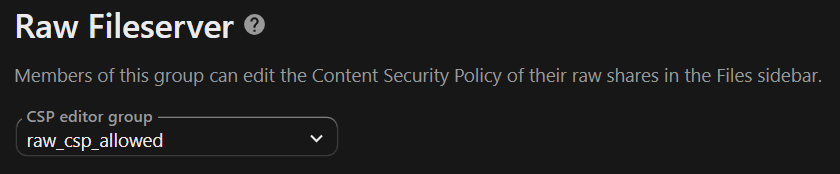
Or set it with occ:
occ group:add raw_csp_allowed
occ group:adduser raw_csp_allowed <uid>
occ config:app:set files_sharing_raw csp_editor_group --value="raw_csp_allowed"
raw_csp_allowed is only an example name. Users outside the group see no Edit CSP entry and cannot change a share's CSP through the API.
- Avoid
script-src 'unsafe-inline'unless it is really needed; prefer nonces or narrow policies. -
extensionand path rules give the most predictable results.path_containswith'/html/'is the safest way to target a folder namedhtml. - Use
tokeninraw_csponly when you want per-token policies from the config; the per-share editor covers the same need in the UI.
