Repository navigation
Enabling raw access
Tip
TL;DR Nothing is served until a token is enabled, in the Files sidebar or in the config.
Important
Password-protected shares are never served raw. /raw/{token} has no UI, so there is nowhere to ask for a password. A share with a password therefore answers /raw/ with a plain 404, even when its token is allowed in the config, and Enable raw link in the Files sidebar stays greyed out until the password is removed.
That holds since 0.9.0 (Nextcloud 34-35) and 0.7.5 (Nextcloud 32-33). Older versions ignored the password and handed the content to anyone who had the URL. The update closes that gap for good: it switches raw access off on every share that already has a password.
For password-protected access to the file itself, use WebDAV on public shares.
Open the share in the Files app (sidebar → Advanced settings), switch on Enable raw link and click Update share. The share is served under /raw/{token} right away.
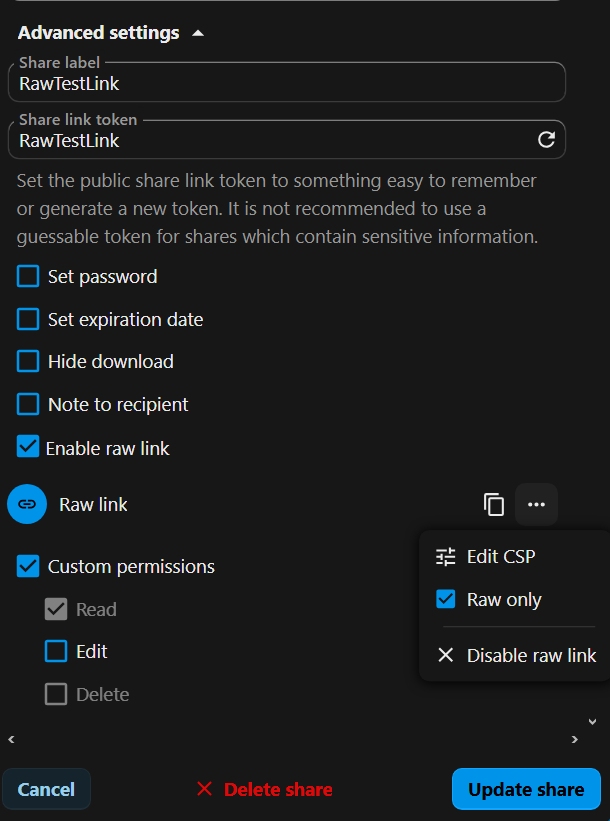
The state is stored per share in the database and removed together with the share.
With the raw link enabled, the ⋯ (three dots) menu in the raw link row offers two more entries:
- Raw only: see Raw-only mode
- Edit CSP: see Content Security Policy
Two arrays in config/raw.config.php allow tokens independently of the database. The config always takes priority over the database.
| Key | Content |
|---|---|
allowed_raw_tokens |
exact share tokens |
allowed_raw_token_wildcards |
patterns with *, matched against the share token |
<?php
$CONFIG = array (
  'allowed_raw_tokens' =>
  array (
    0 => 'scripts',
    1 => 'aBc123DeF456xyZ',
    2 => 'includes',
    3 => 'html',
  ),
  'allowed_raw_token_wildcards' =>
  array (
    0 => '*suffix',
    1 => 'prefix*',
    2 => 'prefix*suffix',
    3 => '*infix*',
    4 => 'prefix*infix*',
  ),
);
Wildcard examples:
| Kind | Pattern | Matches |
|---|---|---|
| suffix | *_json |
data_json |
| prefix | nc-* |
nc-assets |
| infix | *holiday_img* |
2026-02-10-holiday_img.jpg, 2026-02-12-holiday_img.png
|
| combined | site-*_asset_* |
site-example.com_asset_script.js, site-other.example.com_asset_style.css
|
Meaningful share tokens such as html, javascript or data_json instead of a random aBc123DeF456xyZ make links readable and easy to manage, and a common prefix or suffix lets one wildcard cover a whole group.
- Review the enabled tokens and wildcards from time to time.
- Try token and CSP changes on a test instance before production.
